TL;DR
- Google is rolling out a new setup screen that encourages users to enable the more reliable tracking setting for its Find Hub network.
- This setting allows the network to use a single device’s location data to find lost items, improving reliability in low-traffic areas.
- The new screen simplifies the options and explicitly warns that the default setting may make it harder to locate items in remote places.
For most Android users, the best item tracking option is Google’s Find Hub, as it works on almost every Android device. There are even a variety of compatible Bluetooth trackers you can use to locate your items. Unfortunately, Find Hub can have trouble locating items in some areas due to its default configuration. Out of the box, the network requires multiple Android devices to detect an item before reporting its location, limiting reliability in low-traffic areas. While it looks unlikely that Google will reverse this decision soon, the company is starting to nudge users to enable the network’s more reliable tracking setting.
Don’t want to miss the best from Android Authority?


Because Find Hub is part of Google Play Services, it is available on nearly every Android device — though it isn’t enabled by default. Users can manually opt in via settings or wait for the service to automatically enroll their device after a few days. Since most people likely didn’t enable the feature manually, their devices are almost certainly using the default tracking setting. Although the service notifies users that they can change this setting prior to auto-enrollment, many likely haven’t done so, possibly due to how the settings are worded.
Currently, Android’s Find Hub settings page lists these four options:
- Off: Find Hub won’t store your devices’ recent locations, and your Android device won’t participate in the network. You can still use Find Hub to locate, secure, and erase your devices when online.If you don’t want to use Find Hub, you can go to Settings > Google > All Services (if tabs exist) > Find Hub to turn it off.
- Without network: Your device won’t participate in the network. You can still locate your offline devices using their stored recent locations when they were online.
- With network in busy places only: Locate using stored recent locations or the network in areas like airports or busy footpaths.To help find a lost item, location info from your device is used only if others in the network can also detect the item.
- With network everywhere: Locate using stored recent locations or the network even in low-traffic areas.To help find a lost item, location info from your device may be used even if it’s the only one in the network to detect the item.
While these descriptions are technically accurate, their presentation poses a few problems. First, they are wordy, which could cause some users to skip the fine print and rely solely on the titles. Second, neither the titles nor the descriptions make it immediately clear that the “with network in busy places only” option makes it harder to locate items in remote areas. This is a crucial caveat of the default setting. Although the linked support page explains this, the menu text only implies it, meaning some users will miss the distinction. Furthermore, some users may never see these settings at all if they ignore or dismiss the enrollment notification.
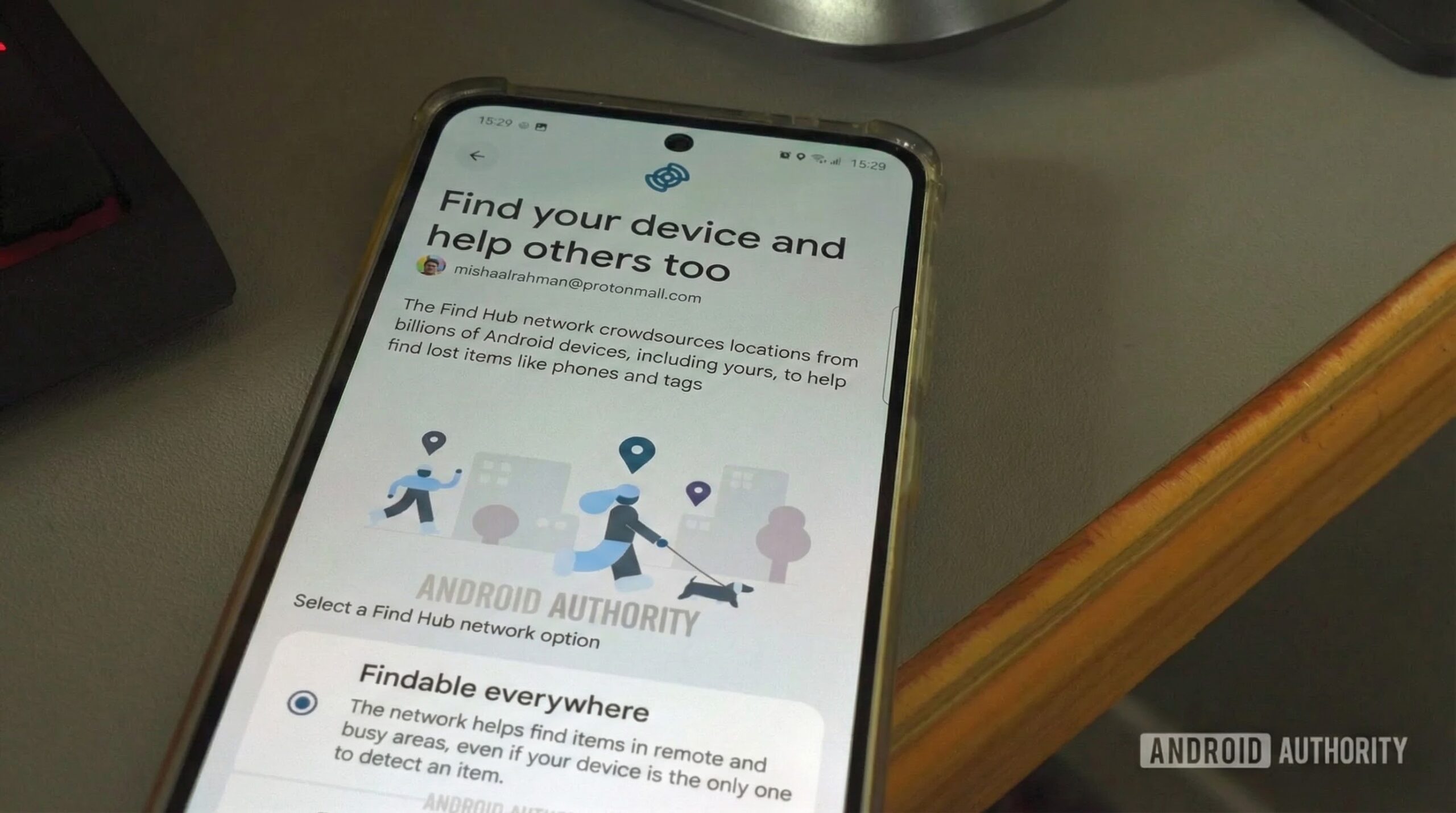
To address this, Google has been working on a new Android setup wizard screen that prompts users to enroll in the Find Hub network. Titled “Find your device and help others too,” the screen explains that the “Find Hub network crowdsources locations from billions of Android devices, including yours, to help find lost items like phones and tags.” It presents only two settings:
- Findable everywhere: The network helps find items in remote and busy areas, even if your device is the only one to detect an item.
- Findable in busy places only: The network works in busy places when multiple devices detect an item nearby. This may make it harder to find items in remote areas.
The first option is effectively a renamed version of “With network everywhere,” making it the more reliable choice. The second mirrors the current default, “With network in busy places only.” While the underlying functionality remains unchanged, the new names and descriptions are a significant improvement. The wording is much more streamlined and explicitly warns users about the limitations of the default setting regarding remote areas. Additionally, presenting these options during setup ensures greater user awareness — provided, of course, that users don’t simply hit “Next” without reading the screen.
We first discovered evidence of this screen back in June via the “Google System Services Release Notes” page, though we originally had to surface it manually. Over the weekend, however, Discord user Anh reported encountering the screen while setting up a new Google Pixel 10 for his girlfriend. Notably, he says that the “findable everywhere” option was pre-selected for him. If this option were to become the default for everyone, it would be a significant development, potentially increasing the number of devices contributing to Find Hub’s most reliable tracking tier, as few users change system defaults.

I reached out to Google earlier this week to confirm if this screen is rolling out broadly and if the default has indeed shifted to “findable everywhere,” but the company has not responded as of publication. When I polled my followers on X, three reported seeing the screen while setting up a new Pixel 10, but with “findable in busy places only” as the default. Conversely, multiple users — myself included — did not see the screen when resetting older Pixels or setting up older Pixel 10s. This suggests the screen may be limited to devices shipping with updated versions of Play Services. Furthermore, the default selection likely carries over from the user’s previous device settings. This aligns with Anh’s experience, as he confirmed that “findable everywhere” was enabled on his girlfriend’s previous phone.
Regardless, integrating this screen into the Android setup process should encourage more users to enable Find Hub’s more reliable setting, thereby strengthening the network. Since its launch, Find Hub has been criticized for its unreliability — a byproduct of Google’s privacy-centric default configuration. While changing that default would be the most effective fix, Google seems unwilling to do so. Thus, prompting users to voluntarily opt into the more reliable setting is the next best solution.
Thank you for being part of our community. Read our Comment Policy before posting.