By using this site, you agree to the Privacy Policy and Terms of Use.
Accept
World of SoftwareWorld of SoftwareWorld of Software
  • News
  • Software
  • Mobile
  • Computing
  • Gaming
  • Videos
  • More
    • Gadget
    • Web Stories
    • Trending
    • Press Release
Search
  • Privacy
  • Terms
  • Advertise
  • Contact
Copyright © All Rights Reserved. World of Software.
Reading: First look: Gemini is learning to get smarter when you’re asking about your screen
Share
Sign In
Notification Show More
Font ResizerAa
World of SoftwareWorld of Software
Font ResizerAa
  • Software
  • Mobile
  • Computing
  • Gadget
  • Gaming
  • Videos
Search
  • News
  • Software
  • Mobile
  • Computing
  • Gaming
  • Videos
  • More
    • Gadget
    • Web Stories
    • Trending
    • Press Release
Have an existing account? Sign In
Follow US
  • Privacy
  • Terms
  • Advertise
  • Contact
Copyright © All Rights Reserved. World of Software.
World of Software > News > First look: Gemini is learning to get smarter when you’re asking about your screen
News

First look: Gemini is learning to get smarter when you’re asking about your screen

News Room
Last updated: 2025/09/23 at 2:47 AM
News Room Published 23 September 2025
Share
First look: Gemini is learning to get smarter when you’re asking about your screen
SHARE

Joe Maring / Android Authority

TL;DR

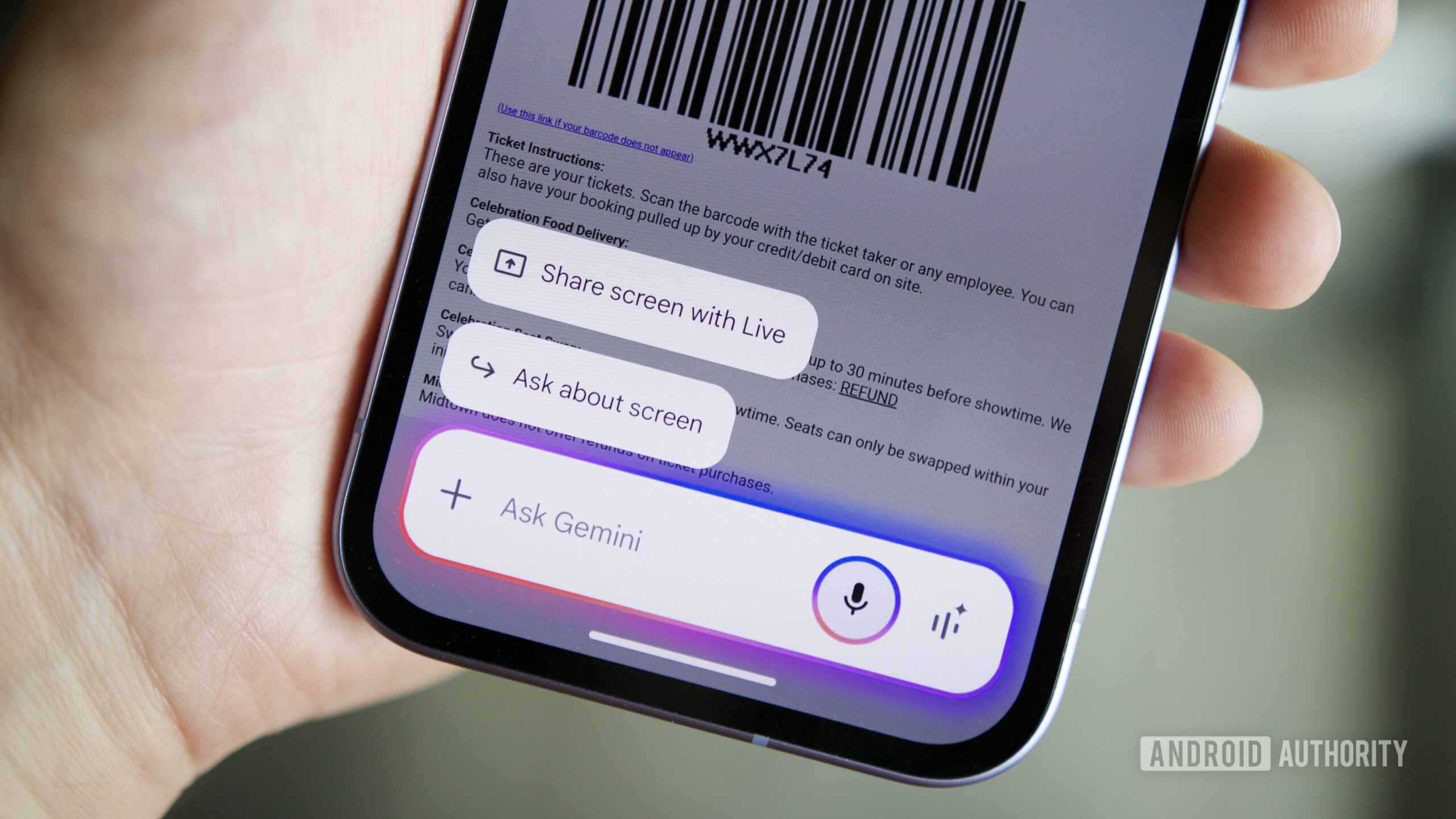
  • Google Gemini can answer questions about the contents of your device’s screen, but only after you tap an “Ask about screen” button.
  • Gemini appears to be working on a new mode that would infer when you’re talking about your screen, and then automatically analyze it.
  • Google would also offer settings to disable this functionality, so Gemini would need explicit permission to look at your screen.

How many different ways does Google give you to make sense out of what you’re seeing on your Android phone’s screen? You could open a screenshot in Lens if you were trying to be as clunky as possible, or just pull up Circle to Search for some quick analysis. Now we’ve also got Gemini ready to lend a hand, and its “Ask about screen” mode is already a deceptively powerful tool. Today we’re checking out one small way that Google could make this screen-searching solution even more streamlined.

Right now, the way you get Gemini to start answering questions about your screen’s contents takes a step or two. First you pull up the Gemini overlay, either with a hotword or button shortcut. Then you have to manually tap on “Ask about screen.” And only then can you ask Gemini your question — if you start directly without hitting “Ask about screen” first, Gemini won’t understand the context.

That works, but like we said, involves a few steps — could there be a better way of doing things? This still appears to be just in testing, so we can’t say with any confidence if Google will follow through with this approach, but in version 16.37.46.sa.arm64 of the Google app, we’ve uncovered evidence of an alternate workflow.

Don’t want to miss the best from Android Authority?

Google could add a new “Screen Context” setting to Gemini that would “Let gemini infer when it should access your screen for more context.” Basically, that would solve exactly the problem we just mentioned, where you ask Gemini a question about your screen prior to manually sharing it. With this feature engaged, Gemini would be able to recognize what you were trying to do and start looking at your screen, even without being explicitly told to.

The top option here would take you to the Digital Assistant app settings we already have, including the option to be able to access screenshots — so between those two settings, Google wants clear permission before it lets Gemini start looking at your screen. The improper lower-case “gemini” branding should also clue you in that we’re looking at an in-progress UI, and that none of this is ready for prime time just yet.

With the setting engaged, when Gemini realizes you’re asking about something on the screen, you’ll see a “Getting app content…” message pop up momentarily, before you get your Gemini report — there’s even a handy notice at the bottom spelling out exactly what just happened, in case you turned it on by accident and would rather toggle it back off. Here’s an early preview of it all in action:

Assuming Google’s reasonably successful about knowing when a question refers to something on your screen, this sounds like a decently executed compromise between giving Gemini full rein, and saving us from unneeded taps. We’ll keep an eye on future releases and will let you know if and when this becomes available for the public to finally try out.

⚠️ An APK teardown helps predict features that may arrive on a service in the future based on work-in-progress code. However, it is possible that such predicted features may not make it to a public release.

Thank you for being part of our community. Read our Comment Policy before posting.
Sign Up For Daily Newsletter

Be keep up! Get the latest breaking news delivered straight to your inbox.
By signing up, you agree to our Terms of Use and acknowledge the data practices in our Privacy Policy. You may unsubscribe at any time.
Share This Article
Facebook Twitter Email Print
Share
What do you think?
Love0
Sad0
Happy0
Sleepy0
Angry0
Dead0
Wink0
Previous Article Pixel 10 Pro XL Review: Google’s Superphone Gets Ai and Magnetic Upgrades Pixel 10 Pro XL Review: Google’s Superphone Gets Ai and Magnetic Upgrades
Next Article What 316 GitHub Issues Teach Us About the Dark Side of Open Source | HackerNoon What 316 GitHub Issues Teach Us About the Dark Side of Open Source | HackerNoon
Leave a comment

Leave a Reply Cancel reply

Your email address will not be published. Required fields are marked *

Stay Connected

248.1k Like
69.1k Follow
134k Pin
54.3k Follow

Latest News

MacBook Air vs. MacBook Pro: Which Apple Laptop Family Is the Better Pick for You?
News
From Amazon to edtech: why universities are ‘ripe’ for innovation
Software
Best TV deal: Save 0 on the Toshiba 55-inch Class C350 Series TV
Best TV deal: Save $200 on the Toshiba 55-inch Class C350 Series TV
News
Report: Johny Srouji contemplating leaving Apple, considering career elsewhere – 9to5Mac
News

You Might also Like

MacBook Air vs. MacBook Pro: Which Apple Laptop Family Is the Better Pick for You?
News

MacBook Air vs. MacBook Pro: Which Apple Laptop Family Is the Better Pick for You?

21 Min Read
Best TV deal: Save 0 on the Toshiba 55-inch Class C350 Series TV
News

Best TV deal: Save $200 on the Toshiba 55-inch Class C350 Series TV

3 Min Read
Report: Johny Srouji contemplating leaving Apple, considering career elsewhere – 9to5Mac
News

Report: Johny Srouji contemplating leaving Apple, considering career elsewhere – 9to5Mac

3 Min Read
Does It Matter Which USB Port You Use On Your Computer? – BGR
News

Does It Matter Which USB Port You Use On Your Computer? – BGR

6 Min Read
//

World of Software is your one-stop website for the latest tech news and updates, follow us now to get the news that matters to you.

Quick Link

  • Privacy Policy
  • Terms of use
  • Advertise
  • Contact

Topics

  • Computing
  • Software
  • Press Release
  • Trending

Sign Up for Our Newsletter

Subscribe to our newsletter to get our newest articles instantly!

World of SoftwareWorld of Software
Follow US
Copyright © All Rights Reserved. World of Software.
Welcome Back!

Sign in to your account

Lost your password?