Standing desks are everywhere these days. People use them at home, in offices, for gaming, and even in garages. But one problem many of us run into is wobble. When you are standing on the height of the desk, certain desks vibrate as one types, or when placing the arms on them or by simply leaning a bit. When a desk moves against your wishes, it can be frustrating and cause you to work more. That is where 4-leg standing desks come in. They are built to stay steady. One that is the FlexiSpot E7 Plus Max, the best standing desk. In this article, we’ll talk about what makes it one of the most stable four-leg standing desks you can find.
Why Four Legs Matter More Than Anything Else
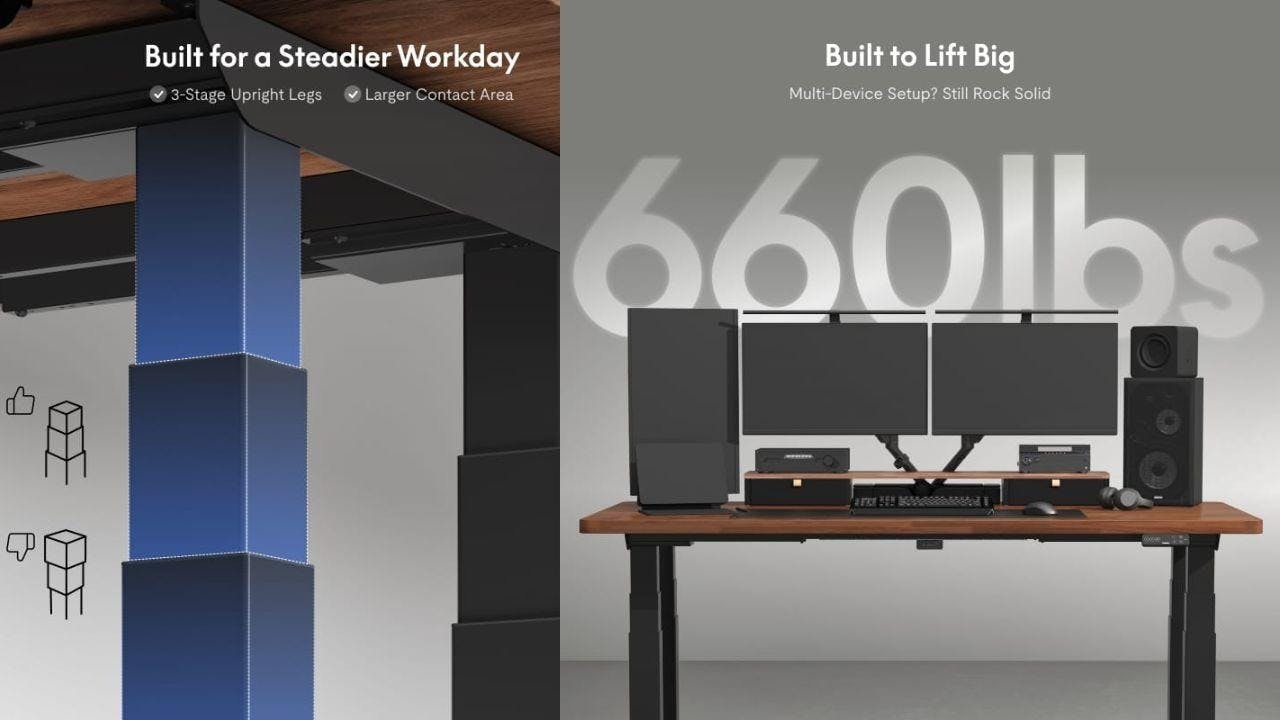
Most standing desks have two legs, which work for many but have limits. With only two points supporting the desktop, heavy items or bumps can cause shaking or tilting. That’s how physics works. A four-leg desk distributes weight over more points, with each corner supporting its own leg. This enhances the stability of the desk and its ability to bear more weight, even at height. As a four-legged table is more difficult to rock than a two-legged table, so too is it in this case. The E7 Plus Max features four motors, one for each leg, ensuring balanced lifting and lowering. This design provides stability regardless of what’s on the desk.
Frame Structure and Weight Support
When you read about stability in a standing desk, the frame is one of the most important parts. In the case of the E7 Plus Max, the frame has four legs, four motors, and four crossbeams. Let’s break that down. The legs provide main support, connected by crossbeams. More connection points reduce wobble. Each motor works with its own leg to lift the desk evenly. This desk supports up to 660 pounds, much more than others. It can hold heavy monitors, two screens, laptops, printers, books, speakers, and accessories without bending or shaking. Its capacity makes the E7 Plus Max ideal for heavy setups or multiple devices.
Motors and Smooth Height Adjustment
A standing desk should support weight while stationary and move smoothly, which is exactly what users expect from a sit stand desk used throughout the day. The E7 Plus Max has four motors, one in each leg, unlike many desks that share motors among legs. In daily use, the desk lifts evenly, press a button, and all four corners rise at the same rate, preventing uneven lifting seen in cheaper models of desks. Another benefit is the noise level. Despite its four motors, this desk remains quiet when adjusting height, with noise below 50 decibels, similar to a quiet room conversation. This matters for shared spaces or frequent small adjustments day.
Lower Center of Gravity and Leg Design
Stability isn’t just about having more legs. It’s also about how those legs are shaped and placed. The E7 Plus Max has a lower center of gravity thanks to its design. This means the weight of the desk and whatever is on it sits closer to the floor. When weight stays low, there’s less chance of tipping or sway. The desk’s leg sections are also built in three stages. This lets you adjust height from about 25.8 inches up to about 51.6 inches. Even at the highest setting, when desks are usually most wobbly, its design keeps things stable. If you’ve ever used a desk that shimmies at standing height, you know how distracting that can be. The crossbeam support and wide base of the E7 Plus Max prevent that shaky feeling. This steadiness is what many buyers call real stability.
Real Stability in Daily Use
People use standing desks in different ways. Some people stand while they type. Others keep computers on the desk and switch between sitting and standing. Others might use the desk for craft projects, heavy tools, or even dining. The E7 Plus Max is stable enough for all these scenarios. The desk is level when it is moved or tilted, and that is why it can be used in home offices, work benches, creative work stations and workstations, even when it has heavy items. This will be appreciated especially by someone who spends their time at a desk. A stable desk helps focus by reducing worries about wobbling working.
Control Panel and Safety Features
A desk this strong needs simple controls. The E7 Plus Max includes an upgraded control panel with a touch screen and buttons. You can save up to four height presets for easy adjustment. It also has a child lock so that no one can make any accidental adjustments, and it is convenient to have children or pets in the surroundings. In case of an obstacle, the desk halts and retracts to avoid damage, having anti-collision protection. Its control panel has a USB rapid-charging device so that you can easily charge your devices on your desk.
Cable Management and Workspace Cleanliness
A stable desk should also be a neat desk. Loose cables can tug on a desk, especially during height adjustment. The E7 Plus Max includes a magnetic cable management system under the desktop. These fabric-wrapped trays snap into place, bundling wires to keep your workspace cleaner and reduce cable pulling when the desk moves. This small detail enhances stability and organization usability.
How It Compares to Typical Standing Desks
It helps to understand how the E7 Plus Max stacks up. Many two-leg desks have strengths, too. They are relatively less expensive and simple to install. However, heavy loads or frequent height adjustments can cause more shaking. Standard two-leg desks typically handle 250 to 350 pounds. Their motors are weaker and lift less slowly. They can also wobble more at tall heights. In comparison, a four-leg desk such as the E7 Plus Max raises more quickly, has higher capabilities of carrying weight, and remains stable when fully extended. It is also heavier and can be more expensive than a simple desk, but people with demanding setups often find it worth it.
Conclusion
The four leg standing desk that is most stable is based on design and build. It also requires a strong frame, equal weight distribution, and the height should also move easily, so as to avoid wobbling. The FlexiSpot E7 Plus Max has implemented these concepts and has four legs and motors on a crossbeam, allowing weight to be distributed evenly and heavy setups to be supported. Features like the control panel, safety measures, cable management, and low center of gravity contribute to a secure, reliable desk.
:::tip
This story was distributed as a release by Sanya Kapoor under HackerNoon’s Business Blogging Program.
:::