By using this site, you agree to the Privacy Policy and Terms of Use.
Accept
World of SoftwareWorld of SoftwareWorld of Software
  • News
  • Software
  • Mobile
  • Computing
  • Gaming
  • Videos
  • More
    • Gadget
    • Web Stories
    • Trending
    • Press Release
Search
  • Privacy
  • Terms
  • Advertise
  • Contact
Copyright © All Rights Reserved. World of Software.
Reading: Gemini now helps you breeze through long Google Docs without reading them
Share
Sign In
Notification Show More
Font ResizerAa
World of SoftwareWorld of Software
Font ResizerAa
  • Software
  • Mobile
  • Computing
  • Gadget
  • Gaming
  • Videos
Search
  • News
  • Software
  • Mobile
  • Computing
  • Gaming
  • Videos
  • More
    • Gadget
    • Web Stories
    • Trending
    • Press Release
Have an existing account? Sign In
Follow US
  • Privacy
  • Terms
  • Advertise
  • Contact
Copyright © All Rights Reserved. World of Software.
World of Software > News > Gemini now helps you breeze through long Google Docs without reading them
News

Gemini now helps you breeze through long Google Docs without reading them

News Room
Last updated: 2026/02/15 at 2:06 AM
News Room Published 15 February 2026
Share
Gemini now helps you breeze through long Google Docs without reading them
SHARE

Edgar Cervantes / Android Authority

TL;DR

  • Google Docs is getting a new Audio Summaries feature powered by Gemini.
  • The feature lets you listen to quick summaries of a document, without having to hear the whole thing or read it.
  • Google says it’s rolling out gradually and won’t be available to everyone just yet.

Google Docs is getting new Gemini smarts that’ll make wading through lengthy documents much less painful. First spotted by Android Authority in September last year, Google is finally starting to roll out Audio Summaries to Docs, letting you hear a brief overview of your document instead of reading or listening to the entire thing.

Don’t want to miss the best from Android Authority?

google preferred source badge light@2xgoogle preferred source badge dark@2x

Audio Summaries in docs could be extremely useful if you simply want to get up to speed with a document in a hurry. That said, the feature is not rolling out to everyone just yet and will be available only to users on the following plans:

  • Business Standard and Plus
  • Enterprise Standard and Plus
  • Google AI Ultra for Business add-on
  • Google AI Pro for Education add-on
  • Google AI Pro and Ultra

How to use Audio Summaries in Google Docs?
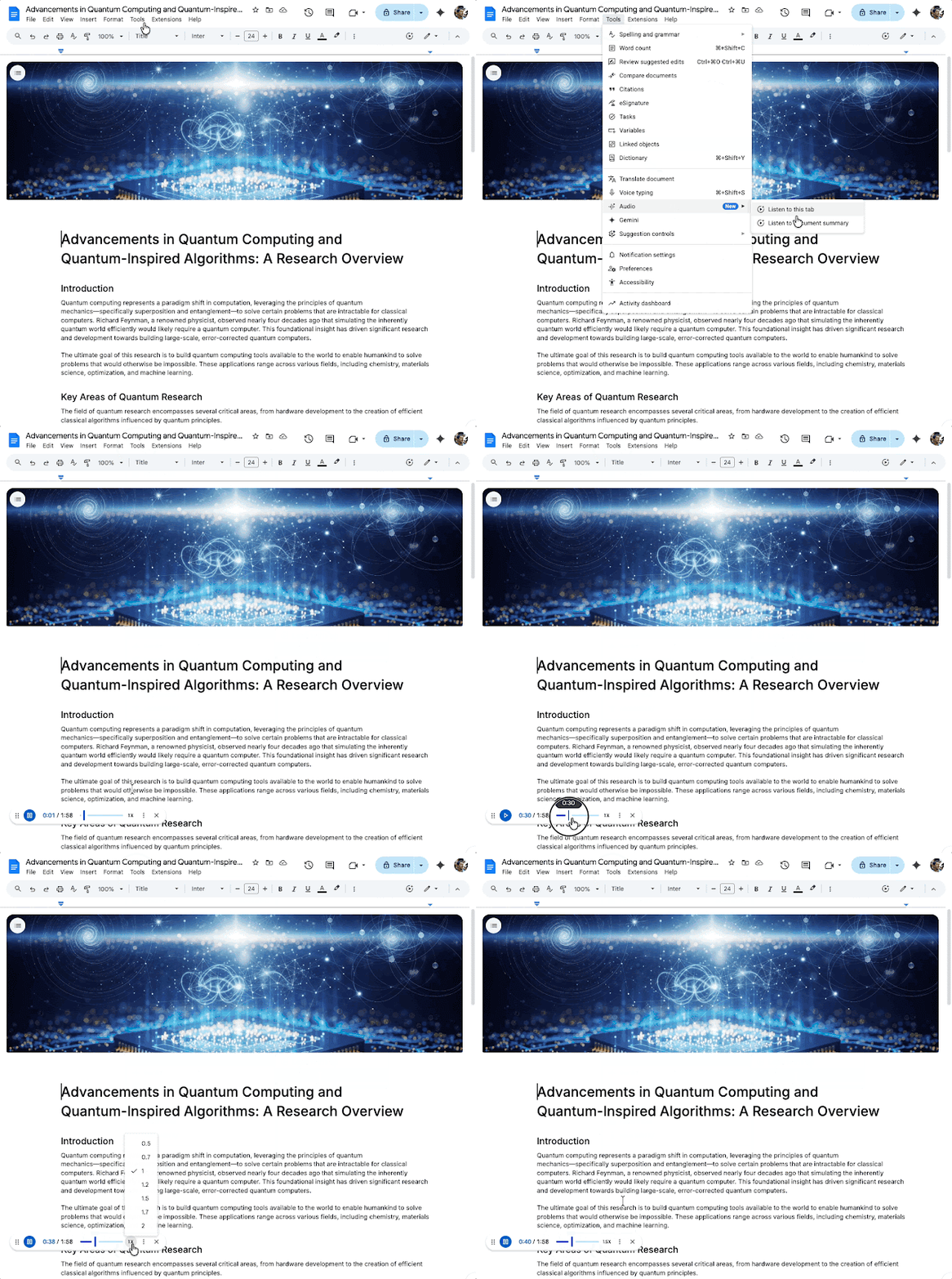
Google Docs Audio Summaries

If the feature is available to you, you can find it in the Tools menu in Google Docs. It would’ve been more convenient if Google had added a dedicated button in the top-left corner or placed it directly in the Gemini sidebar, but for now, you’ll need to dig into the Tools menu to access it. Thankfully, the feature, called “Audio,” is marked with a “New” label, making it easier to spot.

Clicking on “Listen to document summary” will start the audio summary. You can then click the three-dot menu to select different voices, such as Narrator, Educator, Teacher, and more. You can also adjust the playback speeds to suit your preferences.

If you simply want to listen to the document as is and not get an AI-generated summary, you can choose the “Listen to this tab” option instead from the Audio menu in Tools.

Google says the new Audio Summaries feature is rolling out gradually, so you might have to wait a couple of weeks before you start seeing it in Google Docs.

Thank you for being part of our community. Read our Comment Policy before posting.

Sign Up For Daily Newsletter

Be keep up! Get the latest breaking news delivered straight to your inbox.
By signing up, you agree to our Terms of Use and acknowledge the data practices in our Privacy Policy. You may unsubscribe at any time.
Share This Article
Facebook Twitter Email Print
Share
What do you think?
Love0
Sad0
Happy0
Sleepy0
Angry0
Dead0
Wink0
Previous Article The Best Amazon Presidents’ Day Weekend Tech Deals: Massive Savings on Headphones, iPads, Security Cams, and More The Best Amazon Presidents’ Day Weekend Tech Deals: Massive Savings on Headphones, iPads, Security Cams, and More
Next Article The Hands-Down Best Smart TV For Every Budget – BGR The Hands-Down Best Smart TV For Every Budget – BGR
Leave a comment

Leave a Reply Cancel reply

Your email address will not be published. Required fields are marked *

Stay Connected

248.1k Like
69.1k Follow
134k Pin
54.3k Follow

Latest News

SpaceX’s Plan for 1 Million Satellites Faces Light Pollution Backlash
News
8 Apple Products You Should Buy And 4 You Should Skip – BGR
News
Here’s why M5 MacBook Pro is still worth buying, even as redesign rumors loom – 9to5Mac
News
Can you clone Gemini by asking it enough questions? Google says attackers tried
News

You Might also Like

SpaceX’s Plan for 1 Million Satellites Faces Light Pollution Backlash
News

SpaceX’s Plan for 1 Million Satellites Faces Light Pollution Backlash

17 Min Read
8 Apple Products You Should Buy And 4 You Should Skip – BGR
News

8 Apple Products You Should Buy And 4 You Should Skip – BGR

23 Min Read
Here’s why M5 MacBook Pro is still worth buying, even as redesign rumors loom – 9to5Mac
News

Here’s why M5 MacBook Pro is still worth buying, even as redesign rumors loom – 9to5Mac

4 Min Read
Can you clone Gemini by asking it enough questions? Google says attackers tried
News

Can you clone Gemini by asking it enough questions? Google says attackers tried

4 Min Read
//

World of Software is your one-stop website for the latest tech news and updates, follow us now to get the news that matters to you.

Quick Link

  • Privacy Policy
  • Terms of use
  • Advertise
  • Contact

Topics

  • Computing
  • Software
  • Press Release
  • Trending

Sign Up for Our Newsletter

Subscribe to our newsletter to get our newest articles instantly!

World of SoftwareWorld of Software
Follow US
Copyright © All Rights Reserved. World of Software.
Welcome Back!

Sign in to your account

Lost your password?