By using this site, you agree to the Privacy Policy and Terms of Use.
Accept
World of SoftwareWorld of SoftwareWorld of Software
  • News
  • Software
  • Mobile
  • Computing
  • Gaming
  • Videos
  • More
    • Gadget
    • Web Stories
    • Trending
    • Press Release
Search
  • Privacy
  • Terms
  • Advertise
  • Contact
Copyright © All Rights Reserved. World of Software.
Reading: Google is developing a dedicated app for a beloved Pixel feature
Share
Sign In
Notification Show More
Font ResizerAa
World of SoftwareWorld of Software
Font ResizerAa
  • Software
  • Mobile
  • Computing
  • Gadget
  • Gaming
  • Videos
Search
  • News
  • Software
  • Mobile
  • Computing
  • Gaming
  • Videos
  • More
    • Gadget
    • Web Stories
    • Trending
    • Press Release
Have an existing account? Sign In
Follow US
  • Privacy
  • Terms
  • Advertise
  • Contact
Copyright © All Rights Reserved. World of Software.
World of Software > News > Google is developing a dedicated app for a beloved Pixel feature
News

Google is developing a dedicated app for a beloved Pixel feature

News Room
Last updated: 2026/02/15 at 1:15 AM
News Room Published 15 February 2026
Share
Google is developing a dedicated app for a beloved Pixel feature
SHARE
When I’m asked how could I use my Pixel 6 Pro as my daily driver instead of my iPhone 15 Pro Max, it’s because of all the cool little features that Google creates for Pixel users. Features such as the At a Glance widget that tracks food deliveries, package arrivals, tracking your rideshare, earthquake warnings, weather alerts, and more. Another feature that is heavily tied to Pixel handsets is “Now Playing.” 

Now Playing is one of those little features that makes Pixel phones great

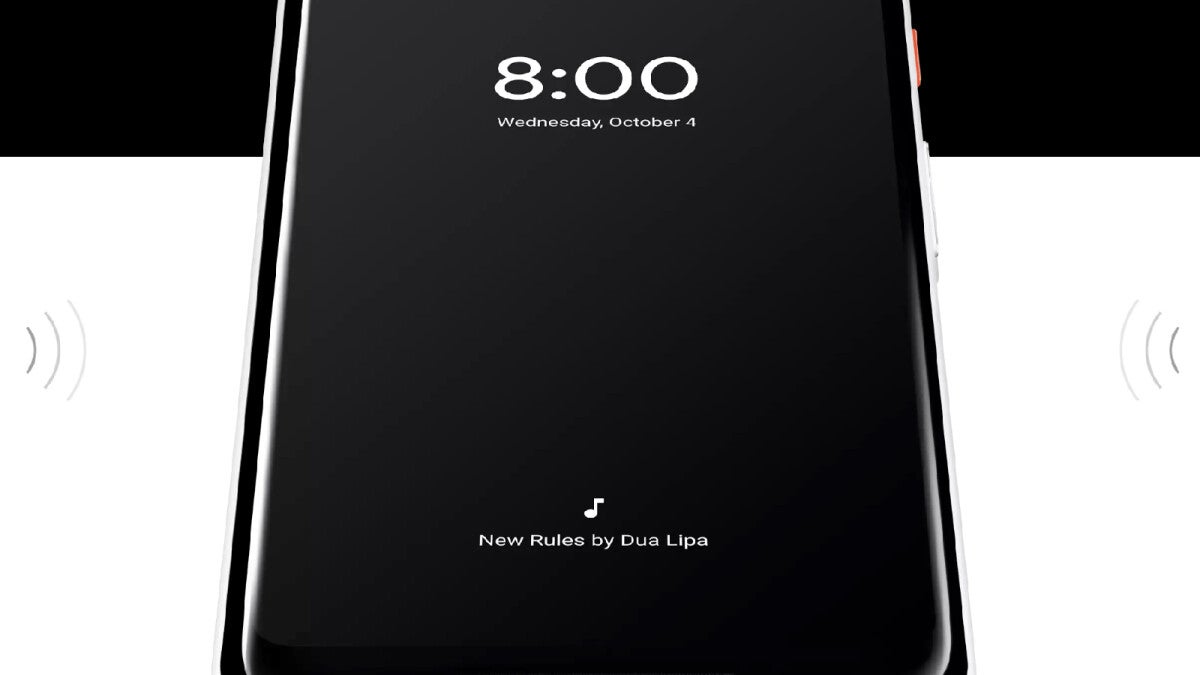
Found on the bottom of the Pixel’s lock screen display, “Now Playing” is a music recognition feature that listens to tunes playing in the background wherever you are, and lists the name of the tune and the artist. To access the feature, go to Settings > Sound & vibration > Now Playing. You can make sure that the feature is enabled by looking at the first toggle on the page which should be toggled on. You can also toggle on Enhance Now Playing, which uses Google Search to identify songs that your device cannot recognize and also provides album artwork.

Furthermore, you can also see a list of your Now Playing history. If you tap on any of the songs on the list, you will be prompted to play the song using your default music streamer. A setting on the Now Playing page allows you to choose between:

  • YouTube Music
  • YouTube
  • Apple Music
  • Spotify
  • None

YouTube Music is my default Music Player.

Google is working on a dedicated app for Now Playing

According to hidden strings of code found by 9to5Google in Version B.21 of Android System Intelligence, Google is working on a dedicated Now Playing app. The app will be available from the Google Play Store under the address com.google.android.apps.pixel.nowplaying. By making a dedicated app for Now Playing, Google will have the ability to add new features, such as the ability to move over your Now Playing history when moving to a new compatible device.

One string of code read “now_playing_upgrade_notification_action”>Go to play store. There is also a notification that says, “Download the new Now Playing app. Now Playing has a new home. Your settings, song history, and other features can be found in the dedicated app.”

There is no set date when we could see a Now Playing app rollout although the March Pixel Drop is approaching. That could be a good time for Google to launch a Now Playing app. As I said, Pixel phones are chock-full of useful features such as the Recorder app, which will digitally record audio. In the Pixel 10 series, the Magic Cue sends you proactive notifications based on your Google apps. For example, you might be looking at a restaurant in Google Maps and receive a Magic Cue notification reminding you that you came down with food poisoning the last time you ate there.

When Google unveiled the Pixel 10 line last year, it made it clear that it would differentiate its phones by making the assistant feature proactive. Let’s say you have to call the airline about making a change to your reservation. Instead of going through your apps to get the information you’ll need when making the call, the Magic Cue will send you the pertinent information such as the flight number, ticket number and the seat number. 

Why I return to the Pixel over and over again

Perhaps Now Playing isn’t as useful or helpful as the Magic Cue, but it really is a good example of the little things that Pixel fans love. Even the quarterly Pixel Drops are a feature that you don’t see on other handsets. Sure, other phones do issue updates from time to time, but Google has a whole schedule for the Pixel Drops and promotes it as a way to make your Pixel feel like a brand-new phone.

So, yeah. I have my reasons for choosing my Pixel 6 Pro over my iPhone 15 Pro Max. Sometimes it is the little things that matter. For example, there is no comparison between the A17 Pro application processor (AP) that powers my iPhone (it was the industry’s first 3nm AP) and the OG Tensor that powers the Pixel 6 Pro; it’s the small little things like At a Glance, Now Playing, the Pixel Drop, the Recorder app, and using Gemini as a powerful assistant that have me returning to the Pixel time and again.
Try Noble Mobile for only $10

Get unlimited talk, text, & data on the T-Mobile 5G Network plus earn cash back for data you don’t use.


Buy at Noble Moblie

Read the latest from Alan Friedman

Sign Up For Daily Newsletter

Be keep up! Get the latest breaking news delivered straight to your inbox.
By signing up, you agree to our Terms of Use and acknowledge the data practices in our Privacy Policy. You may unsubscribe at any time.
Share This Article
Facebook Twitter Email Print
Share
What do you think?
Love0
Sad0
Happy0
Sleepy0
Angry0
Dead0
Wink0
Previous Article Europe Wants To Break Away From The US’s Dominating Tech (For A Good Reason) – BGR Europe Wants To Break Away From The US’s Dominating Tech (For A Good Reason) – BGR
Next Article On Sunday, Team USA Goes for Olympic Gold in Snowboarding, Alpine Skiing, Dual Moguls, More. How to Watch Online On Sunday, Team USA Goes for Olympic Gold in Snowboarding, Alpine Skiing, Dual Moguls, More. How to Watch Online
Leave a comment

Leave a Reply Cancel reply

Your email address will not be published. Required fields are marked *

Stay Connected

248.1k Like
69.1k Follow
134k Pin
54.3k Follow

Latest News

8 Shockingly Useful Ways to Use the Flipper Zero, No Hacking Skills Required
News
Apple Now Testing Flip-Style Foldable iPhone
News
The Hands-Down Best Smart TV For Every Budget – BGR
News
Gemini now helps you breeze through long Google Docs without reading them
News

You Might also Like

8 Shockingly Useful Ways to Use the Flipper Zero, No Hacking Skills Required
News

8 Shockingly Useful Ways to Use the Flipper Zero, No Hacking Skills Required

18 Min Read
Apple Now Testing Flip-Style Foldable iPhone
News

Apple Now Testing Flip-Style Foldable iPhone

5 Min Read
The Hands-Down Best Smart TV For Every Budget – BGR
News

The Hands-Down Best Smart TV For Every Budget – BGR

9 Min Read
Gemini now helps you breeze through long Google Docs without reading them
News

Gemini now helps you breeze through long Google Docs without reading them

3 Min Read
//

World of Software is your one-stop website for the latest tech news and updates, follow us now to get the news that matters to you.

Quick Link

  • Privacy Policy
  • Terms of use
  • Advertise
  • Contact

Topics

  • Computing
  • Software
  • Press Release
  • Trending

Sign Up for Our Newsletter

Subscribe to our newsletter to get our newest articles instantly!

World of SoftwareWorld of Software
Follow US
Copyright © All Rights Reserved. World of Software.
Welcome Back!

Sign in to your account

Lost your password?