Being able to easily share your location with others is one reason that Android’s Find Hub — which received a massive update with Android 16 — and the iPhone’s Find My network have become so popular. It makes keeping up with family and close friends extremely simple, while also giving you the ability to remove the tracking option at any time. But what if you’re meeting up with a friend that you don’t want to give access to your location all the time? Well, if you have an Android phone with Google Messages, then that is now more easily possible thanks to Google’s latest addition of real-time sharing directly in the Messages app.
Now, we’ve known this feature was coming for at least a month or so, as a previous APK teardown helped reveal that real-time location sharing had been spotted in a beta for Google Messages; however, it appears that the feature has now officially begun rolling out, with us confirming its availability on a Galaxy S25 Ultra earlier this morning. So how exactly does this new feature work? Well, it’s thankfully quite simple. Instead of having to go into Google Maps or register someone through the Find Hub on Android, you can now share your location directly in the Messages app by tapping on a few quick options.
How to share real-time location in Google Messages
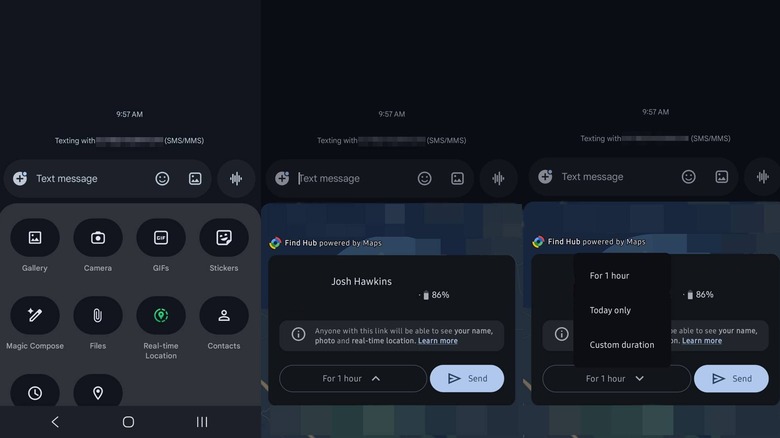
To start easily sharing your location, open the conversation that you want to share your location with. Next, tap the plus icon in the chat — it is located next to the text entry area — and then select Real-time location from the list. If you haven’t given Messages access to your location, then you’ll be prompted to do so. Once confirmed, you’ll get a quick view of the area around you, as well as an option for how long you want to share and a Send button.
To customize the duration of time you share your location, simply tap on the dropdown and then select one of the options that pop up. You can share for one hour, just that day, or even until you turn the feature off. If you only need to share for 15 to 30 minutes, then you can select the Custom duration setting and enter the time you want to share. It is worth noting that the fake phone number we put in for our screenshots does not list the Until I turn it off option; however, we did confirm its existence with a real phone number that has RCS chats enabled (RCS being the feature that helps Google Messages catch more scams).
After you confirm the location-sharing options, your location will be visible directly in Google Messages, allowing you to easily see where your friends and family are and letting them track you. And, once the timer for the duration you set runs out, it should revert to not sharing anymore, without requiring you to go in and remove the person with any additional steps.