By using this site, you agree to the Privacy Policy and Terms of Use.
Accept
World of SoftwareWorld of SoftwareWorld of Software
  • News
  • Software
  • Mobile
  • Computing
  • Gaming
  • Videos
  • More
    • Gadget
    • Web Stories
    • Trending
    • Press Release
Search
  • Privacy
  • Terms
  • Advertise
  • Contact
Copyright © All Rights Reserved. World of Software.
Reading: Google Photos tries to save you from accidental edits in its latest shakeup
Share
Sign In
Notification Show More
Font ResizerAa
World of SoftwareWorld of Software
Font ResizerAa
  • Software
  • Mobile
  • Computing
  • Gadget
  • Gaming
  • Videos
Search
  • News
  • Software
  • Mobile
  • Computing
  • Gaming
  • Videos
  • More
    • Gadget
    • Web Stories
    • Trending
    • Press Release
Have an existing account? Sign In
Follow US
  • Privacy
  • Terms
  • Advertise
  • Contact
Copyright © All Rights Reserved. World of Software.
World of Software > News > Google Photos tries to save you from accidental edits in its latest shakeup
News

Google Photos tries to save you from accidental edits in its latest shakeup

News Room
Last updated: 2026/03/31 at 6:49 PM
News Room Published 31 March 2026
Share
Google Photos tries to save you from accidental edits in its latest shakeup
SHARE

TL;DR

  • Google Photos is removing tap, circle, and scribble shortcuts for editing tools on Android.
  • Tools like Move, Erase, and Reimagine are now accessed through menus or search instead.
  • Google says the change should reduce accidental edits and improve performance.

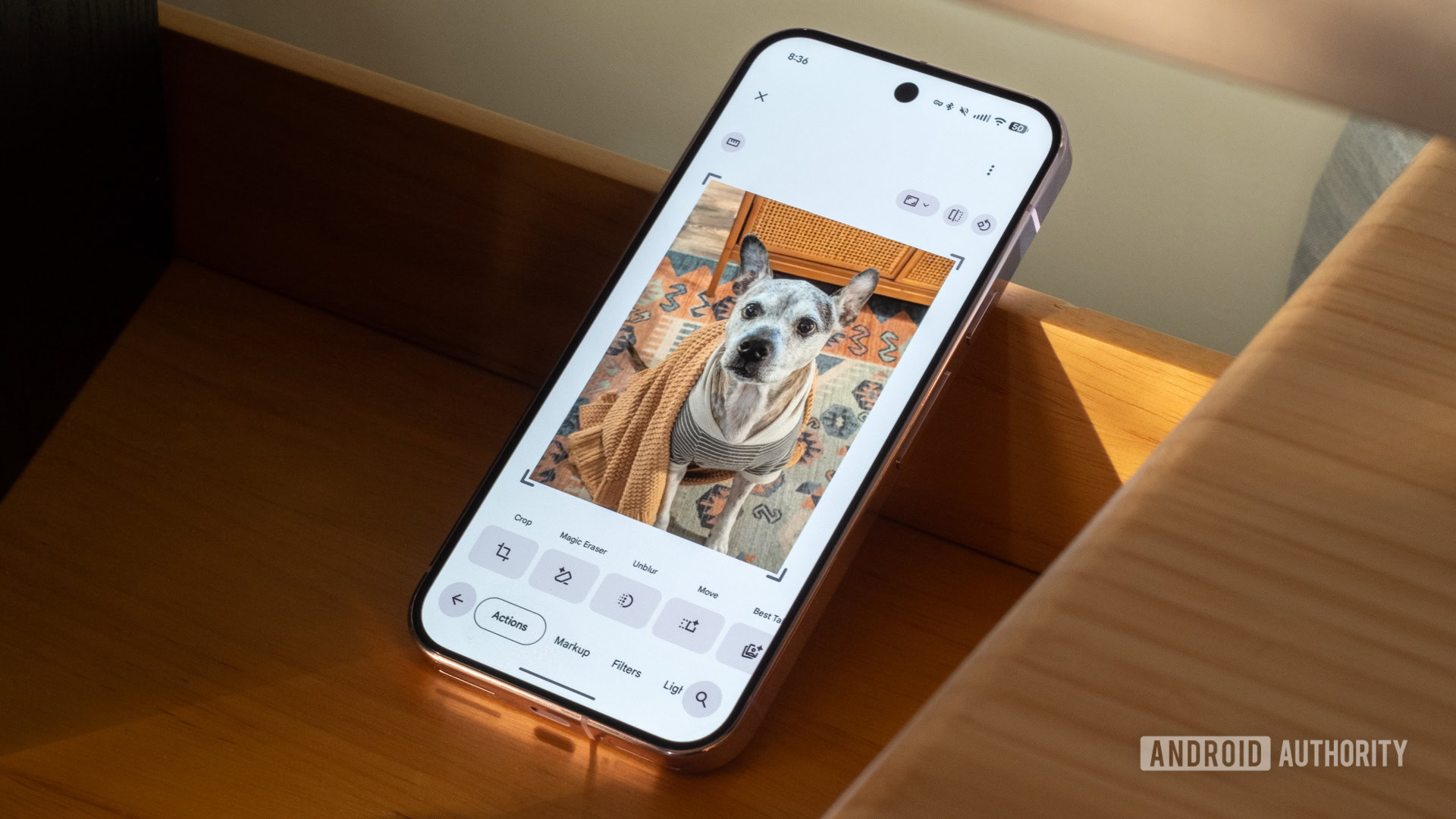
Google Photos and its editor have been in a near-constant state of change over the past couple of years, and it doesn’t look like things are settling down just yet. The latest tweak changes how you interact with some of the app’s most powerful tools, and while it looks like a bit of a regression in some respects, it aims to make the editor less frustrating to use.

Don’t want to miss the best from Android Authority?

google preferred source badge dark@2x

In a new post on its Help pages, Google says it’s updating how users access editing tools on Android. Features like Move, Erase, and Reimagine will no longer activate when you tap, circle, or scribble directly on an image. Instead, you’ll need to open the editor and select them from the tools menu or search for them by name.

Is Magic Eraser working well for you in Google Photos?

196 votes

According to Google, the change is intended to reduce accidental edits and improve performance. Anyone who’s ever triggered an editing tool by mistake will probably see the upside. At the same time, it does remove one of the more direct and intuitive ways to make quick edits.

Google’s Photos editor has undergone a major redesign and even shown signs of partial reversals over the last 12 months. This latest update isn’t a dramatic overhaul, but it’s the kind of change you’ll notice pretty quickly if you rely on those gesture-based shortcuts. Whether it feels like an improvement will likely come down to how often you found yourself making edits you didn’t mean to in the first place.

Thank you for being part of our community. Read our Comment Policy before posting.

Sign Up For Daily Newsletter

Be keep up! Get the latest breaking news delivered straight to your inbox.
By signing up, you agree to our Terms of Use and acknowledge the data practices in our Privacy Policy. You may unsubscribe at any time.
Share This Article
Facebook Twitter Email Print
Share
What do you think?
Love0
Sad0
Happy0
Sleepy0
Angry0
Dead0
Wink0
Previous Article ‘I don’t think anything will ever replace Rec Room’: Fans shocked by gaming platform shutdown ‘I don’t think anything will ever replace Rec Room’: Fans shocked by gaming platform shutdown
Next Article Russian CTRL Toolkit Delivered via Malicious LNK Files Hijacks RDP via FRP Tunnels Russian CTRL Toolkit Delivered via Malicious LNK Files Hijacks RDP via FRP Tunnels
Leave a comment

Leave a Reply Cancel reply

Your email address will not be published. Required fields are marked *

Stay Connected

248.1k Like
69.1k Follow
134k Pin
54.3k Follow

Latest News

Gaim 3 Is In Development For Restoring The Original Gaim Instant Messaging App In GTK4
Computing
Google Hints at a New Fitness Health Wearable, Hidden in a Steph Curry Video
News
How to watch Iraq vs Bolivia: FREE live streams for World Cup 2026 playoff
News
Seed Funding Hasn’t Stalled, But It’s Skewing Larger And Is More Competitive Than Ever, Crunchbase Data Shows
News

You Might also Like

Google Hints at a New Fitness Health Wearable, Hidden in a Steph Curry Video
News

Google Hints at a New Fitness Health Wearable, Hidden in a Steph Curry Video

3 Min Read
How to watch Iraq vs Bolivia: FREE live streams for World Cup 2026 playoff
News

How to watch Iraq vs Bolivia: FREE live streams for World Cup 2026 playoff

7 Min Read
Seed Funding Hasn’t Stalled, But It’s Skewing Larger And Is More Competitive Than Ever, Crunchbase Data Shows
News

Seed Funding Hasn’t Stalled, But It’s Skewing Larger And Is More Competitive Than Ever, Crunchbase Data Shows

5 Min Read
UK cyber group joins PSG’s innovation accelerator – UKTN
News

UK cyber group joins PSG’s innovation accelerator – UKTN

1 Min Read
//

World of Software is your one-stop website for the latest tech news and updates, follow us now to get the news that matters to you.

Quick Link

  • Privacy Policy
  • Terms of use
  • Advertise
  • Contact

Topics

  • Computing
  • Software
  • Press Release
  • Trending

Sign Up for Our Newsletter

Subscribe to our newsletter to get our newest articles instantly!

World of SoftwareWorld of Software
Follow US
Copyright © All Rights Reserved. World of Software.
Welcome Back!

Sign in to your account

Lost your password?