By using this site, you agree to the Privacy Policy and Terms of Use.
Accept
World of SoftwareWorld of SoftwareWorld of Software
  • News
  • Software
  • Mobile
  • Computing
  • Gaming
  • Videos
  • More
    • Gadget
    • Web Stories
    • Trending
    • Press Release
Search
  • Privacy
  • Terms
  • Advertise
  • Contact
Copyright © All Rights Reserved. World of Software.
Reading: Hate the new Pixel home screen search UI? Here’s how to bring the old one back
Share
Sign In
Notification Show More
Font ResizerAa
World of SoftwareWorld of Software
Font ResizerAa
  • Software
  • Mobile
  • Computing
  • Gadget
  • Gaming
  • Videos
Search
  • News
  • Software
  • Mobile
  • Computing
  • Gaming
  • Videos
  • More
    • Gadget
    • Web Stories
    • Trending
    • Press Release
Have an existing account? Sign In
Follow US
  • Privacy
  • Terms
  • Advertise
  • Contact
Copyright © All Rights Reserved. World of Software.
World of Software > News > Hate the new Pixel home screen search UI? Here’s how to bring the old one back
News

Hate the new Pixel home screen search UI? Here’s how to bring the old one back

News Room
Last updated: 2025/12/23 at 8:07 PM
News Room Published 23 December 2025
Share
Hate the new Pixel home screen search UI? Here’s how to bring the old one back
SHARE

Joe Maring / Android Authority

TL;DR

  • A recent Pixel update changed the home screen search bar behavior, but you can revert it with a workaround.
  • The change forces the search bar to open the standard Google Search UI rather than the Pixel Launcher’s unified search.
  • By using ADB to toggle a specific launcher flag, you can force the device to return to the old unified search experience.

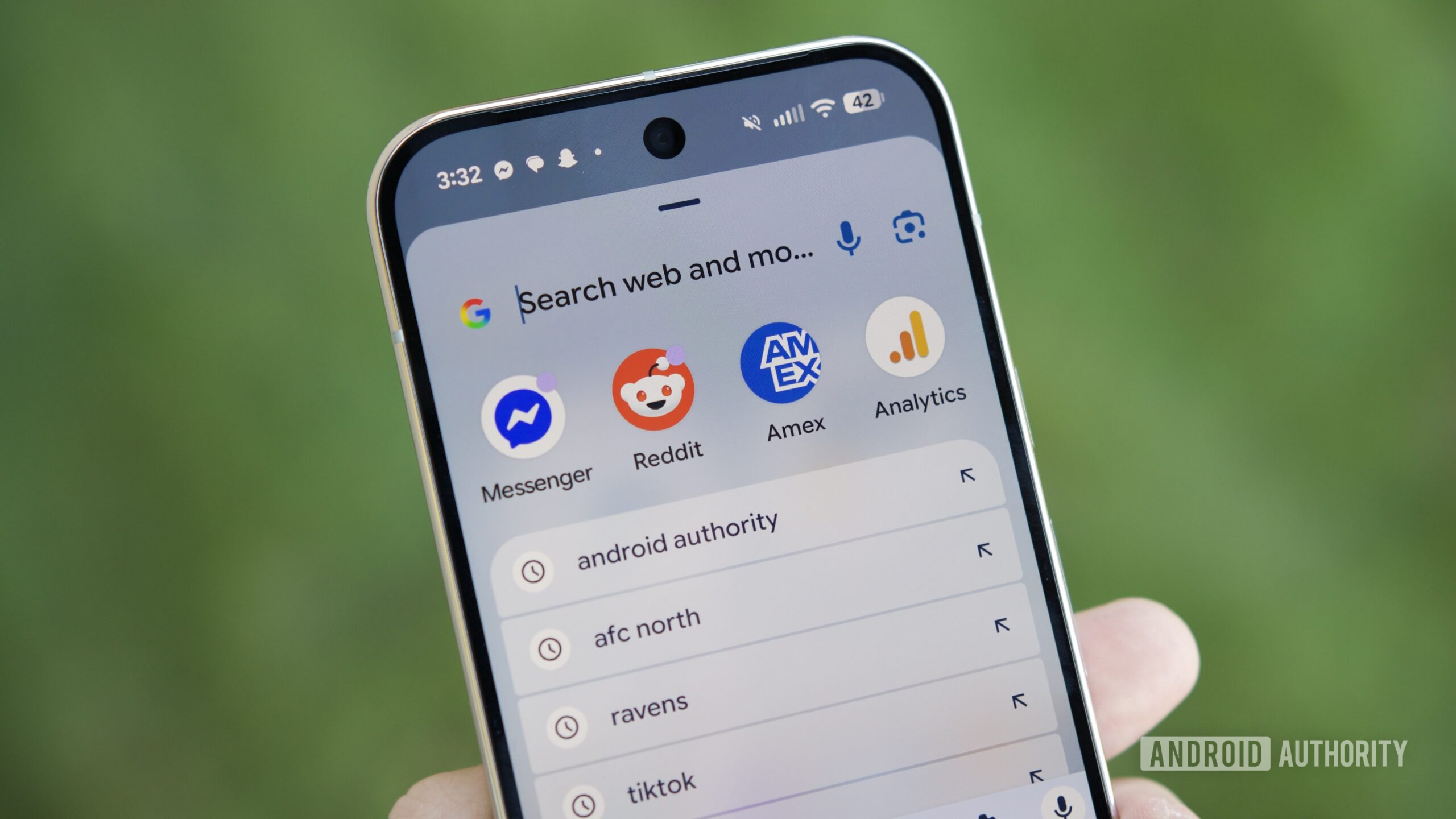
Google constantly experiments with new ways to improve its products, but like all experiments, results vary. In a recent Pixel update, Google modified the home screen search bar to launch the standard Google Search UI rather than the Pixel Launcher’s unified search experience. While the standard UI makes it easier to access AI Mode, it lacks some features and feels less integrated. Fortunately, users who want to restore the old search experience can do so with a simple workaround. Here’s what you need to do.

Don’t want to miss the best from Android Authority?

google preferred source badge light@2xgoogle preferred source badge dark@2x

First, follow this guide to set up ADB on your device. You’ll need this tool to run a command that overrides the flag responsible for the search UI switch. Once ADB is ready, run the following two commands one-by-one:

Code

adb shell cmd device_config override launcher enable_one_search true
adb shell am force-stop com.google.android.apps.nexuslauncher

The first command overrides the “enable_one_search” flag read by the Pixel Launcher. Setting it to ‘true’ forces the launcher to use the unified search experience instead of the standard Google Search UI. The second command restarts the Pixel Launcher to apply the updated flag. To revert this, simply replace ‘true’ with ‘false’ in the first command.

Thanks to users jspirit and Kieron Quinn for sharing these commands!

Thank you for being part of our community. Read our Comment Policy before posting.
Sign Up For Daily Newsletter

Be keep up! Get the latest breaking news delivered straight to your inbox.
By signing up, you agree to our Terms of Use and acknowledge the data practices in our Privacy Policy. You may unsubscribe at any time.
Share This Article
Facebook Twitter Email Print
Share
What do you think?
Love0
Sad0
Happy0
Sleepy0
Angry0
Dead0
Wink0
Previous Article 9 Best Instagram Reels Editing Apps on the Market in 2025 9 Best Instagram Reels Editing Apps on the Market in 2025
Next Article Google Confirms Android Under Attack, Warns 30 Pct Of Phones Will Not Get A Fix Google Confirms Android Under Attack, Warns 30 Pct Of Phones Will Not Get A Fix
Leave a comment

Leave a Reply Cancel reply

Your email address will not be published. Required fields are marked *

Stay Connected

248.1k Like
69.1k Follow
134k Pin
54.3k Follow

Latest News

How to Spot & Report a Fake Instagram Account in 2025 (5 Tips)
Computing
Ray-Ban Meta glasses just got a big upgrade: 9 new features to try now
News
Best fitness tech of 2025
News
80D Tax Deductions for Senior Citizens: How to Benefit from Additional Coverage | HackerNoon
Computing

You Might also Like

Ray-Ban Meta glasses just got a big upgrade: 9 new features to try now
News

Ray-Ban Meta glasses just got a big upgrade: 9 new features to try now

5 Min Read
Best fitness tech of 2025
News

Best fitness tech of 2025

4 Min Read

Bolivia lifts restrictions on satellite companies to upgrade internet connectivity

4 Min Read
CDs Are Actually Making A Comeback – Here’s How – BGR
News

CDs Are Actually Making A Comeback – Here’s How – BGR

5 Min Read
//

World of Software is your one-stop website for the latest tech news and updates, follow us now to get the news that matters to you.

Quick Link

  • Privacy Policy
  • Terms of use
  • Advertise
  • Contact

Topics

  • Computing
  • Software
  • Press Release
  • Trending

Sign Up for Our Newsletter

Subscribe to our newsletter to get our newest articles instantly!

World of SoftwareWorld of Software
Follow US
Copyright © All Rights Reserved. World of Software.
Welcome Back!

Sign in to your account

Lost your password?