We are moving past the era of simply “chatting” with AI code editors. The difference between a junior developer using AI and a senior architect using AI is context orchestration.
If you treat Cursor like a chatbot, you get generic code. If you treat it like a specialized agent operating within rigid architectural boundaries, you get production-ready software.
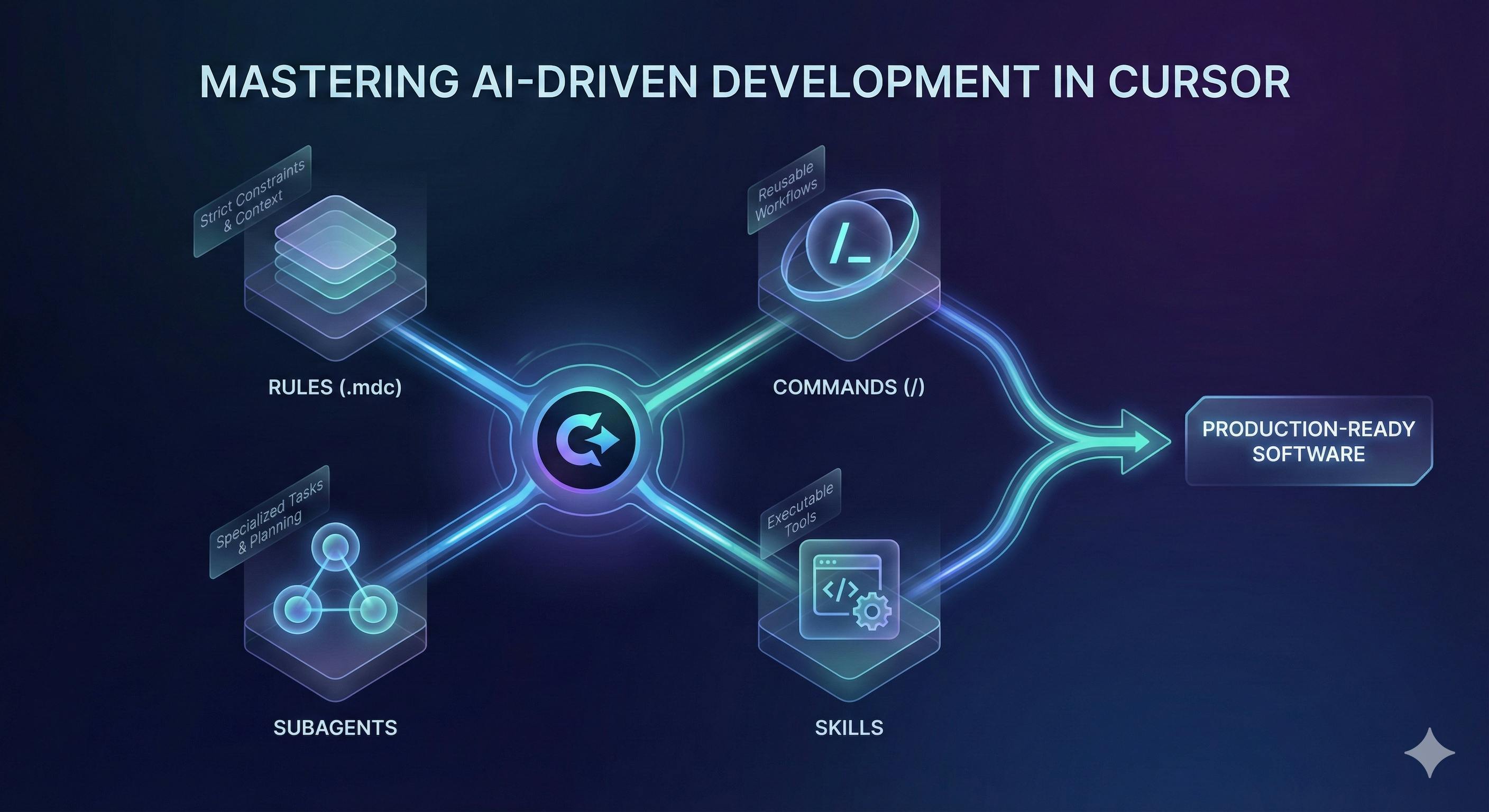
With Cursor’s latest updates, specifically the removal of Custom Modes and the introduction of Slash Commands, Skills, and Subagents, we now have a powerful framework to automate development standards.
Here is the concise guide to mastering this workflow.
1. Structure Your Intelligence (.cursor/rules/)
Forget the single, massive .cursorrules file. It is unmanageable and prone to context loss. Instead, use the .cursor/rules/ directory to create modular, domain-specific rule files.
We use the .mdc extension, which allows for metadata frontmatter to control exactly when the AI reads the rule.
Example: .cursor/rules/css-architecture.mdc
---
description: "Apply this rule when writing CSS or styling components"
globs: "**/*.css"
alwaysApply: false
---
# CSS Architecture Rules
- NO :root or @import declarations in widget files.
- MUST use var(--design-token) variables.
- NEVER use raw hex codes.
Configuration Options:
- Always Apply: Use for high-level context that must be present in every request (e.g.,
project-context.mdc). - Apply Intelligently: Let Cursor decide relevance based on the
description. Perfect for library-specific patterns (e.g.,@react-patterns.mdc). - Scoped (Globs): Enforce rules only on specific file types.
2. Define the “Source of Truth”
You must prevent the AI from hallucinating about your tech stack. Create a single rule file (e.g., project-context.mdc) with alwaysApply: true.
- Content: Project goals, current tech stack, folder structure, and “No-Go” zones.
- Example: “We are migrating FROM React TO Vanilla JS. The final output must be 100% vanilla. Do not suggest React solutions for output files.”
3. Replace “Custom Modes” with Slash Commands
Custom Modes have been removed from Cursor. The new, superior alternative is Custom Slash Commands. These allow you to bundle specific prompts and rule sets into a reusable trigger.
How to Implement:
- Create a folder
.cursor/commands/. - Add a markdown file, e.g.,
convert-widget.md. - Define your workflow prompt inside.
Example: .cursor/commands/convert-widget.md
You are an expert frontend developer. Convert the selected React component into a production-ready vanilla HTML/CSS/JS widget.

You MUST follow these rules:
- @css-architecture.mdc
- @design-system.mdc
- @parallax-effects.mdc
Step-by-step plan:
1. Analyze the React props and state.
2. Create the HTML structure using our BEM naming convention.
3. Extract CSS using only allowed design tokens.
Usage: Type /convert-widget in chat to trigger this specialized agent behavior immediately.
4. Extend Capabilities with Skills
Use Skills (.cursor/skills/) to give the AI executable tools, not just text instructions. A skill is a package that can contain scripts (Python, Bash, etc.) that the Agent can actually run.
Use Cases:
- Minification: Create a skill that runs
npm run minifyautomatically after generating code. - Docs Fetching: A skill that fetches the latest documentation from your internal wiki or specific URLs.
5. Delegate Deep Thinking to Subagents
For tasks that require heavy reasoning, research, or multi-step architecture, use Subagents (.cursor/agents/). Subagents run in their own isolated context window, preventing them from polluting your main chat history or hitting token limits.
When to use a Subagent:
- The “Planner”: Before coding a complex feature, use a
planner.mdsubagent to generate a detailed implementation plan. - The “Architect”: Use a subagent to analyze the entire codebase map before suggesting a refactor.
Pro Tip: The “Two-Pass” Protocol
One of the most effective workflows I have discovered is decoupling creation from verification.
If you ask an AI to “Create this component and make sure it follows the rules,” it often prioritizes creation and glosses over the rules. Instead, split this into two distinct Slash Commands.
Step 1: The Maker (/build-widget)
This command focuses purely on logic and implementation. It generates the code based on your requirements.
Step 2: The Checker (/qa-review)
Once the code is generated, do not accept it yet. Run a second command against the specific context of the generated code.
Create .cursor/commands/qa-review.md:
You are a Senior QA Engineer.

Review the code generated in the previous turn. Cross-reference it STRICTLY against:
1. @design-system.mdc (Did it use raw hex codes?)
2. @css-architecture.mdc (Did it use :root?)
3. @accessibility.mdc (Are ARIA labels present?)

Output a checklist of PASS/FAIL.
If there are failures, rewrite the code to fix them immediately.
Why this works:
When you force the AI to switch “personas” from a Creator to a Reviewer, it re-reads the output with a critical “eye,” catching 90% of the errors it would have otherwise missed.
Bonus: The AI-Native Designer Handoff
The most powerful application of this workflow isn’t just writing code from scratch — it’s transforming “raw” AI output into production-ready software.
Here is a real-world example of how I collaborate with designers who also use AI tools:
- The Designer’s Role: My designer uses Figma (and tools like Figma’s “Make” or Dev Mode) to generate a raw React export of the design. This code is visually correct but often lacks our specific architectural standards or logic.
- The Developer’s Role: Instead of coding from zero, I treat this React export as my “Source Material.”
- The Cursor Workflow: I drag the raw React files into Cursor and run a custom Slash Command like
/adapt-design.
Example Command (/adapt-design):
You are a Senior Frontend Architect.
Input: The raw React code from Figma in the current file.
Task: Refactor this strictly into our project structure.

1. KEEP the visual structure and Tailwind classes.
2. REPLACE hardcoded strings with our i18n keys.
3. EXTRACT types to `types.ts` according to @tech-stack.mdc.
4. ENSURE accessibility rules from @a11y.mdc are applied.
The Result: A seamless pipeline where the designer handles the visuals via AI, and your Cursor workflow instantly sanitizes and architects that code into your system. This turns the dreaded “handoff” into a simple 30-second conversion task.
Stop typing code. Start orchestrating intelligence.