People use smartphones everywhere, without necessarily realizing they’re exposing the handsets to all sorts of germs and dirt. In addition to collecting dirt while in use, phones can accumulate dust and lint while sitting in purses or pockets. That’s why it’s important to give our handsets a deep clean regularly, while also ensuring the cleaning process is safe for the device’s components. In what follows, we’ll tell you everything you need to know to clean your Android phone thoroughly.
Many people may use protective accessories with their Android devices. These should be included in the cleaning process. You won’t remove the screen protector from the display, but you will want to take the handset out of the case. Then, you’ll want to clean the case separately (skip this step if you don’t use one). You may want to start the cleaning procedure with the case. Power off the handset, remove any connected charging cables or headphones, and take it out of the case. Place the handset on a secure surface so it doesn’t slip, and clean the case.
Since cases are made of all sorts of materials, the cleaning procedure will vary. You’ll want microfiber cloths on hand for the job, one for using cleaning solutions, and one for drying the case at the end. For plastic, you can use soap and warm water or an ammonia-free spray cleaner. Bleach can be used on plastic cases if needed, but not on silicone. On that note, silicone and rubber cases can be cleaned with dish soap and water. Baking soda can come in handy if the silicone case is stained or dirty. Wood and leather cases can be cleaned with wood or leather cleaner, but you should spray the solution on a microfiber cloth, not the case.
How to clean the screen of your Android phone
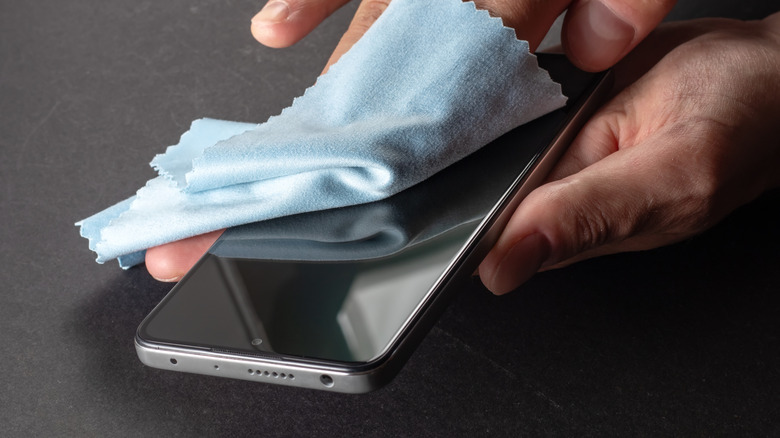
Once the case is cleaned and dried, you may leave it to air-dry while you clean the handset. Both Google and Samsung advise users to use soft, lint-free cloths for wiping the entire phone. A microfiber cloth may be the best choice for the job. It should remove dust and smudges from the screen, rear panel, cameras, and sides. You’ll want to be careful with the screen protector when cleaning the phone, with Google explicitly advising Pixel 10 Pro Fold users not to remove the protective film or pick at the edges.
A separate, damp cloth can be used to remove any visible markings, like makeup or color transfers. Samsung notes that you can dampen the corner of a microfiber cloth with distilled water for grime that’s harder to remove. For the display, you can use screen wipes or eyeglass cleaner, according to Google, while soap and bleach-free cleaning wipes work on the back and sides of Pixel phones. You can use similar tools to clean Android phones from other vendors, not just Pixel and Galaxy devices.
Users who want to disinfect their devices can use alcohol-based wipes (70% isopropyl), according to Google. Samsung also lists hypochlorous acid-based solutions or solutions that contain “more than 70% ethanol or isopropyl alcohol.” Bleach should not be used on any surface of the phone. Regardless of the substance, you should not spray or spill the solutions directly onto your phone. Instead, use a microfiber cloth to apply the disinfectant and then clean the display, the cameras, the sides, and the back. A dry microfiber can be used immediately after that to dry the phone.
How often should you clean your Android phone?
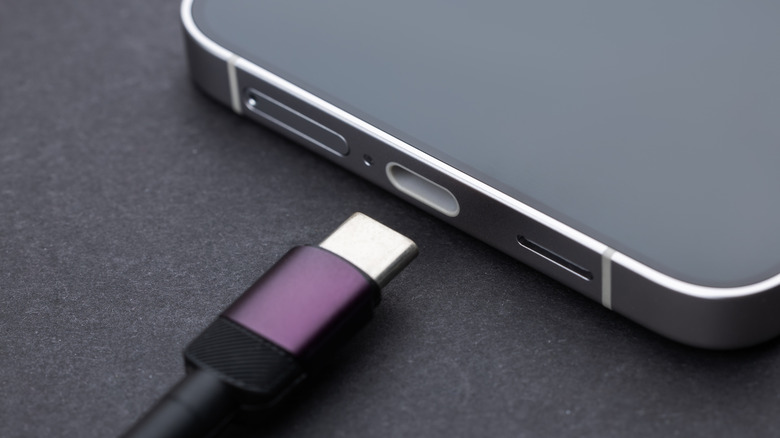
You’ll want to pay attention to the phone’s ports, whether it’s the USB-C port (or a different connector), the speaker, or the 3.5 mm headphone port (if your phone still has one). Dust can accumulate in these openings and interfere with normal function. You may find the phone doesn’t charge, or the sound isn’t as crisp as it used to be. Do not use any liquids to remove any dust from those openings. Also, smartphone vendors including Apple, Google, and Samsung advise against using compressed air when cleaning phones. Apple and Samsung suggest using gentle brushes to remove any debris from speakers. Brushes should be clean and dry. The charging port may be trickier. You can use a toothpick to try to remove any visible lint, but you should be very gentle about it.
The entire deep clean process should not take very long, but you may not want to repeat it every day. That said, you can clean the display and case every day with a dry microfiber. This will remove smudges and fingerprints. You can then do a periodic deep clean when needed. As for disinfecting the Android handset, it’s up to the user to decide when to do that.
A study published in Antimicrobial Resistance & Infection Control in early 2026 found that cleaning mobile phones belonging to healthcare workers with 70% isopropanol leads to a “significant reduction in microbiological contamination.” A 2024 study published in South African Medical Journal also showed that using a 70% isopropyl alcohol solution to clean the phones belonging to healthcare workers in a paediatric intensive care unit was 67% more effective than ultraviolet light disinfection at killing pathogens. These studies indicate that periodic phone disinfection will remove more than grime and lint.
![Hands-on: Anker’s new 45W charger adds a useful built-in display in a compact design [U] – 9to5Mac](https://i0.wp.com/9to5mac.com/wp-content/uploads/sites/6/2026/01/Anker-45W.jpg?resize=1200%2C628&quality=82&strip=all&ssl=1 "Hands-on: Anker’s new 45W charger adds a useful built-in display in a compact design [U] – 9to5Mac")