By using this site, you agree to the Privacy Policy and Terms of Use.
Accept
World of SoftwareWorld of SoftwareWorld of Software
  • News
  • Software
  • Mobile
  • Computing
  • Gaming
  • Videos
  • More
    • Gadget
    • Web Stories
    • Trending
    • Press Release
Search
  • Privacy
  • Terms
  • Advertise
  • Contact
Copyright © All Rights Reserved. World of Software.
Reading: How To Disable Personalized Ads On Your Android Phone (And Why You Should) – BGR
Share
Sign In
Notification Show More
Font ResizerAa
World of SoftwareWorld of Software
Font ResizerAa
  • Software
  • Mobile
  • Computing
  • Gadget
  • Gaming
  • Videos
Search
  • News
  • Software
  • Mobile
  • Computing
  • Gaming
  • Videos
  • More
    • Gadget
    • Web Stories
    • Trending
    • Press Release
Have an existing account? Sign In
Follow US
  • Privacy
  • Terms
  • Advertise
  • Contact
Copyright © All Rights Reserved. World of Software.
World of Software > News > How To Disable Personalized Ads On Your Android Phone (And Why You Should) – BGR
News

How To Disable Personalized Ads On Your Android Phone (And Why You Should) – BGR

News Room
Last updated: 2026/02/19 at 2:18 AM
News Room Published 19 February 2026
Share
How To Disable Personalized Ads On Your Android Phone (And Why You Should) – BGR
SHARE


Stock-Asso/Shutterstock

Unless you’re using an ad blocker on your Android device, you’re bound to run into at least one ad while scrolling on your mobile browser or playing games. They’re incredibly annoying, yes, but they get even creepier when they seem too tailored for your liking. Imagine looking up a garnet ring once, and now everywhere you go, you see jewelry ads. This is what you call personalized ads, and to be fair, they do have their upsides. For one, you get to discover new products and services that match your needs. That means you won’t have to go out of your way to manually search for them — they’ll automatically show up at the right time.

But the thing is, there are arguably more trade-offs to personalized ads. The biggest drawback is the privacy concern. Personalized ads use data, and that data can range from basic information like app usage to sensitive ones like your email address and age. And since user data is involved, there’s always a question about the security risk too. The good news is, there’s a built-in Android setting to improve your user experience and stop personalized ads on your device. Moreover, Android comes with other powerful security features, such as Advanced Protection, which further keeps your device and Google account safe.

Steps to turn off personalized ads on your Android
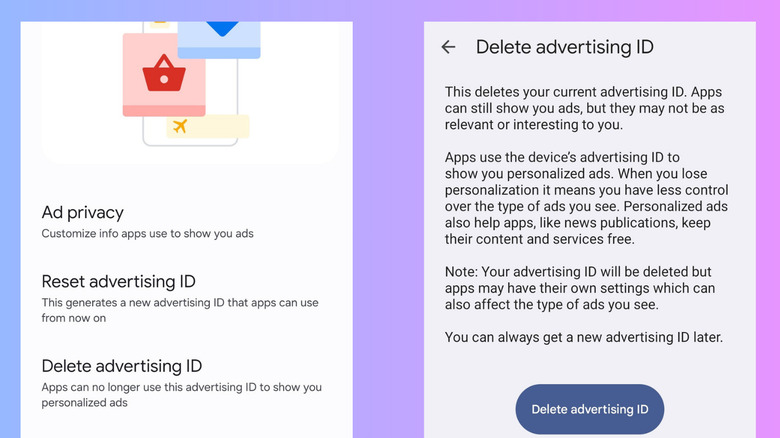

Android settings for deleting advertising ID
Marinel Sigue/BGR

To personalize ads on your Android, apps use a so-called advertising ID that’s unique to your device. This ID essentially associates your mobile with things like your app interactions and the information and account settings you’ve provided to a website or app. With the advertising ID, advertisers can better decide what ads to show you. That’s why you get targeted ads in the apps and websites you use.

Thankfully, Google allows you to remove this advertising ID from your Android phone. Once it’s deleted, the sites and apps on your device will revert to sending you generic ads instead. Here’s how you can delete your advertising ID and turn off personalized ads on your Android:

  1. Launch your Settings app.
  2. Open Google.
  3. Select the All services tab.
  4. Under Privacy & security, head over to Ads.
  5. Tap on Delete advertising ID.
  6. Hit Delete advertising ID to confirm.

You should then be redirected to the main Ads page. From there, you can go to Ad privacy to further configure the data your apps use for advertising. For instance, toggle off Ad topics to stop Android from determining your interests from the apps you use. Turn off App-suggested ads, so apps can no longer recommend ads you might like. Disable Ad measurement to prevent apps from asking for reports about their ad performance on your device.

Keep in mind, though, that even after deleting your advertising ID and deactivating the options under Ad privacy, you’ll continue to see ads pop up just as frequently as before. They won’t be limited or disappear altogether — they just won’t be personalized to your interests and activities anymore. 



Sign Up For Daily Newsletter

Be keep up! Get the latest breaking news delivered straight to your inbox.
By signing up, you agree to our Terms of Use and acknowledge the data practices in our Privacy Policy. You may unsubscribe at any time.
Share This Article
Facebook Twitter Email Print
Share
What do you think?
Love0
Sad0
Happy0
Sleepy0
Angry0
Dead0
Wink0
Previous Article Meet the Contest Winner: Crypto VC Researcher Glaze on Finding Opportunity in a Crowded AI Market | HackerNoon Meet the Contest Winner: Crypto VC Researcher Glaze on Finding Opportunity in a Crowded AI Market | HackerNoon
Next Article OpenAI taps Tata for 100MW AI data center capacity in India, eyes 1GW |  News OpenAI taps Tata for 100MW AI data center capacity in India, eyes 1GW | News
Leave a comment

Leave a Reply Cancel reply

Your email address will not be published. Required fields are marked *

Stay Connected

248.1k Like
69.1k Follow
134k Pin
54.3k Follow

Latest News

TikTok Influencers: The Ultimate Guide (2024)
Computing
Lowest price ever: M5 iPad Pro plunges to 9
Lowest price ever: M5 iPad Pro plunges to $799
News
5 Brands That Make The Worst Cars, According To Consumer Reports – BGR
News
Xiaomi Redmi Turbo 4 Pro reaches one million units sold in under a month · TechNode
Computing

You Might also Like

Lowest price ever: M5 iPad Pro plunges to 9
News

Lowest price ever: M5 iPad Pro plunges to $799

1 Min Read
5 Brands That Make The Worst Cars, According To Consumer Reports – BGR
News

5 Brands That Make The Worst Cars, According To Consumer Reports – BGR

8 Min Read
You can get the Pixel 10a for free at Verizon, but here’s the catch
News

You can get the Pixel 10a for free at Verizon, but here’s the catch

3 Min Read
Today's NYT Mini Crossword Answers for Feb. 19 – CNET
News

Today's NYT Mini Crossword Answers for Feb. 19 – CNET

2 Min Read
//

World of Software is your one-stop website for the latest tech news and updates, follow us now to get the news that matters to you.

Quick Link

  • Privacy Policy
  • Terms of use
  • Advertise
  • Contact

Topics

  • Computing
  • Software
  • Press Release
  • Trending

Sign Up for Our Newsletter

Subscribe to our newsletter to get our newest articles instantly!

World of SoftwareWorld of Software
Follow US
Copyright © All Rights Reserved. World of Software.
Welcome Back!

Sign in to your account

Lost your password?