Welcome, friend! I’m going to show you how to start a blog in the next 15 minutes. I’ll help you pick your blog name and niche, get your blog online (with web hosting), design your blog, write your first blog post, promote your content and set your site up with a foundation to make money once it’s driving traffic.
Follow these steps to learn how to start a blog and make money today:
How to Start a Blog (and Make Money) in 6 Steps: Easy Beginner’s Guide
The Ultimate Beginner’s Guide to Start a Blog and Make Money Blogging in 2026 (New Bloggers)
- Pick Your Blog Name and Niche
- Get Your Blog Online (Web Hosting)
- Design Your Blog with a Free WordPress Theme
- Write Your First Blog Post
- Promote Your Blog to Get Readers and Traffic
- Make Money from Your Blog
Disclosure: Please note that some of the links below are affiliate links and at no additional cost to you, I’ll earn a commission. When you purchase hosting using my Bluehost affiliate link, they compensate me, which helps make this step-by-step guide to start a blog and make money blogging free of charge to you. Know that I only recommend products and services I’ve personally used and stand behind.
Step 1. Pick Your Blog Name and Niche
First, you’ll need to pick a name and niche for your new blog.
Your blog’s name is what readers will see first (like yourblog.com), so it should ideally represent either the topics you’ll be writing about—or it could be your own name, or your business/brand name.
Before you settle on the name, check it’s available as a domain name. (We’ll be covering registering this in Step 2). I strongly recommend using the same name for your blog and your domain name (URL). If your blog is called “Hikes With Ryan” but your URL is “ryanrobinson.com”, that’s confusing for readers.
Your blog’s niche is the general topic area that you’ll be focusing your content around: think travel, food, fashion, lifestyle, technology, business, and so on. (Having a clear focus makes it much easier to build a readership than just blogging about anything.)
Ideally, include something that signals what your content is about in the name of your blog (like fashionbyjane.com or hikewithryan.com).
Need Help Choosing Your Name and Niche?
You might already have some ideas in mind … but if not, here are my top articles and tools for choosing your blog’s name and niche:
Step 2. Get Your Blog Online (Web Hosting & WordPress)
Next, you need to get your blog online. That’s what a web hosting company will do for you. In this step, you’ll be selecting the web hosting plan and blogging platform you’ll use to get your blog online.
Tip: Many new bloggers find this the trickiest step. Just take it slowly and don’t worry if a lot of the terms are new to you. I’ll explain everything clearly as we go through, with links to further information if you want it. Very soon, you’ll have your blog up and running!
Important: Don’t let the cost put you off blogging. You can get started with a free blogging site if you can’t afford web hosting. For a robust, professional blog, though, I strongly recommend paid hosting.
The Basics of Web Hosting
Web hosting is a service that stores all your website files on a powerful computer called a “server”. It keeps your website safe, secure and makes sure that people can access your blog 24/7.
Paying for web hosting is like renting a digital space on the internet. It doesn’t cost a lot: when you’re just starting out, you can get hosting from around $5/mo with a high quality hosting provider like Bluehost.
Bluehost is my favorite web host and checks all the boxes (and more) for new bloggers, with lots of features, security, support, and a fantastic track record.
The Basics of Blogging Platforms
A blogging platform is the software that runs your blog. It makes it easy to create and publish posts, without needing any coding skills. The software handles things like text formatting (bold, italics, links, etc), comments, contact forms, and lots more.
By far the most popular blogging platform out there is WordPress. Big webhosts like Bluehost make it very easy for you to start a WordPress site with built-in support.
—> Click here to head over to Bluehost and hit the “Get Started Now” button
For my full video walkthrough on starting a blog this year, watch the step-by-step tutorial here:
Setting Up Your Bluehost Hosting + WordPress Blog Combo
Choose Your Web Hosting Plan
- Select a web hosting plan and click the “Choose Plan” button. I recommend choosing the Starter plan, which costs from $3.79/mo: you can always upgrade in the future as your blog grows.
- Type in the domain name that you want. If you aren’t sure, don’t get stuck here! Just click “Choose domain later” and move on.
- Enter your email address and a password, or connect via your Google or Apple account. If you’re entering your details manually, make sure your email address is correct—this is where you’ll receive vital info like your login details!
- Choose how long to sign up for. You can pick from monthly, one year, or three years. The longer you choose, the cheaper per month. I recommend picking the three year option if you can, as the one year plan will go up a lot in price after your first year.
- Keep the Domain Privacy & Protection enabled. Bluehost automatically includes Domain Privacy & Protection (highly recommended, as otherwise your full name, email, phone number, and address will be published online).
- Skip the other extras. You can safely remove SiteLock Essentials (I’ll cover free WordPress security plugins later in this guide). I suggest that you uncheck Bluehost’s email service too: Google Workspace is a better, though slightly more expensive, option for most bloggers.
- Enter your billing information. Once you’re ready, add in your billing info (or use Google Pay or PayPal), then click the “Submit Payment” button.
Woo! It’s time for a mini celebration 🙂
You’ve officially completed the first major step in starting a blog.
It’s time to move into the next stage of getting your blog fully setup and optimized.
First, we’ll get WordPress installed on your blog through Bluehost.
Then later on in this guide, I’ve got a ton of helpful tips for optimizing your blog, free and cheap plugins you can install to help get your blog looking great, and more.
Need Help Choosing Your Web Hosting and Blogging Platform?
To keep things simple in this guide, I’ve stuck with setup instructions for my personal top recommendations: Bluehost for your web hosting, and WordPress as your blogging platform.
Looking for a different host? After Bluehost, my top 2 picks are:
- Dreamhost — I’ve hosted dozens of websites on Dreamhost over the years (and I still do). They offer similar features to Bluehost like 1-click WordPress install and a free SSL certificate, and they include free domain privacy even on the starter plan.
- HostGator — The thing that sets HostGator apart from other hosting companies, is their fantastic level of customer support. They’re a great choice if you think you might need a bit of extra help to get your blog up and running.
If you want to explore more options, I have plenty of articles to help you.
Disclosure: Please note that when you purchase hosting using my Bluehost affiliate link, they compensate me, which helps me make this ultimate guide to starting a blog free of charge to you. Know that I also use Bluehost hosting, and I would never recommend a product, tool or service I don’t personally use & advocate for 🙂
—> Click here to head over to Bluehost and register your domain if you haven’t already.
Feeling a Bit Overwhelmed by All the Steps Here?
I know first-hand that starting a blog on WordPress (and learning how to use WordPress) can be a daunting process.
So, if you need a little more detailed guidance, I put together a free master course that spreads all of this work out into a series of action-packed lessons, and goes into even more granular detail than this tutorial.
While the first crucial step to getting your blog started today is registering your domain name and setting up hosting, my free course expands into actually growing your blog. Throughout this 7-day course, you’ll go from zero to publishing (and promoting) your first blog post. I can’t recommend it enough.
Want my Free Course: How to Start a Profitable Blog in 7 Days?
Enter your name and email address and you’ll get instant access to my course that’s been featured on Forbes, Business Insider and Entrepreneur.
“*” indicates required fields
Step 3. Get Your Blog Ready for Visitors (Your WordPress Theme, Plugins, About Page, and More)

Getting WordPress set up and creating the design for your blog might sound tricky, but I promise this won’t get too technical. For a much more in-depth, step-by-step process, check out my WordPress tutorial for beginners.
First, you need to install WordPress. Login to your Bluehost account (check your email inbox if you need your login details) and head to the “Websites” tab. Select your domain name, and click to “Install WordPress”, then follow the prompts.
Need some help? Bluehost has a quick video walking you through this process:
Once WordPress is set up on your site, you should get an email prompting you to set your password. Click the link, come up with a secure password, and then you’ll see your WordPress dashboard.
There are a lot of different features: you don’t need to understand them all straight away! We’ll run through the key functionality, and I’ll give you lots of links to further info.
Next, you’ll want to choose a theme (design/template) for your blog, install crucial plugins, and create an About page to tell readers what your blog is all about.
But before we dig in, let’s clarify something important about WordPress..
Understanding WordPress.com vs WordPress.org
One slightly confusing thing about WordPress is that it comes in two flavors: WordPress.com and WordPress.org.
These are the key differences.
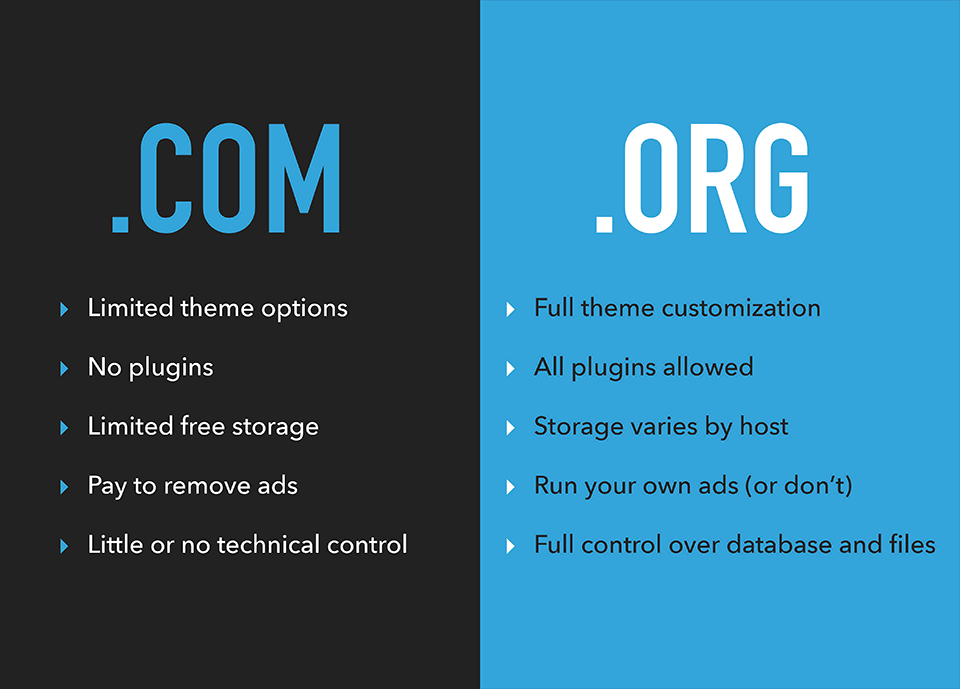
WordPress.com:
- Is free to use (but with heavy restrictions)
- Has very limited monetization options (you can’t sell your own ads)
- Doesn’t let you upload plugins (for email capture and other things)
- Has limited blogging theme support (e.g. you can’t upload premium themes)
- You have to pay to remove WordPress branding and get your own domain like yoursite.com
- Limited SEO (Search Engine Optimization) and analytics
WordPress.org:
- Fully customizable design (using WordPress themes), unlimited plugin options, and no branding
- Your own custom domain name for your blog to run on (like ryrob.com)
- Total control over your own monetization efforts
- Powerful SEO features with great plugins (so people can find your site easier)
- Let’s you start or add an eCommerce store or membership site
- Small monthly fee (from the cheap hosting plan you use to get your blog online)
- A free domain name during sign up (with most blog hosting platforms)
If you want to take full advantage of your blog, be able to have it grow with you and eventually make money as a blogger, WordPress.org is the way to go, so that’s the version we’re using in this guide.
Choosing & Installing a Free WordPress Theme for Your New Blog
In your dashboard, head to Appearance > Themes > Add Theme. This will show you a great set of free WordPress themes.
I recommend Kadence WP, Elementor, or Astra (all 100% free, lightning fast, and with affordable premium upgrades if you want those later).
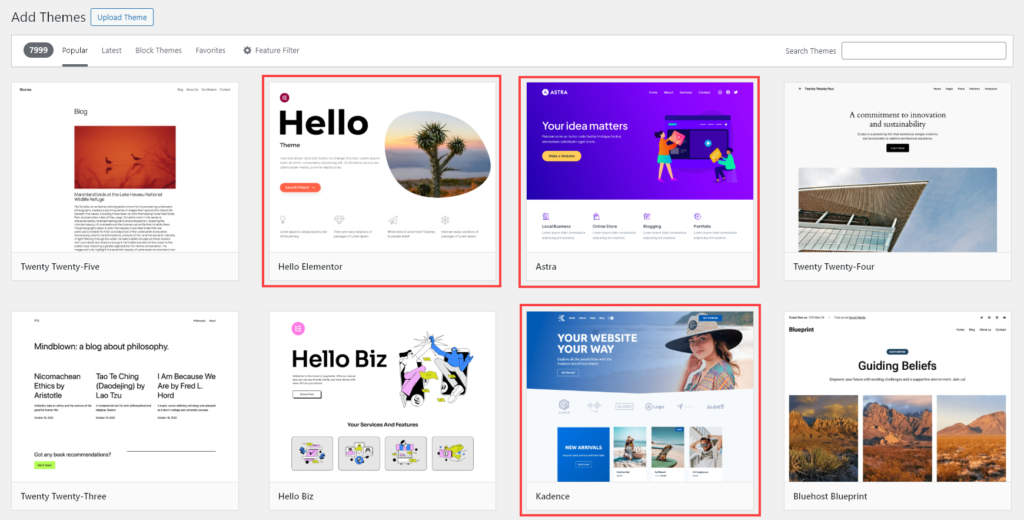
Run your cursor over any theme and click “Preview” to see a quick preview, plus details about the theme.
Click the “Install” button to install your chosen theme for your new website. If you change your mind, you can switch it at any time. (Your content — posts, pages, comments, etc — will all still stay in place, it’ll just look a bit different.)
Tips on Choosing a WordPress Theme
If you want to experiment with different WordPress themes, look for ones that are easy to use, responsive (mobile friendly), SEO-friendly, and that include support.
In general, look for themes with a great track record and positive ratings in WordPress.org’s theme directory.
Your blog’s design matters a lot in 2026. As long ago as 2012, a study from Google and the University of Basel found that users judge a website’s aesthetic beauty and perceived functionality in 1/20th–1/50th of a second. And thanks to the Halo Effect, people will extend that judgement to all aspects of your blog.
Good blog design builds trust. It makes your blog (and business, if your blog is supporting that) look reputable and professional.
Once you’ve settled on the right theme for your WordPress blog, it’s time to dive into the world of WordPress plugins, to help unlock even more customizations of your blog design & functionality. This is the necessary prep work in order to give your blog a chance of developing into a real business over time.
10 Essential WordPress Plugins for Your New Blog
WordPress plugins play a crucial role in how your blog will function, and getting the most essential plugins dialed in as quickly as possible is a major step that’s designed to serve both your audience and perform well for search enWordPress plugins add extra functions to your blog. They let you add all sorts of features from collecting email subscribers, to nailing your blog SEO (search engine optimization), tracking your website analytics, optimizing your images, increasing your blog’s page load speed and more.
There are thousands of plugins and blogging tools to choose from. To make it easy, I’ve listed the top 10 popular blog plugins here.
- Yoast SEO: People need to be able to find your blog. This plugin lets you optimize blog post titles, meta titles, meta descriptions, and more so your content can easily be found by search engines. Tip: Use my free meta title generator & meta description generator tools, too.
- WPForms: You want your readers to be able to get in touch. WPForms is an easy-to-use plugin that allows you to drag & drop contact forms onto any page of your blog.
- Site Kit by Google: This 100% free plugin by Google lets you see all of your relevant Google Analytics 4, Google Search Console, Google AdSense and Google PageSpeed optimization data inside your WordPress dashboard. Sign up for a free Google Analytics account here.
- UpdraftPlus: All bloggers need a robust backup plugin. If something goes wrong, you won’t lose all your hard work.
- WP Rocket: Faster websites rank higher on Google. WP Rocket caches your blog pages, reduces your file sizes, and more to ensure that your blog loads as quickly as possible.
- Bunny CDN: This CDN (Content Delivery Network) plugin makes images and other static elements of your blog load at lightning speed.
- WPCode (Insert Headers and Footers): Sometimes, you need to add code snippets to your blog’s header or footer. This plugin makes it super easy to do so, without any risk of breaking your blog.
- Lightweight Accordion: This plugin lets you quickly add collapsible FAQ box functionality to your WordPress blog.
- MightyShare: Automatically generate social share images in WordPress for free. Includes multiple templates, fonts, color choices and robust customization.
- Antispam Bee: This is one the best free anti-spam plugins to stop spam comments on your blog. Includes lots of different filter options.
Want more recommendations as your blog grows? Check out my guide to the 19 Best WordPress Plugins for Your Blog.
How to Install a WordPress Plugin (Quickly) on Your New Blog
First, login to your blog’s dashboard. Then:
- Search for the WordPress Plugin. Just type its name into the search box.
- Navigate to Plugins > Add Plugin
- Click Install Now, then Activate. Your plugin is now running on your blog. With some plugins, you may need to follow additional setup steps.
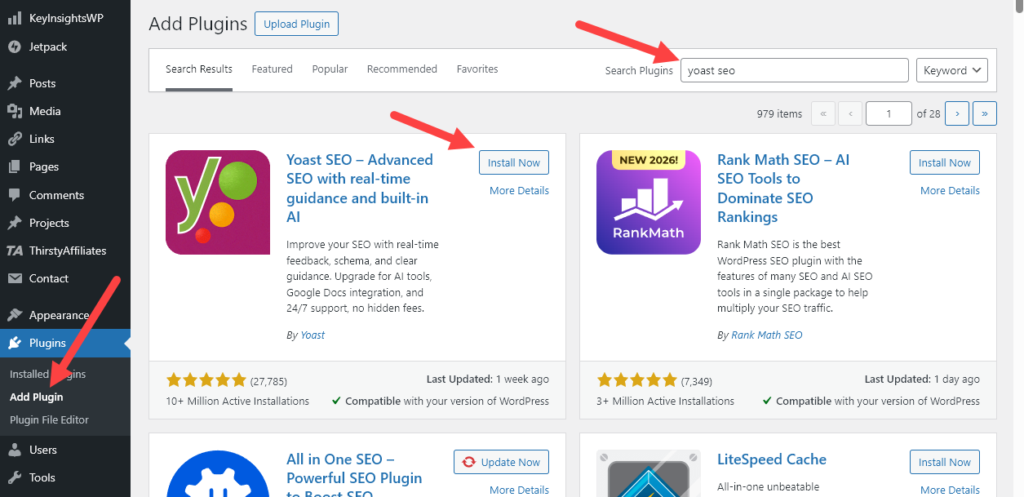
Tip: If you have downloaded a premium plugin as a .zip file, go to Plugins > Add Plugin then click the “Upload Plugin” button (at the top right of the page).
Setting Up Your Blog’s Homepage
When you’re just starting your blog, I recommend setting your homepage to be where your blog posts display.
Most themes will display your blog posts on the homepage by default. You can change your homepage under Settings > Reading, where it says “Your homepage displays”.
Your theme settings may let you show the full text, not just excerpts, from your posts on the homepage. This can be helpful when you’ve only got a few posts online, as it makes the most of your content.
Setting Up Your Blog’s Menu
Once you’ve published some key blog pages (see below!) you’ll want a menu to display on your homepage & across all the pages of your blog. Just go to Appearance > Menus and you can create one in a few clicks.
Alright, we’ve covered the basic foundations of getting your blog’s WordPress settings dialed in. Now, let’s dig into creating a few of the main pages on your blog.
Creating the Main Pages of Your Blog: About, Contact, Hire (on the WordPress Blogging Platform)
As soon as readers come to your blog, you want them to know who you are, how to get in touch, and how to hire you. That’s where your About, Contact, and Hire pages come in.
These pages are all pretty standard, but they’re also a great way to have some fun and let your readers get to know you. In fact, I use my own About page to introduce myself, tell my story, and capture email signups … all with plenty of personality in the mix too!
Writing Your About Page
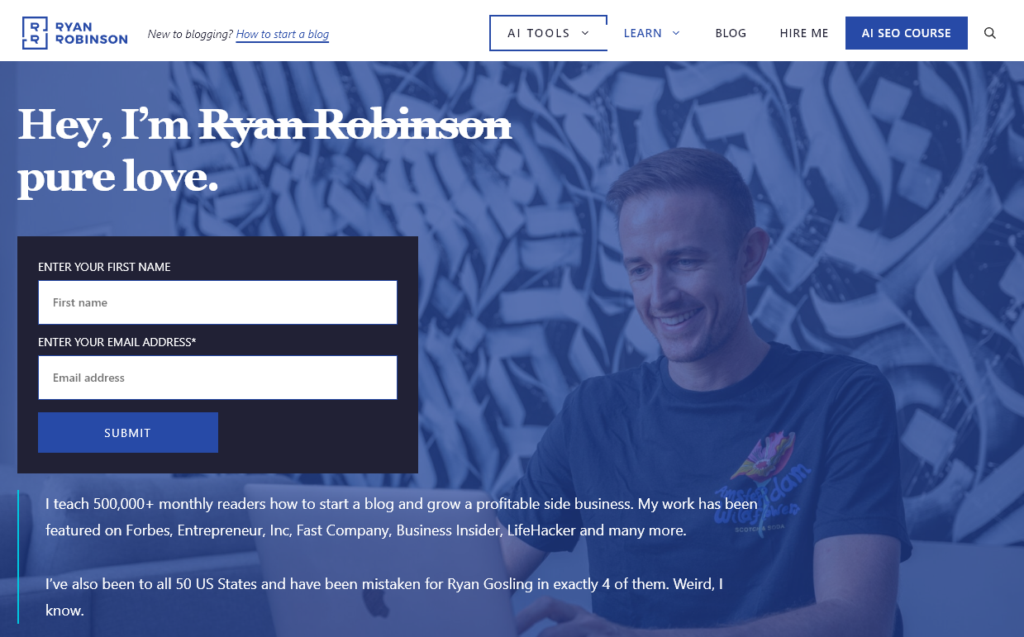
Here’s a quick guide to writing your own About page.
Ask yourself:
1. What value are you creating for your readers?
Don’t just talk about yourself on your About page. It needs to talk about your readers, too, and the value you’re creating for them. Why should they stick around on your blog?
For example, my blog is all about helping people grow their blogs today, finding the best business ideas and launching profitable side projects. I make that clear upfront so readers know they’re in the right place.
2. Who is your blog for?
You can simply say who your blog is aimed at (e.g. if your blog is about cooking tips for working moms, “I’m here to help busy working moms make great dinners that kids are guaranteed to love”).
Another option is to show readers that you’re part of their community. For instance, if you write for other publications in your niche, or have a testimonial or social proof from someone in your industry, add that.
3. Why should they listen to you?
By now, readers should know who you are, what your blog’s about, and whether it’s for them. But you might also want to add:
- What types of blog posts (or other content marketing) they can expect. “If you love X, Y, and Z, you’ll feel totally at home here.”
- What they’ll get out of reading your posts. “I share everything I’ve learned building a 6-figure consulting business from nothing.”
- Where they should start. “If this is your first time here, check out my Ultimate Guide to X.”
- What gives you and your blog credibility. “I’m a regular contributor to Fast Company, Business Insider, and Inc. Magazine.”
- How you got started in this niche. “Back in 2003, during an especially bad Colorado Winter, I fell in love with snowshoeing…”
4. Where should your readers go next?
Finish your About page by telling readers what you want them to do next. Do you want them to read your latest blog post? Sign up for your newsletter? Follow you on Instagram? Make their next action super clear.
Want more details and plenty of examples on writing an about page? Check out my full article on how to write an About Me page.
Use your About page to show the value you’re creating for your readers—and work hard to earn that attention.
Writing Your Contact Page
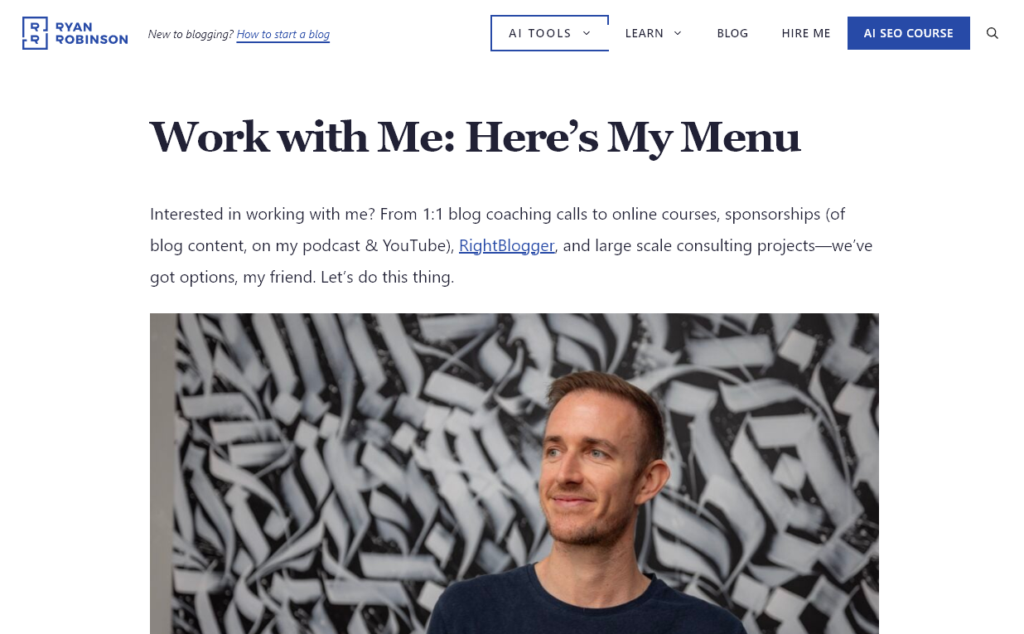
Make it easy for readers (and potential collaborators) to get in touch.
Your Contact page could simply list your email address and social media accounts, or you could use a plugin like WPForms to create a contact form.
Tip: Draw on your purpose as a blogger when writing your Contact page. For my blog, I know that people reading it might want to hire me to help them with their own content marketing. Which is why I’ve chosen to make my Contact page more focused around the topic of how to “Work with Me”.
As your blog grows, you may also want to include FAQs on your contact page, to cut down on unnecessary emails.
New to Starting a Blog with WordPress? 10 WordPress Blogging Platform Technical Tutorials
If you want to spend a little more time tuning things up, experimenting with your settings, and getting to grips with WordPress, check out my quick & easy WordPress tutorials:
Want my Free Course: How to Start a Profitable Blog in 7 Days?
Enter your name and email address and you’ll get instant access to my course that’s been featured on Forbes, Business Insider and Entrepreneur.
“*” indicates required fields
Step 4. Write Your First Blog Post

Creating high quality content is what will bring you readers and help you to eventually make money blogging.
Before you get too far down the road of creating a blog business plan, laying out your content roadmap and writing your first blog post—you need to answer one simple question… Why?
- Why do you care for the topic you’re blogging about?
- Why should other people listen to what you’re saying?
- Why is this a blogging topic you can add real value to?
You’ve hopefully already chosen a broad niche or topic area for your blog, but now it’s time to think about what you can bring to it.
Your niche includes the approach you’re going to take, the audience you want to go after, the way you’re going to talk to them and how you’ll position yourself. You want to feel interested enough in it that you can write about it for months or years to come.
NIf you want to make money from your blog, you’ll also want to do a bit of research to see if there is a market demand for your niche. Are people actively searching for what you’re writing about? Can you add value and help them in a way that makes you money?
In order to create a business from your blog, you need to solve a real problem for people. To do this, I use a simple spreadsheet I call the Niche Market Demand Checker (you can get a free copy of it in my course right here), which will help make sure you create content that your target audience will find useful.
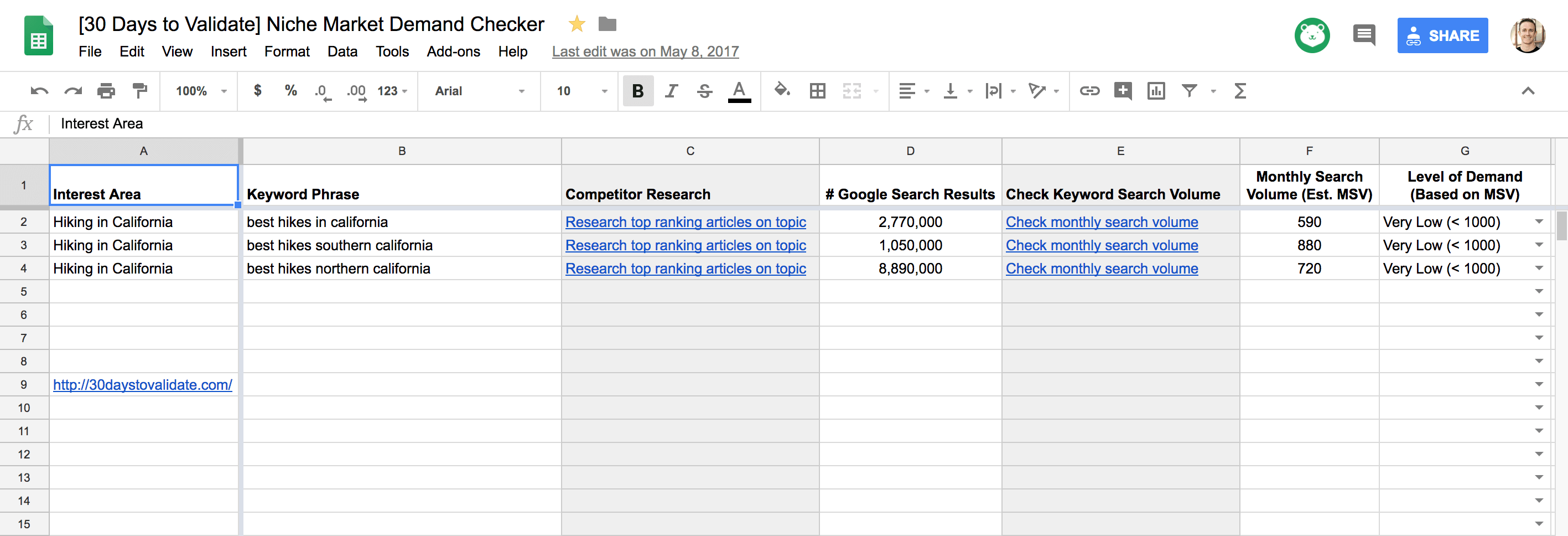
Coming Up With Blog Post Ideas (with SEO Traffic & ChatGPT Citation Potential)
Take the blog niche that you’re thinking about and come up with 5–10 keyword phrases or blog topics within that niche. This is also known as a keyword cluster. So, a blog about guitar playing might tackle topics like “best guitar books,” “how to play guitar,” “beginner guitar chords,” “what guitar should I buy,” and so on.
Tip: Powerful AI writing tools can provide a lot of help in the ideation, research & writing process for your new blog. We built RightBlogger to be the all-in-one AI content creation platform for bloggers and I also have a free AI article writer & free paragraph rewriter tool you can try out here on my blog—in addition to loads more free AI tools for you.
To test whether a blog post idea is worth writing about…
Use My Free Keyword Research Tool
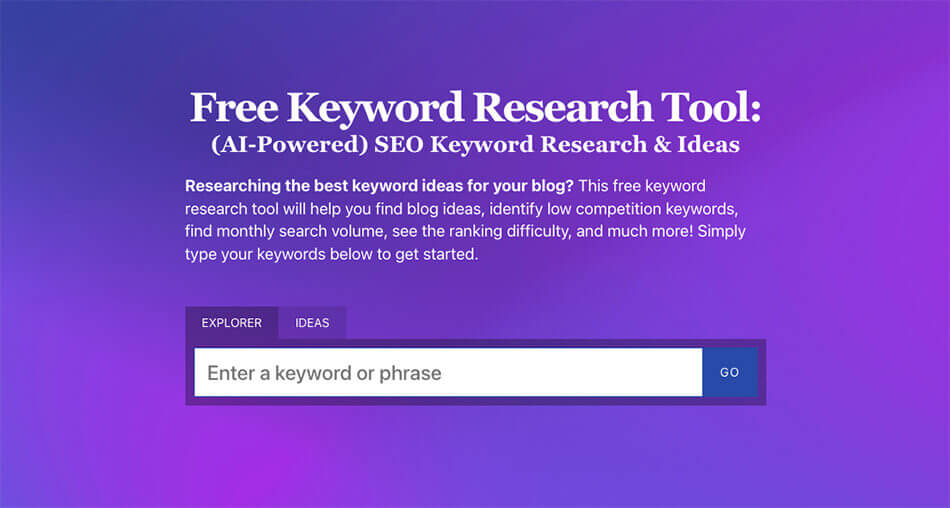
Try my free AI-Powered Keyword Tool to get dozens of research-backed ideas for keywords & topics to write about on your blog today.
Do this for each of your keywords and look at the results. If all of your top keywords have a Monthly Search Volume of 5,000–10,000, you’re in a great spot. If it’s more like 100–500, and there may not be enough people ii anterested in your topic to make it a viable business. And if you’re at 100,000+ for your keywords, you might need to narrow your niche down a bit … rather than compete with giant, established websites.
Brainstorm Smart Blog Post Ideas (Using Keyword Research & AI)
Smart keyword research helps you generate the right blog post ideas that’ll actually bring you readers. That’s where free AI tools like my blog idea generator come into play. You can use it to come up with dozens of ideas in seconds, or check out my list of creative blog writing prompts to find more inspiration.
I also recommend using a simple editorial calendar so you can keep track of what you’re writing and publishing, when.
How to Come up with Clever Blog Post Ideas (+ My AI Blog Idea Generator)
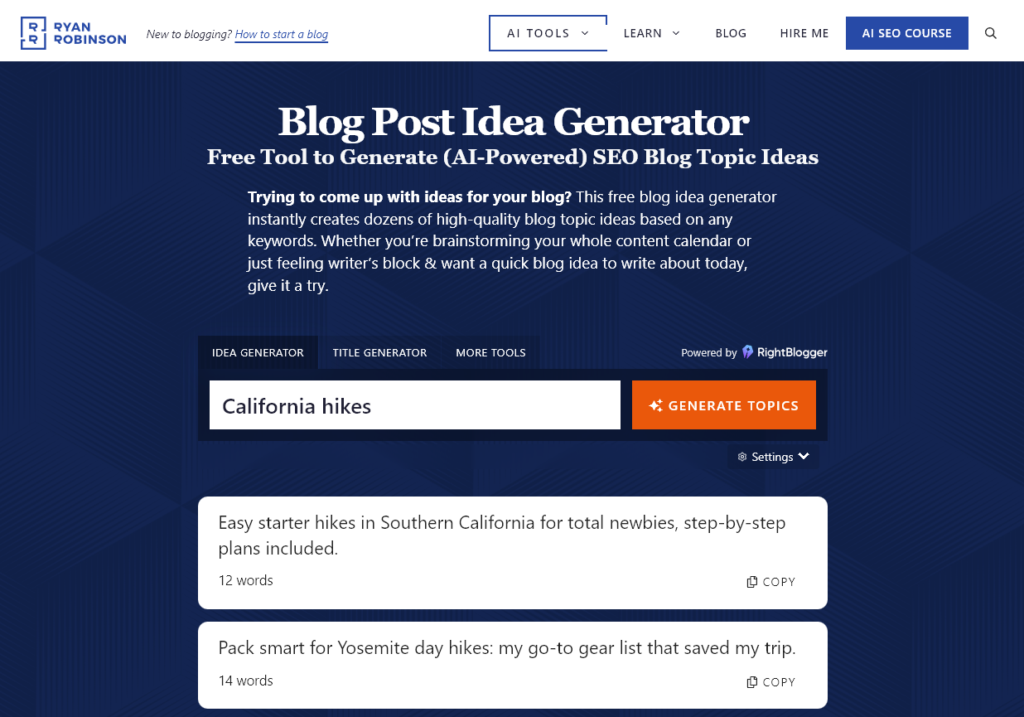
First, I recommend my Blog Post Idea Generator, which will come up with dozens of ideas for you in seconds. Just pop in your chosen keyword or a general topic phrase, and hit “Generate Topics”.
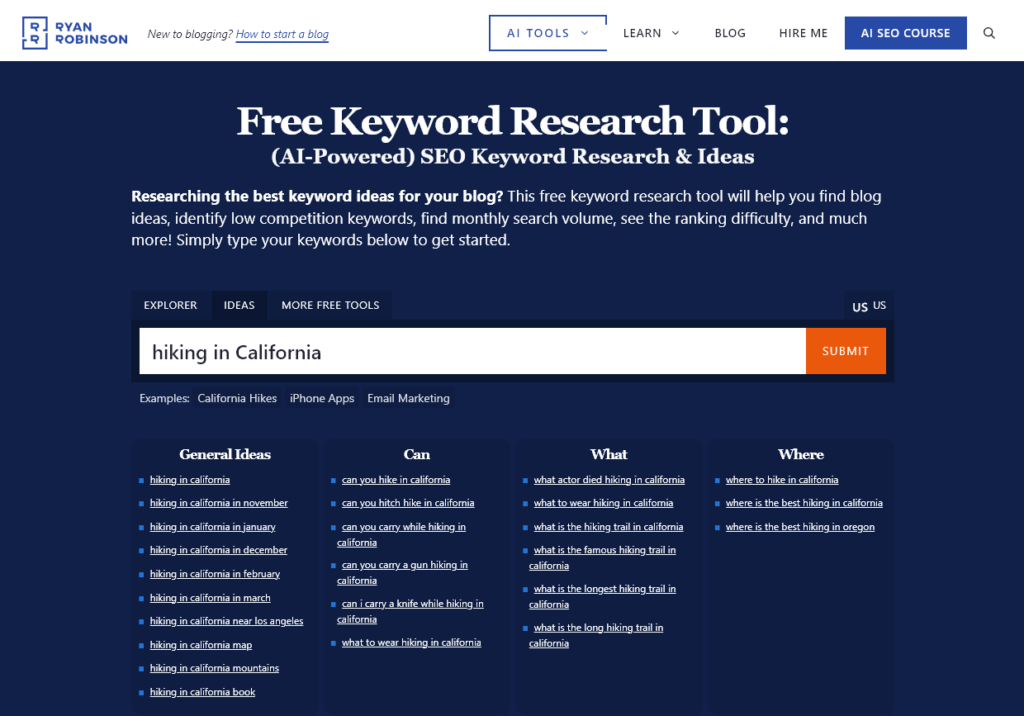
Alternatively, you can use the “Ideas” tab of my AI powered free keyword research tool, which also generates dozens of related blog post ideas:
Copy your favorites into a doc, and add any further ideas you’ve got—think about the questions your target audience is asking, or the things you wanted to know when you were new to your niche.
Then, it’s time to sort through your ideas:
- Put similar terms together to create one powerful blog post idea. (That way, you won’t end up with 2+ pieces of content competing for the same keywords.)
- Create an editorial calendar spreadsheet and prioritize your ideas (based on your keyword, estimated search volume & difficulty, from my keyword research tool).
- Focus on the ideas that (a) fit your niche, (b) give readers what they want, and (c) have the potential to drive traffic to your blog from search engines.
Need even more ideas? Try quote roundup posts (like my posts about business advice and online business tools), reflecting on what you’ve learned (see my blogging lessons and blogging mistakes posts).
By this point, I’ve usually got a fully stocked content calendar. Still need some more content inspiration? Here are 205+ winning blog post ideas.
Write Your First Blog Post, Step by Step
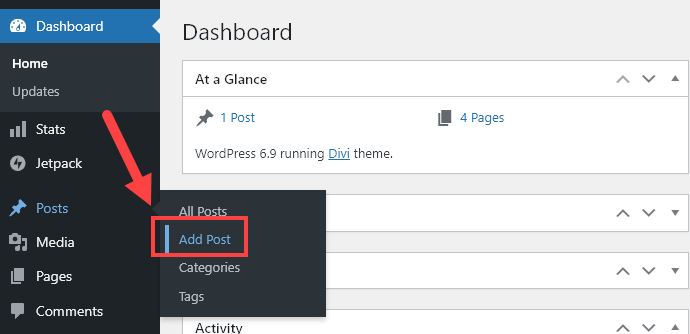
Ready to write? Go to Posts > Add Post in your WordPress dashboard:
Once you’ve decided on the first blog post you want to write, you’ll navigate to the “Add New Post” section from your WordPress Dashboard.
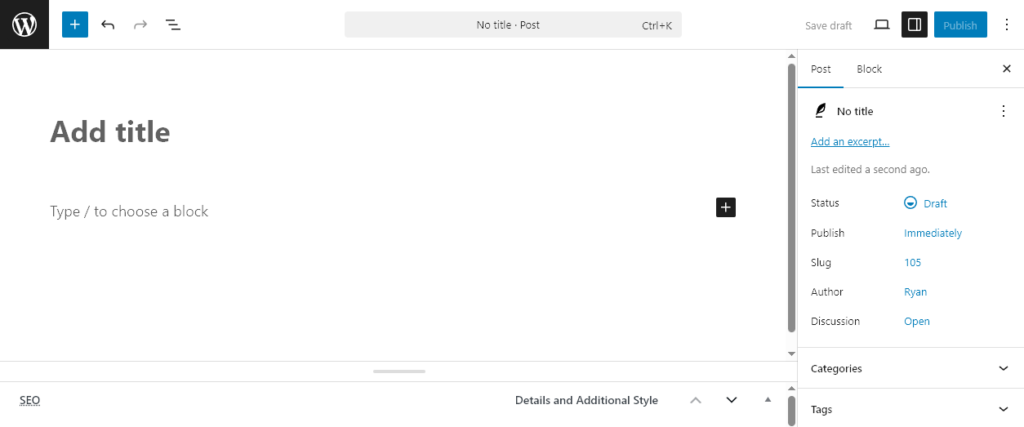
Next, you’ll be taken to a brand new article page that’ll look like this (a totally blank canvas 🙂):
You don’t have to write everything from scratch. Try my free AI article writer or my full platform RightBlogger, to make your writing process way faster.
(If you’re using ChatGPT instead, snag my best ChatGPT prompts for bloggers to save you a ton of time and re-prompting.)
Write a Blog Post Headline that Encourages Readers to Click Through
To get readers, you need to know how to write a headline that’ll grab attention (and make a promise you can deliver on). Quick tips: use numbers, power words, and specificity.
My free blog title generator tool comes up with instant blog title ideas for the topics you want to cover. I also have a free headline analyzer tool you can use to score your existing headlines & get actionable suggestions on how to improve them.
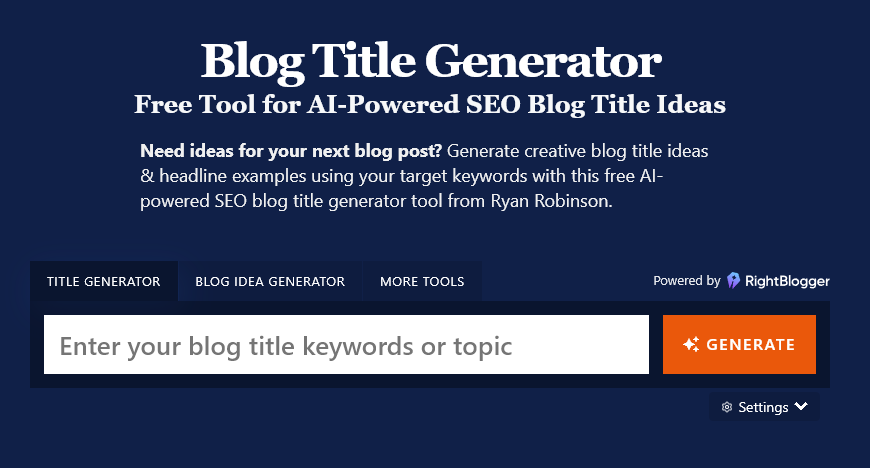
Try my free AI-Powered Blog Title Generator Tool to get dozens of SEO-friendly headline ideas to make your blog posts stand out today.
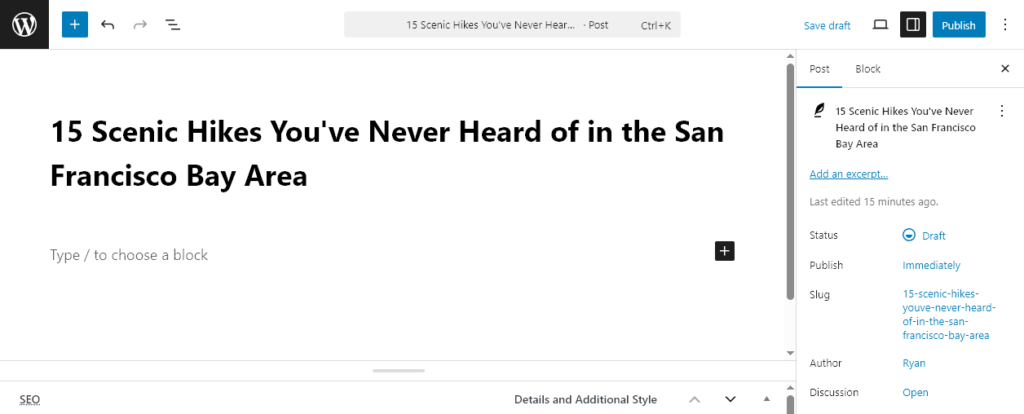
So let’s say you’ve determined that your hiking blog (like Hike with Ryan) should start by breaking down some underrated hikes in Yosemite, compiling a list of the best hiking boots on the market, rounding up gifts for hikers in your life and talking about when to visit Yosemite during the year. Next, click into the “Add title” area on your new post page and type in a title like “15 Scenic Hikes You’ve Never Heard of in the San Francisco Bay Area”.
Need More Help Writing Titles?
Check out these resources for extra help:
Choose an SEO-Friendly Blog Post URL
Ideally, you should customize the URL (blog link) of your new post to help it rank well.
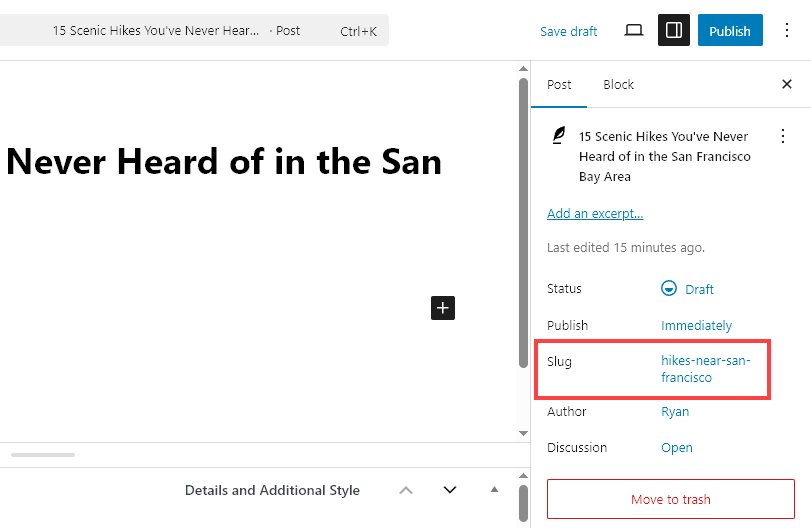
Keep it short (3 – 5 words), separate each word with a dash, avoid numbers in the URL (in case you add more points/ideas to a post in future!) and always include your primary keyword phrase.
E.g. I want to rank the article “15 Scenic Hikes You’ve Never Heard of in the San Francisco Bay Area” for keyword phrases like “hikes near San Francisco,” so that’s exactly what I’ve chosen as my post URL… /hikes-near-san-francisco
Craft a Compelling Introduction to Your New Blog Post
Your first couple of sentences need to convince readers your post is worth their time.
AI writing tools like RightBlogger can help a lot at this stage. Here’s an intro I generated in seconds using the blog post introduction generator tool in RightBlogger. (You can try out a free version of this tool here.)
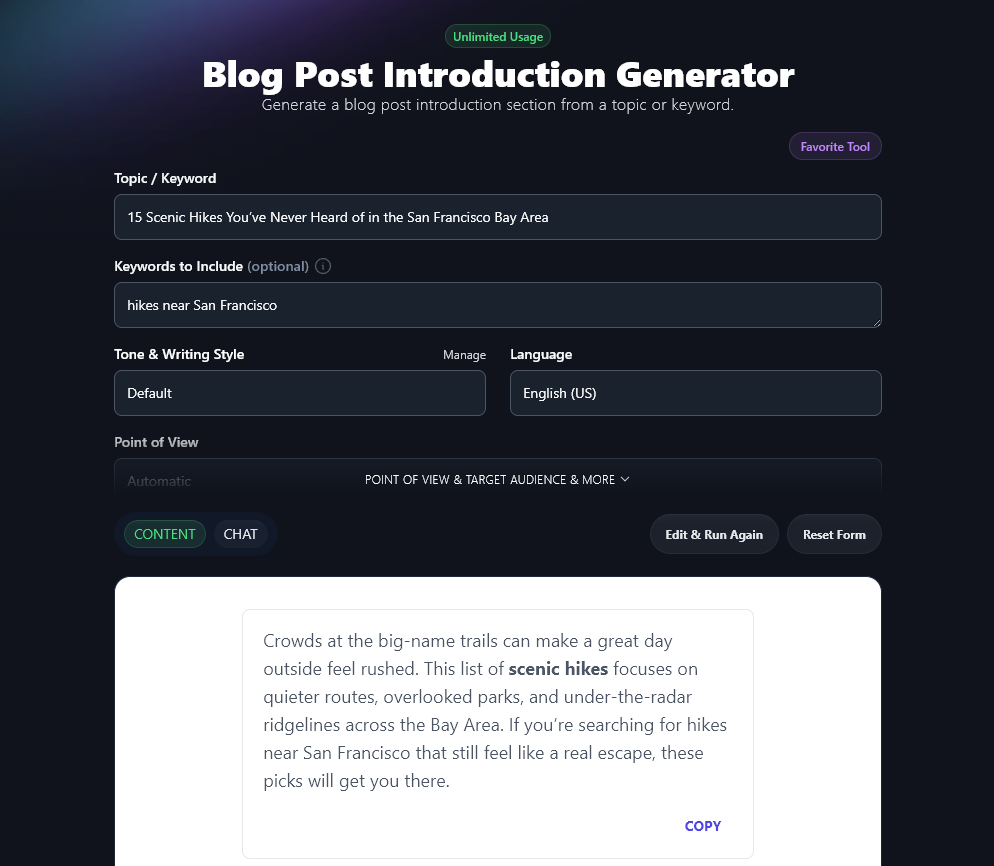
In your intro, establish relevance fast, try using a startling statistic or interesting quote, add drama or humor, and use bold or italic formatting to grab attention. Note how the RightBlogger tool did this automatically.
The faster you can show readers that your post has the info or answers they need, the more likely they’ll be to dig into your piece … and share it with others.
For more help, check out my tips on writing a blog post or grab my free blog post templates.
Optimize the Design and Layout of Your Blog Post
Design matters. What looks “good” depends on your audience and their expectations … but here are some general tips that work for all blogs:
- Make your blog posts readable: avoid crazy colors, multiple fonts, and tons of images. Use a large enough font size (16pt or more), keep sentences and paragraphs short, and use white space well. Check out my guides on how to change font size and change font color on your blog if you need help with those.
- Always include a relevant featured image at the top of your blog post. This grabs attention fast. You can use stock photos and images from copyright-free sites (Unsplash is my favorite) … or create your own custom images in seconds using my free AI image generator.
- Use frequent sub headers to break up your text. You don’t want your post to look like a giant wall of text. Add a heading (sub header) every 300–500 words (bonus points for using keywords in these).
- Use styling to emphasize key parts of your post. Bold or italics will make key points stand out. Use these thoughtfully and consistently (e.g. at the start of each item in a list, like I’m doing here).
Hit Publish on Your First Blog Post
Once you’ve written your first blog post (and ideally got it to a good length of 1,000+ words) you’re almost ready to publish!
You just need to:
- Check Yoast SEO suggestions and ensure your blog post is SEO-friendly, which will give you the best chance of ranking well in organic search.
- Tick the most appropriate “Category” box for your post.
- Preview your post to make sure everything looks good.
And boom! It’s that easy if you allow it to be 🎉
Now, if like me, you appreciate great design—before you hit publish on your first blog post, there’s one last step you could take.
Studies show that blog posts with images get 94% more views than those without. And when it comes to posts getting shared on social media, tweets with photos get 150% more retweets than those without one, while Facebook posts with images get 2.3X more engagement. Adding a few visual elements can almost double your amount of views and expand the shares a blog post gets.
Where Next? Creating a Blog Content Strategy
Publishing one post is just the beginning. As you go forward, you’ll want both a comprehensive blog strategy and content marketing strategy for your blog.
Check out these articles and tools to help:
We’ve now come a long way in this guide. You’ve got your blog fully set up and published your first post.
Next, you’ll be promoting your content, driving traffic and eventually making money from your blog.
Want my Free Course: How to Start a Profitable Blog in 7 Days?
Enter your name and email address and you’ll get instant access to my course that’s been featured on Forbes, Business Insider and Entrepreneur.
“*” indicates required fields
Step 5. Promote Your Blog to Get Readers and Traffic
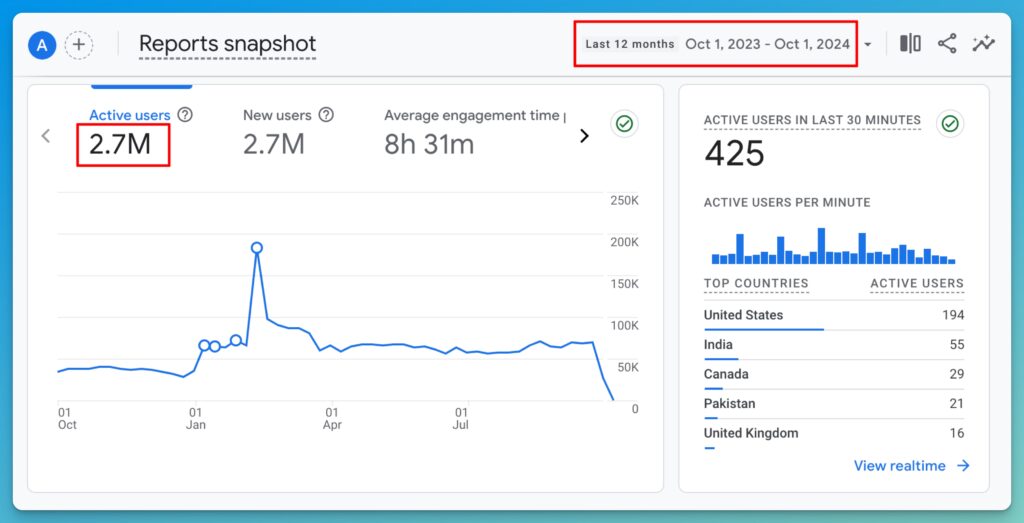
My blog brought in 2.7 million+ readers in this one year snap shot above, so I know it’s possible to go from starting a blog to quickly driving millions of readers to your content. This is the reason I’m hired as a consultant by companies like LinkedIn, Zendesk, Adobe, Close, Intuit and more—to write content for their blogs, teach them how to promote their content, and bring in new readers.
Here’s how to promote your blog content and get posts in front of new readers. For more, see my guide on how to drive traffic to your website where we dig even deeper into the tactics I’ve used to grow my blog to millions of yearly readers.
Using Social Media to Promote Your Blog
The obvious first place to turn when you want to find readers is social media. Facebook, X (Twitter), YouTube, Pinterest, LinkedIn, Reddit, Instagram, Snapchat and TikTok are the key social media platforms.
This might sound like extra work … but using social media could save you time on your blog! One of my favorite free blogging tools is my YouTube Video to Blog Post Generator, which instantly turns your videos (from YouTube) into high-quality blog post drafts.
Look for the Social Channels That Suit You and Your Audience Well
Each social network naturally appeals to a certain niche and type of reader. This is a pretty broad statement, but generally speaking, here’s what works best on each social platform:
- Facebook: Videos and curated content
- Instagram: High-res photos, quotes, and Stories
- Twitter: News, blog posts, and GIFs
- YouTube: Video content (2nd largest search engine in the world)
- LinkedIn: Professional content and career news
- Pinterest: Infographics, step-by-step photo guides, visual content
- Reddit: Comments about topics in your niche
Want Help Building Your Audience on Social Media?
Here are some great resources and tools for growing a social media audience:
- How to Start a Video Blog: complete guide to starting your own vlog (video blog)
- Blogging vs YouTube: the pros & cons of starting a blog vs starting a YouTube account
- YouTube Keyword Research (Tool): instantly come up with the perfect topics for YouTube
- Buffer: easily queue up shares in advance for a range of social media sites
- Hootsuite: powerful social sharing, scheduling, and monitoring platform
- Gain App: social media management tool with powerful workflows & permissions for multiple users
Check out my YouTube Channel for more inspiration: I get hundreds of thousands of views on my video tutorials—reaching a new audience who want to learn how to start a blog. Many of those viewers also click through to visit my blog, join my email list, etc.
You might also want to start a podcast like I did with The Side Hustle Project (check out my tips on blogging vs podcasting and my roundup of the best cheap podcast microphones too).
The key insight here, is that you’ll need to experiment and see which social networks will perform best for you and your type of content.
Using Guest Blogging and Forums to Grow Your Audience
Guest blogging on other relevant sites is a fantastic way to connect with an already established audience. Check out my ultimate guide to guest blogging for a full walkthrough and my tips on blogger outreach to help you form connections.
I’ve written literally hundreds of guest posts over the past decade, and it’s been the single best strategy for promoting my blog content.
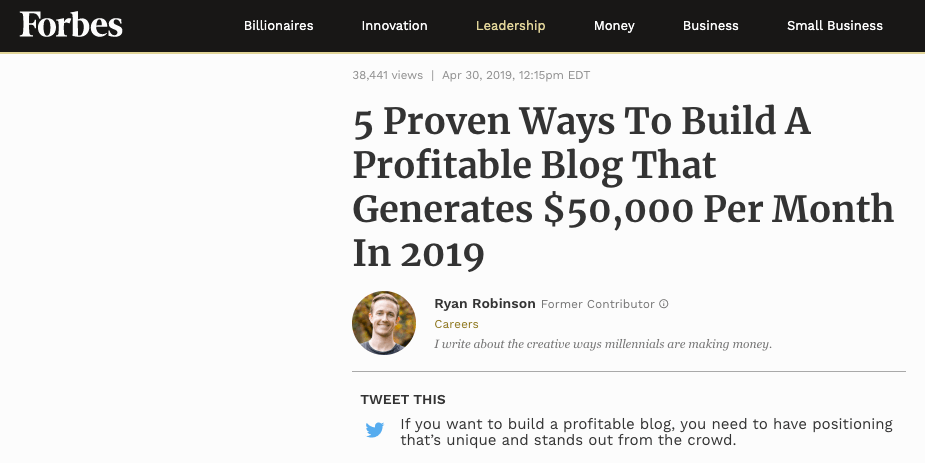
Another option is republishing your content on sites like Medium.
There’s also Quora—a question and answer site that lets anyone respond to users’ queries. Search for relevant topics in your niche and then answer questions you’ve already written about on your blog (like this Quora answer I gave about how to get blog traffic, that’s received thousands of views).
You can also join targeted forums and online communities. Facebook and LinkedIn are great sources for this. For example, if you’re starting a blog about photography, you could consider joining Facebook groups like Nikon Digital Camera & Photo Enthusiasts (28,000+ members) and Nikon UK Photography (21,000+ members).
Remember, you need to provide value before you ask for anything in return. So, I recommend you start building relationships and engaging with people there before sharing links to your blog.
Using an Email Newsletter to Grow Your Blog Audience
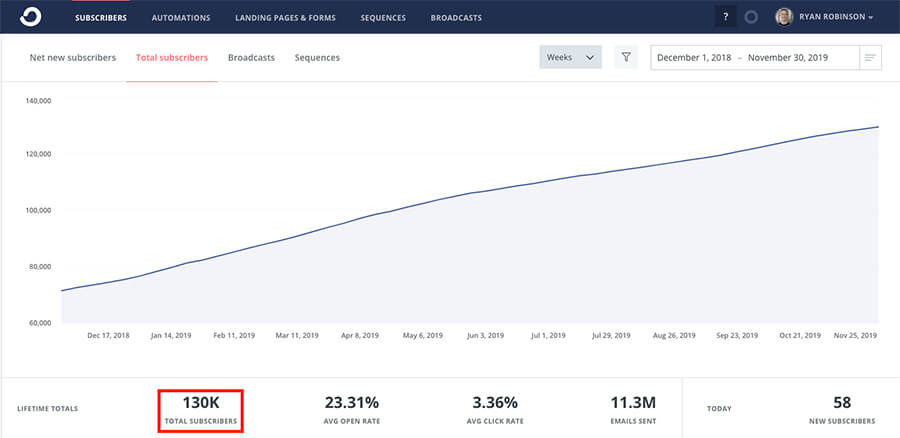
Building your own email list (or email newsletter) is the most powerful way to keep existing readers engaged with the work you’re doing.
Start building your email list from day one with your blog—it’s easier than you think. Place a signup form within your posts and across key pages of your site. I use Kit to manage the 150,000+ email subscribers on my blog, but Mailchimp is another good option to get started with.
Read through my detailed comparison of ConvertKit vs AWeber vs Mailchimp for my take on where you should start and when to upgrade to more robust email marketing tools.
Email marketing and promoting content to my own email list has by far been the biggest driver of growth and revenue for my blog. It’s the most important of all the blog marketing strategies you can invest in.
Almost every guide about how to start a blog stops long before this point. But I didn’t want to just leave you hanging once your blog was up and running.
Now, I’m going to equip you with the tools (and strategies) to go from starting your new blog to building a true business around it—based on my experience growing this blog to more than 500,000 monthly readers and $50,000/mo in revenue.
Let’s talk about how to make money from your blog.
Step 6. Make Money from Your Blog
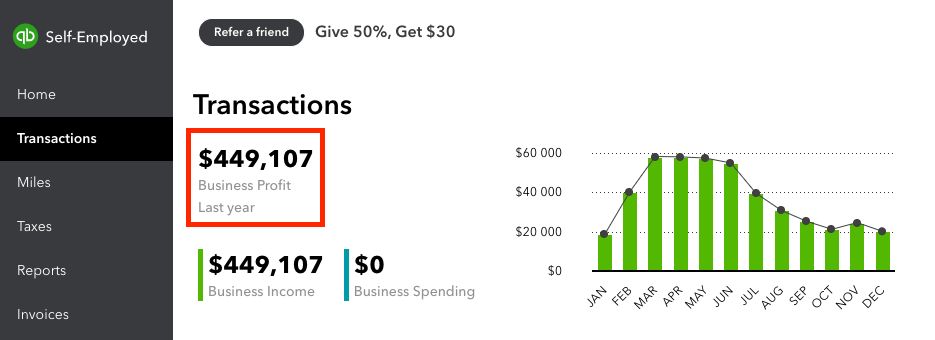
In one year alone, my blog generated $449,107 in revenue (ignore the $0 in expenses—you can see all the details in my blog income reports).
I share this not to brag, but to show that I know what I’m talking about when it comes to starting a blog and making serious income with it. And of course, I’ll be the first to tell you that these kinds of income figures aren’t typical with blogging—it took me 6 years to reach that point in my blog business.
For more on this, check out how much bloggers can make & how long does it take to make money from a blog?
Unless you have a big audience, you can’t expect to make money right away—monetization should not be your #1 focus at first, but rather something to work towards.
Plus, the way you monetize your blog depends on the type of blog you have. For example, a lifestyle blog will pursue different monetization strategies than say a personal blog, mom blog, dad blog, food blog, beauty blog, fashion blog, pet blog or travel blog.
It’s still good to have an idea of which ways you’d like to make money blogging as you go into this new adventure, so you can gear up for that early on.
In this part of the guide, I’ll run you through 6 key ways to make money from your blog.
1. Freelancing (Selling Your Services)
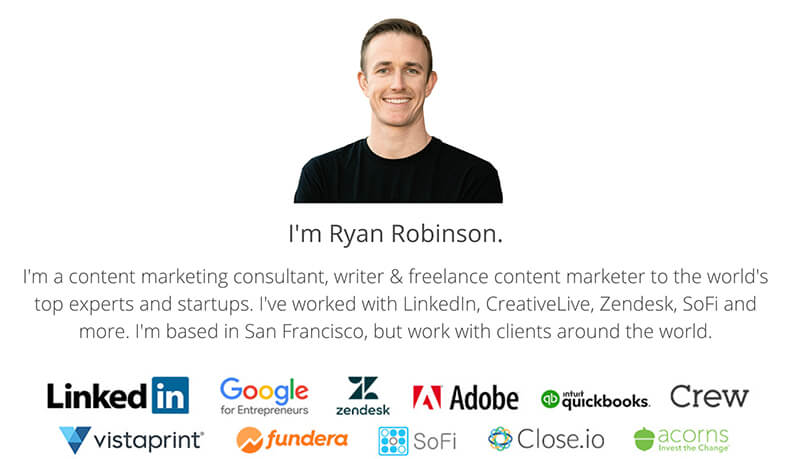
If you want to begin earning as quickly as possible, selling your services (by landing blogging jobs, freelance writing gigs, consulting, coaching, etc) is the easiest option by far. That’s why I love this small business idea. For years, I was freelancing as a blog monetization channel for my own business:
All kinds of skills can be offered as a service, including:
- Writing (a key blogging skill)!
- Design, illustration, or photography
- Marketing (content marketing, digital marketing, blog marketing, and more)
- SEO or paid advertising campaigns
- Software development / coding (check out these WordPress developer job sites)
- Business strategy or project management
- Virtual assistance
- Community-building
To land a freelance client, you’ll want to build out your key pages (About, Contact, Hire Me) and showcase at least a couple examples of the type of work you’ve done. (Create sample articles, designs, or deliverables and host them on your own blog, if you don’t have other samples yet.)
If you don’t have those work samples yet… don’t let that hold you back. Create those sample articles, designs or other deliverables and host them on your own blog as if they were a project you got paid to produce.
Today, I still regularly book new freelance clients (like LinkedIn, Zendesk, Adobe) for $5,000/mo or more and I’m brought on to advise and execute on their content marketing.
More Resources on Freelancing
2. Affiliate Programs
Affiliate marketing is another great way to monetize. Every month, I earn a substantial amount of passive income from affiliate programs (sometimes $50,000+). For example, here’s my blog income from just one affiliate program (Bluehost) across 5 months:
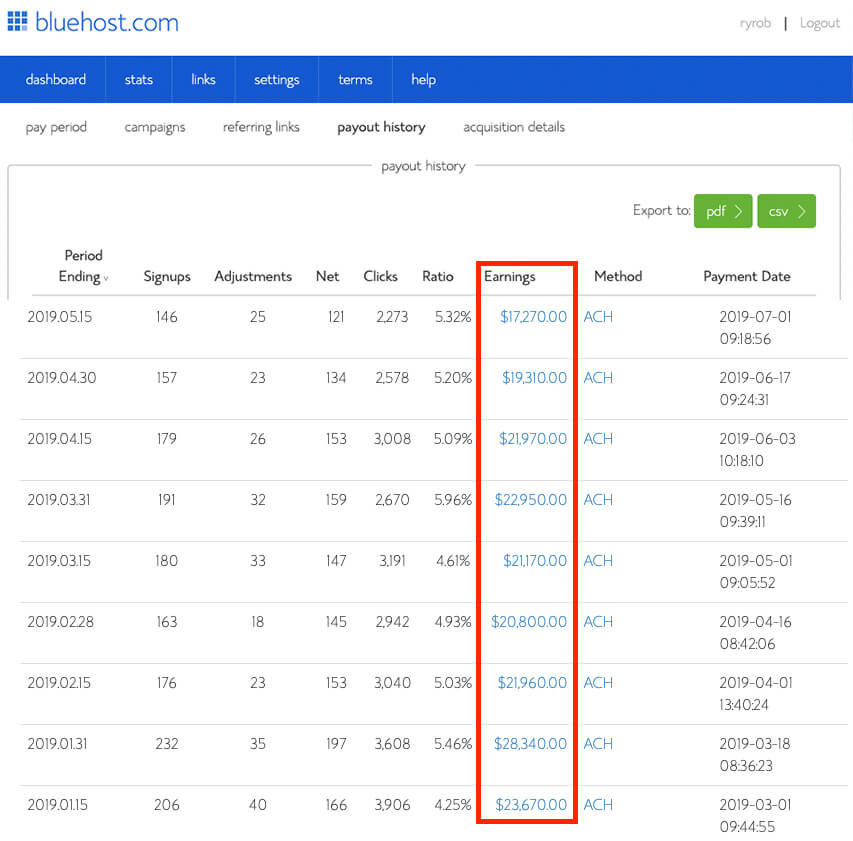
Here’s how affiliate marketing works: When you join a company’s affiliate program, you get a special tracking link. Then, you place that link in posts, email newsletters, etc.
When someone clicks the link and makes a purchase, you earn either a set fee or percentage of that sale. You’re getting compensated for referring new customers to your affiliate partners, like I do with Bluehost in my roundup of Bluehost reviews.
Most big brands have affiliate programs. Think companies like Amazon, all the way down to key players in specific niches like online education where brands like CreativeLive and Udemy have lucrative programs. Here’s a snapshot of my recent earnings from just a couple of other programs:

More Resources on Affiliate Marketing
3. Sponsored Blog Content
Sponsored blog content is when a brand, company or individual pays you a fee in order to get their content (or offer) in front of your audience in the form of a blog sponsorship.
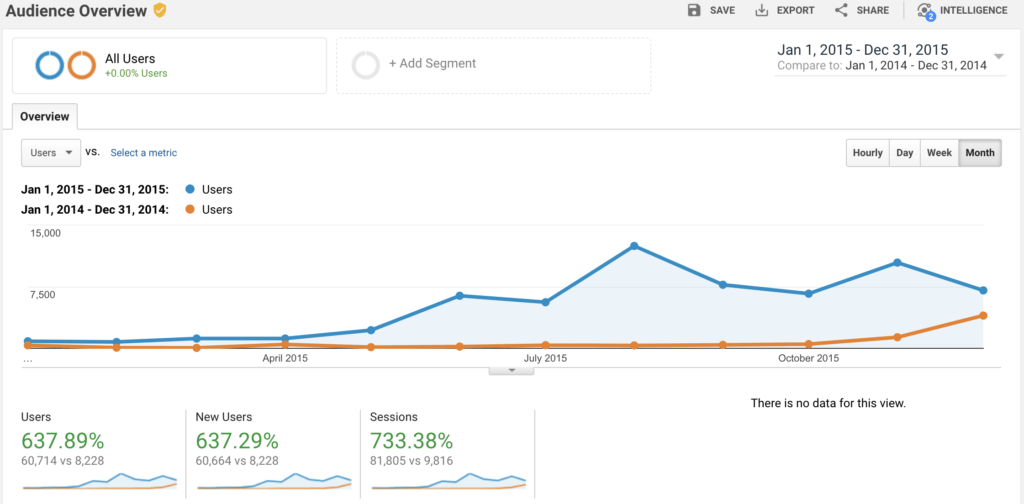
Expect sponsors to want your traffic to be at around 5,000+ monthly readers (or more), depending on your niche and engagement. It might take a while. For example, here’s a snapshot of my first year of traffic (in orange, around 9,000 total readers) when I started blogging—and my second year of traffic (in blue, around 10,000 monthly readers):
When you publish sponsored content, it’s important not to alienate your readers. Aim to weave it into your typical publishing style (like I’ve done with this sponsored post and this one too).
4. Online Courses
Once you have a skill (or experience) that others also want to learn, it’s relatively easy to package your best advice (like my blogging tips), strategies, tactics and tutorials into an online course where people can pay for access to accelerate their learning.
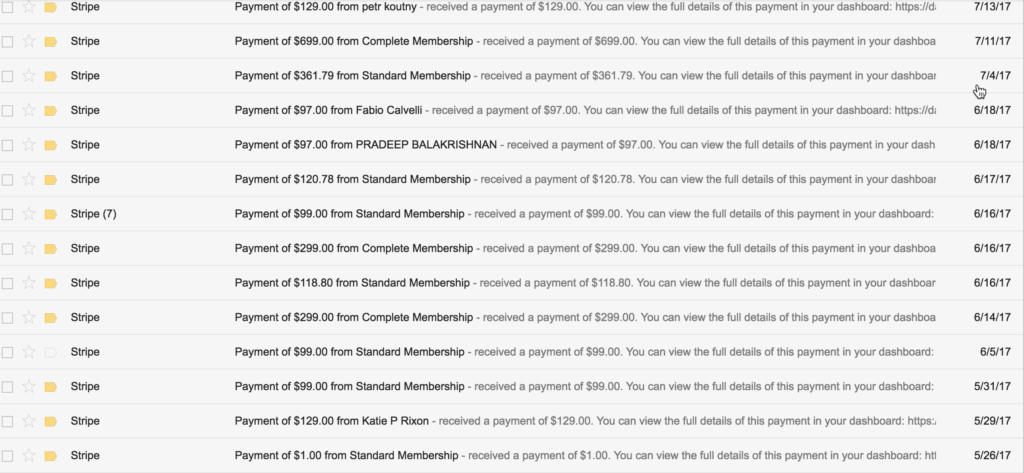
In its first year alone, I generated $60,000+ from launching my premium blogging course, Built to Blog, which takes students far beyond just starting a blog and into advanced strategies for getting readers & generating revenue from their blogs.
You don’t need a huge audience in order to earn from online courses. The same goes if you choose to write an ebook.
Here’s a way you can build a course risk-free:
- Encourage interaction from your readers through asking questions & offering free downloads
- Get them to join your email list … or reach out personally and connect with you by email/DM
- Learn about their biggest challenges and pinpoint how you can help them solve these
- Pitch them, individually (on email or a call) on pre-ordering your course and getting direct coaching from you while you build out the course material
This way, you’ll validate your idea, get paid upfront, and have an audience to help build and curate your course content in real-time with.
5. Traditional Blog Advertisements (Ad Networks)
Another way to make money blogging is through ads, either in your sidebar, header, footer, or partway through your written content.
I used to run ads from top blog advertising networks that earned $1,500+ per month, before I turned advertisements off in favor of optimizing for page speed & other sources of income. I was a member of a small ad network, Carbon Ads during this time.
With around 300,000 to 500,000 monthly readers on my blog, I only earned about $1,500/mo from being a member of the Carbon Ads network. If you want to earn serious bucks from ads, you’ll need 1 million or more monthly readers.
Other ad networks offer higher CPC (cost per click) and CPM (cost per 1,000 impressions) rates, but aren’t as choosy in the types of products that are allowed to advertise on your site.
How much you can earn from ads also depends on the type of blog you choose to start, so be sure to do your homework and evaluate all of the top blog advertising networks in your niche.
Some of the best blog ad networks to consider applying to include Mediavine, Monumetric, Google AdSense and Propeller Ads. Depending upon the niche you’re blogging about, there may also be a handful of dedicated ad networks offering higher payouts than the competition in your space.
6. Podcast Sponsorships
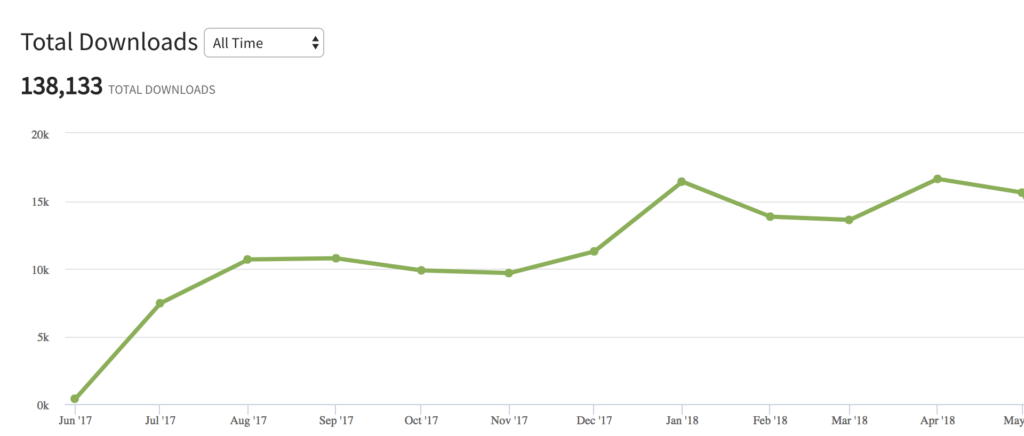
Another great way to start monetizing your blog is by starting a podcast. You can use your traffic and early listener numbers to book sponsorships from brands that want to reach your type of readers & listeners.
Here’s the growth trajectory of my podcast over its first year:
More Resources on Podcasts
7. Physical Products (eCommerce) and Software Tools
Another great way to monetize your audience is by selling a physical product or software tool to the people. 75% of online shoppers say they use social media as a part of their buying process … so make sure you’re getting in front of them!
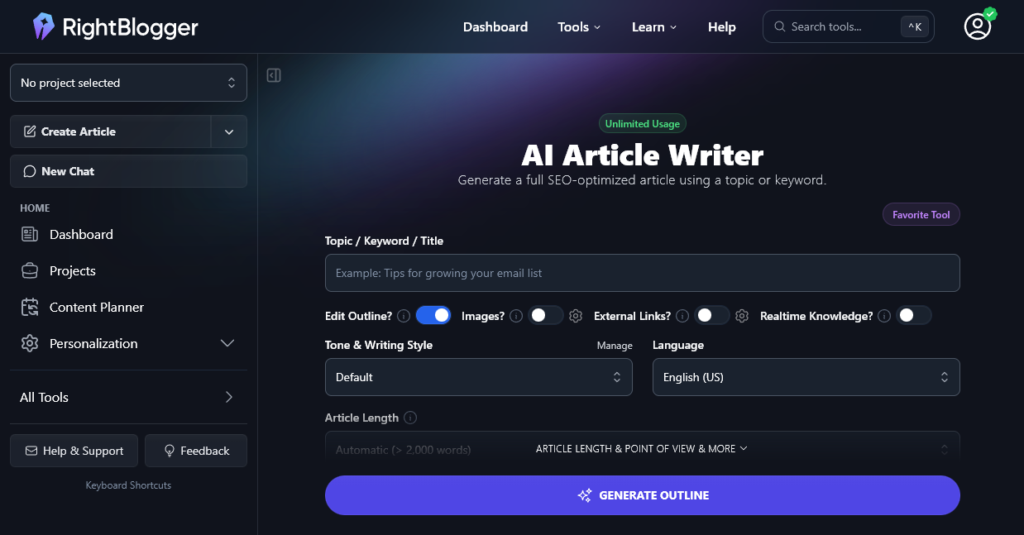
Software (especially SaaS tools) is another great monetization option. Take for example, my AI-powered content creation platform, RightBlogger, which I launched with my friend Andy to give new bloggers affordable access to fantastic tech-enabled tools to speed up their content creation process.
On top of just selling to your own audience, you can create loyalty programs that incentivize word-of-mouth referrals via first-time customer discounts, free one-month trials, gifting programs and more.
To launch a product (physical or software) fast, try this validation process:
- Building a relationship with 10 readers of your blog
- Working with them to pinpoint a challenge that you’re interested in solving with a physical or digital product
- Solving that problem yourself … and doing the same for these 10 people in their unique situation
- Inviting those 10 readers to pre-order, and coaching them through their problem, so you know your eventual product will solve their challenge
More Resources on Physical & Digital Products
8. Business Partnerships
I’ve been able to use my blog to meet some incredibly talented entrepreneurs. Here are a few examples of how my decision has turned into profitable partnerships:
- I’ve collaborated with my friend Jory (a writer) that I met because of my blog, on growing a $20,000/mo content marketing & digital marketing agency together.
- I’ve launched new websites (like RightBlogger, SmartWP and MightyShare) with my friend Andy who has a similar audience to me.
- I’ve partnered with a friend to help her grow her vegan food blog, Vegan Anj with eyes toward monetization one day.
- I’ve worked with a former podcast guest to help build a blogging software tool I’ve envisioned for years.
- I’ve had offers to sell a blog multiple times over the years.
There aren’t as many ways to authentically engineer the creation of these types of partnerships—aside from growing your brand and the reach of your blog—then being receptive to the creative people & ideas that come your way as they discover you.
On the flip side, if there’s someone in your space that you really want to collaborate and work with, strategize on a way you can add value to their business.
How to Start a Blog (and Make Money) in 2026: Final Takeaways for New Bloggers
Ultimately, growing a successful blog all boils down to being excited and engaged. If you want people to read what you’re writing, you need to give them a reason to.
Write exciting content, connect with people in your niche and enthusiastically share what you’re working on.
The traffic, monetization, and everything else will follow.
I wrote this guide because starting a blog has been one of the most empowering, life-changing decisions I’ve made in my life.
And I hope that by now you feel confident enough to go out there and start a blog of your own.
I’d love to have you in my free 7-day course that expands on the teachings of this guide. We also dive even further into topics like driving traffic, my personal writing process, monetizing your blog and more.
Want my Free Course: How to Start a Profitable Blog in 7 Days?
Enter your name and email address and you’ll get instant access to my course that’s been featured on Forbes, Business Insider and Entrepreneur.
“*” indicates required fields
Infographic: How to Start a Blog (for Profit) and Become a Blogger This Year
For those more visual learners, I also put together this infographic breakinIg down the process of starting a blog—and my personal experience generating both traffic and revenue from your blog. Enjoy!

Want to share this infographic about how to start a blog on your site? Email me at [email protected] and I’ll hook you up!
How to Start a Blog FAQs (Frequently Asked Questions by New Bloggers): People Also Ask
I get dozens of questions every day from readers (like you), who are learning how to start a blog for the first time. Here are my answers to the most common beginner blogging questions.
Getting Started as a New Blogger FAQs
What is a blog?
A blog is a regularly updated website where new content is frequently published, typically written in an informal or conversational style. The goal is to attract readers, whether it’s a fun personal blog, for community-building or growing a business. For more, check out my full guide: What is a Blog? How a Blog is Different Than a Website.
Can you start a blog for free in 2026?
Yes! Free blogging sites like Medium, Tumblr and Blogger are awesome resources for testing things out (or starting personal/hobby blogs). The same goes for choosing a free hosting plan from providers like WordPress.com.
If you’re looking to build a business out of your blog or make money blogging, I highly recommend paid, yet very affordable, options like Bluehost that we covered in this step-by-step tutorial. (Dreamhost and HostGator are other great ones.)
- When you go with free, you’ll have a lack of control over how your blog looks and acts
- Most free services have limits on monetization
- Switching or upgrading to a better service eventually is a hassle
- There’s a lack of support if something goes wrong
- Free blog hosting services can disappear overnight
It’s fine (and easy) to learn how to blog for free and build up your skills a bit, but if you want to turn blogging into an income-stream, you will need to invest in hosting and your own domain name.
How much does it cost to start a blog in 2026?
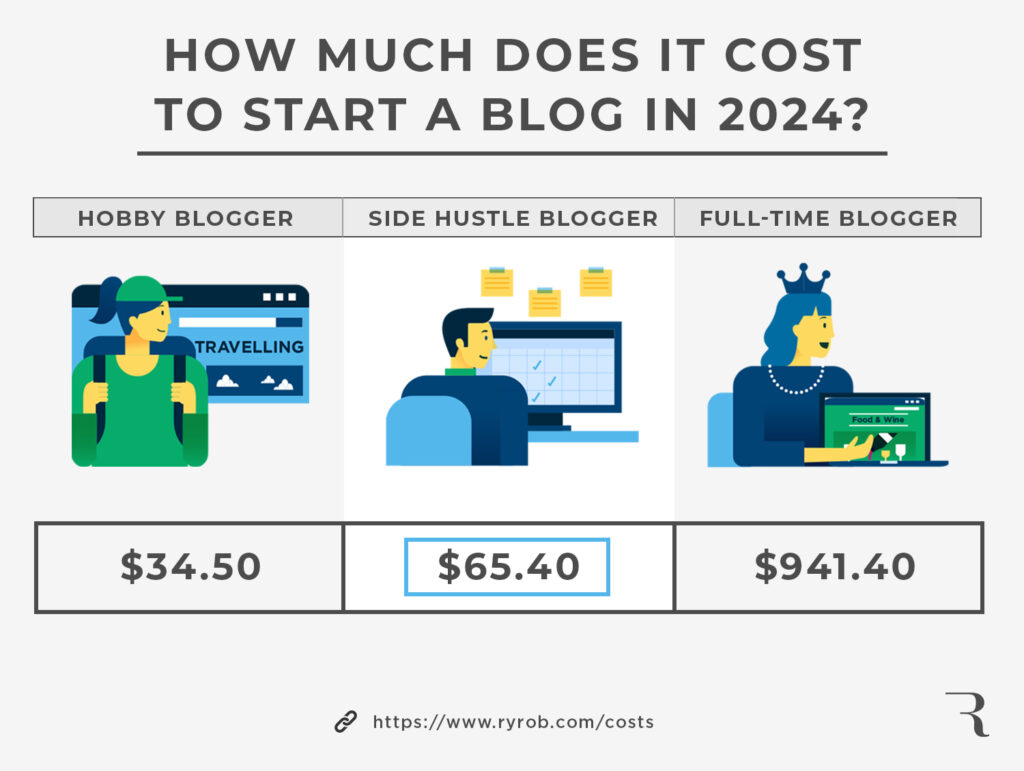
Depending upon your goals and the type of blog you want to start, it costs around $34.50 to $65.40 in 2026 to start a blog and cover your first year of expenses.
This assumes you’re using an affordable shared hosting plan (or opting for an eco-friendly green hosting plan)—and doing all of your own content writing & social media, not running ads, etc. It also assumes you already have a computer!
There’s also a difference between:
- Hobby Bloggers (blogging solely for fun or as a creative outlet)
- Side Hustle Bloggers (blogging on the side of your day job to slowly build a business)
- Full-Time Bloggers (blogging as a full-time business, generating a full-time income where you’ll likely want managed WordPress hosting too)
Here’s a graphic that also illustrates how much it costs to start blogging this year.
For a more in-depth analysis, read through my guide to creating a budget for your blog and deciding which costs you should spring for as you grow your blog.
Which blogging platforms are best to start a blog in 2026?
Self-hosted WordPress is by far the best blog platform to use for getting started.
If your goal is to eventually make money from your blog—or build a business plan around growing it, then go with self-hosted WordPress and an affordable hosting company like my personal favorite, Bluehost (or strong alternatives like Dreamhost and HostGator). This gives you lots of customization options, plus tech support.
Is blogging still relevant in 2026?
Yes, absolutely—people still read blogs.
Today, my blog earns me anywhere from $20,000 to $60,000/mo in income. That’s pretty damn relevant if you ask me, and millions of other bloggers are building businesses on the backs of starting their blogs, building an audience, and learning how to monetize that audience.
How do you pick the right name for your blog?
First, dig deep into your niche and uncover why you decided to start a blog. Think about the message you want to deliver, whether this is the name for a brand new blog, or a rebrand. List everything your blog is about, and who your ideal reader is.
Some great blog name examples are:
- Art of Manliness
- Smart Passive Income
- Epicurious
- The Huffington Post
- Learn to Code with Me
Finally, say the name of your blog out loud and tell it to others
It’s easy to get wrapped up in some fun wordplay when it comes to picking a blog name (and choosing a domain name to represent it). But it still needs to be easy enough that people will remember it and be able to tell their friends about you.
For lots of great potential names, use my free domain name generator.
How do I know how much demand there is for the topics I want to blog about?
I have a free tool I put together to help you check search demand, called the Niche Demand Checker, which you can grab in my free course right here.
And here’s my ultimate guide on how to do keyword research to create an intelligent content strategy.
These are the ranges (of monthly searches) I use to determine the level of demand a keyword phrase has in my keyword research tool:
- Very Low (< 1,000)
- Low (1,001 – 2,000)
- Medium (2,001 – 5,000) … you’re ideally looking for topics (keywords) in this range when you’re first starting out.
- High (5001 – 10,000)
- Very High (10,000+)
You can go for those high / very high in-demand phrases as your blog grows and becomes more competitive in search engines.
How do I log into WordPress once I’m logged out?
You can always login to your WordPress by going to yourblog.com/wp-admin. (Just swap out the “yourblog” part for your actual website’s URL of course).
If you can’t remember your login details, search your email inbox for the welcome emails you received right after originally setting up your blog. Check your spam folder just in case, too.
Still stuck? Try resetting your password. In WordPress, you can reset your password by clicking the “Lost your password?” link right below the login fields on your WordPress login page (the yourblog.com/wp-admin one). You can reset your Bluehost password right here.
How to Get Blog Traffic FAQs
How do I get readers to come to my blog?
Make sure you read my guide on how to drive traffic to your website.
First, you need to create share-worthy content that people will actually want to read.
Then, do as many of these as you can:
- Speak at conferences
- Nail your on-page SEO
- Begin guest posting on other blogs/websites with a similar audience
- Share regular content on social media
- Engage in relevant online communities
- Get interviewed on podcasts
- Launch a YouTube channel
- Host webinars
What is Google’s rich snippet and how do I rank there?
Google’s rich snippet (also sometimes called the featured snippet) is an #1 organic search result placement that displays info direct from your post—increasing the likelihood that your content will receive the most clicks from searchers. Increasingly frequently, it’s replaced by an AI summary, so understanding AEO (Answer Engine Optimization) is vital too.
To get a rich snippet (or featured snippet) placement means nailing all of your blog SEO best practices, which includes on-page SEO and working extremely hard to promote your blog content and attract earned links from authoritative websites..
What is Google’s AI overview in search results?
Google’s Search Generative Experience has now become an ongoing “AI Overview” incorporated into Google search results. Their goal is to help searchers better understand a topic faster and get more custom-tailored answers provided by their AI tools behind the scenes.
Here’s a screenshot example of how Google’s generative AI displays an AI-generated answer to a hiking-related search query:
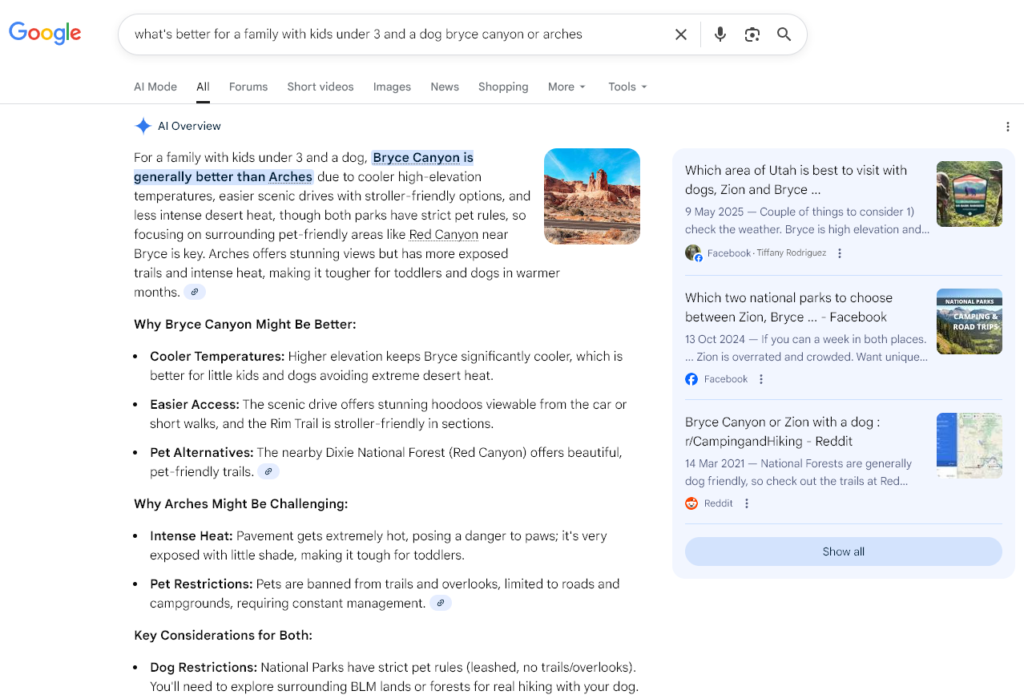
What does this mean for bloggers? SEO still matters. Google’s generative AI results will still display sources it pulls answers from (pictured to the right of the AI result), with links to those sites—so the likelihood of organic search traffic from Google going to zero is very low. But make sure you’re using AEO tools too in order to improve your chances of appearing in AI results.
How to Make Money Blogging FAQs
How do bloggers get paid and how much do bloggers make?
Becoming a blogger, and actually getting paid for it are two very different things.
How long does it take to make money blogging? You can start making money within a few weeks … but most bloggers don’t ever earn a life-changing amount of income from their blogs.
Here’s how much bloggers make: typically, newer bloggers make less than $1,000/year. But as your blog grows, you can make much more. I make anywhere from $25,000 to $60,000 per month from my blog—which makes for a nice cushion of extra savings for me (a very meaningful amount of money).
I break down my favorite ways to monetize a blog here in this guide. In general, expect it to take 3–6 months to start making any significant amount of money. After 1–3+ years, you’ll have more content on your blog, more authority, and more readers. After 6 years of blogging, I was making $50,000/mo some months.
Do I have to pay taxes on my blog income?
Yes. In my ultimate guide to taxes for bloggers, I dive into the best way to set your blog up as a real small business (and safely calculate your tax obligations).
If you’re earning income from your blog, it qualifies as self-employed income under the guidelines of the IRS. This includes whether or not you’re operating as a formal business entity (like a sole proprietorship, corporation or LLC).
Is it better to buy an existing blog or start a new blog?
Buying a blog that’s already got an established audience can help you leapfrog some technical hurdles and cut out the time taken to establish a brand new blog. But it can also be expensive, and you might run into issues you haven’t anticipated.
If you’re considering going down the route of acquiring an existing blog, check out my guide to buying a blog today.
Quick Summary of How to Start a Blog and Make Money in 6 Steps Today
To sum things up, you need to:
- Step 1. Pick your blog name and niche
- Step 2. Get your blog online (web hosting)
- Step 3. Design your blog with a free WordPress theme
- Step 4. Write your first blog post
- Step 5. Promote your blog and get readers
- Step 6. Make money from your blog
That’s it! Follow along with this step-by-step guide to starting a blog and you’ll be on the right path.
I also have a ton of free AI blogging tools to help you with all kinds of tasks, from coming up with traffic-generating ideas to writing full-length blog posts. You can get full versions, plus even more tools and blogging courses, inside RightBlogger.
Want some extra reading? Take a look at my in-depth articles:
And if you’re still looking for more, here’s a collection of all my content about blogging.
Will You Take the Leap to Learn How to Start a Blog (and Become a Blogger) Today?
Now, I want to know how your blogging journey is coming along too. Good luck!
Drop me a line or ask any questions in the comments below!
Want my Free Course: How to Start a Profitable Blog in 7 Days?
Enter your name and email address and you’ll get instant access to my course that’s been featured on Forbes, Business Insider and Entrepreneur.
“*” indicates required fields