By using this site, you agree to the Privacy Policy and Terms of Use.
Accept
World of SoftwareWorld of SoftwareWorld of Software
  • News
  • Software
  • Mobile
  • Computing
  • Gaming
  • Videos
  • More
    • Gadget
    • Web Stories
    • Trending
    • Press Release
Search
  • Privacy
  • Terms
  • Advertise
  • Contact
Copyright © All Rights Reserved. World of Software.
Reading: How to use Google AI Studio to create your own Gemini without filters or defining its censorship
Share
Sign In
Notification Show More
Font ResizerAa
World of SoftwareWorld of Software
Font ResizerAa
  • Software
  • Mobile
  • Computing
  • Gadget
  • Gaming
  • Videos
Search
  • News
  • Software
  • Mobile
  • Computing
  • Gaming
  • Videos
  • More
    • Gadget
    • Web Stories
    • Trending
    • Press Release
Have an existing account? Sign In
Follow US
  • Privacy
  • Terms
  • Advertise
  • Contact
Copyright © All Rights Reserved. World of Software.
World of Software > Mobile > How to use Google AI Studio to create your own Gemini without filters or defining its censorship
Mobile

How to use Google AI Studio to create your own Gemini without filters or defining its censorship

News Room
Last updated: 2026/03/17 at 9:30 AM
News Room Published 17 March 2026
Share
How to use Google AI Studio to create your own Gemini without filters or defining its censorship
SHARE

Let’s explain to you how to use Google AI Studio to set up a Gemini chat that does not have security filters. Thus, you will be able to chat without the protections that the Gemini website has by default with the same model that the chat with artificial intelligence uses.

Google AI Studio is a page that has many functions, you can from creating applications and code to playing with the AI ​​models created by Google by configuring the way it responds to you. And this second is what we are going to teach you in a quick and simple way.

Gemini’s filter is a Google AI Studio
New chat

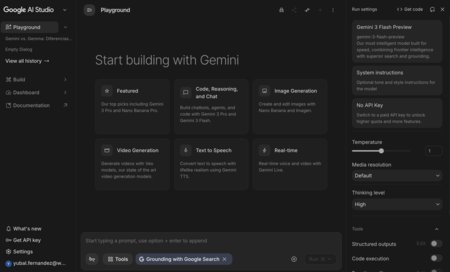
The first thing you have to do is enter Google AI Studio and open a new chat. For that, you have to click on the option Playground or enter directly at aistudio.google.com/prompts/new_chat, although this will be what the tool itself does by default when you enter.
Safety
Safety

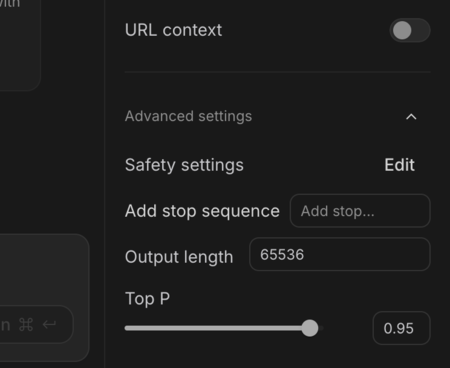
This will put you in a new chat. In it, in the right column you will have several options to configure it. Here you have to go down to the bottom and open the section Advanced settingswhich will be closed by default. Once inside, click on Safety Settings to proceed to configure chat security.
Protection
Protection

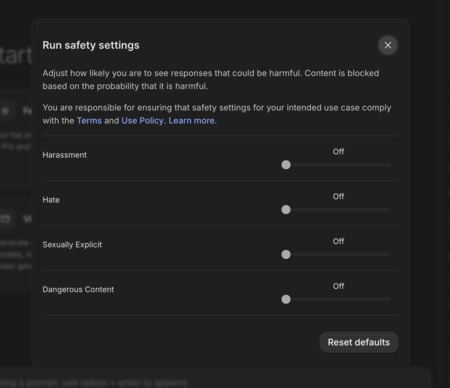
This will open the key window, where you can completely disable security filters that censor the content of your chats. Of course, even if you reduce it there will still be minimal protectionssuch as for adult content.

Therefore, basically what you are going to do is reduce the filters to a minimum. And once you have it, just close the window and start chatting normally. The conversation will take place with these filters.
Newsletter summary with artificial intelligence: summarize all the newsletters in your email inbox with Claude, Gemini or ChatGPT

Two small details to take into account
Tokens
Tokens

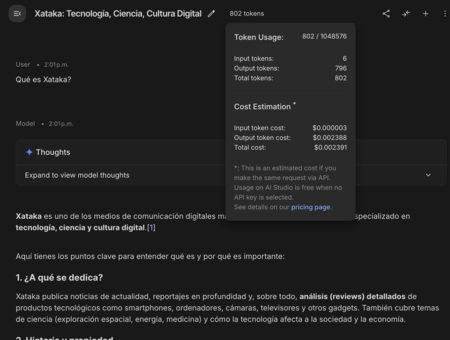
Although just using Google AI Studio to chat does not involve the use of the APIat the top of the chat you will be able to see the account of tokens you are spending and their equivalent in money. Thus, if you built an app that requires the API to make these dialogues, you would know the money it costs you.
Model
Model

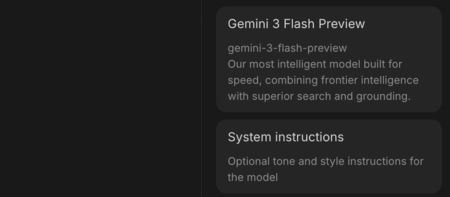
Another thing to note is that on the right you will be able to choose the Gemini model that you want to use. Each of them will have a different token consumption, but also more or less possibilities. Besides, you can configure some system instructions in case you want to define the tone you want Gemini to use or its responding style.

In WorldOfSoftware Basics | Free Gemini API: what it is, what it is for and how you can get one to use in your projects


Sign Up For Daily Newsletter

Be keep up! Get the latest breaking news delivered straight to your inbox.
By signing up, you agree to our Terms of Use and acknowledge the data practices in our Privacy Policy. You may unsubscribe at any time.
Share This Article
Facebook Twitter Email Print
Share
What do you think?
Love0
Sad0
Happy0
Sleepy0
Angry0
Dead0
Wink0
Previous Article We’ve been waiting for years, the Tesla Roadster will arrive in April?! We’ve been waiting for years, the Tesla Roadster will arrive in April?!
Next Article iQOO 15R Review: Maximum Speed, Minimum Compromise iQOO 15R Review: Maximum Speed, Minimum Compromise
Leave a comment

Leave a Reply Cancel reply

Your email address will not be published. Required fields are marked *

Stay Connected

248.1k Like
69.1k Follow
134k Pin
54.3k Follow

Latest News

Avast Ultimate: One Subscription Designed to Help Protect Your Digital Life – With Up to 49% Off
Gadget
The Boox Go 10.3 (Gen II) is here: An e-ink tablet equipped with Android 15
News
ZeroSlop: Why I Built the ‘SponsorBlock’ for AI Slop on X | HackerNoon
Computing
3 proven time management systems to get rid of unnecessary work and boost productivity
News

You Might also Like

NVIDIA expands its open AI models and adds security to OpenClaw with NemoClaw
Mobile

NVIDIA expands its open AI models and adds security to OpenClaw with NemoClaw

6 Min Read
We’ve been waiting for years, the Tesla Roadster will arrive in April?!
Mobile

We’ve been waiting for years, the Tesla Roadster will arrive in April?!

4 Min Read
Intel Xeon 6 in NVIDIA DGX Rubin NVL8 systems
Mobile

Intel Xeon 6 in NVIDIA DGX Rubin NVL8 systems

4 Min Read
The games of 2026 aim to be graphic marvels. NVIDIA is clear that the solution is in AI
Mobile

The games of 2026 aim to be graphic marvels. NVIDIA is clear that the solution is in AI

7 Min Read
//

World of Software is your one-stop website for the latest tech news and updates, follow us now to get the news that matters to you.

Quick Link

  • Privacy Policy
  • Terms of use
  • Advertise
  • Contact

Topics

  • Computing
  • Software
  • Press Release
  • Trending

Sign Up for Our Newsletter

Subscribe to our newsletter to get our newest articles instantly!

World of SoftwareWorld of Software
Follow US
Copyright © All Rights Reserved. World of Software.
Welcome Back!

Sign in to your account

Lost your password?