By using this site, you agree to the Privacy Policy and Terms of Use.
Accept
World of SoftwareWorld of SoftwareWorld of Software
  • News
  • Software
  • Mobile
  • Computing
  • Gaming
  • Videos
  • More
    • Gadget
    • Web Stories
    • Trending
    • Press Release
Search
  • Privacy
  • Terms
  • Advertise
  • Contact
Copyright © All Rights Reserved. World of Software.
Reading: I added a rear screen to my iPhone — and it’s a game changer for my selfies and vlogs
Share
Sign In
Notification Show More
Font ResizerAa
World of SoftwareWorld of Software
Font ResizerAa
  • Software
  • Mobile
  • Computing
  • Gadget
  • Gaming
  • Videos
Search
  • News
  • Software
  • Mobile
  • Computing
  • Gaming
  • Videos
  • More
    • Gadget
    • Web Stories
    • Trending
    • Press Release
Have an existing account? Sign In
Follow US
  • Privacy
  • Terms
  • Advertise
  • Contact
Copyright © All Rights Reserved. World of Software.
World of Software > News > I added a rear screen to my iPhone — and it’s a game changer for my selfies and vlogs
News

I added a rear screen to my iPhone — and it’s a game changer for my selfies and vlogs

News Room
Last updated: 2025/12/23 at 5:04 AM
News Room Published 23 December 2025
Share
I added a rear screen to my iPhone — and it’s a game changer for my selfies and vlogs
SHARE

One of the biggest reasons why I continue to keep the Galaxy Z Flip 7 as one of my daily drivers is because of how Samsung’s foldable flip phone is much better suited for capturing selfies and vlogs than conventional handsets. Because of its design, I’m able to pair the Flip’s outer screen with its rear cameras to see myself as I’m capturing images and footage, which is a common characteristic I find with the best foldable phones.

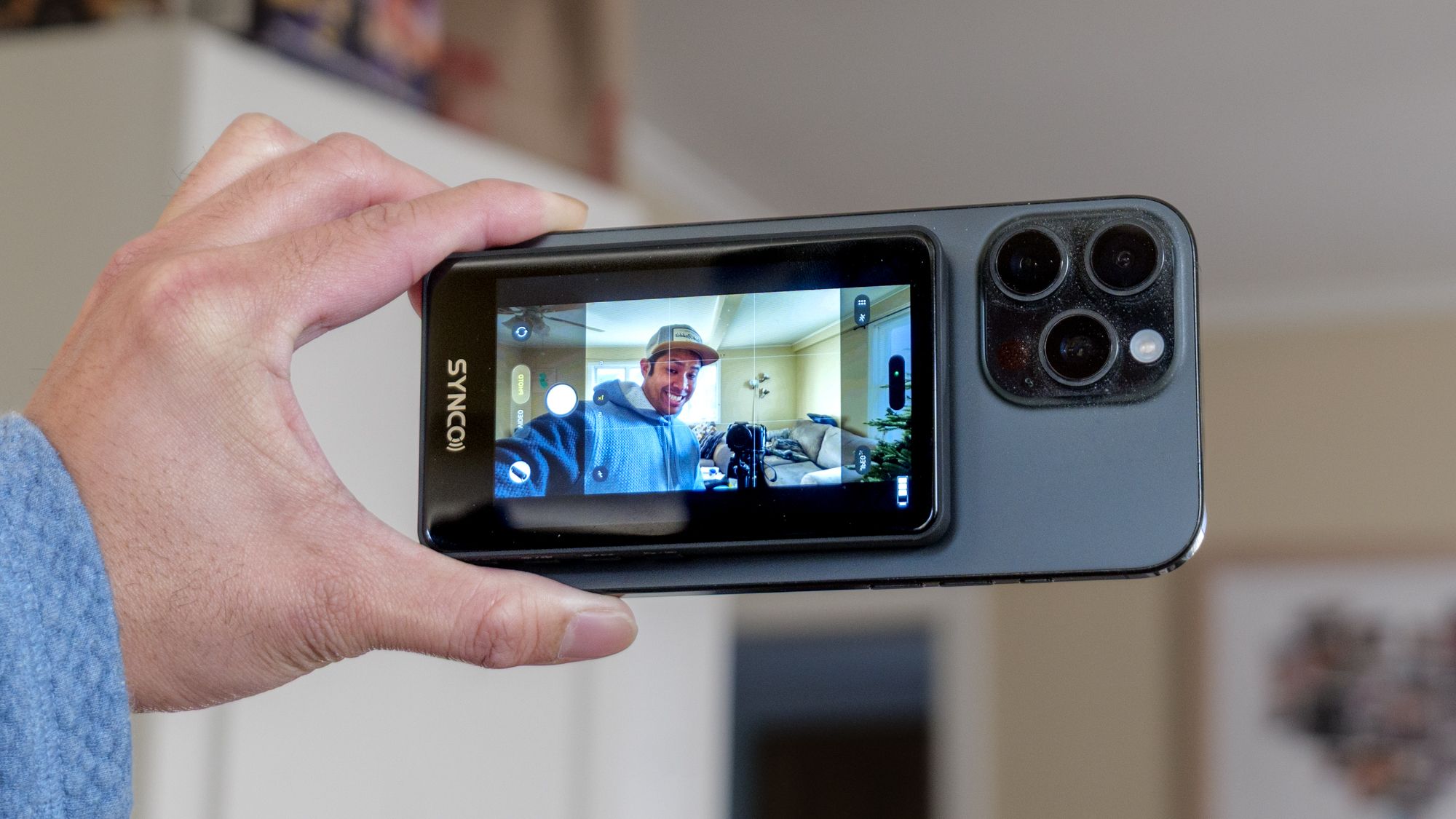
There’s no way I could do this with devices like my iPhone 16 Pro Max or iPhone 17 Pro, so I’m left to simply use their front facing cameras — but everyone knows the quality’s a downgrade with those front camera sensors. That’s why I’ve been using the SYNCO XView M4, a handheld monitor with a MagSafe connection that fastens to the back of my iPhone.

Thanks to the XView M4, I’m able to record selfies and vlogs with the superior rear cameras of my iPhone. It’s really the iPhone accessory I didn’t know I needed until now. Here’s why.


You may like

This pocket-sized monitor works by allowing me to cast my phone’s display to it, much like a Chromecast. I’m essentially performing a screen mirroring function with AirPlay, so whatever’s on my iPhone shows up on the display. That makes the XView M4 the easiest way to add a rear screen to my iPhone — at least until an iPhone Fold shows up.

(Image credit: Tom’s Guide / John Velasco)

I didn’t have high expectations with the 3.9-inch screen initially, but the XView M4 turned out better than I had anticipated with decent contrast and detail that makes it usable for a wide variety of applications. Since it relies on a direct Wi-Fi connection, I was initially skeptical about the latency — but that doesn’t appear to suffer, resulting in smooth mirroring. However, I’ve found a few situations where the latency lags a bit when recording video.

As much as I appreciate the added utility the XView M4 offers with selfies and vlogs, I’ve used it on some of my professional shoots to monitor the framing of a video using a second camera. I did this by mounting my iPhone to the top of my b-camera, while I held onto the SYNCO XView M4 in my hand using my main a-roll camera roughly 10 feet away.

SYNCO XView M4 Magnetic Wireless Phone Monitor connected to iPhone.

(Image credit: Tom’s Guide / John Velasco)

Since it’s pocketable, it doesn’t add a lot of extra bulk into my backpack — and it’s way better than carrying one of my portable monitors. There’s also a built-in speaker inside of the SYNCO XView M4 that lets me listen to the videos I’ve just recorded.

Get instant access to breaking news, the hottest reviews, great deals and helpful tips.

So far, I’ve been able to wirelessly stream to the XView M4 for an hour with the battery lasting me that long. The company claims it’ll last 3 hours, but I’ve found the battery indicator at less than one bar after an hour’s use.

SYNCO XView M4 Magnetic Wireless Phone Monitor connected to iPhone.

(Image credit: Tom’s Guide / John Velasco)

Best of all, the XView M4 works on any phone — including many of the best Android phones using their respective screen mirroring functions. You’ll get way more utility from Android phones that have embedded magnets, like the Pixel 10, so the accessory can easily stay attached to them with its magnetic connection.

Finally, it’s worth mentioning that this handheld monitor doesn’t cost a fortune. Normally the XView M4 sells for $59, which is pretty good for an accessory such as this, but it’s currently discounted by 24% off to bring its price down to $45.


Google News

Follow Tom’s Guide on Google News and add us as a preferred source to get our up-to-date news, analysis, and reviews in your feeds.



More from Tom’s Guide

Today’s best Apple iPhone 17, Apple iPhone 17 Pro, Apple iPhone 17 Pro Max and Apple iPhone Air deals

Sign Up For Daily Newsletter

Be keep up! Get the latest breaking news delivered straight to your inbox.
By signing up, you agree to our Terms of Use and acknowledge the data practices in our Privacy Policy. You may unsubscribe at any time.
Share This Article
Facebook Twitter Email Print
Share
What do you think?
Love0
Sad0
Happy0
Sleepy0
Angry0
Dead0
Wink0
Previous Article YouTube’s Key Priorities for 2023 | YouTube’s Key Priorities for 2023 |
Next Article Scottish satellite communications group secures £6m investment – UKTN Scottish satellite communications group secures £6m investment – UKTN
Leave a comment

Leave a Reply Cancel reply

Your email address will not be published. Required fields are marked *

Stay Connected

248.1k Like
69.1k Follow
134k Pin
54.3k Follow

Latest News

Tesla’s Full Self-Driving system to be China approved by Q1 2025 · TechNode
Computing
Apple fined 6M in Italy over ATT privacy feature in iOS –  News
Apple fined $116M in Italy over ATT privacy feature in iOS – News
News
An Expert Explains 6 Common Laundry Mistakes That Are Killing Your Favorite Garments
News
Dometic makes a better portable water faucet
News

You Might also Like

Apple fined 6M in Italy over ATT privacy feature in iOS –  News
News

Apple fined $116M in Italy over ATT privacy feature in iOS – News

5 Min Read
An Expert Explains 6 Common Laundry Mistakes That Are Killing Your Favorite Garments
News

An Expert Explains 6 Common Laundry Mistakes That Are Killing Your Favorite Garments

7 Min Read
Dometic makes a better portable water faucet
News

Dometic makes a better portable water faucet

4 Min Read
Chinese-made robotaxis coming to UK via Uber and Lyft partnerships – UKTN
News

Chinese-made robotaxis coming to UK via Uber and Lyft partnerships – UKTN

2 Min Read
//

World of Software is your one-stop website for the latest tech news and updates, follow us now to get the news that matters to you.

Quick Link

  • Privacy Policy
  • Terms of use
  • Advertise
  • Contact

Topics

  • Computing
  • Software
  • Press Release
  • Trending

Sign Up for Our Newsletter

Subscribe to our newsletter to get our newest articles instantly!

World of SoftwareWorld of Software
Follow US
Copyright © All Rights Reserved. World of Software.
Welcome Back!

Sign in to your account

Lost your password?