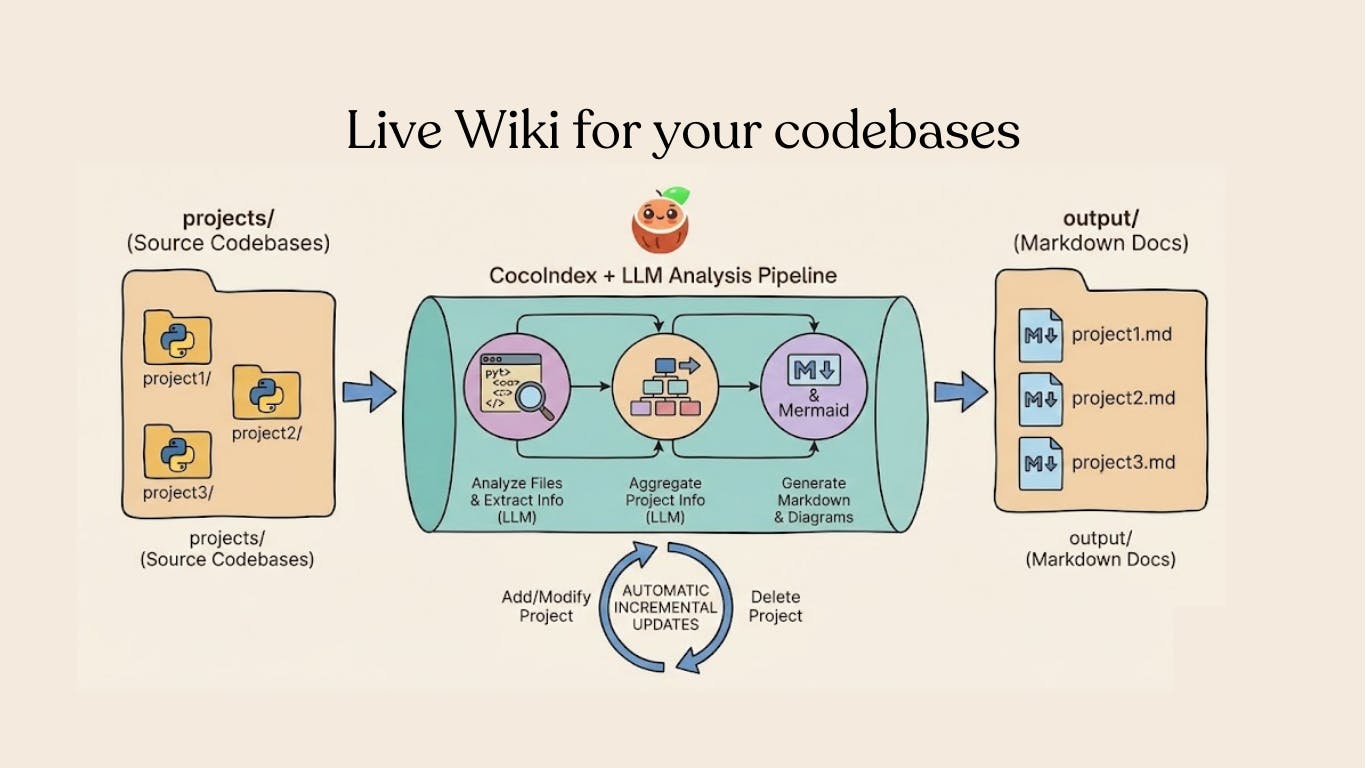
I built an open-source Python pipeline that scans multiple codebases, extracts structured information using LLMs, and generates Markdown documentation with Mermaid diagrams — all with incremental processing so only changed files get re-analyzed. No wasted LLM calls, no stale docs. ⭐ ==The entire project is open source — grab it, fork it, ship it: full source code on GitHub. Star CocoIndex if it is helpful!==
The Problem Every Engineering Team Knows Too Well
Documentation rots. It’s one of the few universal truths in software engineering.
You write beautiful docs on day one. By week three, someone refactors a module. By month two, half the documented APIs no longer exist. By quarter three, new engineers are told “don’t trust the docs, just read the code.”
I manage a collection of 20+ Python example projects. Each one needs a wiki-style overview: what it does, its key classes and functions, how the components connect. Maintaining those by hand was a losing battle. Every time I updated an example, the corresponding docs fell behind.
So I asked myself: what if the code was the documentation? Not in the “self-documenting code” handwave sense, but literally — a pipeline that reads your source, understands it, and produces structured documentation that stays current automatically.
What I Built
The pipeline does four things:
Scans subdirectories, treating each as a separate project
Extracts structured information from each Python file using an LLM (classes, functions, relationships)
Aggregates file-level data into project-level summaries
Generates Markdown documentation with Mermaid diagrams showing component relationships
The key insight is the formula:
target_state = transformation(source_state)
You declare what the transformation is. The framework handles when and what to re-process.
The Architecture
Here’s the processing flow:
app_main
  └── For each project directory:
        └── process_project
              ├── extract_file_info (per file, concurrent)
              ├── aggregate_project_info
              └── generate_markdown → output/{project}.md
Let me walk through each stage.
Stage 1: Scanning Projects
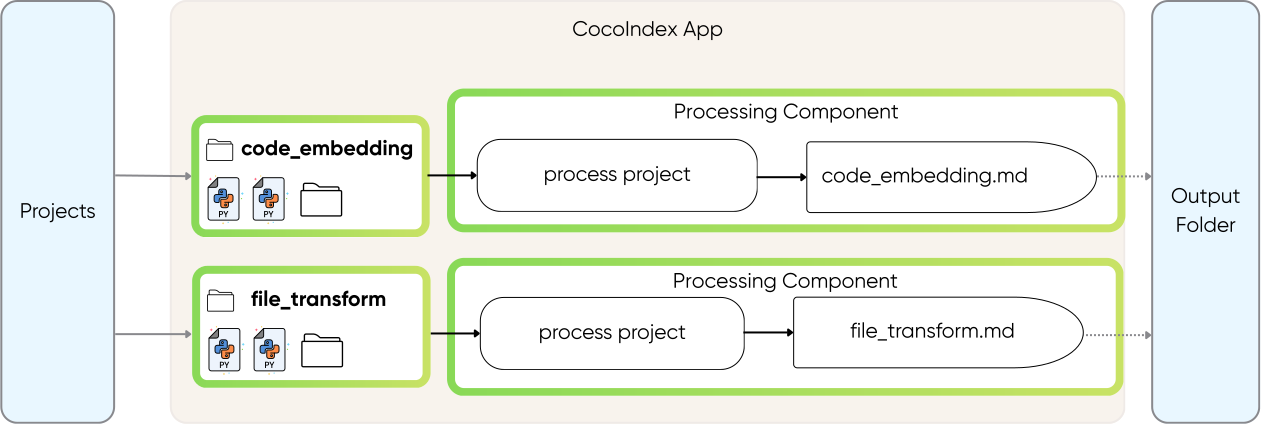
The entry point loops through subdirectories, treating each as a separate project:
@coco.function
def app_main(
    root_dir: pathlib.Path,
    output_dir: pathlib.Path,
) -> None:
    """Scan subdirectories and generate documentation for each project."""
    for entry in root_dir.resolve().iterdir():
        if not entry.is_dir() or entry.name.startswith("."):
            continue
        project_name = entry.name

        files = list(
            localfs.walk_dir(
                entry,
                recursive=True,
                path_matcher=PatternFilePathMatcher(
                    included_patterns=["*.py"],
                    excluded_patterns=[".*", "__pycache__"],
                ),
            )
        )

        if files:
            coco.mount(
                coco.component_subpath("project", project_name),
                process_project,
                project_name,
                files,
                output_dir,
            )
coco.mount() registers each project as a tracked processing component. CocoIndex handles dependency tracking automatically — if a file changes, only that project gets re-processed.
Stage 2: Structured LLM Extraction
This is where it gets interesting. I define exactly what I want to extract using Pydantic models:
class FunctionInfo(BaseModel):
    name: str = Field(description="Function name")
    signature: str = Field(
        description="Function signature, e.g. 'async def foo(x: int) -> str'"
    )
    is_coco_function: bool = Field(
        description="Whether decorated with @coco.function"
    )
    summary: str = Field(description="Brief summary of what the function does")


class ClassInfo(BaseModel):
    name: str = Field(description="Class name")
    summary: str = Field(description="Brief summary of what the class represents")


class CodebaseInfo(BaseModel):
    name: str = Field(description="File path or project name")
    summary: str = Field(description="Brief summary of purpose and functionality")
    public_classes: list[ClassInfo] = Field(default_factory=list)
    public_functions: list[FunctionInfo] = Field(default_factory=list)
    mermaid_graphs: list[str] = Field(
        default_factory=list,
        description="Mermaid graphs showing function relationships"
    )
Then I use Instructor with LiteLLM to extract this structured data from each file:
_instructor_client = instructor.from_litellm(acompletion, mode=instructor.Mode.JSON)

@coco.function(memo=True)
async def extract_file_info(file: FileLike) -> CodebaseInfo:
    """Extract structured information from a single Python file using LLM."""
    content = file.read_text()
    file_path = str(file.file_path.path)

    prompt = f"""Analyze the following Python file and extract structured information.

File path: {file_path}
{content}
Instructions:
1. Identify all PUBLIC classes (not starting with _) and summarize their purpose
2. Identify all PUBLIC functions (not starting with _) and summarize their purpose
3. If this file contains CocoIndex apps (coco.App), create Mermaid graphs showing the
   function call relationships (see the mermaid_graphs field description for format)
4. Provide a brief summary of the file's purpose
"""

    result = await _instructor_client.chat.completions.create(
        model=LLM_MODEL,
        response_model=CodebaseInfo,
        messages=[{"role": "user", "content": prompt}],
    )
    return CodebaseInfo.model_validate(result.model_dump())
Notice memo=True. This is the critical piece. The function’s result is cached based on the input content. Change a file? That file gets re-analyzed. Don’t change it? The cached result is used. No redundant LLM call.
Stage 3: Aggregation
For multi-file projects, I aggregate file-level extractions into a unified project summary:
@coco.function
async def aggregate_project_info(
    project_name: str,
    file_infos: list[CodebaseInfo],
) -> CodebaseInfo:
    if not file_infos:
        return CodebaseInfo(
            name=project_name, summary="Empty project with no Python files."
        )

    if len(file_infos) == 1:
        info = file_infos[0]
        return CodebaseInfo(
            name=project_name,
            summary=info.summary,
            public_classes=info.public_classes,
            public_functions=info.public_functions,
            mermaid_graphs=info.mermaid_graphs,
        )

    # Multiple files — use LLM to synthesize
    files_text = "nn".join(
        f"### {info.name}n"
        f"Summary: {info.summary}n"
        f"Classes: {', '.join(c.name for c in info.public_classes) or 'None'}n"
        f"Functions: {', '.join(f.name for f in info.public_functions) or 'None'}"
        for info in file_infos
    )

    prompt = f"""Aggregate the following Python files into a project-level summary.

Project name: {project_name}

Files:
{files_text}

Create a unified CodebaseInfo that:
1. Summarizes the overall project purpose (not individual files)
2. Lists the most important public classes across all files
3. Lists the most important public functions across all files
4. Creates a single unified Mermaid graph showing component connections
"""

    result = await _instructor_client.chat.completions.create(
        model=LLM_MODEL,
        response_model=CodebaseInfo,
        messages=[{"role": "user", "content": prompt}],
    )
    return CodebaseInfo.model_validate(result.model_dump())
Single-file projects skip the LLM call entirely. Multi-file projects get a synthesized overview. This is a deliberate design choice — don’t spend API credits when you don’t need to.
Stage 4: Concurrent Processing
Each project is processed with asyncio.gather() for concurrent file extraction:
@coco.function(memo=True)
async def process_project(
    project_name: str,
    files: Collection[localfs.File],
    output_dir: pathlib.Path,
) -> None:
    file_infos = await asyncio.gather(*[extract_file_info(f) for f in files])
    project_info = await aggregate_project_info(project_name, file_infos)
    markdown = generate_markdown(project_name, project_info, file_infos)
    localfs.declare_file(
        output_dir / f"{project_name}.md", markdown, create_parent_dirs=True
    )
All file extractions within a project happen concurrently. If a project has 10 files, all 10 LLM calls fire simultaneously rather than sequentially. The difference in wall-clock time is substantial when you’re processing dozens of projects.
The Output
Each generated Markdown file includes:
- Overview — What the project does, in plain language
- Components — Public classes and functions with descriptions
- Pipeline diagram — A Mermaid graph showing how functions connect
- File details — Per-file breakdowns for multi-file projects
Here’s what a generated pipeline diagram looks like:
graph TD
    app_main[app_main] ==> process_project[process_project]
    process_project ==> extract_file_info[extract_file_info]
    process_project ==> aggregate_project_info[aggregate_project_info]
    process_project --> generate_markdown[generate_markdown]
Why Incremental Processing Matters
This is the part that makes the approach practical at scale.
Without incremental processing, every run re-analyzes every file. For 20 projects with an average of 5 files each, that’s 100 LLM calls per run. At even a few cents per call, that adds up — and it’s slow.
With incremental processing:
- Edit one file → only that file is re-analyzed, its project re-aggregated, and its markdown regenerated
- Add a new project → only the new project is processed
- Change your LLM prompt or model → everything is re-processed (because the transformation logic changed)
The framework tracks this automatically. I don’t write any caching logic, invalidation logic, or diffing logic. I declare the transformation, and CocoIndex figures out the minimum work needed.
Running It
Setup is straightforward:
pip install --pre 'cocoindex>=1.0.0a6' instructor litellm pydantic

export GEMINI_API_KEY="your-api-key"
export LLM_MODEL="gemini/gemini-2.5-flash"

echo "COCOINDEX_DB=./cocoindex.db" > .env
Put your projects in projects/, then:
cocoindex update main.py
Check the results:
ls output/
# project1.md  project2.md  ...
You can swap LLM providers via the LLM_MODEL environment variable — OpenAI, Anthropic, local models through Ollama — anything LiteLLM supports.
Three Patterns Worth Stealing
Even if you don’t use this exact pipeline, there are three patterns here that are broadly applicable:
1. Structured LLM outputs with Pydantic
Don’t parse free-text LLM responses with regex. Define a Pydantic model for exactly the data you need, and use Instructor to enforce it. The LLM returns validated, typed data every time.
2. Memoized LLM calls
LLM calls are expensive. Cache results keyed by input content. If the input hasn’t changed, skip the call. This pattern alone can cut your LLM costs by 80%+ in iterative workflows.
3. Hierarchical aggregation
Extract at the smallest useful granularity (file level), then aggregate up (project level). This gives you both detail and high-level summaries, and the fine-grained extraction means you only re-process the specific files that changed.
Try It Yourself
==The full source code is available at github.com/cocoindex-io/cocoindex under== examples/multi_codebase_summarization==.==
Read more tutorials at cocoindex.io/examples !
If you find it useful, ⭐ star CocoIndex on GitHub — it helps more developers discover the project and keeps us shipping. And if you build something with it — a different kind of documentation pipeline, a code review system, an architecture analyzer — I’d genuinely like to hear about it.