We copy secrets into random websites way more often than we like to admit.
API keys. Recovery phrases. Draft contracts. Love letters. n And every time, there’s that little voice in your head:
“They say they don’t store anything… but do they really not?”
I got tired of that voice. So I built Encrypter, a tiny static site that lets you encrypt and decrypt text entirely in your browser, with no backend, no database, no login, and no tracking.
This post is the story behind it, how it works, and some of the trade-offs I made along the way.
The Problem: “Just paste your secret here…”
I live in a world of:
- crypto wallets and seed phrases
- API keys and webhooks
- private notes I don’t want to park in some random SaaS
When you google “encrypt text online”, you’ll find plenty of existing tools, and many of them are perfectly fine for a lot of people. They just make different trade-offs: some are integrated with accounts and cloud storage, some rely on a backend service, some focus on rich features and collaboration rather than being as small and transparent as possible.
I realized that my personal ideal looked a bit different:
- Client-side only: all crypto in JavaScript, in my browser.
- No backend at all: static hosting, no database to leak.
- Zero accounts: you show up, paste, encrypt, leave.
- Shareable by design: ciphertext should be easy to share as text, link, or QR.
So I turned this into a tiny side project: Encrypter.
What Encrypter Actually Does
The one-sentence version:
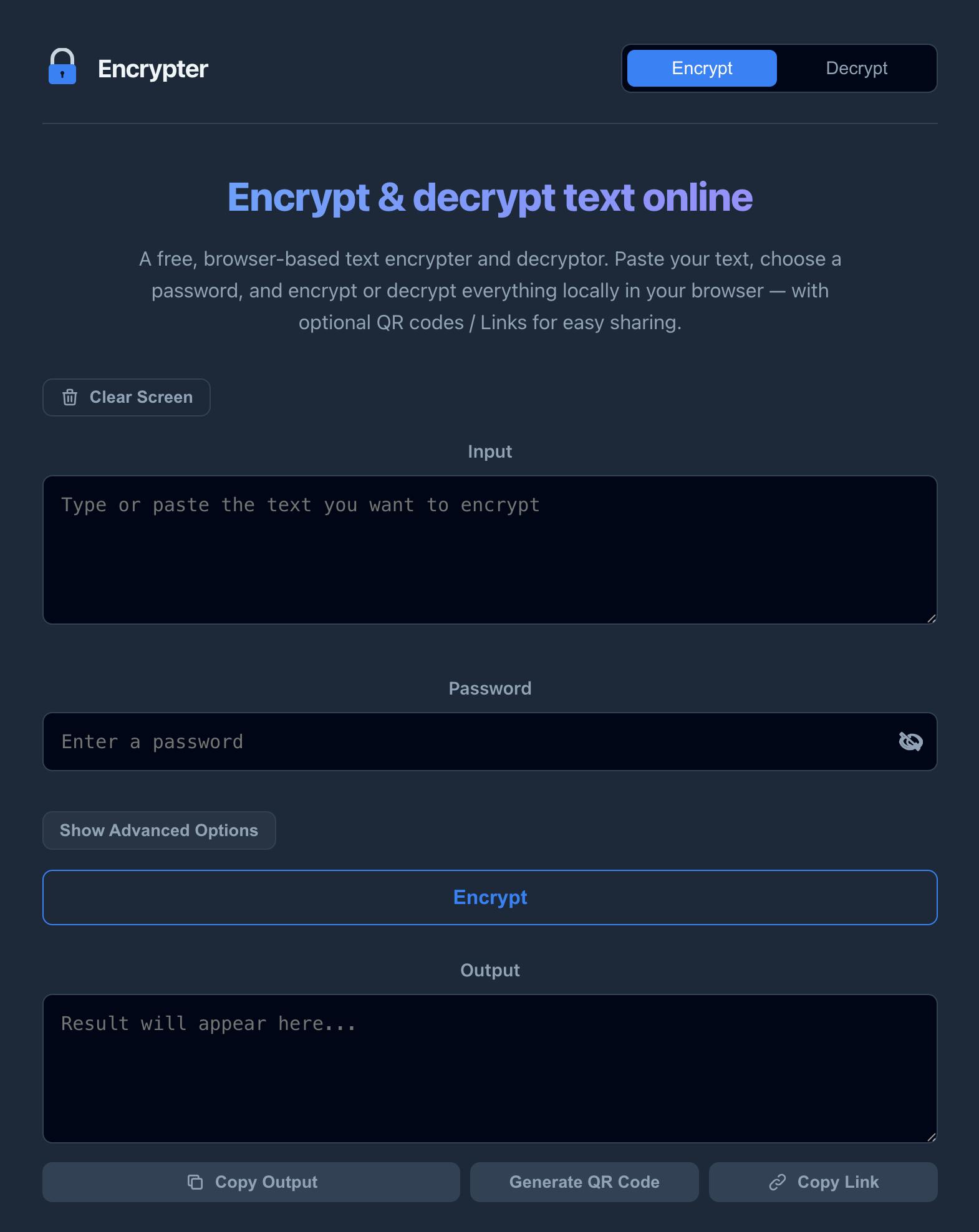
Encrypter is a browser-only tool that lets you type or paste text, protect it with a password, and get back a block of ciphertext you can safely share. Anyone with the ciphertext + password can decrypt it back to the original text — again, locally in their own browser.
No servers touching your plaintext. No login. No account history.
The flow is intentionally minimal.
1. Encrypt
- Go to the Encrypt tab.
- Paste or type any text:
- a private note
- a recovery phrase (ideally split across multiple tools or contexts)
- a config snippet
- Choose a password (this is your key; if you lose it, it’s gone).
- Click Encrypt.
You get:
- A block of ciphertext (random-looking characters).
- Depending on your implementation options:
- copy the ciphertext as text
- turn it into a shareable link
- encode it into a QR code
At no point does the plaintext leave your browser.
2. Decrypt
- Go to the Decrypt tab.
- Paste the ciphertext (or open a link that pre-fills it for you).
- Type the password.
- Click Decrypt.
If the password and ciphertext match, you get your original text back. If not, you get an error and your secret stays secret.
There’s also a separate “Decrypt from QR code” route, which lets you upload a QR image containing ciphertext and then decrypt it with a password — again, all locally.
Why Being “Just a Static Site” Matters
Encrypter runs as a static website:
- Hosted on a static host (like Vercel/Netlify/etc.).
- No application server.
- No database.
- No user state.
From a threat-model perspective, that’s surprisingly powerful:
- There’s no “encryption API” endpoint to intercept.
- There’s no database cluster full of everyone’s secrets.
- If someone compromises the backend, there’s nothing valuable to steal except the static files themselves.
You can still attack the static files, of course. If someone tampers with the JavaScript, they could, in theory, exfiltrate plaintext or passwords. So the security story still includes:
- Using HTTPS
- Trusting DNS / hosting
- Inspecting the source or self-hosting if you’re paranoid
But at least you’re not trusting a mysterious backend process that you can’t inspect at all.
Under the Hood: Browser Crypto, Not Custom Math
There’s an important rule when building anything that touches security:
Don’t invent your own crypto.
Encrypter uses the browser’s Web Crypto API under the hood, instead of rolling some “fun little cipher” in JavaScript.
A simplified version of the flow looks like this (pseudo-code):
// 1) Turn a password into a key using a KDF (e.g. PBKDF2)
async function deriveKeyFromPassword(password, salt) {
  const enc = new TextEncoder();
  const baseKey = await crypto.subtle.importKey(
    "raw",
    enc.encode(password),
    { name: "PBKDF2" },
    false,
    ["deriveKey"]
  );

  return crypto.subtle.deriveKey(
    {
      name: "PBKDF2",
      salt: salt,
      iterations: 100000,
      hash: "SHA-256",
    },
    baseKey,
    {
      name: "AES-GCM",
      length: 256,
    },
    false,
    ["encrypt", "decrypt"]
  );
}

// 2) Encrypt a text string
async function encryptText(plaintext, password) {
  const enc = new TextEncoder();
  const data = enc.encode(plaintext);

  const salt = crypto.getRandomValues(new Uint8Array(16));
  const iv   = crypto.getRandomValues(new Uint8Array(12));
  const key  = await deriveKeyFromPassword(password, salt);

  const ciphertext = await crypto.subtle.encrypt(
    {
      name: "AES-GCM",
      iv: iv,
    },
    key,
    data
  );

  // Encode salt + iv + ciphertext into a single string (e.g. Base64)
  return encodeToString({ salt, iv, ciphertext });
}
On decrypt:
- Parse the encoded package.
- Re-derive the key from password + salt.
- Call
crypto.subtle.decryptwith AES-GCM. - Turn bytes back into a string.
The password never leaves the browser. The plaintext never leaves the browser. Only the encoded salt + iv + ciphertext might be copied, shared, or turned into a link/QR.
Links and QR Codes: Sharing Ciphertext, Not Secrets
One of my goals was: “make secrets easy to share without sharing secrets”.
That’s where links and QR codes come in.
Shareable links
The idea is simple:
- The ciphertext (the random-looking blob) gets URL-encoded and put into a query parameter, e.g.:
https://encrypter.site/#/decrypt?c=ENCRYPTED_BLOB_HERE
- When someone opens that URL:
- The site reads the
cparameter from the URL. - It pre-fills the “Ciphertext” textarea on the Decrypt screen.
- The user still has to type the password manually.
So the URL is useless without the password, but extremely convenient with it.
QR codes
QR codes are just another way to carry the ciphertext (or the link that contains it).
- Encrypt → generate a QR code from the ciphertext (or from the shareable link).
- → Decrypt from QR code: upload/scan the QR, extract ciphertext, ask for password, decrypt locally.
This is handy in a few scenarios:
- You want to move a secret between offline/online devices.
- You want to give someone a printed QR but never send the plaintext over chat.
- You are allergic to typing long ciphertext strings by hand.
Again, the guarantee is: no server ever sees your plaintext. The server only ever needs to serve static JS, CSS, and HTML.
Why Not Use PGP, Signal, or ?
Important confession: n Encrypter isnot trying to replace mature, audited tools like:
- PGP/GPG
- Signal
- Keybase
- age, sops, etc.
Those tools have much deeper security properties, community scrutiny, and feature sets.
Encrypter is intentionally:
- Small in scope: text in, ciphertext out.
- UX-first: dead simple for non-technical people to use.
- Infrastructure-minimal: just a static site.
- Perfect for “I need something right now” scenarios.
If your threat model includes:
- Nation-state adversaries,
- Physical device compromise,
- Targeted supply-chain attacks on the hosting,
…you’ll still want the full power of mature cryptographic tools.
But if your threat model is closer to:
- “I’m tired of throwing my secrets into random web forms”
- “I need a quick way to share something sensitive with a friend or colleague”
- “I want to store notes in a place I don’t fully trust, but encrypt them first”
…then Encrypter sits in a nice spot between “do nothing” and “set up a full PGP workflow”.
What I Learned Building It
A few things this side project reinforced for me:
1. Web Crypto is good enough for real things
The Web Crypto API is a bit verbose, but it’s:
- standardized
- implemented natively
- significantly safer than using random NPM “crypto” packages
Once you wrap it with a small utility layer, it’s perfectly usable for tools like this.
2. Static sites are underrated for security tools
We love shipping “APIs for everything”, but for some categories, no backend is the best backend.
Static hosting + client-side logic means:
- less code
- fewer moving parts
- fewer opportunities to leak
It doesn’t solve everything, but it’s a great baseline for this kind of tool.
3. UX matters, especially for security
If encryption feels heavy or confusing, people will:
- reuse weak passwords
- copy plaintext into convenient but unsafe places
- bypass protections entirely
A simple interface (“Encrypt”, “Decrypt”, password, done) lowers the friction enough that people might actually use it in everyday life.
Limitations and Honest Disclaimers
No tool is magic, and Encrypter is no exception. A few honest disclaimers:
- If you forget your password, your data is gone. There’s no “reset password” link. That’s the point.
- If your device is compromised, your secrets are, too. Keyloggers, screen recorders, and malicious browser extensions — client-side tools can’t protect against an already-owned machine.
- If the site is ever tampered with, that’s a risk. You’re trusting DNS, hosting, and that the JavaScript you load is the one I actually wrote. n (If you’re paranoid: save the page locally and run it offline.)
- It’s focused on text. You can copy/paste anything that’s text, but this isn’t a full “encrypted file storage” solution (at least not yet).
I’d Love Your Feedback
Encrypter started as “I just want something I can trust for my own secrets,” but now that it’s live, I’d genuinely love feedback from other developers, security folks, and anyone who cares about privacy.
If you try it and think:
- “This piece of UX is confusing.”
- “This threat model assumption is naive.”
- “You should really support use case X.”
—I want to hear it.
Suggestions on features, crypto defaults, copywriting, or even visual design are all welcome. My goal is not to build a giant platform, but to make a small, understandable, view-sourceable tool that people actually feel comfortable using.
Try It Yourself
If you’ve ever hesitated before pasting a secret into a random website, this tool is for you.
- Visit:
https://encrypter.site(or whatever URL you configure). - Paste something you care about.
- Give it a strong password.
- Encrypt it, copy the ciphertext, and send that instead.
Whether you adopt Encrypter, fork it, or roll your own, I hope this story nudges you to think a bit more carefully about where your secrets live — and who really needs to see them.