SocialBee includes a unified social inbox for managing comments, mentions, and direct messages in one place, along with analytics and exportable PDF reports that are easy to share internally. Team collaboration features like role-based permissions, post approvals, and separate workspaces support multiple team members and make it easier to keep nonprofit social media work organized and consistent.
Here are SocialBee’s key social media features:
- Schedule, publish, and manage posts across Facebook, Instagram, LinkedIn, X (Twitter), Pinterest, TikTok, YouTube, Threads, Bluesky, and Google Business Profile
- Generate captions, hashtags, and visuals with built-in AI tools
- Customize posts for each platform, either manually or with AI assistance
- Create multiple versions of the same post for different social media channels
- Edit captions, resize images, update hashtags, tag profiles, add first comments, and set locations
- Save hashtag collections and reuse them across campaigns
- Edit images, add alt text, and choose custom video thumbnails
- Tag accounts and add location details to improve post visibility
- Receive posting time suggestions based on previous social media performance
- Reuse evergreen content and apply expiration dates to time-sensitive posts
- Set up custom posting schedules for each social media profile
- Bulk schedule and edit multiple posts at the same time
- Save drafts and return to them later
- Import visuals through Canva, Unsplash, and GIPHY integrations
- Collaborate using comments, approvals, and content review workflows
- Manage multiple clients or brands through separate workspaces
- Monitor performance with detailed social media analytics, filtering posts by highest engagement or recency, and export PDF reports
- Respond to comments, mentions, and messages from a unified social inbox
- Automatically import blog posts with captions, images, and links pre-filled
- Shorten and track links using support for more than 10 URL shorteners
What I like about SocialBee
From my own experience using SocialBee, it stands out for how easy it makes day-to-day social media work.
Managing multiple brands and accounts feels organized instead of messy, mainly because scheduling is flexible and content is incredibly easy to sort. I’ve seen the same thing echoed in user feedback, where people often mention simple approval steps, helpful AI features, and fast, reliable support as reasons they stick with the tool.
What users are saying about SocialBee’s pros:
- “Even though I’m mostly working solo, it’s great to have a structured system where drafts, approvals, and final versions are clearly separated. It helps keep everything organized when handling multiple companies.” – Elissa V., Content Marketeer (Source)
- “I like that I can post across multiple social media platforms at once, and customize each. It is simple enough for someone like me who isn’t a super tech wiz to use and figure out without having to watch tons of training videos. It was very easy to implement and immediately start using. I also love that you can upgrade to Concierge Bee or other options if you want to hire someone to help (which I did for several months, and would go back to again!).” – Dr. Jennifer Y., Adjunct Faculty (Source)
- “Automatization of scheduling, AI features.” – Marina P., Owner / Interior Design Consultant (Source)
- “Easy to create and organize social media content by content category and schedule by category too. SocialBee has also been amazing in terms of customer service. They are super responsive.” – Carey K., Co-founder (Source)
- “SocialBee has been a game-changer for managing our multi-brand social presence. The interface is clean, intuitive, and built for efficiency. It allows us to customize content by platform while maintaining a consistent brand voice.” – Tom, Director of Sales and Marketing (Source)
What I dislike about SocialBee
If you’re a beginner, SocialBee can take a bit of time to get comfortable with because of how much it offers. Once everything is set up, it runs smoothly, but I’ve noticed brief slowdowns when working with larger content libraries or bulk actions. That aligns with user feedback, where the most common drawbacks mentioned relate to the platform’s depth and occasional performance issues.
What users are saying about SocialBee’s cons:
- “None except the odd glitch, which they help with right away.” – Carey K., Co-founder (Source)
- “Because SocialBee offers so many advanced features, it took me a little time to get familiar with everything.” – Elissa V., Content Marketeer (Source)
- “There is a learning curve, and because the platform is so powerful, it might seem more difficult than it is… but SocialBee support is pretty amazing.” – John C., Social Media Manager (Source)
SocialBee pricing
2. Sprout Social – Best for enterprise nonprofits focused on analytics and stakeholder reporting
Does Sprout Social have a special discount for nonprofits?
Yes, paid plans for nonprofits start at $239/month for Professional, instead of the regular $299.
Who is Sprout Social best for?
Sprout Social is a strong fit for larger nonprofit organizations and foundations with dedicated communications or digital marketing teams. It works best when multiple team members need structured collaboration, formal approval workflows, and advanced analytics across several social media platforms.
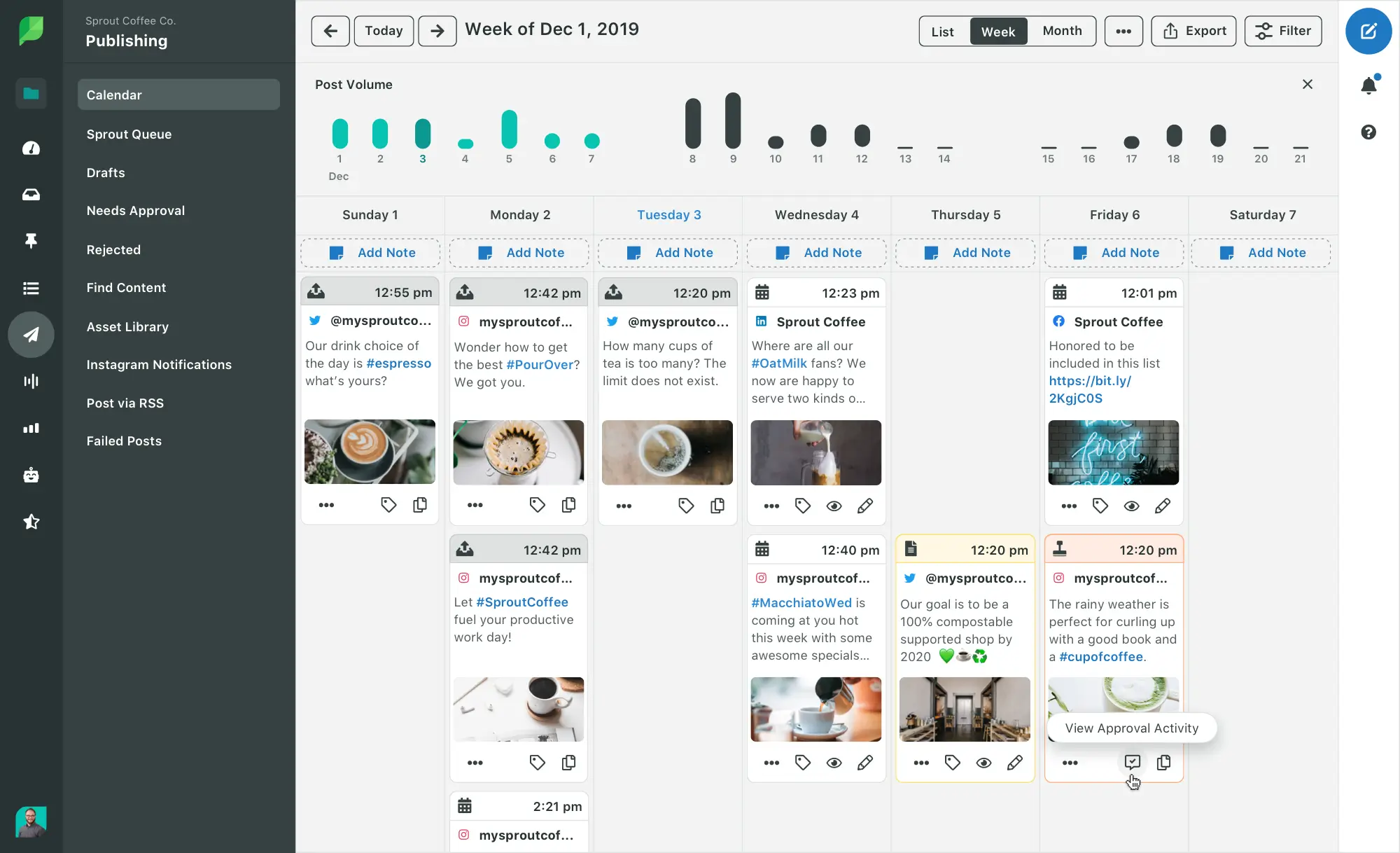
Sprout Social feature overview
Sprout Social is a social media management platform built around data, reporting, and structured workflows in one central hub. It supports cross-platform publishing, centralized inbox management, and detailed performance tracking, which makes it easier to manage multiple social media profiles at scale.
From my experience using Sprout Social, the platform feels polished and reliable, especially when working with analytics and reports. The platform places a strong emphasis on analytics and reporting, with tools designed to produce presentation-ready reports for internal teams, leadership, or external stakeholders.
Here are Sprout Social’s key social media features:
- Manage anywhere from five to unlimited social profiles, depending on the plan, with brand keyword tracking and higher custom keyword limits available on upper tiers.
- Access iOS and Android mobile apps on all plans to publish content, engage with audiences, and monitor activity while on the go.
- Plan content using a shared publishing calendar with advanced scheduling, queues, drafts, bulk scheduling, Instagram grid planning, and multi-profile, multi-network publishing.
- Publish all major content formats, including multimedia posts, with built-in image editing, location tagging, alt text generation, hashtag suggestions, and optimal send-time recommendations.
- Use native AI-powered publishing tools such as Enhance Post, AI-generated alt text, content suggestions, and ViralPost® timing optimization.
- Automate publishing through RSS feeds, automated feeds, post pausing, evergreen queues, and advanced publishing rules available on higher-tier plans.
- Organize content with campaign tags, digital asset and content libraries, custom link tracking, and automated link tracking on Professional plans and above.
- Manage engagement from a unified social inbox with message assignment, collision detection, moderation tools, saved replies, case management, tagging, and full conversation history.
- Monitor brands and keywords in real time using social listening tools, including sentiment analysis, spike alerts, and automated message classification on Advanced and Enterprise plans.
- Support customer care workflows with case routing, reply approvals, CSAT and NPS surveys, chatbots, inbox rules, macros, and AI-assisted reply and conversation summaries.
- Track performance metrics using post-level, profile-level, group-level, and cross-network analytics, including competitor reports, paid social reporting, and Google Analytics integration.
- Create and schedule custom reports with branding options, team and care reporting, scheduled delivery, and BI tool integrations on higher-tier plans.
- Connect with any popular social channel, including Instagram, Facebook, X, TikTok, LinkedIn, Threads, YouTube, Pinterest, Google Business Profile, WhatsApp, review sites, ad accounts, and eCommerce platforms.
- Integrate with business systems such as Shopify, WooCommerce, Salesforce, HubSpot, Zendesk, Microsoft Dynamics, and Marketo on Advanced and Enterprise plans.
- Use built-in integrations with Canva, Adobe Express, Google Drive, Dropbox, Slack, Bitly, and multiple digital asset management tools.
- Access 24/5 phone and live chat support, onboarding help, and additional resources for self-service training across all plans.
What I like about Sprout Social
Using Sprout Social day to day, the interface feels clear and predictable, even when managing multiple brands at once. Publishing across channels is straightforward, and the reporting tools make it easy to see how posts are performing without extra setup. That lines up with what many teams mention when they talk about Sprout: it’s the right tool if you need reliable cross-platform publishing and reports that are easy to act on.
What users are saying about Sprout Social’s pros:
- “I love using Sprout Social for social publishing across different channels simultaneously. It makes it easy to publish once and post everywhere. The analytics module in Sprout Social has been a blessing, as it helps me understand how well the published post is performing.” – Karan K., Software Developer (Source)
- “Easy-going and convenient scheduling on all social platforms.” – Mason M., Brand Account Manager (Source)
- “I appreciate how the platform allows me to track social activity from various platforms for each brand. The saved responses feature is also helpful, and overall, I find it easy to use.” – Verified User, Marketing and Advertising (Source)
- “Sprout Social offers some of the best social media reporting I have encountered. In addition, it is user-friendly and integrates smoothly into our workflows and systems.” – Christian E., Owner (Source)
- “What I like most about Sprout Social is its intuitive, easy-to-use interface paired with powerful customization options and robust data tracking that makes performance insights clear and actionable.” – Mackenzie L., Senior Social Media Manager II (Source)
What I dislike about Sprout Social
In my opinion, the biggest drawback with Sprout Social shows up around cost, especially for nonprofits adding more users or accounts. While going through reviews, I’ve noticed a consistent pattern. Social listening is often described as delayed or unreliable, and several teams say integrations and customization start to feel limiting over time.
What users are saying about Sprout Social’s cons:
- “The platform occasionally provides inaccurate assessments of comments and messages, particularly when it comes to sentiment, priority, and the intent behind messages.” – Verified User, Marketing and Advertising (Source)
- “Sprout Social’s pricing has become excessive. Since we began using the platform, the cost per seat and per social account has increased significantly.” – Christian E., Owner (Source)
- “My main dislike is that Sprout Social’s social listening capabilities could be more robust and flexible compared to other tools.” – Mackenzie L., Senior Social Media Manager II (Source)
- “I dislike that social listening works great but sometimes there are delays.” – Karan K., Software Developer (Source)
Sprout Social pricing
- Offers a 30-day free trial
- Paid plans start at $199
3. Buffer – Best simple scheduler for small nonprofit teams
Does Buffer have a special discount for nonprofits?
Yes, Buffer offers a 50% discount on plans for nonprofits.
Who is Buffer best for?
Buffer works well for small nonprofit organizations, solo communicators, and teams where one person handles social media alongside other responsibilities. I’ve found it fits best when the goal is to stay consistent across multiple social media accounts without spending time learning a complex system.
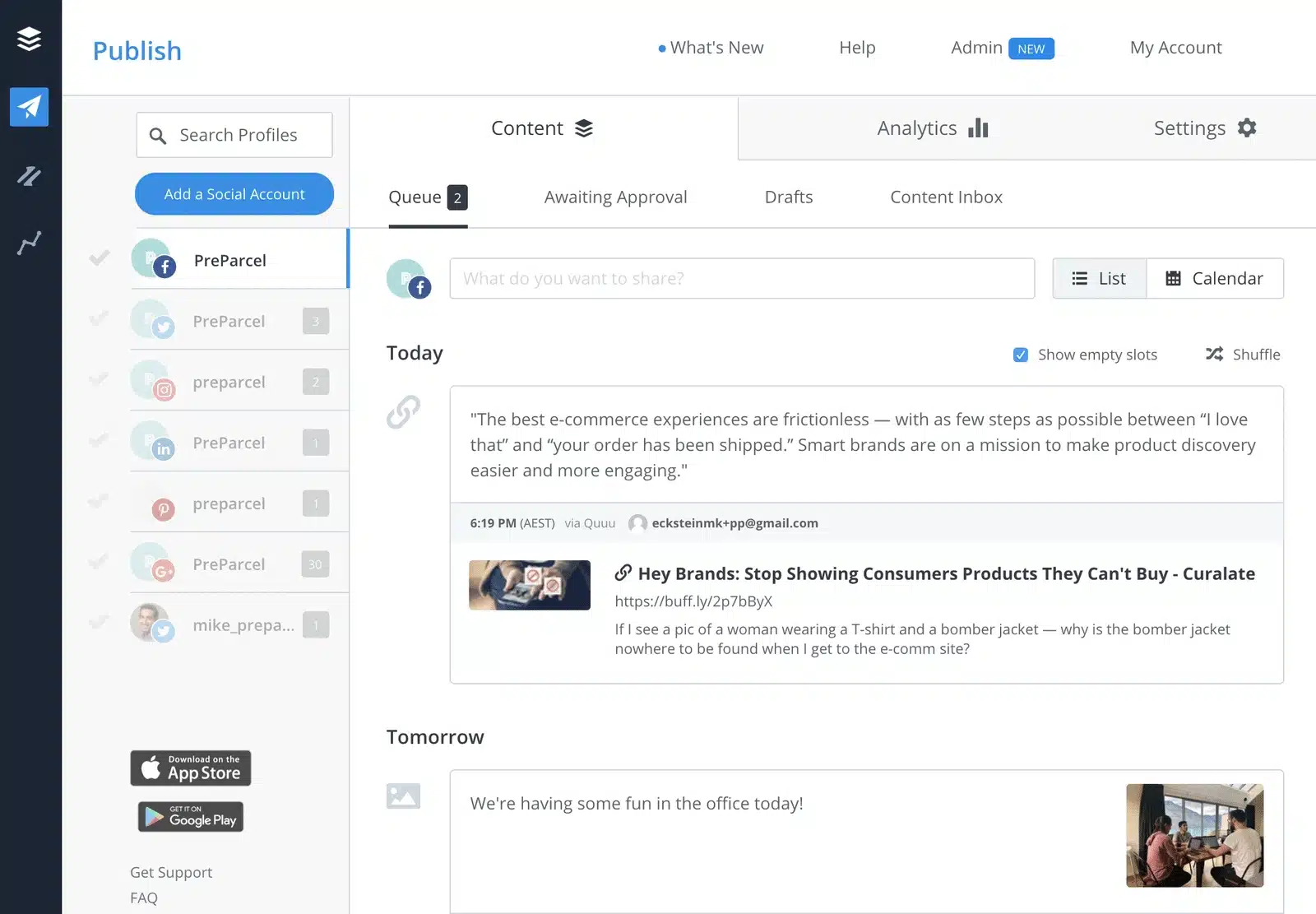
Buffer feature overview
Buffer is a lightweight social media management tool built around publishing and scheduling. It focuses on a clean interface, quick setup, and reliable posting across multiple platforms. The visual calendar and simple post customization make day-to-day publishing easy to manage, while drafts and built-in AI tools help support ongoing content creation.
For nonprofits that prioritize ease of use, speed, and affordability over advanced features, Buffer can be a dependable option for managing social media content consistently.
Here are Buffer’s key social media features:
- Plan and organize content ideas using an ideas board, drafts, templates, tags, and a kanban-style board view, with unlimited drafts and AI-assisted content refinement available on all plans.
- Use Buffer’s AI Assistant with unlimited credits to refine copy, repurpose existing content, and generate replies that adapt to your brand voice over time.
- Publish and schedule posts across multiple platforms using queues, threaded posts for X, Bluesky, Threads, and Mastodon, duplicate posts, and a visual content calendar.
- Manage posting workflows with scheduled post limits on lower plans, and unlock unlimited scheduling, channel groups, and hashtag management on higher tiers.
- Schedule first comments for Instagram and LinkedIn, set custom video covers, and automatically shorten links, with advanced options available on paid plans.
- Maintain posting consistency with reminder notifications for Instagram, TikTok, and YouTube when native publishing is required.
- Reply to comments across LinkedIn, X, Threads, Instagram, Facebook, and Bluesky from a single interface.
- Use AI-powered replies, saved replies, comment insights, and convert comment threads into new post ideas.
- Monitor performance with post-level analytics, engagement history, performance summaries, custom analytics, audience demographics, and best-time-to-post suggestions on paid plans.
- Export reports as spreadsheets, PDFs, or images, with branded reporting available on higher-tier plans.
- Collaborate with teams using internal notes, approval workflows, custom permissions, and support for one to unlimited users, depending on the plan.
- Protect accounts with two-factor authentication included on all plans.
- Create a simple Start Page, a link-in-bio style landing page that counts as a channel within your plan.
- Connect with tools like Canva, Unsplash, Dropbox, Google Drive, OneDrive, WordPress, Feedly, Pocket, Bitly, Zapier, and IFTTT through built-in integrations.
- Capture content quickly using Buffer’s browser extension and import media directly into your publishing queue.
What I like about Buffer
After testing Buffer, what stood out most was how easy it is to get started. The interface stays clean, managing multiple social media accounts from one place feels straightforward, and the visual calendar makes scheduling social media posts simple to follow. That matches what reviews tend to highlight as well, especially around its beginner-friendly setup and cross-platform scheduling.
What users are saying about Buffer’s pros:
- “I find the capability to schedule posts across multiple platforms at once extremely beneficial, saving me a lot of time and effort.” – Mahesh D. M., Video Editor (Source)
- “I like that I can save unlimited drafts until I can queue them.” – Melissa S., Content Writer and Strategist (Source)
- “Buffer application is user-friendly, easy to use, and affordable.” – Simon N., Accounting Specialist (Source)
- “Key highlights include its user-friendly interface, ability to customize posts for different platforms and the content calender used to schedule the Ad-Posts.” – Charanteja N., Digital Marketing Executive (Source)
- “I love that it has a clean, intuitive interface that’s easy to pick up even for beginners. Using Buffer it has been a great experience managing all our social media accounts in one place. Buffer enables us to publish and schedule on all our major platforms such us Facebook, X, and Pinterest. Buffer technical support team has to be the best in the market.” – Yoyo W., Content Creator and Specialist (Source)
What I dislike about Buffer
While looking through Buffer more closely, the limits became clearer around analytics, engagement, and publishing flexibility. The reporting stays surface-level, engagement tools feel sparse, and some posting options are restricted. Reviews tend to echo the same concerns, especially around analytics depth and occasional reliability issues.
What users are saying about Buffer’s cons:
- “I dislike Buffer mostly regarding its limited analytics, high pricing for advanced features, and occasional performance issues.” – Charanteja N., Digital Marketing Executive (Source)
- “Posts sometimes fail to send or get stuck, or they have to manually retry.” – Yoyo W., Content Creator and Specialist (Source)
- “Using Buffer, it’s impossible to post to our Instagram account.” – Simon N., Accounting Specialist (Source)
- “I just think the calendar display could be better.” – Melissa S., Content Writer and Strategist (Source)
Buffer pricing
- Offers a 14-day free trial and a free plan
- Paid plans start at $6/month
4. – Best visual-first tool for nonprofit campaigns on Instagram and TikTok
Does have a special discount for nonprofits?
Yes, offers a 50% discount on the Growth plan to nonprofits.
Who is best for?
works well for nonprofit teams that care most about visual consistency and planning content visually. If your focus is on keeping feeds cohesive and easy to manage, rather than building detailed workflows or reports, tends to feel intuitive and quick to pick up.
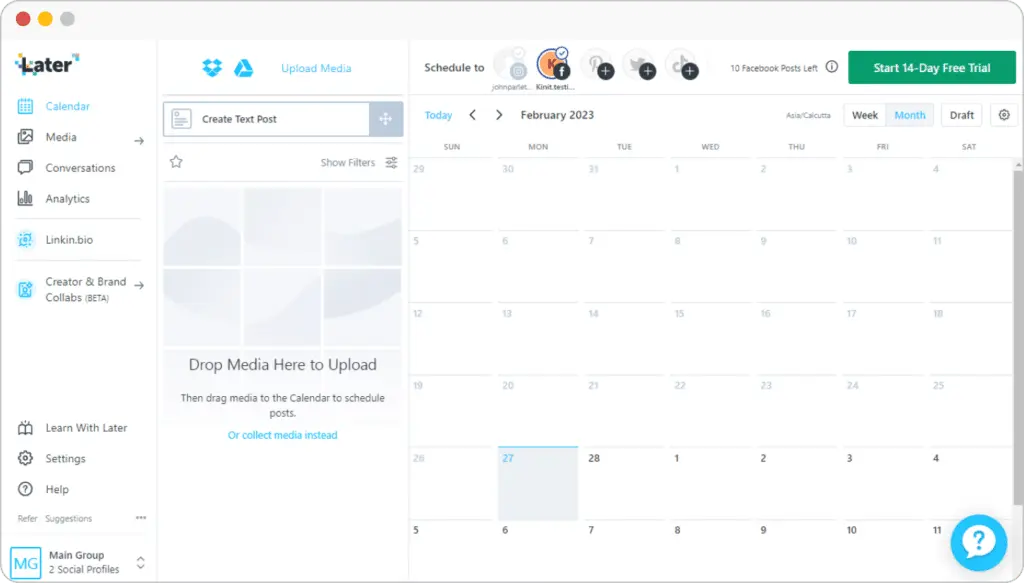
feature overview
is built around visual planning and brand consistency. It’s a good fit for nonprofits that rely on image-led platforms and want a clear way to organize posts, preview content before it goes live, and maintain a consistent look across channels.
The visual content calendar sits at the center of the platform. Planning posts for Instagram, Pinterest, TikTok, LinkedIn, and other supported platforms is straightforward thanks to drag-and-drop scheduling and dependable auto-publishing. Saved captions, drafts, and post previews help teams move quickly while keeping control over how content appears.
also supports brand-focused workflows through media libraries, Link in Bio customization, and light AI tools for captions and post ideas, which can be useful for social media campaigns, events, or fundraising links.
Here are ’s key social media features:
- Schedule and auto-publish content to Instagram, Facebook, Threads, Pinterest, TikTok, LinkedIn, YouTube, and Snapchat
- Manage between one and six Social Sets, supporting up to 48 social profiles in total, depending on the plan
- Publish up to 30 posts per profile each month on Starter plans, with unlimited posting available on the Scale plan
- Plan content using a visual calendar with multi-profile scheduling, drafts, saved captions, and post previews
- Receive best-time-to-post recommendations for Instagram on all plans and for TikTok on higher-tier plans
- Generate captions and content ideas with AI tools, with monthly credit limits that vary by plan
- Access Instagram-specific features such as first comments, user and location tagging, and product tagging on Growth and Scale plans
- Store unlimited media and create visuals using built-in editing tools, Canva exports, and a Chrome extension
- Collect and organize user-generated content by profile, hashtag, tag, or mention on higher-tier plans
- Track performance using platform-specific analytics for Instagram, TikTok, Facebook, Threads, and Pinterest
- Access up to two years of historical analytics data on the Scale plan
- Use custom analytics, competitive benchmarking, and future insights on the Scale plan
- Monitor Link in Bio performance with analytics, location-based views, and Google Analytics integration
- Build customizable Link in Bio pages with buttons, featured media, affiliate links, email capture, and Mailchimp integration, without branding
- Collaborate with teams through shared calendars, notes, comments, activity logs, and approval workflows on Growth and Scale plans
- Manage conversations from Instagram, Facebook, and TikTok using a built-in social inbox on paid plans
- Protect accounts with two-factor authentication and single sign-on
- Plan and manage content from anywhere using iOS and Android mobile apps
What I like about
From spending time with , its strength clearly lies in visual planning. Scheduling feels intuitive, setup is quick, and it works especially well for visually driven social media platforms. That matches how users tend to describe it too, with frequent mentions of post previews, media organization, and the flexibility of Link in Bio pages as standout features.
What users are saying about ’s pros:
- “I particularly enjoy the ability to select media by labels and upload multiple pictures simultaneously, which streamlines my content organization and posting process.” – K. E. (Source)
- “ Social is a magnificent visual content planner or calendar, that guides companies on visualizing posts.” – Graziana C., IT Manager (Source)
- “I use Social to manage social accounts for multiple businesses. I find the content search option great and appreciate the ability to share posts externally for review.” – Ginny G. (Source)
- “I appreciate Social because the team continually innovates, constantly bringing fresh ideas and improvements that enhance the user experience.” – José H. (Source)
- “ Social is robust in visual scheduling, where it coordinates with the calendar and plan or schedule for the day for content sharing, through posts.” – Sonalina C., Digital Marketing Manager (Source)
What I dislike about
The gaps showed up for me most clearly around reporting and scale. Lower plans offer limited analytics, video formatting can be restrictive, and publishing has a few constraints. Account reconnections also come up from time to time. These issues tend to surface once teams manage multiple clients or need more detailed reporting.
What users are saying about ’s cons:
- “It would be great to be able to see follower analytics that break down by country for my reporting.” – Ginny G. (Source)
- “ Social has issues with video compression, and this hurts the quality of the video.” – Graziana C., IT Manager (Source)
- “ Social faces some shallow analytics criticism, which fails to capture the social media insights from this app.” – Sonalina C., Digital Marketing Manager (Source)
- “Sometimes I need to reconnect my account for verification, which can be annoying for both myself and my clients.” – José H. (Source)
pricing
- Offers a 14-day free trial
- Paid plans start at $25/month
5. Hootsuite – Best for nonprofits managing many accounts at scale
Does Hootsuite have a special discount for nonprofits?
Yes, pricing for nonprofits is $39 per user/month for the Standard plan or $99 per user/month for Advanced, as opposed to the normal $249 and $499.
Who is Hootsuite best for?
Hootsuite works best for larger nonprofit organizations and teams that manage a high volume of social media activity across multiple platforms. It’s a strong fit when reporting, monitoring, and structured workflows matter as much as publishing, especially for organizations with multiple team members involved in social media.
Hootsuite feature overview
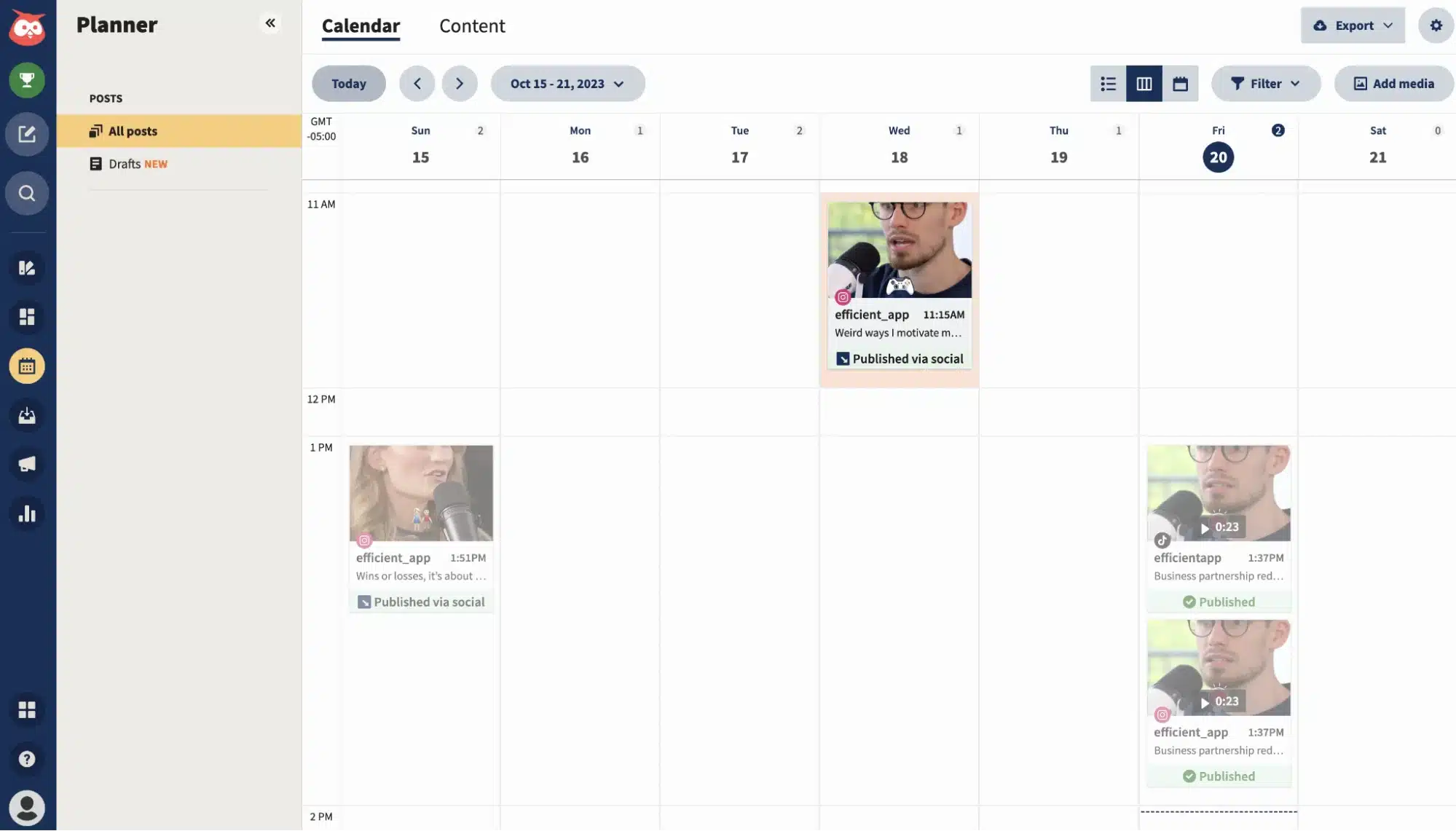
Hootsuite is built for teams that need more structure around social media. After using it, it’s clear the focus is on keeping social media posts, conversations, and performance tracking in one place, with analytics, inbox management, and team workflows doing most of the heavy lifting.
The dashboard pulls scheduling, monitoring, and reporting into a single view. I found it easy to plan and schedule content across multiple social media platforms, manage messages and comments from a unified inbox, and keep an eye on social media performance through customizable reports and an analytics dashboard.
The added competitive benchmarking and social listening tools help provide context around trends, audience behavior, and brand mentions.
For larger nonprofit teams, the collaboration features allow them to provide access to relevant team members. Approval workflows, message assignments, and role-based access make it easier to coordinate work across multiple people. For nonprofits running ongoing social media campaigns across several channels, that structure can be helpful, even if it comes with more complexity and higher costs than simpler tools.
Here are Hootsuite’s key social media features:
- Manage up to 10 or unlimited social accounts, depending on plan, with support for multiple users, team permissions, and optional departmental organization
- Draft, schedule, and publish unlimited social media posts across multiple networks using a visual content calendar, bulk scheduling, and cross-network scheduling
- Plan content with tools like whiteboard planning spaces, target audience settings, approval workflows, internal comments, and outbound message tagging
- Get publishing support through recommended posting times, best-time-to-publish charts, and AI assistance via OwlyGPT for content ideas, captions, and hashtags
- Create and edit content using built-in media editing, an asset and content library, free stock photos, GIPHY, and integrations with Adobe Express and Canva
- Use link management tools including link shortening, automated link tracking, custom-branded URLs, Bitly integration, link-in-bio pages (Hootbio), and the ability to pause scheduled posts
- Track social media performance with customizable analytics dashboards, post-level and cross-network reports, performance scores, and personalized recommendations
- Benchmark performance using industry and competitive benchmarking, with support for tracking up to 20 competitors on higher plans
- Generate, schedule, and share analytics reports with notes, logos, basic or advanced exporting, scheduled delivery, and internal report sharing
- Measure ROI and team impact with reporting for team productivity, inbox performance, social attribution, and paid social analytics
- Manage conversations through a centralized social inbox with message assignment, saved replies, automations, tagging, collision avoidance, business hours, and conversation history
- Support customer care workflows with inbox rules, case management, contact notes, resolve reasons, auto-resolved conversations, and customer service surveys
- Use advanced messaging tools such as AI-powered smart replies, generative AI chatbots, skill-based routing, agent collaboration, and Salesforce integration
- Monitor brand conversations with social listening tools, including keyword search, trending topics discovery, sentiment analysis, image recognition, peak detection, and alerts
- Access listening data with historical coverage, forecasting, scheduled reports, data exporting, and benchmarking, powered by Talkwalker on higher tiers
- Plan and analyze paid social campaigns with tools for ad publishing, boosting posts, automated boosting, and social ads reporting
- Extend social media efforts with employee advocacy, brand review monitoring, advanced inbox tools for customer care, and deeper social attribution analytics
What I like about Hootsuite
I found that Hootsuite’s biggest strength is how much it centralizes in one place. Scheduling, monitoring conversations, and tracking social media performance all sit in the Hootsuite dashboard, which makes it easier to manage multiple social media accounts and keep social media campaigns moving without constant platform switching. That matches what reviewers repeatedly emphasize as social media pros.
What users are saying about Hootsuite’s pros:
- “What I like best about Hootsuite is that it lets me manage all my social media accounts in one place. I can schedule posts in advance, monitor comments and messages, and track performance without switching between platforms. It saves me a lot of time, keeps my work organized, and helps me stay consistent with posting and engagement. It also makes it easier to collaborate with a team and keep everything running smoothly.” – Diego S., Community Manager (Source)
- “What I like best about Hootsuite is the fact that you don’t have to learn anything new to post to your social media networks. It’s all in one place and that’s why I like it so much. I can schedule a post and then I don’t have to worry about it being shared on all my social media accounts, it just happens.” – Vuyile M., Managing Director (Source)
- “Hootsuite is great for scheduling content on a variety of social media platforms. It has some nice built-in features like link shortening and analytics reporting.” – Maddie S., Marketing Manager (Source)
- “Throughout all this continual turmoil, Hootsuite has been a constant, evolving along with the changing social media landscape. From analytics, to scheduling, to listening, Hootsuite is the only scheduling tool that does everything. Customer service is topnotch as well. Truly, I love everything about Hootsuite!” – AZ Media M., Owner (Source)
- “I especially love the customization of the reports, which makes it easy to share analytics with my team members who are not on the Hootsuite platform. Additionally I feel as though the Hootsuite customer support is quick to address questions, concerns and suggestions.” – Paola R., Content Marketing Manager (Source)
What I dislike about Hootsuite
While testing Hootsuite, I felt friction around cost, interface density, and flexibility at scale. As more accounts, users, or advanced tools are added, the platform can feel heavier than expected, and pricing climbs quickly. Reviewers call out the same issues, especially when comparing plans or managing larger volumes of content.
What users are saying about Hootsuite’s cons:
- “What I dislike about Hootsuite is that it can feel a bit slow and sometimes not very intuitive, especially when managing many accounts or large amounts of content. Some useful features are locked behind more expensive plans, and the analytics could be more flexible and detailed. Also, the interface can feel a bit crowded, which makes simple tasks take more clicks than necessary.” – Diego S., Community Manager (Source)
- “The pricing jumps noticeably between plans, and key advanced features (such as bulk scheduling or advanced analytics) are locked behind higher tiers. For small businesses or solopreneurs, that makes the overall cost difficult to justify, especially if you don’t need a full suite of higher-tier tools.” – Vuyile M., Managing Director (Source)
- “There are some quirks about the platform. For example, I can’t make a custom shortened link for different platforms in the same window. I have to do it separately, which ends up defeating the purpose of having an efficient, one-window process for multiple platforms. Occasionally a post won’t go through as well due to API issues. Additionally, the cost can be pricey compared to some other platforms on the market.” – Maddie S., Marketing Manager (Source)
- “While I am fortunate to have started as a legacy member of Hootsuite, I know that prices have had to increase to accommodate updates and changes. I know these updates in tools are absolutely essential, and appreciate that Hootsuite invests in improvements for users. But many of the social media manager groups to which I belong talk about how pricey it is for solopreneurs.” – AZ Media M., Owner (Source)
- “I just wish the content calendar preview offered a full month view instead of only showing one week at a time. Having a month-long calendar would make things much easier to manage and greatly improve usability.” – Paola R., Content Marketing Manager (Source)
Hootsuite pricing
- Offers a 30-day free trial
- Paid plans start at $249 per user/month
Frequently asked questions
1. What should nonprofits look for in a social media management tool?
Nonprofits should prioritize ease of use, affordable pricing, and tools that save valuable time. Features like post scheduling, a unified inbox for messages, basic analytics, and team collaboration matter more than advanced enterprise add-ons for their social media strategy.
2. Are social media management tools worth it for small nonprofit teams?
Yes, for small teams or volunteer-led nonprofits, a management tool reduces manual work and helps create posts and maintain a consistent posting schedule. Even basic scheduling and engagement tracking can free up hours each week, leaving more time for mission-critical initiatives.
3. Do nonprofits get discounts on social media management tools?
Many platforms offer nonprofit or charity discounts, but eligibility and savings vary. It’s worth checking each provider’s pricing page or contacting sales directly to see if nonprofit rates or special plans are available.
Choose the right social media tool for your nonprofit
The right social media management tool for a nonprofit depends on how your team actually works day to day. Some tools are better when reporting and analytics matter most. Others shine when visual planning or simple scheduling is the priority.
What tends to get difficult for nonprofits is keeping everything moving at once. Social media posts need to go out regularly, messages need replies, and performance still needs to be tracked, often alongside other mission-critical initiatives. When that work is spread across too many tools, it’s harder to stay consistent.
If the main challenge is staying organized and keeping social media manageable, SocialBee supports nonprofits with tools for planning, posting, and engagement across platforms. Having one place to create posts, schedule content, manage conversations, and check performance makes it easier to keep momentum without adding to the team’s workload. Start your 14-day free trial today.