Robert Triggs / Android Authority
In a bid to relive a bit of my youth, I’ve been enjoying some retro games for the past month or so (I’m currently a good way through Wind Waker), but have been confined to playing on my couch. While I could install a bunch of games on my daily driver, that is a distraction I’d rather not carry around all the time. Thankfully, I have a few aging handsets around to use instead, so I picked up my Pixel 7 Pro and set about converting it into an Android gaming handheld.
While the Pixel 7 Pro is far from a powerhouse handset by today’s standards, emulation often doesn’t require as much horsepower as you think, especially for 16-bit consoles. Not to mention that you can often get away with 720p on a small phone screen for more demanding 3D consoles. In any case, I was curious to see how an aging model would fare.
Setting up an emulation station

Robert Triggs / Android Authority
Before booting up any games, I first needed to choose the right software. There’s a healthy selection of emulators for various consoles out there, but for a dedicated gaming device, I don’t want to have to dig through app icons and drawers to find what I want to play. An aggregator or combined front-end is what I need.
I’ve previously had success using RetroAssembly to host games on my NAS and share them with any device on my network. However, this is less ideal when using my phone outside my home, and it doesn’t support some of the more demanding emulators. RetroArch is the gold standard for supporting a wide range of emulators under one roof. Its UI isn’t the prettiest, but you can pair it up with front-ends like LaunchBox or Daijisho if that’s really a problem.
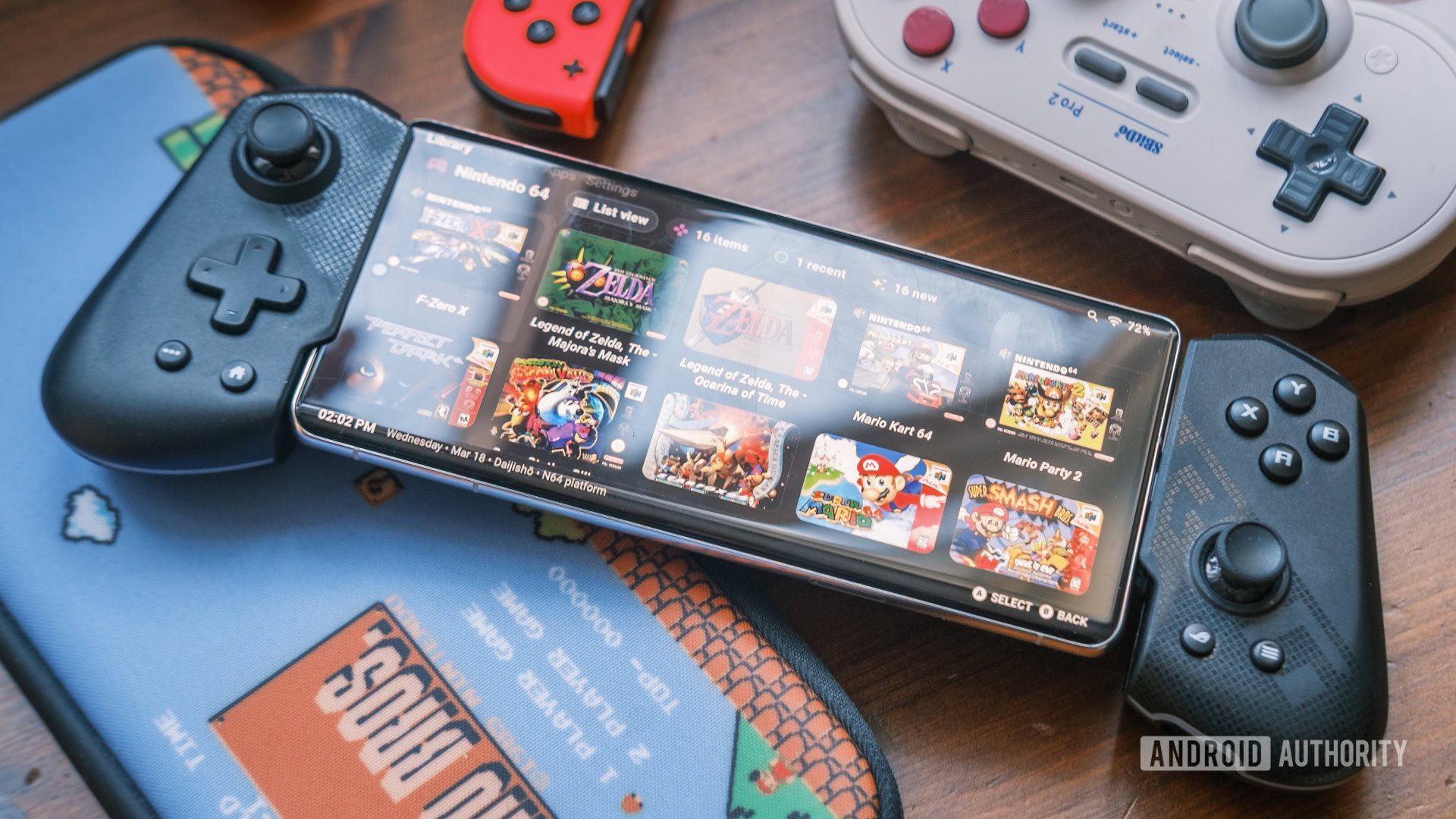
Daijisho’s UI paired with RetroArch’s power is a match made in emulation heaven.
After a bit of trial and error, I decided on a combination of RetroArch as the core and Daijisho as the front end. I couldn’t get comfortable with RetroArch’s UI and deep settings menus on a small phone screen, whereas Daijisho is built for controller navigation. It requires a little bit of back-and-forth configuration, but Daijisho is smart enough to automatically recognise installed RetroArch cores and boot straight into the app to launch the game. Likewise, RetroArch is robust enough to automatically detect and configure my ASUS ROG Tessen game controller, saving me from painstaking manual mapping.
With everything set up, I can have a nice controller-friendly UI, complete with wonderful cover art to reminisce through. At the same time, it’s backed by a robust core ecosystem that I can configure to work with other emulators as well. I used this ability to boot up NetherSX2, DuckStation, and Dolphin (I was having graphical issues with RetroArch’s Dolphin core) while still launching all my games from a unified UI. If there’s a better emulation setup on Android, I’d love to see it.
How good (or bad) is performance on older phones

Robert Triggs / Android Authority
OK, so my phone now looks like a top-tier portable emulation station, but how does a three-year-old phone actually perform in 2026?
Well, obviously, archaic 2D titles perform really well. You can run Atari classics and SNES games on a potato these days. To test the Pixel 7 Pro’s hardware a little more, I booted up PlayStation, PlayStation 2, and GameCube games that are more likely to stress the aging Tensor G2 processor. For testing, I stuck with the emulator defaults, targeting the suggested 1920×1080 rendering resolution (typically slightly taller for 4:3 aspect-ratio games), and experimented with both OpenGL and Vulkan to find the best performance.
I started at the deep-end and dived into NetherSX2 to revisit perhaps the best game soundtrack of all time with Need for Speed: Most Wanted. I initially cranked the graphics resolution up to 3x for some nice crisp visuals, but this was far too ambitious. In fact, even native 480p rendering with the speedier Vulkan graphics API struggles to maintain playable frame rates on the Tensor G2’s Mali-G710 MP7 GPU.

While you can achieve above 30fps in the opening cinematic with lower graphical options, the game still spends a lot of time running at 0.5x speed or worse, making it essentially unplayable. I wasn’t going to press my luck with other PS2 titles; Need for Speed may be demanding, but it’s hardly known as the console’s visual showpiece. The Tensor G2 CPU appears to be the main limitation here, as changing the rendering resolution made little real difference.
Not wanting to give up on the golden Sony years, I dropped down a gear to the OG PlayStation via the DuckStation emulator.

That was more like it. Metal Gear Solid is a little wobbly during the intro clip, but overall, the experience feels plenty smooth with very few major stutters. Crash Bandicoot 2 performs even more consistently, holding close to its 50fps PAL target. It’s not flawless, but PlayStation and other early 3D console emulation is well within the phone’s capabilities, especially if you drop down from a 5x/1080p target rendering resolution.
To try and find where the Pixel 7 Pro’s performance limit lies, I tried out the faster-paced F:Zero GX and Mario Kart Wii on GameCube and Wii via the Dolphin emulator with a crisp-looking 3x resolution upscale applied.

This feels more like the sweet spot for my aging Pixel 7 Pro. It’s able to hit a pretty close-to-steady 60 fps with an arguably overkill 3x native resolution. Games look great and run really well — and I could probably drop to 2x native resolution for a few extra FPS if needed. This likely speaks to how well-optimized Dolphin is; despite the GameCube and Wii being more powerful than the PS2, they run surprisingly well on older mobile hardware.
It’s interesting that OpenGL is by far the better pick here compared to other emulators, where Vulkan often offers a performance boost. Out of curiosity, I dropped Vulkan to 1x resolution, and it was still stuck below 45fps, with barely any improvement in the worst frames. Best to stick to OpenGL here, then.
Breathe some new life into older handsets

Hadlee Simons / Android Authority
I never had particularly high hopes for my Pixel 7 Pro for really high-end emulation. The handset’s performance was modest for its time, well behind today’s flagship phones in emulation performance, and even outpaced by some modern mid-rangers.
The Pixel 7 Pro may be past its prime, but it still hits a sweet spot for emulating virtually everything up to the GameCube era — making it a surprisingly capable handheld in 2026. The phone would otherwise have remained sitting in my drawer for years to come, so I’m mostly just glad I’ve given an older phone a new lease of life as an Android gaming handheld.
Performance limitations aside, my old phone is now a great emulation handheld.
Needless to say, I won’t be running cutting-edge PlayStation 4 emulators on my Pixel 7 Pro, but that was never really a plan. I have a huge back catalog of PlayStation, N64, GameCube, and other platforms to work my way back through, which will probably last me another decade. Being able to take these on the road with a unified UI and virtually seamless controller support is all I ever really wanted.
I’m sure there are more tweaks and improvements that I’ll make to the setup in the coming weeks and months. If you have any Android emulator tips or tricks to share, let me know.
Don’t want to miss the best from Android Authority?


Thank you for being part of our community. Read our Comment Policy before posting.