

By using this site, you agree to the Privacy Policy and Terms of Use.
Accept
World of SoftwareWorld of SoftwareWorld of Software
  • News
  • Software
  • Mobile
  • Computing
  • Gaming
  • Videos
  • More
    • Gadget
    • Web Stories
    • Trending
    • Press Release
Search
  • Privacy
  • Terms
  • Advertise
  • Contact
Copyright © All Rights Reserved. World of Software.
Reading: I wish every Android phone had Samsung’s Separate App Sound feature. Here’s how it works
Share
Sign In
Notification Show More
Font ResizerAa
World of SoftwareWorld of Software
Font ResizerAa
  • Software
  • Mobile
  • Computing
  • Gadget
  • Gaming
  • Videos
Search
  • News
  • Software
  • Mobile
  • Computing
  • Gaming
  • Videos
  • More
    • Gadget
    • Web Stories
    • Trending
    • Press Release
Have an existing account? Sign In
Follow US
  • Privacy
  • Terms
  • Advertise
  • Contact
Copyright © All Rights Reserved. World of Software.
World of Software > News > I wish every Android phone had Samsung’s Separate App Sound feature. Here’s how it works
News

I wish every Android phone had Samsung’s Separate App Sound feature. Here’s how it works

News Room
Last updated: 2026/02/07 at 10:21 AM
News Room Published 7 February 2026
Share
I wish every Android phone had Samsung’s Separate App Sound feature. Here’s how it works
SHARE

Joe Maring / Android Authority

Modern Samsung phones are packed with features — more so than practically any other Android brand. That’s obviously great if you like to tinker with and get the most out of your phone, but with so many tools at your disposal, it’s only natural to have some of them fall through the cracks.

This was the case with Samsung’s hidden Wi-Fi menu we highlighted a few months ago, and we’ve also now stumbled across a little-known audio feature that’s arguably even cooler. It’s called “Separate App Sound,” and if you aren’t using it now, you’ll absolutely want to. Here’s how it works.

Did you know about Samsung’s Separate App Sound feature?

56 votes

How to use Separate App Sound on your Samsung phone

Samsung Galaxy S25 Series 21

Lanh Nguyen / Android Authority

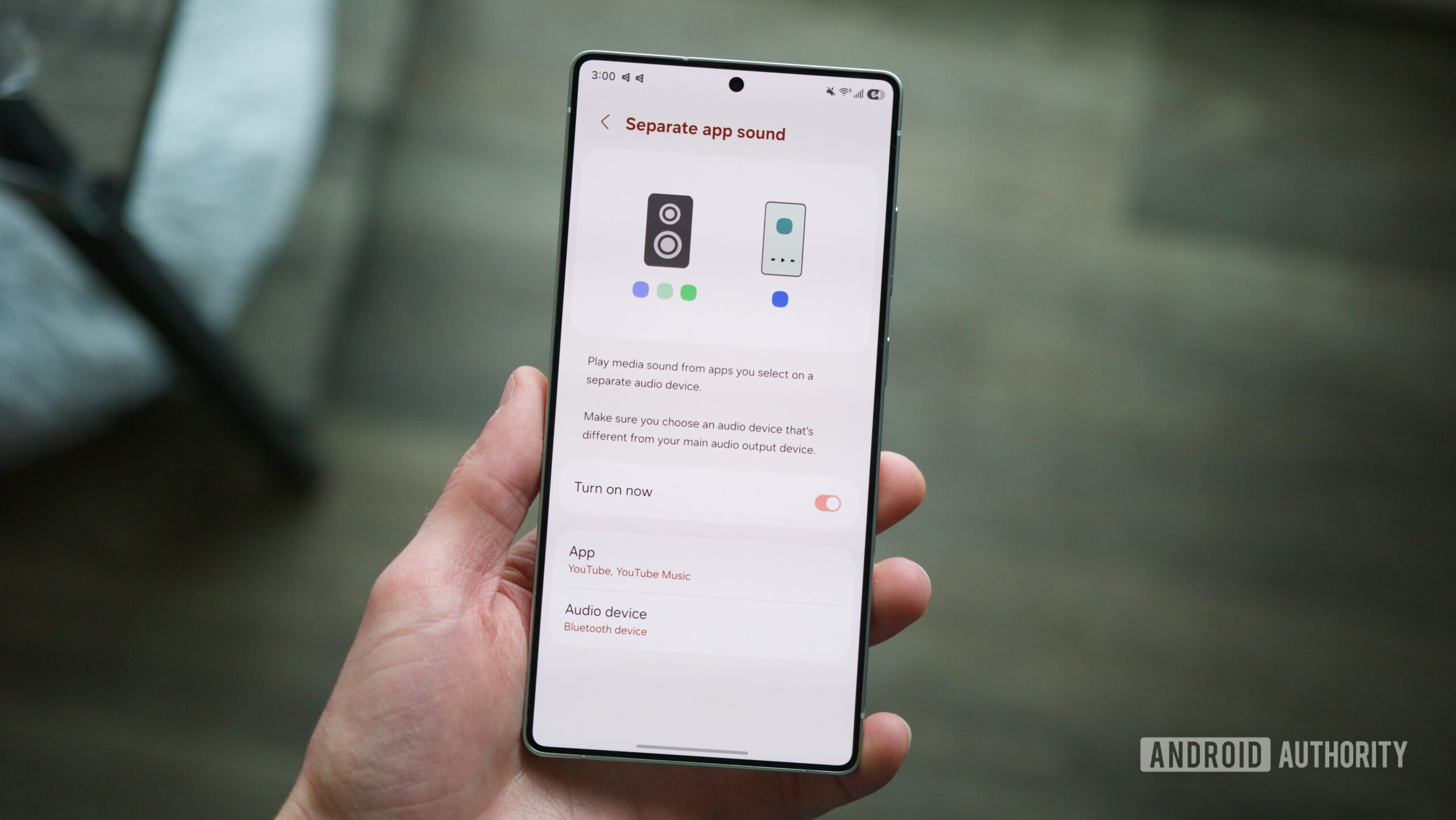
In short, Separate App Sound does exactly what the name implies — it allows you to play audio from specific apps through different audio sources. For example, if you want YouTube Music to play through your Bluetooth speaker while notification alerts and other sounds still play through your phone’s speaker, you can do that.

Separate App Sound isn’t that difficult to find in the Settings app, but if you don’t know where to look, chances are you’ve glossed over it countless times without ever realizing. To set up and enable Separate App Sound, here’s what to do.

  1. Open the Settings app on your Samsung phone.
  2. Tap Sounds and vibrations.
  3. Scroll to the bottom of the page.
  4. Tap Separate app sound.
  5. Tap the toggle next to Turn on now.
  6. Tap Select on the pop-up.
  7. Select which apps you want.
  8. Select whether to play the audio from those apps on your phone or a connected Bluetooth device.

After doing this, you may receive a notification about changing your main audio output. For example, I selected YouTube and YouTube Music to play through the Pixel Buds 2a, but they were already set as the main audio device on my phone. After tapping OK on this notification, my Samsung phone speakers switched to the main audio output, while the Pixel Buds 2a were limited to playing YouTube and YouTube Music audio, as configured above.

Separate App Sound first debuted with the Galaxy S8 series in 2017, so while it’s far from a new feature, it’s also rarely discussed. I’ve been writing about Android phones for years, and I wasn’t aware of its existence until a recent post on r/SamsungGalaxy pointed it out.

Why should you use or care about Separate App Sound?

Separate App Sound notification on a Samsung phone.

Joe Maring / Android Authority

That’s how Separate App Sound works, but how is this useful, and why would you ever want to use it? There are a few scenarios where it can come in handy.

Let’s say you have some friends over at your place and are playing music on your phone via a Bluetooth speaker. Normally, all smartphone audio would play through the Bluetooth speaker, including phone calls and notifications, which you probably won’t want interrupting the music. With Separate App Sound, you could set it up so that only your music app audio plays through the Bluetooth speaker, while all other audio uses your phone speaker.

When my partner and I drive together, their phone is often connected to the car’s Bluetooth to play music. However, if they open a Snapchat message or scroll past a video on Instagram, the audio from that app interrupts the music. Separate App Sound could prevent that from happening. If you’re listening to a Google Meet or Teams call through your earbuds, you can route all other audio to your phone’s speaker.

There are countless scenarios like this where Separate App Sound can come to the rescue, and it’s a shame that no other Android brand other than Samsung has cracked the code on how to make it work. For a Pixel user like me, I’m bummed. But for any Samsung users out there, have fun with this one.

Don’t want to miss the best from Android Authority?

google preferred source badge light@2xgoogle preferred source badge dark@2x

Thank you for being part of our community. Read our Comment Policy before posting.

Sign Up For Daily Newsletter

Be keep up! Get the latest breaking news delivered straight to your inbox.
By signing up, you agree to our Terms of Use and acknowledge the data practices in our Privacy Policy. You may unsubscribe at any time.
Share This Article
Facebook Twitter Email Print
Share
What do you think?
Love0
Sad0
Happy0
Sleepy0
Angry0
Dead0
Wink0
Previous Article You Can’t Farm the Farmers… Or Can You? Post-Saturation Life in SaaS & Info Space | HackerNoon You Can’t Farm the Farmers… Or Can You? Post-Saturation Life in SaaS & Info Space | HackerNoon
Next Article Apple is working to make CarPlay compatible with AI chatbots like ChatGPT |  News Apple is working to make CarPlay compatible with AI chatbots like ChatGPT | News
Leave a comment

Leave a Reply Cancel reply

Your email address will not be published. Required fields are marked *

Stay Connected

248.1k Like
69.1k Follow
134k Pin
54.3k Follow

Latest News

iPhone Air vs iPhone 17: What’s the difference?
Gadget
Apple will introduce these key Messages app upgrades very soon, here’s what they are – 9to5Mac
News
Save 51% on Beats Studio Pro Headphones With This Unbeatable Deal
News
Apple’s 2017 MacBook Air is now 80% off
News

You Might also Like

Apple will introduce these key Messages app upgrades very soon, here’s what they are – 9to5Mac
News

Apple will introduce these key Messages app upgrades very soon, here’s what they are – 9to5Mac

4 Min Read
Save 51% on Beats Studio Pro Headphones With This Unbeatable Deal
News

Save 51% on Beats Studio Pro Headphones With This Unbeatable Deal

6 Min Read
Apple’s 2017 MacBook Air is now 80% off
News

Apple’s 2017 MacBook Air is now 80% off

4 Min Read

FsfsKnsssnfunvnnkngngn

0 Min Read
//

World of Software is your one-stop website for the latest tech news and updates, follow us now to get the news that matters to you.

Quick Link

  • Privacy Policy
  • Terms of use
  • Advertise
  • Contact

Topics

  • Computing
  • Software
  • Press Release
  • Trending

Sign Up for Our Newsletter

Subscribe to our newsletter to get our newest articles instantly!

World of SoftwareWorld of Software
Follow US
Copyright © All Rights Reserved. World of Software.
Welcome Back!

Sign in to your account

Lost your password?