

By using this site, you agree to the Privacy Policy and Terms of Use.
Accept
World of SoftwareWorld of SoftwareWorld of Software
  • News
  • Software
  • Mobile
  • Computing
  • Gaming
  • Videos
  • More
    • Gadget
    • Web Stories
    • Trending
    • Press Release
Search
  • Privacy
  • Terms
  • Advertise
  • Contact
Copyright © All Rights Reserved. World of Software.
Reading: If Your Android Phone Won’t Charge, These Common Issues Might Be Why – BGR
Share
Sign In
Notification Show More
Font ResizerAa
World of SoftwareWorld of Software
Font ResizerAa
  • Software
  • Mobile
  • Computing
  • Gadget
  • Gaming
  • Videos
Search
  • News
  • Software
  • Mobile
  • Computing
  • Gaming
  • Videos
  • More
    • Gadget
    • Web Stories
    • Trending
    • Press Release
Have an existing account? Sign In
Follow US
  • Privacy
  • Terms
  • Advertise
  • Contact
Copyright © All Rights Reserved. World of Software.
World of Software > News > If Your Android Phone Won’t Charge, These Common Issues Might Be Why – BGR
News

If Your Android Phone Won’t Charge, These Common Issues Might Be Why – BGR

News Room
Last updated: 2026/03/08 at 3:09 AM
News Room Published 8 March 2026
Share
If Your Android Phone Won’t Charge, These Common Issues Might Be Why – BGR
SHARE


Weiyi Zhu/Getty Images

Nothing can be more frustrating than realizing your phone hasn’t charged right when you’re about to leave the house. Unless you’re carrying a decade-old phone, the phone should charge even if your charging habits are poor. Your Android device can stop charging for a variety of reasons, including damage to the charging port, a bad cable, or an outlet that isn’t providing enough power.

No matter the reason, you’ll want to investigate it, as a damaged charging port, unlike a problem with your cableisn’t always a cheap fix (and not every phone has wireless charging to bypass the problem). Fortunately, there are telltale signs for what might be causing it, and in some cases, even easy fixes you can apply safely. In even rarer situations, the charging issue is caused by a persistent software glitch, such as Samsung’s Wet Status, which prevents charging altogether if the device detects moisture inside its port.

Everything we cite can be done by yourself or involves a low-cost replacement. Though if you suspect a deeper issue with your Android phone, you’ll want to check the warranty status or have the device serviced by a technician.

Your device’s USB port and cables could be the culprit
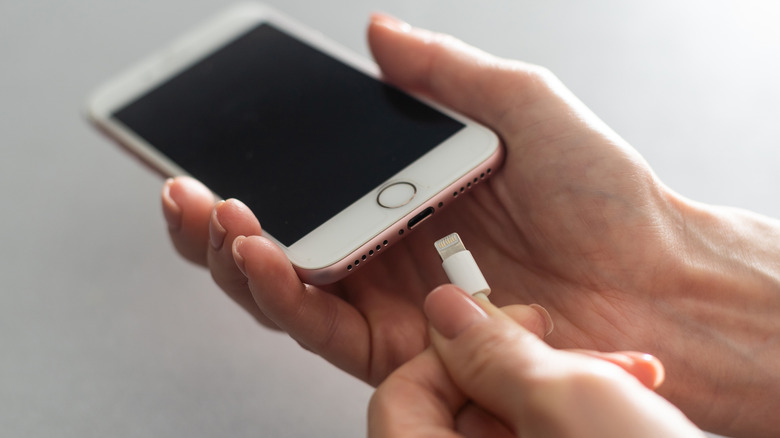

plugging in a usb-c cable into a phone while a person is holding it
Andrew Angelov/Shutterstock

Unless you can see physical damage inside the charging port, the other likely reason your Android phone might not be charging properly is that the USB port is dirty, or the cable has done its time.

Generally, if your USB port is dirty, you won’t feel a click when you plug in your cable (and you might notice a bit of resistance), and in some cases, you might see lint if you shine a light directly on it. Cleaning a dirty port isn’t too bad if you have some household tools, like a plastic dental pick or a tiny brush that can slot inside. In trickier situations, if something sticky is inside, use 91% isopropyl alcohol with a cotton swab to clean it — but turn off your device and let it thoroughly dry before turning it on again. A clogged port can happen, especially if you’ve had your device for several years, and it’s accumulated dirt — so it’s not a bad idea to routinely clean it as one of your first early steps.

If your device’s port looks completely clean, and you’re sure there’s no damage, then the next easy solution involves changing your cables. They will experience wear and tear over time, and this wearing is faster if you’re using a cheap cable from Amazon rather than the one your original equipment manufacturer provides. The simple fix is to use another one or buy a replacement.

A wet status notification could stop your phone from charging
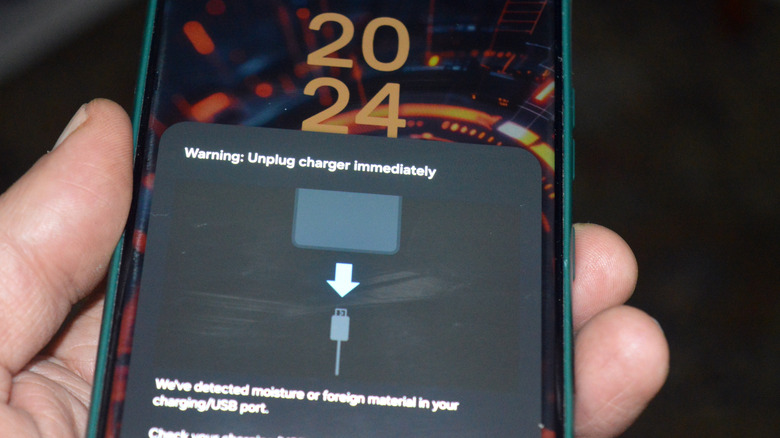

warning to unplug charger immediately because of moisture or foreign material detection
Tamer A Soliman/Shutterstock

Some manufacturers include moisture protection settings directly into the Android phone. For example, Samsung’s Moisture Detection notification will appear on your phone if you attempt to charge it after it’s been exposed to moisture or a wet substance. This safety mechanism activates the moment you try to plug in your phone. In most cases, you should take this notification seriously and let your device fully dry before charging it. The mechanism prevents your phone from short-circuiting or corroding. Phones have an IP rating indicating how resistant they are to dust and water, and how much exposure they can withstand. Even if your device was in contact with small amounts of water and the IP rating means it can handle it, it is recommended to keep it thoroughly dry anyway.

But in some cases, the notification will persist even after a full day of letting your device dry. Aside from the most tried-and-true method of restarting your Android phone, a few tricks may work to clear it. The first one involves moving charging locations; if you’ve decided to charge your phone in the bathroom, try a spot with better ventilation, like your living room. The other involves changing your cable, which might have been slightly damp from water condensation. If that doesn’t work and the notification persists, you can try turning off fast charging in your battery menu, or clear the USB settings cache in your app settings.


Sign Up For Daily Newsletter

Be keep up! Get the latest breaking news delivered straight to your inbox.
By signing up, you agree to our Terms of Use and acknowledge the data practices in our Privacy Policy. You may unsubscribe at any time.
Share This Article
Facebook Twitter Email Print
Share
What do you think?
Love0
Sad0
Happy0
Sleepy0
Angry0
Dead0
Wink0
Previous Article Don’t Look Away From This Deal: This 55-Inch TCL 4K Smart TV Is Now Under 0 Don’t Look Away From This Deal: This 55-Inch TCL 4K Smart TV Is Now Under $200
Next Article Sydney Opera House to be lit up by art created on iPad Sydney Opera House to be lit up by art created on iPad
Leave a comment

Leave a Reply Cancel reply

Your email address will not be published. Required fields are marked *

Stay Connected

248.1k Like
69.1k Follow
134k Pin
54.3k Follow

Latest News

Discount Code Inside: Get 6TB of Encrypted Cloud Workspace for a One-Time Payment
News
I played all 3 new Resident Evil games on Switch 2 — here’s the one you should buy
News
Apple iPhone 17e vs. Google Pixel 10a: Which Budget Phone Should You Buy?
News
What the Fork? Roblox’s AI to Replace Swearing With More ‘Civil’ Language
News

You Might also Like

Discount Code Inside: Get 6TB of Encrypted Cloud Workspace for a One-Time Payment
News

Discount Code Inside: Get 6TB of Encrypted Cloud Workspace for a One-Time Payment

4 Min Read
I played all 3 new Resident Evil games on Switch 2 — here’s the one you should buy
News

I played all 3 new Resident Evil games on Switch 2 — here’s the one you should buy

9 Min Read
Apple iPhone 17e vs. Google Pixel 10a: Which Budget Phone Should You Buy?
News

Apple iPhone 17e vs. Google Pixel 10a: Which Budget Phone Should You Buy?

10 Min Read
What the Fork? Roblox’s AI to Replace Swearing With More ‘Civil’ Language
News

What the Fork? Roblox’s AI to Replace Swearing With More ‘Civil’ Language

4 Min Read
//

World of Software is your one-stop website for the latest tech news and updates, follow us now to get the news that matters to you.

Quick Link

  • Privacy Policy
  • Terms of use
  • Advertise
  • Contact

Topics

  • Computing
  • Software
  • Press Release
  • Trending

Sign Up for Our Newsletter

Subscribe to our newsletter to get our newest articles instantly!

World of SoftwareWorld of Software
Follow US
Copyright © All Rights Reserved. World of Software.
Welcome Back!

Sign in to your account

Lost your password?