By using this site, you agree to the Privacy Policy and Terms of Use.
Accept
World of SoftwareWorld of SoftwareWorld of Software
  • News
  • Software
  • Mobile
  • Computing
  • Gaming
  • Videos
  • More
    • Gadget
    • Web Stories
    • Trending
    • Press Release
Search
  • Privacy
  • Terms
  • Advertise
  • Contact
Copyright © All Rights Reserved. World of Software.
Reading: It took Google four years to fix the Pixel Watch’s terrible screenshots
Share
Sign In
Notification Show More
Font ResizerAa
World of SoftwareWorld of Software
Font ResizerAa
  • Software
  • Mobile
  • Computing
  • Gadget
  • Gaming
  • Videos
Search
  • News
  • Software
  • Mobile
  • Computing
  • Gaming
  • Videos
  • More
    • Gadget
    • Web Stories
    • Trending
    • Press Release
Have an existing account? Sign In
Follow US
  • Privacy
  • Terms
  • Advertise
  • Contact
Copyright © All Rights Reserved. World of Software.
World of Software > News > It took Google four years to fix the Pixel Watch’s terrible screenshots
News

It took Google four years to fix the Pixel Watch’s terrible screenshots

News Room
Last updated: 2025/12/11 at 9:05 AM
News Room Published 11 December 2025
Share
It took Google four years to fix the Pixel Watch’s terrible screenshots
SHARE

Rita El Khoury / Android Authority

TL;DR

  • An update to Google’s Pixel Watch companion app is rolling out, fixing its horrendous screenshot problem.
  • New screenshots get saved automatically on the phone’s local storage.
  • A new screenshot no longer dismisses the previous one, so you can finally take bulk screenshots without losing them.

I never thought the day would come, but after more than four years, Google has finally rolled out an update to the Pixel Watch companion app on Android that fixes the horrendous way it manages screenshots coming from the watch. Every silly issue we used to have while taking watch screenshots is now gone, and you can finally take multiple shots in a row without stopping to save or share each one and without them vanishing.

Don’t want to miss the best from Android Authority?

google preferred source badge light@2xgoogle preferred source badge dark@2x

Version 4.2.0.833802130 of the Pixel Watch app rolled out to my Pixel 10 Pro XL yesterday evening, and I’m pretty sure it’s the one that triggered this change. Just a few hours earlier, I had taken a bunch of screenshots on my watch for another article, and I had to manage them the silly and horrifically slow old way. That is, each screenshot I used to take on my Pixel Watch got sent to the phone with only an option to share it. There was no save or view, so I often resorted to sharing to Google Drive to keep it safe. Plus, every new screenshot dismissed the previous one, even if I hadn’t acted on that one yet.

This created so many frustrating moments where I thought I’d saved a few snaps on my watch, only to realize that my phone just showed me the last one and the rest had vanished. Go back, repeat one by one. It was a stupid time waste, and for someone who has a job covering Pixels and smartwatches, it made my own life (and several of my colleagues) hell. Ask Kaitlyn how many times she had to repeat some exercises during her tests because she took a few screenshots in a row and forgot that the Pixel Watch only keeps the last one!

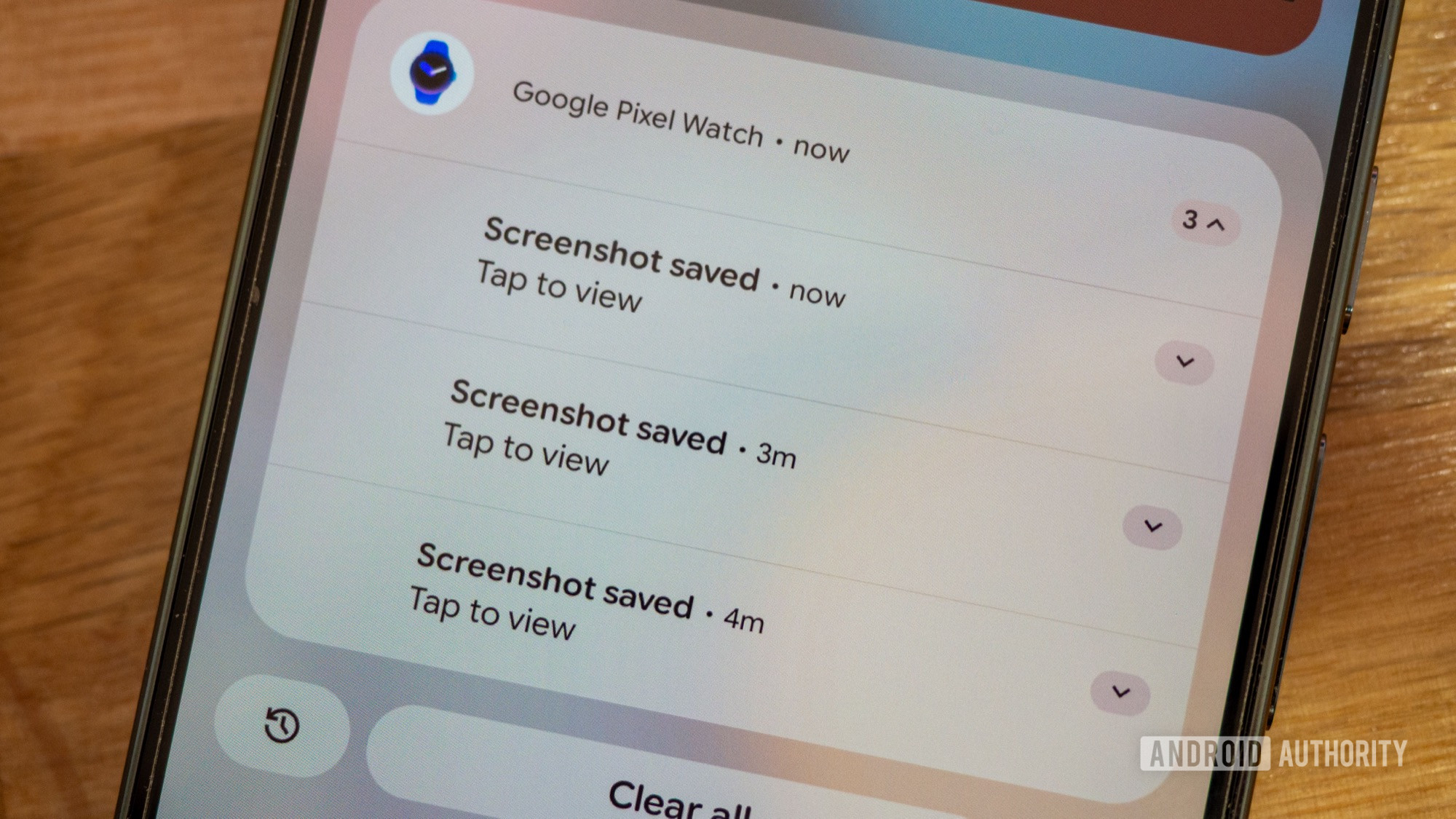
The new Pixel Watch app changes that completely. Now, screenshot notifications stack up on top of each other, instead of dismissing one another. I can bulk-screenshot on my watch, then grab my phone, and every notification is there for me to see. Better yet? They get automatically saved on the phone’s local storage under Pictures > Watch screenshots. No more manual saving one by one.

Google has also changed the default notification action. Instead of sharing, it’s now Tap to view, which opens the screenshot in any gallery or photo viewer on your phone. If you choose Google Photos, you’ll be able to back it up, edit it, add it to an album, and more. All standard stuff, but we had to go through hoops to achieve these before. Thankfully, not anymore.

Thank you for being part of our community. Read our Comment Policy before posting.

Sign Up For Daily Newsletter

Be keep up! Get the latest breaking news delivered straight to your inbox.
By signing up, you agree to our Terms of Use and acknowledge the data practices in our Privacy Policy. You may unsubscribe at any time.
Share This Article
Facebook Twitter Email Print
Share
What do you think?
Love0
Sad0
Happy0
Sleepy0
Angry0
Dead0
Wink0
Previous Article Lucid (LCID) vows to fix Gravity software issues after complaints Lucid (LCID) vows to fix Gravity software issues after complaints
Next Article A Step-By-Step Guide to Activating IIS Client Certificate Mapping in Windows 11 | HackerNoon A Step-By-Step Guide to Activating IIS Client Certificate Mapping in Windows 11 | HackerNoon
Leave a comment

Leave a Reply Cancel reply

Your email address will not be published. Required fields are marked *

Stay Connected

248.1k Like
69.1k Follow
134k Pin
54.3k Follow

Latest News

Best Buy’s Holiday Chromebook Sale Is Spreading the Savings on Portable PCs
News
Better Artificial Intelligence (AI) Stocks for 2026: Nvidia or AMD?
News
INE Highlights Enterprise Shift Toward Hands-On Training Amid Widening Skills Gaps | HackerNoon
Computing
15 Ways Fintech Revolutionizes Financial Reporting: Expert Insights
Gadget

You Might also Like

Best Buy’s Holiday Chromebook Sale Is Spreading the Savings on Portable PCs
News

Best Buy’s Holiday Chromebook Sale Is Spreading the Savings on Portable PCs

6 Min Read
Better Artificial Intelligence (AI) Stocks for 2026: Nvidia or AMD?
News

Better Artificial Intelligence (AI) Stocks for 2026: Nvidia or AMD?

5 Min Read
1X struck a deal to send its ‘home’ humanoids to factories and warehouses |  News
News

1X struck a deal to send its ‘home’ humanoids to factories and warehouses | News

3 Min Read
Turn PDF headaches into hassle-free workflows with this  tool
News

Turn PDF headaches into hassle-free workflows with this $24 tool

3 Min Read
//

World of Software is your one-stop website for the latest tech news and updates, follow us now to get the news that matters to you.

Quick Link

  • Privacy Policy
  • Terms of use
  • Advertise
  • Contact

Topics

  • Computing
  • Software
  • Press Release
  • Trending

Sign Up for Our Newsletter

Subscribe to our newsletter to get our newest articles instantly!

World of SoftwareWorld of Software
Follow US
Copyright © All Rights Reserved. World of Software.
Welcome Back!

Sign in to your account

Lost your password?