Building AI features is straightforward until you need to integrate them into a production system.
In production, a simple ‘call an LLM’ often becomes:
- wiring HTTP/JMS/Kafka/file inputs,
- enforcing timeouts, retries, fallbacks,
- stitching context obtained from internal data sources,
- protecting secrets,
- making it testable without burning API credits,
- and ensuring the system is observable when issues occur overnight.
This is where Apache Camel excels. With Camel 4.5 and later, you can handle LLM calls as standard integration endpoints using camel-langchain4j-chat, powered by LangChain4j.
In this tutorial, you will build a Java 21 and Gradle project that demonstrates:
- Single-message chat (CHATSINGLEMESSAGE)
- Prompt templates + variables (CHATSINGLEMESSAGEWITHPROMPT)
- Chat history (CHATMULTIPLEMESSAGES)
- RAG with Camel’s Content Enricher (EIP + aggregator strategy)
- RAG via headers (simple “inject context” approach)
- A mock mode so everything executes in CI without API keys.
You’ll finish with a project you can reuse as a foundation for real integration flows, without turning your codebase into a “prompt spaghetti factory”.
What We’re Building
A small runnable CLI app that boots Camel Main (no Spring required) and runs five demos:
singleprompthistoryrag-enrichrag-header
You can run them all or one at a time from the command line.
Prerequisites
- Java 21
- Basic Apache Camel familiarity (routes,
direct:endpoints,ProducerTemplate) - Optional: OpenAI API key (the tutorial runs fully without it)
Architecture in One Picture
Here’s the mental model:
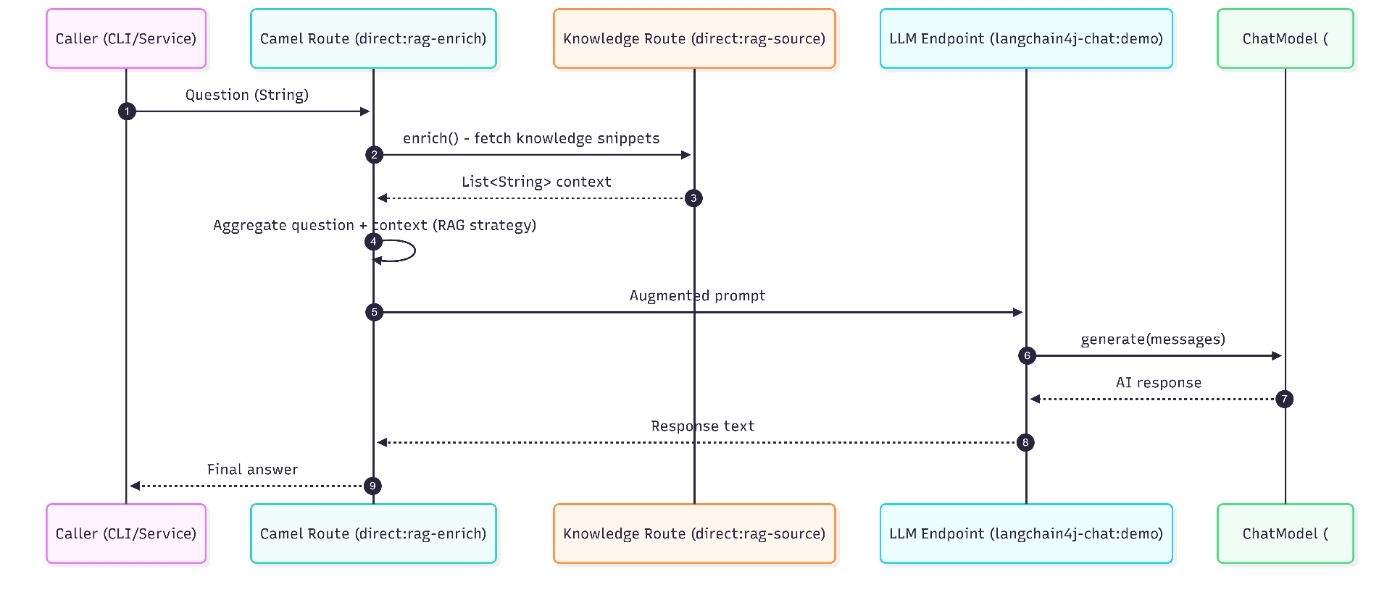
For RAG, Camel enriches the exchange before calling the LLM:
Project Setup
Tech Stack
- Java 21
- Apache Camel 4.17.0
- LangChain4j 1.10.0
- Gradle 8.x
- OpenAI GPT-4o-mini (optional)’
Folder Structure
camel-langchain4j-chat-demo/
├── build.gradle
├── settings.gradle
├── src/
│   ├── main/
│   │   ├── java/com/example/langchain4j/
│   │   │   ├── App.java
│   │   │   ├── ChatRoutes.java
│   │   │   ├── MockChatModel.java
│   │   │   └── ModelFactory.java
│   │   └── resources/
│   │       ├── application.properties
│   │       └── logback.xml
│   └── test/
│       └── java/com/example/langchain4j/
│           └── ChatRoutesTest.java
└── README.md
Step 1: Gradle Setup
Create build.gradle:
plugins {
    id 'java'
    id 'application'
}

group = 'com.example'
version = '1.0.0'

java {
    toolchain {
        languageVersion = JavaLanguageVersion.of(21)
    }
}

application {
    mainClass="com.example.langchain4j.App"
}

repositories {
    mavenCentral()
}

dependencies {
    implementation 'org.apache.camel:camel-core:4.17.0'
    implementation 'org.apache.camel:camel-main:4.17.0'
    implementation 'org.apache.camel:camel-langchain4j-chat:4.17.0'
    implementation 'dev.langchain4j:langchain4j-core:1.10.0'
    implementation 'dev.langchain4j:langchain4j-open-ai:1.10.0'
    implementation 'ch.qos.logback:logback-classic:1.5.15'
    testImplementation 'org.junit.jupiter:junit-jupiter:5.11.4'
    testImplementation 'org.apache.camel:camel-test-junit5:4.17.0'
    testImplementation 'org.assertj:assertj-core:3.27.3'
}

test {
    useJUnitPlatform()
}
And settings.gradle:
rootProject.name="camel-langchain4j-chat-demo"
Step 2: Configuration and Logging
application.properties
# Application Mode (mock or openai)
app.mode=openai

# OpenAI Configuration (only used when app.mode=openai)
openai.apiKey=sk-*****
openai.modelName=gpt-4o-mini
openai.temperature=0.3

# Apache Camel Configuration
camel.main.name=camel-langchain4j-chat-demo
camel.main.duration-max-seconds=0
camel.main.shutdown-timeout=30

# Logging Configuration
logging.level.root=INFO
logging.level.org.apache.camel=INFO
logging.level.com.example.langchain4j=DEBUG
logback.xml
<?xml version="1.0" encoding="UTF-8"?>
<configuration>
    <appender name="CONSOLE" class="ch.qos.logback.core.ConsoleAppender">
        <encoder>
            <pattern>%d{HH:mm:ss.SSS} [%thread] %-5level %logger{36} - %msg%n</pattern>
        </encoder>
    </appender>

    <root level="INFO">
        <appender-ref ref="CONSOLE"/>
    </root>

    <logger name="com.example.langchain4j" level="DEBUG"/>
    <logger name="org.apache.camel" level="INFO"/>
</configuration>
Step 3: Production-Friendly “Mock Mode” (No API Key Required)
If you want this to be more than a toy demo, you need a way to run it without external dependencies.
That’s why we implement a deterministic MockChatModel:
MockChatModel.java
package com.example.langchain4j;

import dev.langchain4j.data.message.AiMessage;
import dev.langchain4j.data.message.ChatMessage;
import dev.langchain4j.model.chat.ChatModel;
import dev.langchain4j.model.chat.request.ChatRequest;
import dev.langchain4j.model.chat.response.ChatResponse;

/**
 * Mock implementation of ChatModel for testing and demo without API keys.
 */
public class MockChatModel implements ChatModel {

    @Override
    public ChatResponse chat(ChatRequest request) {
        StringBuilder response = new StringBuilder("[MOCK] Responding to: ");

        if (request != null && request.messages() != null && !request.messages().isEmpty()) {
            ChatMessage lastMessage = request.messages().get(request.messages().size() - 1);
            // Use text() method which should exist
            String userText = "";
            try {
                userText = (String) lastMessage.getClass().getMethod("text").invoke(lastMessage);
            } catch (Exception e) {
                userText = lastMessage.toString();
            }

            // Generate deterministic response based on content
            if (userText.contains("recipe") || userText.contains("dish")) {
                response.append("Here's a delicious recipe with your requested ingredients!");
            } else if (userText.contains("Apache Camel")) {
                response.append("Apache Camel is a powerful integration framework!");
            } else if (userText.contains("capital")) {
                response.append("Paris is the capital of France.");
            } else {
                response.append("I understand your question about: ").append(userText.substring(0, Math.min(50, userText.length())));
            }
        } else {
            response.append("Hello! I'm a mock AI assistant.");
        }

        return ChatResponse.builder()
                .aiMessage(new AiMessage(response.toString()))
                .build();
    }
}
Why this matters in production:
- CI/CD runs don’t require an LLM.
- Unit tests are stable.
- Engineers can work offline.
- You can validate flow logic (routing, RAG, templates) before spending money.
Step 4: Choosing a Model at Runtime (OpenAI or Mock)
ModelFactory.java
package com.example.langchain4j;

import dev.langchain4j.model.chat.ChatModel;
import dev.langchain4j.model.openai.OpenAiChatModel;
import org.slf4j.Logger;
import org.slf4j.LoggerFactory;

import java.time.Duration;

/**
 * Factory to create ChatModel instances based on configuration.
 */
public class ModelFactory {
    private static final Logger log = LoggerFactory.getLogger(ModelFactory.class);

    public static ChatModel createChatModel(String mode, String apiKey, String modelName, Double temperature) {
        if ("openai".equalsIgnoreCase(mode) && apiKey != null && !apiKey.isEmpty()) {
            log.info("Creating OpenAI chat model with model: {}", modelName);
            return OpenAiChatModel.builder()
                    .apiKey(apiKey)
                    .modelName(modelName)
                    .temperature(temperature)
                    .timeout(Duration.ofSeconds(60))
                    .build();
        } else {
            log.info("Creating Mock chat model (API key not provided or mode is mock)");
            return new MockChatModel();
        }
    }
}
Step 5: The Camel Routes (Where AI Becomes “Just Another Endpoint”)
The Camel component URI looks like:
langchain4j-chat:chatId?chatModel=#beanName&chatOperation=OPERATION
chatIdis just an identifierchatModel=#chatModelreferences a bean in the Camel registrychatOperationcontrols the behavior
ChatRoutes.java
package com.example.langchain4j;

import dev.langchain4j.data.message.AiMessage;
import dev.langchain4j.data.message.ChatMessage;
import dev.langchain4j.data.message.SystemMessage;
import dev.langchain4j.data.message.UserMessage;
import dev.langchain4j.rag.content.Content;
import org.apache.camel.AggregationStrategy;
import org.apache.camel.Exchange;
import org.apache.camel.builder.RouteBuilder;
import org.apache.camel.component.langchain4j.chat.LangChain4jChat;

import java.util.ArrayList;
import java.util.List;
import java.util.Map;

/**
 * Apache Camel routes demonstrating camel-langchain4j-chat component usage.
 */
public class ChatRoutes extends RouteBuilder {

    @Override
    public void configure() throws Exception {

        // Demo 1: CHAT_SINGLE_MESSAGE - Simple question/answer
        from("direct:single")
            .log("Demo 1: Single message - Input: ${body}")
            .to("langchain4j-chat:demo?chatModel=#chatModel&chatOperation=CHAT_SINGLE_MESSAGE")
            .log("Demo 1: Response: ${body}");

        // Demo 2: CHAT_SINGLE_MESSAGE_WITH_PROMPT - Using prompt template with variables
        from("direct:prompt")
            .log("Demo 2: Prompt template - Variables: ${body}")
            .process(exchange -> {
                // Set the prompt template in header
                String template = "Create a recipe for a {{dishType}} with these ingredients: {{ingredients}}";
                exchange.getIn().setHeader("CamelLangChain4jChatPromptTemplate", template);
            })
            .to("langchain4j-chat:demo?chatModel=#chatModel&chatOperation=CHAT_SINGLE_MESSAGE_WITH_PROMPT")
            .log("Demo 2: Response: ${body}");

        // Demo 3: CHAT_MULTIPLE_MESSAGES - Chat with history/context
        from("direct:history")
            .log("Demo 3: Multiple messages with history")
            .process(exchange -> {
                // Build a conversation with system message, previous context, and user question
                List<ChatMessage> messages = new ArrayList<>();
                messages.add(new SystemMessage("You are a helpful AI assistant specialized in Apache Camel."));
                messages.add(new UserMessage("What is Apache Camel?"));
                messages.add(new AiMessage("Apache Camel is an open-source integration framework based on enterprise integration patterns."));
                messages.add(new UserMessage("What are some key features?"));

                exchange.getIn().setBody(messages);
            })
            .to("langchain4j-chat:demo?chatModel=#chatModel&chatOperation=CHAT_MULTIPLE_MESSAGES")
            .log("Demo 3: Response: ${body}");

        // Demo 4: RAG using Content Enricher pattern with LangChain4jRagAggregatorStrategy
        from("direct:rag-enrich")
            .log("Demo 4: RAG with Content Enricher - Question: ${body}")
            .enrich("direct:rag-source", new LangChain4jRagAggregatorStrategy())
            .to("langchain4j-chat:demo?chatModel=#chatModel&chatOperation=CHAT_SINGLE_MESSAGE")
            .log("Demo 4: Response: ${body}");

        // RAG knowledge source route
        from("direct:rag-source")
            .log("Fetching RAG knowledge...")
            .process(exchange -> {
                // Simulate fetching relevant documents/snippets
                List<String> knowledgeSnippets = new ArrayList<>();
                knowledgeSnippets.add("Apache Camel 4.x introduced the concept of lightweight mode for faster startup.");
                knowledgeSnippets.add("The camel-langchain4j-chat component supports multiple chat operations including single message, prompt templates, and chat history.");
                knowledgeSnippets.add("LangChain4j integration allows Camel routes to interact with various LLM providers like OpenAI, Azure OpenAI, and more.");

                exchange.getIn().setBody(knowledgeSnippets);
            });

        // Demo 5: RAG using CamelLangChain4jChatAugmentedData header
        from("direct:rag-header")
            .log("Demo 5: RAG with header - Question: ${body}")
            .process(exchange -> {
                String question = exchange.getIn().getBody(String.class);

                // Create augmented data content
                List<Content> augmentedData = new ArrayList<>();
                augmentedData.add(Content.from("Apache Camel version 4.0 was released in 2023 with major improvements."));
                augmentedData.add(Content.from("The LangChain4j component enables AI-powered integration patterns in Camel routes."));

                // Set augmented data in header
                exchange.getIn().setHeader("CamelLangChain4jChatAugmentedData", augmentedData);

                // Reset body to the question
                exchange.getIn().setBody(question);
            })
            .to("langchain4j-chat:demo?chatModel=#chatModel&chatOperation=CHAT_SINGLE_MESSAGE")
            .log("Demo 5: Response: ${body}");
    }

    /**
     * Custom aggregation strategy for RAG pattern using Content Enricher.
     */
    private static class LangChain4jRagAggregatorStrategy implements AggregationStrategy {
        @Override
        public Exchange aggregate(Exchange original, Exchange resource) {
            String question = original.getIn().getBody(String.class);
            List<String> knowledgeSnippets = resource.getIn().getBody(List.class);

            // Build augmented prompt with context
            StringBuilder augmentedPrompt = new StringBuilder();
            augmentedPrompt.append("Context:n");
            for (String snippet : knowledgeSnippets) {
                augmentedPrompt.append("- ").append(snippet).append("n");
            }
            augmentedPrompt.append("nQuestion: ").append(question);

            original.getIn().setBody(augmentedPrompt.toString());
            return original;
        }
    }
}
Why Camel’s approach is useful
Camel gives you EIPs (Enterprise Integration Patterns) that apply beautifully to AI:
- Content Enricher → RAG
- Circuit breaker → LLM resilience
- Throttling → cost control
- Dead letter channel → failure routing
- Idempotency → don’t process the same request twice
You don’t need a new architecture. You reuse proven integration patterns.
Step 6: Bootstrapping Camel Main + Running Demos
App.java
package com.example.langchain4j;

import dev.langchain4j.model.chat.ChatModel;
import org.apache.camel.CamelContext;
import org.apache.camel.ProducerTemplate;
import org.apache.camel.main.Main;
import org.slf4j.Logger;
import org.slf4j.LoggerFactory;

import java.util.HashMap;
import java.util.Map;

/**
 * Main application class demonstrating Apache Camel LangChain4j Chat component.
 */
public class App {
    private static final Logger log = LoggerFactory.getLogger(App.class);

    public static void main(String[] args) throws Exception {
        Main main = new Main();

        // Configure Camel Main
        main.configure().addRoutesBuilder(new ChatRoutes());

        // Initialize Camel context first (without starting routes)
        main.init();

        CamelContext camelContext = main.getCamelContext();

        // Read configuration from properties
        String mode = camelContext.resolvePropertyPlaceholders("{{app.mode}}");
        String apiKey = System.getenv("OPENAI_API_KEY");
        if (apiKey == null || apiKey.isEmpty()) {
            apiKey = camelContext.resolvePropertyPlaceholders("{{openai.apiKey}}");
        }
        String modelName = camelContext.resolvePropertyPlaceholders("{{openai.modelName}}");
        Double temperature = Double.parseDouble(camelContext.resolvePropertyPlaceholders("{{openai.temperature}}"));

        // Create and register ChatModel BEFORE starting routes
        ChatModel chatModel = ModelFactory.createChatModel(mode, apiKey, modelName, temperature);
        camelContext.getRegistry().bind("chatModel", chatModel);

        log.info("=".repeat(80));
        log.info("Apache Camel LangChain4j Chat Demo");
        log.info("Mode: {}", mode);
        log.info("=".repeat(80));

        // Now start Camel
        main.start();

        try {
            // Determine which demo(s) to run
            String demoMode = args.length > 0 ? args[0] : "all";

            ProducerTemplate template = camelContext.createProducerTemplate();

            switch (demoMode.toLowerCase()) {
                case "single":
                    runSingleMessageDemo(template);
                    break;
                case "prompt":
                    runPromptTemplateDemo(template);
                    break;
                case "history":
                    runChatHistoryDemo(template);
                    break;
                case "rag-enrich":
                    runRagEnrichDemo(template);
                    break;
                case "rag-header":
                    runRagHeaderDemo(template);
                    break;
                case "all":
                default:
                    runAllDemos(template);
                    break;
            }

            log.info("=".repeat(80));
            log.info("Demo completed! Shutting down...");
            log.info("=".repeat(80));

        } finally {
            // Shutdown after demos complete
            main.stop();
        }
    }

    private static void runAllDemos(ProducerTemplate template) {
        runSingleMessageDemo(template);
        runPromptTemplateDemo(template);
        runChatHistoryDemo(template);
        runRagEnrichDemo(template);
        runRagHeaderDemo(template);
    }

    private static void runSingleMessageDemo(ProducerTemplate template) {
        log.info("n" + "=".repeat(80));
        log.info("DEMO 1: CHAT_SINGLE_MESSAGE");
        log.info("=".repeat(80));

        String question = "What is the capital of France?";
        String response = template.requestBody("direct:single", question, String.class);

        log.info("Question: {}", question);
        log.info("Answer: {}", response);
    }

    private static void runPromptTemplateDemo(ProducerTemplate template) {
        log.info("n" + "=".repeat(80));
        log.info("DEMO 2: CHAT_SINGLE_MESSAGE_WITH_PROMPT (Prompt Template)");
        log.info("=".repeat(80));

        Map<String, Object> variables = new HashMap<>();
        variables.put("dishType", "pasta");
        variables.put("ingredients", "tomatoes, garlic, basil, olive oil");

        String response = template.requestBody("direct:prompt", variables, String.class);

        log.info("Template: Create a recipe for a {{dishType}} with these ingredients: {{ingredients}}");
        log.info("Variables: {}", variables);
        log.info("Answer: {}", response);
    }

    private static void runChatHistoryDemo(ProducerTemplate template) {
        log.info("n" + "=".repeat(80));
        log.info("DEMO 3: CHAT_MULTIPLE_MESSAGES (Chat History)");
        log.info("=".repeat(80));

        log.info("Building conversation with context...");
        String response = template.requestBody("direct:history", null, String.class);

        log.info("Final Answer: {}", response);
    }

    private static void runRagEnrichDemo(ProducerTemplate template) {
        log.info("n" + "=".repeat(80));
        log.info("DEMO 4: RAG with Content Enricher Pattern");
        log.info("=".repeat(80));

        String question = "What's new in Apache Camel 4.x?";
        String response = template.requestBody("direct:rag-enrich", question, String.class);

        log.info("Question: {}", question);
        log.info("Answer (with RAG context): {}", response);
    }

    private static void runRagHeaderDemo(ProducerTemplate template) {
        log.info("n" + "=".repeat(80));
        log.info("DEMO 5: RAG with CamelLangChain4jChatAugmentedData Header");
        log.info("=".repeat(80));

        String question = "Tell me about the LangChain4j integration in Camel";
        String response = template.requestBody("direct:rag-header", question, String.class);

        log.info("Question: {}", question);
        log.info("Answer (with augmented data): {}", response);
    }
}
Running It
Build + run all demos (mock mode)
./gradlew clean test
./gradlew run
Run one demo
./gradlew run --args="prompt"
./gradlew run --args="rag-enrich"
Enable OpenAI mode
Option A (properties):
app.mode=openai
openai.apiKey=sk-...
Option B (recommended): environment variable
Windows (PowerShell)
setx OPENAI_API_KEY "sk-..."
Then in application.properties you can use a placeholder:
openai.apiKey=${OPENAI_API_KEY:}
Example Output (Mock Mode)
You’ll see logs like:
=== DEMO 1: CHAT_SINGLE_MESSAGE ===
Q: What is the capital of France?
A: [MOCK] The capital of France is Paris.
Best Practices (The Stuff You’ll Appreciate )
1) Never hardcode API keys
Use environment variables or a secrets manager. Even in demos, set the pattern.
openai.apiKey=${OPENAI_API_KEY:}
2) Add timeouts and resilience early
LLMs are network calls. Treat them like any dependency: timeouts, retries, fallback.
In Camel, this typically becomes:
timeout()/circuitBreaker()(Resilience4j)onException()for controlled failure pathsthrottle()to protect budget and upstream limits
3) Keep prompts versioned and externalized
Prompts are “business logic”. Don’t bury them as strings in random methods.
At minimum: store templates in resources/ and load them, or manage them as versioned assets.
4) Use mock mode + tests to protect your pipeline
Your LLM code should be testable without network calls. That’s what MockChatModel gives you.
Unit Testing the Routes
ChatRoutesTest.java
package com.example.langchain4j;

import dev.langchain4j.data.message.UserMessage;
import dev.langchain4j.model.chat.request.ChatRequest;
import dev.langchain4j.model.chat.response.ChatResponse;
import org.apache.camel.CamelContext;
import org.apache.camel.ProducerTemplate;
import org.apache.camel.builder.RouteBuilder;
import org.apache.camel.test.junit5.CamelTestSupport;
import org.junit.jupiter.api.Test;

import java.util.HashMap;
import java.util.List;
import java.util.Map;

import static org.assertj.core.api.Assertions.assertThat;

/**
 * Unit tests for ChatRoutes using MockChatModel.
 */
public class ChatRoutesTest extends CamelTestSupport {

    @Override
    protected CamelContext createCamelContext() throws Exception {
        CamelContext context = super.createCamelContext();

        // Register MockChatModel for testing
        context.getRegistry().bind("chatModel", new MockChatModel());

        return context;
    }

    @Override
    protected RouteBuilder createRouteBuilder() {
        return new ChatRoutes();
    }

    @Test
    public void testSingleMessage() {
        ProducerTemplate template = context.createProducerTemplate();

        String question = "What is the capital of France?";
        String response = template.requestBody("direct:single", question, String.class);

        assertThat(response)
            .isNotNull()
            .isNotEmpty()
            .contains("MOCK")
            .contains("capital");
    }

    @Test
    public void testPromptTemplate() {
        ProducerTemplate template = context.createProducerTemplate();

        Map<String, Object> variables = new HashMap<>();
        variables.put("dishType", "pasta");
        variables.put("ingredients", "tomatoes, garlic, basil");

        String response = template.requestBody("direct:prompt", variables, String.class);

        assertThat(response)
            .isNotNull()
            .isNotEmpty()
            .contains("MOCK")
            .containsAnyOf("recipe", "dish");
    }

    @Test
    public void testChatHistory() {
        ProducerTemplate template = context.createProducerTemplate();

        String response = template.requestBody("direct:history", null, String.class);

        assertThat(response)
            .isNotNull()
            .isNotEmpty()
            .contains("MOCK");
    }

    @Test
    public void testRagEnrich() {
        ProducerTemplate template = context.createProducerTemplate();

        String question = "What's new in Apache Camel 4.x?";
        String response = template.requestBody("direct:rag-enrich", question, String.class);

        assertThat(response)
            .isNotNull()
            .isNotEmpty()
            .contains("MOCK")
            .containsAnyOf("Camel", "Apache");
    }

    @Test
    public void testRagHeader() {
        ProducerTemplate template = context.createProducerTemplate();

        String question = "Tell me about LangChain4j in Camel";
        String response = template.requestBody("direct:rag-header", question, String.class);

        assertThat(response)
            .isNotNull()
            .isNotEmpty()
            .contains("MOCK");
    }

    @Test
    public void testMockChatModel() {
        MockChatModel mockModel = new MockChatModel();

        ChatRequest request = ChatRequest.builder()
            .messages(List.of(new UserMessage("What is Apache Camel?")))
            .build();

        ChatResponse response = mockModel.chat(request);

        assertThat(response).isNotNull();
        assertThat(response.aiMessage()).isNotNull();
        assertThat(response.aiMessage().text())
            .contains("MOCK")
            .contains("Apache Camel");
    }
}
RAG: Two Approaches (When to Use Which)
| Approach | How it works | Best for | Tradeoff |
|—-|—-|—-|—-|
| Content Enricher (enrich) | Camel pulls context from one or more routes and merges it | Dynamic retrieval, multiple sources | Slightly more code (strategy) |
| Header-based (AUGMENTED_DATA) | You directly attach known context as structured content | Simple static context or already-retrieved context | Less flexible for complex retrieval logic |
In real projects, RAG often evolves like this:
- Start with header-based (fast, easy, predictable)
- Move to enrich() when retrieval becomes a workflow (vector DB, permissions, reranking)
Real-World Use Cases (Where This Pattern Fits)
Once you’re comfortable with camel-langchain4j-chat, the same structure powers:
- Customer support routing (tickets → context → response)
- Document pipelines (extract → summarize → classify → route)
- Data enrichment (incoming events → explain/label → persist)
- Ops assistants (logs/metrics → RAG → remediation steps)
The key is Camel: it already knows how to connect and orchestrate everything around the AI call.
Conclusion: Treat LLM Calls Like Integrations, Not “Special Snowflakes”
The biggest mindset shift is this:
An LLM is not an app. It’s a dependency—like a database, a queue, or an API.
And if you treat it that way, you’ll naturally build:
- safer prompts,
- better error handling,
- testability,
- and integration flows that can scale beyond demos.