By using this site, you agree to the Privacy Policy and Terms of Use.
Accept
World of SoftwareWorld of SoftwareWorld of Software
  • News
  • Software
  • Mobile
  • Computing
  • Gaming
  • Videos
  • More
    • Gadget
    • Web Stories
    • Trending
    • Press Release
Search
  • Privacy
  • Terms
  • Advertise
  • Contact
Copyright © All Rights Reserved. World of Software.
Reading: Make Your MacBook Battery Last Longer With This Setting
Share
Sign In
Notification Show More
Font ResizerAa
World of SoftwareWorld of Software
Font ResizerAa
  • Software
  • Mobile
  • Computing
  • Gadget
  • Gaming
  • Videos
Search
  • News
  • Software
  • Mobile
  • Computing
  • Gaming
  • Videos
  • More
    • Gadget
    • Web Stories
    • Trending
    • Press Release
Have an existing account? Sign In
Follow US
  • Privacy
  • Terms
  • Advertise
  • Contact
Copyright © All Rights Reserved. World of Software.
World of Software > News > Make Your MacBook Battery Last Longer With This Setting
News

Make Your MacBook Battery Last Longer With This Setting

News Room
Last updated: 2026/04/12 at 10:49 PM
News Room Published 12 April 2026
Share
Make Your MacBook Battery Last Longer With This Setting
SHARE

If you own a MacBook and work from home, it’s easy to have your laptop plugged in for hours on end without thinking about the long-term battery life implications. Fortunately, Apple recently added a setting that lets you cap how high your Mac’s battery charges, and if you own an iPhone that was released in the last few years, you may already be familiar with it.

Lithium-ion batteries generally degrade fastest when held at a high state of charge, which means keeping your iPhone or your Mac’s battery at 100 percent accelerates the chemical wear that permanently reduces its actual capacity over time.

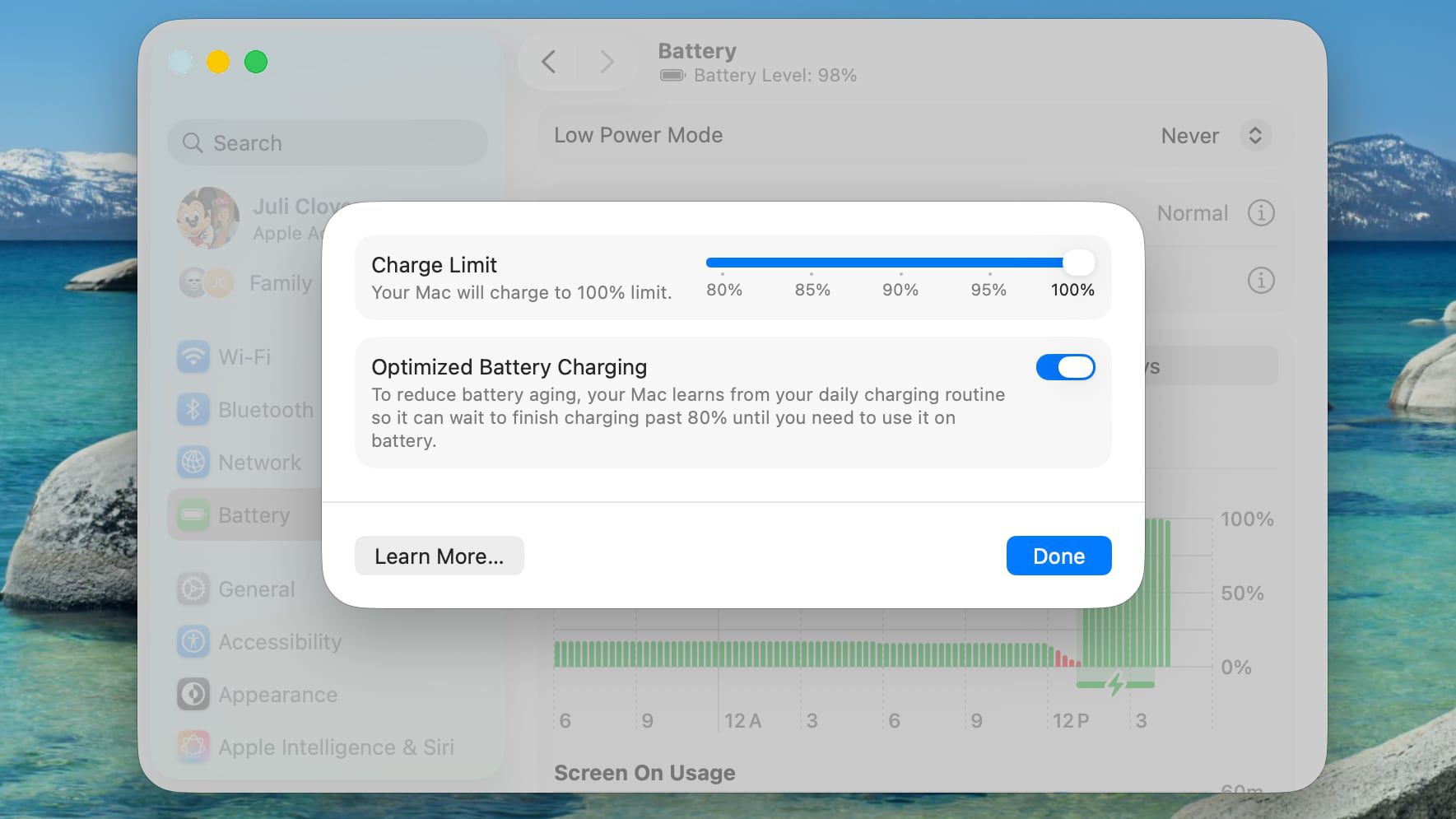
To mitigate this on iPhone 15 and newer models, Apple lets you set a Charge Limit that prevents your device from charging beyond 80, 85, 90, 95, or 100 percent. And in macOS Tahoe 26.4, Apple has brought over the same Charge Limit feature to Macs for the first time.

This option differs from Optimized Battery Charging, which learns your daily routine and delays charging past 80 percent until you’re likely to need a full battery. Depending on your usage, however, your Mac may still regularly reach 100 percent.

Setting a charge limit prevents that. Obviously a lower charge cap means less time you’ll be able to work away from a power outlet. But if you mostly sit at a desk with your MacBook plugged in, the trade-off is worth the long-term battery gains. That said, if you regularly rely on your Mac away from power, then you may want to opt for a higher cap, which should hopefully still curb battery wear without leaving you completely stranded. Either way, here’s how to set the feature:

Set a MacBook Battery Charge Limit in macOS

  1. Click the Apple symbol () in your Mac’s menu bar and open System Settings….
  2. Click Battery in the sidebar.
  3. Click the i button next to Charging.
  4. Drag the Charge Limit slider to your preferred level: 80%, 85%, 90%, 95%, or 100%, then click Done.

That’s all there is to it. Your Mac will now stop charging once it hits the level you chose, and Optimized Battery Charging will continue to work in the background unless you switch it off in the same panel.

Note that even with Optimized Battery Charging set to a limit below 100%, your Mac will occasionally charge to 100% so that macOS can maintain accurate battery level estimates, but for the most part it will stick to the specified maximum level.


Sign Up For Daily Newsletter

Be keep up! Get the latest breaking news delivered straight to your inbox.
By signing up, you agree to our Terms of Use and acknowledge the data practices in our Privacy Policy. You may unsubscribe at any time.
Share This Article
Facebook Twitter Email Print
Share
What do you think?
Love0
Sad0
Happy0
Sleepy0
Angry0
Dead0
Wink0
Previous Article Today's NYT Connections: Sports Edition Hints, Answers for April 13 #567 Today's NYT Connections: Sports Edition Hints, Answers for April 13 #567
Next Article Samsung to scale back appliances, TV and display businesses in China, sources say · TechNode Samsung to scale back appliances, TV and display businesses in China, sources say · TechNode
Leave a comment

Leave a Reply Cancel reply

Your email address will not be published. Required fields are marked *

Stay Connected

248.1k Like
69.1k Follow
134k Pin
54.3k Follow

Latest News

Meta‘s AI glasses and the dawn of wearable tech – podcast
News
Huawei now has more than 100,000 non-refundable orders for premium Aito SUV · TechNode
Computing
10 Ways to Make Money with YouTube Affiliate Marketing
Computing
The foldable redesign we’ve been waiting to see from Samsung and Apple is already here
News

You Might also Like

Meta‘s AI glasses and the dawn of wearable tech – podcast
News

Meta‘s AI glasses and the dawn of wearable tech – podcast

1 Min Read
The foldable redesign we’ve been waiting to see from Samsung and Apple is already here
News

The foldable redesign we’ve been waiting to see from Samsung and Apple is already here

3 Min Read
Apple reportedly testing four designs for upcoming smart glasses |  News
News

Apple reportedly testing four designs for upcoming smart glasses | News

2 Min Read
Today's NYT Mini Crossword Answers for April 13 – CNET
News

Today's NYT Mini Crossword Answers for April 13 – CNET

2 Min Read
//

World of Software is your one-stop website for the latest tech news and updates, follow us now to get the news that matters to you.

Quick Link

  • Privacy Policy
  • Terms of use
  • Advertise
  • Contact

Topics

  • Computing
  • Software
  • Press Release
  • Trending

Sign Up for Our Newsletter

Subscribe to our newsletter to get our newest articles instantly!

World of SoftwareWorld of Software
Follow US
Copyright © All Rights Reserved. World of Software.
Welcome Back!

Sign in to your account

Lost your password?