
When you’re posting to multiple platforms, the “Customize each caption” option uses AI to adapt the same idea for each channel, so posts feel native without rewriting everything by hand. The end result is faster planning and creation, while tone, voice, and final decisions stay firmly in your control.
Here are SocialBee’s key features:
- Plan, schedule, publish, and oversee content on all major social media platforms: Facebook, Instagram, LinkedIn, X (Twitter), Pinterest, TikTok, YouTube, Threads, Bluesky, and Google Business Profile from one dashboard
- Use AI-powered tools to generate captions, hashtags, and visual assets when you need a starting point
- Adjust posts for each platform either manually or with AI-assisted tweaks
- Create and schedule multiple variations of a single post across different social channels
- Fine-tune post details by editing captions, resizing images, updating hashtags, tagging profiles, adding first comments, setting locations, and selecting posting options
- Build, save, and reuse hashtag sets across different social media campaigns
- Edit visuals directly, add alt text for accessibility, and choose custom thumbnails for video content
- Tag accounts and apply location tags to increase post visibility
- Get posting time suggestions based on how your previous content has performed
- Reuse evergreen posts while setting clear expiration dates for time-sensitive content
- Set up custom posting schedules for each social media profile
- Schedule and edit large batches of posts at the same time
- Save unfinished posts as drafts and return to them later
- Import images and media through built-in integrations with Canva, Unsplash, and GIPHY
- Collaborate with teammates using comments, approvals, and content review workflows
- Manage multiple brands or clients using separate, clearly defined workspaces
- Monitor social media performance with in-depth analytics and export results as PDF reports
- Respond to comments, mentions, and direct messages from a single social inbox
- Automatically pull in blog posts with pre-filled captions, images, and links
- Shorten and track links using integrations with more than ten URL shortening services
What I like about SocialBee
I really enjoy SocialBee’s AI-driven scheduling, structured content organization, and ability to manage multiple social media accounts and brands from a single platform. Reviewers frequently highlight Copilot’s AI features, content categorization, the ability to schedule posts in bulk, and the quality of customer support.
What users are saying about SocialBee’s pros:
- “AI-Powered Copilot: Generates on-brand captions, hashtags, and optimal post times—boosted my engagement by 30%.” – Dave K., Owner (Source)
- “Comprehensive social media management platform with all features including AI content generation, details analytics, and social inbox. SocialBee belongs to the top contenders in the market segment with and covers all relevant functionalities. Integration is easy. Implementation with relevant platforms straight forward. Customer support is fast and responsive. The scheduling function makes it possible to use the application as daily driver.” – Uli K., Director, Online Media (Source)
- “(in answer to what do you like most about SocialBee) Automatization of scheduling, AI features.” – Marina P., Owner / Interior Design Consultant (Source)
- “Social Bee is a great all-in-one solution for social media management, especially for startups and agencies. I love that it offers competitive pricing while providing all the essential tools: analytics, automatic posting, AI features, and more. It streamlines the entire process of managing social media accounts, saving time and effort. The comprehensive nature of the platform, combined with its affordability, makes it a standout choice for efficiently handling social media presence.” – Tye T., CEO & Founder (Source)
- “I work with several different companies, which means I manage a large number of social profiles and SocialBee has made this so much easier. The platform is extremely organized, allowing me to categorize everything clearly and keep a complete overview without feeling overwhelmed. I also really appreciate the content approval flow. Even though I’m mostly working solo, it’s great to have a structured system where drafts, approvals, and final versions are clearly separated. It helps keep everything organized when handling multiple companies.” – Elissa V., Content Marketeer (Source)
What I dislike about SocialBee
I find that SocialBee has a short learning curve due to the platform’s depth.
What users are saying about SocialBee’s cons:
- “None except the odd glitch, which they help with right away.” – Carey K., Co-founder (Source)
- “Because SocialBee offers so many advanced features, it took me a little time to get familiar with everything. It’s not really a downside but more something to keep in mind when starting out.” – Elissa V., Content Marketeer (Source)
SocialBee pricing
2. HubSpot – Best AI-powered CRM and social media management software
Who is HubSpot best for?
HubSpot is best suited for mid-sized to enterprise marketing teams that want an all-in-one platform connecting CRM, email, ads, and their own social media, and are willing to trade higher, contact-based pricing for cleaner data, stronger reporting, and tightly integrated marketing workflows as they scale.
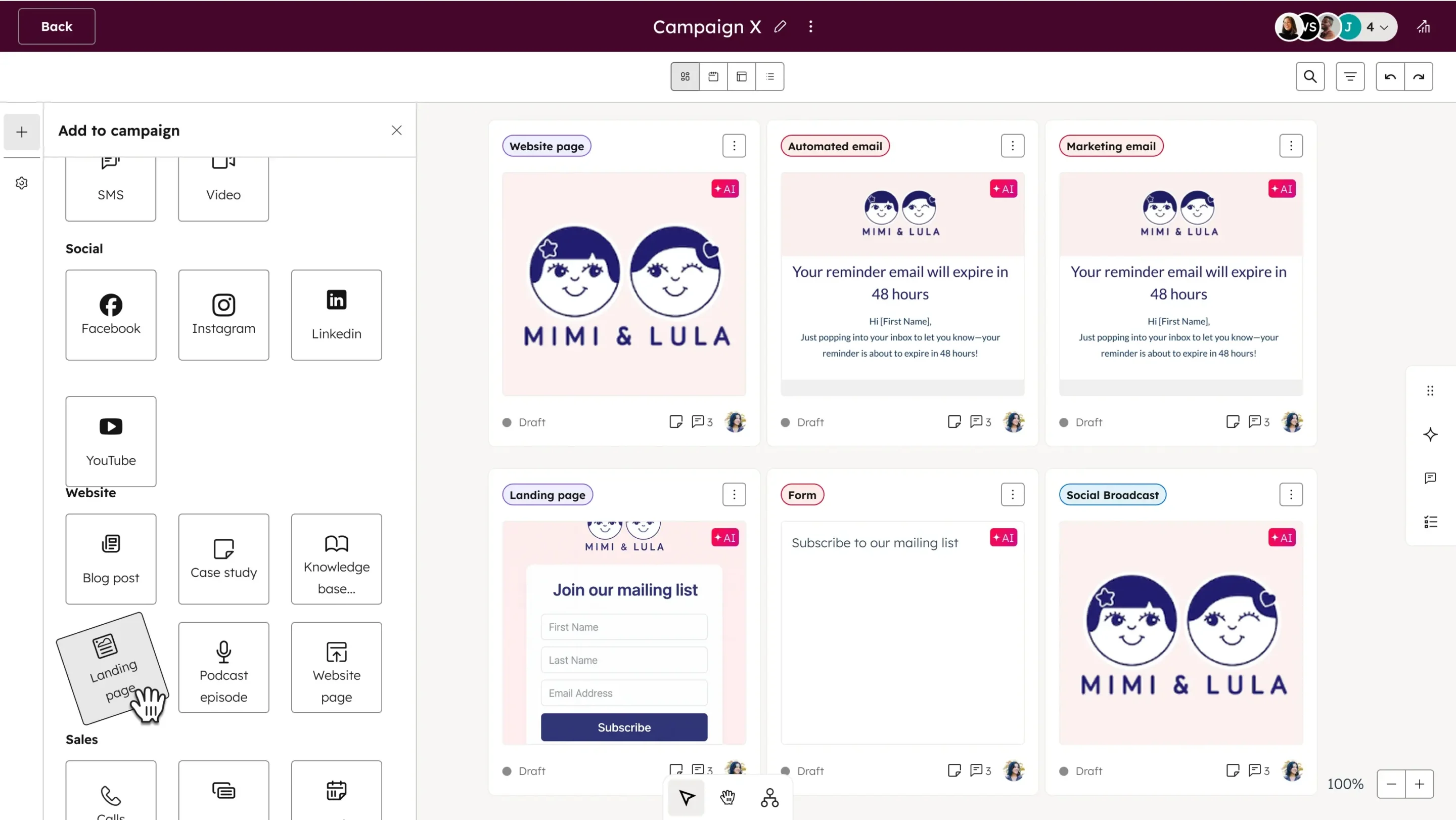
HubSpot feature overview
I think of HubSpot Marketing Hub as the place where everything meets. Social posts, email campaigns, ads, and CRM data all live in the same system, which makes the AI feel a lot more useful than in tools that only generate copy.
What works well for me is how the AI supports everyday decisions instead of trying to take over. It helps with things like segmenting audiences, shaping content ideas, picking better timing, and making sense of performance, all based on real customer data. That context is what makes the insights feel reliable rather than generic.
Here are HubSpot’s key features:
- Manage social media publishing at scale with support for up to 300 connected social accounts, 10,000 posts per month, long-term scheduling (up to 3 years in advance), post approvals, and collaboration workflows across teams and campaigns.
- Create, schedule, and approve social media posts directly within HubSpot, including Instagram direct messages, Facebook Messenger, and shared inbox views for handling social conversations alongside other customer interactions.
- Use HubSpot’s AI Social Media Post Generator and Breeze social post agent to generate post copy, assist with content creation, and speed up publishing workflows without leaving the platform.
- Apply AI-powered marketing assistance across channels with Breeze Assistant, AI content generation for emails and campaigns, AI segment suggestions, AI-powered data formatting recommendations, and AI-driven enrichment of company and contact data.
- Automate social and marketing workflows using simple to omni-channel marketing automation, including automated actions tied to forms, ads, journeys, behavioral triggers, and social media approvals.
- Plan and measure campaigns with campaign management tools, campaign reporting (up to 10,000 campaigns per account), and customizable reporting dashboards with up to 100 dashboards and 50 reports per dashboard.
- Track and analyze performance with social media analytics, filtered analytics views, custom reports, attribution reporting, and multi-touch revenue attribution, connecting social activity to broader marketing and sales outcomes.
- Optimize content and timing using AI-powered send time optimization (Beta), intent signals, predictive lead scoring, behavioral event triggers, and journey analytics that map user actions across channels.
- Monitor and act on audience data with contact and company enrichment, automatic enrichment, continuous data enrichment, smart properties, personalization tokens, and advanced segmentation powered by AI and machine learning.
- Support paid social and advertising with ad management, ad retargeting, ad goals, ad conversion events, Google Performance Max (PMax) integration (Beta), and audience building for Facebook and other ad platforms.
- Centralize collaboration and governance with team-based permissions, approval workflows, social media approvals, content access controls, audit tools, and multi-account management (Beta).
- Extend social and content workflows with integrations such as Google Search Console, Salesforce, Stripe, Canva, video hosting, URL mappings, and APIs for custom data and automation use cases.
What I like about HubSpot
I like HubSpot most when I want everything under one roof, and other users agree. CRM, email, social media, ads, and landing pages live in the same system, which removes a lot of manual handoffs and reporting gaps. The AI features come up often too, mostly as a way to speed up segmentation, content creation, and performance analysis.
What users are saying about HubSpot Marketing Hub’s pros:
- “This is the best tool for keeping CRM, email, social media, ads, and landing pages all in one place. We don’t have to duct-tape different tools together, which keeps the data cleaner and makes reporting more accurate. HubSpot is also genuinely pleasant to work with thanks to its great user experience. Marketing teams can usually get up and running quickly without a lot of friction.” – Sourav D., Software Engineer (Source)
- “I find HubSpot Marketing Hub helps with connecting with customers and managing customer data effectively. I appreciate how it helps to analyze performance with ease. I like the easy-to-use system, and I find the AI tools beneficial. The platform stands out for its ease of use and tutorials that are easy to access.” – Elly R. (Source)
- “I like that it is giving me an experience of having all the functions in a single place. The AI function is easy to use. It helps me segment my customers and also the social media marketing part is useful.” – flossy f., Marketing (Source)
- “I find HubSpot Marketing Hub to be intuitive and user-friendly, which makes it very easy to use. I like that it’s constantly updated with new features and more functionality. I appreciate the AI agents and feedback tools that provide me with valuable insights about our customers, helping us make the right decisions.” – Emma T. (Source)
- “I appreciate how HubSpot Marketing Hub makes my marketing efforts more efficient. I really like having everything on one platform. I also enjoy being able to create a lot of content from one piece with the help of AI. The initial setup was quite easy.” – Sergeja P., Growth (Source)
What I dislike about HubSpot
From what I’ve read and experienced, the main trade-offs come down to cost and scale. HubSpot works best when you fully buy into the ecosystem, but that also means pricing can climb fast as your contact list grows. A few users also mention friction around collaboration, formatting, and using the platform across multiple markets or languages.
What users are saying about HubSpot Marketing Hub’s cons:
- “Pricing is based on the number of contacts we want to market to. If that list grows quickly, the bill can skyrocket, creating a kind of success tax where doing your job well ends up making the software more expensive.” – Sourav D., Software Engineer (Source)
- “I find it difficult to communicate between other team members. I always get a bug where the bold button is not working. I also wish there was an easier way to leave notes. Plus, I hate the home page.” – Elly R. (Source)
- “The Pricing could be better—otherwise it is good.” – flossy f., Marketing (Source)
- “It’s still hard to use all the features properly since we’re a Swedish company working towards the Swedish market. I’d like to see that you can have the same account for several markets and continue to have the main account in English but get more help to set up signals and buyer intent on Swedish keywords.” – Emma T. (Source)
- “The price is really high. It would be better if it was a bit cheaper.” – Sergeja P., Growth (Source)
HubSpot pricing
- Offers a free plan
- Paid plans start at €15/mo/seat
3. Canva – Best AI-assisted visual content creation for social media
Who is Canva best for?
In my opinion, Canva is best suited for solo creators, small teams, and non-designers who need to produce social media visuals, presentations, and marketing assets quickly.

Canva feature overview
Canva is a tool I lean on when I need to move fast and let AI handle the heavy lifting. For social media graphics, presentations, and quick marketing assets, Canva’s Magic Write is often my starting point. It helps me turn rough ideas into usable copy instead of staring at a blank page.
From there, Canva’s AI-assisted design tools and templates make it easy to build visuals without getting pulled into design decisions. I also use Magic Resize constantly to adapt one design across platforms. For everyday social content, the AI support genuinely speeds things up without taking control away.
Here are Canva’s key features:
- Access a massive creative library with millions of stock photos, graphics, fonts, videos, audio assets, and over 3 million templates on paid plans.
- Design across formats with tools for social media posts, presentations, videos, print materials, websites, whiteboards, documents, sheets, emails, and multi-design projects from one workspace.
- Create designs with custom dimensions, export files as PNG, JPG, PDF, and generate print-ready CMYK designs on higher-tier plans.
- Scale content production using bulk design creation, reusable templates, saved designs as templates, and multi-design editing.
- Plan and distribute content using social sharing tools and the built-in Social Content Planner.
- Use basic and advanced design insights to understand how designs perform and improve future content.
- Leverage a broad suite of AI design tools, including Canva AI for text, Magic Write, Magic Resize, Translate, Magic Animate, Magic Charts, Magic Edit, Magic Eraser, Magic Expand, Magic Grab, Magic Morph, Style Match, Magic Background, and Magic Activities.
- Generate visuals and media with AI-powered image and video creation, including Dream Lab, text-to-image, text-to-video, AI video clips, background generators, and element generation.
- Edit and enhance visuals with photo and video background removal, animations, mockups, highlights, beat sync, AI voice, and voice enhancement tools.
- Build interactive and advanced experiences using Canva Code, Magic Formulas, Magic Insights, and AI-assisted logic inside designs and sheets.
- Support marketing workflows with AI ad creation and ad insights via Canva Grow, plus bulk actions in Sheets for data-driven content.
- Collaborate in real time with live editing, comments, task assignments, link sharing, anonymous collaboration, and team-only links.
- Maintain brand consistency with Brand Kits, Brand Templates, Brand Controls™, element locking, logo and image replacement, and org-wide brand kits and templates.
- Manage approvals with individual and group-based approval workflows designed for teams and organizations.
- Extend creative workflows with Affinity on-device AI tools, premium AI capabilities, and background removal outside the browser.
- Learn and scale skills through courses and recordings built into the platform.
What I like about Canva
From what I’ve seen in user reviews, I’ve seen reviews about how Canva helps people create content quickly and turn ideas into finished visuals, and I agree. Templates and AI features come up often as practical tools for getting unstuck and working faster, especially for social media graphics and presentations. Many users also mention that the user interface feels approachable, which makes it easy to start designing without a steep learning curve.
What users are saying about Canva’s pros:
- “The templates make it so easy to find something creative and add your own twist to it. Starting from scratch can be difficult but having something to work with takes a bit of the pressure off.” – Stephanie M., Engagement Specialist (Source)
- “The templates and new AI features are quite helpful. Creating a flow is straightforward, and there are several chart options available, which makes preparing presentations much easier.” – Verified User, E-Learning (Source)
- “I can go from a blank page to a professional-grade social media graphic or presentation in minutes thanks to the massive premium template library. The Magic Resize tool is a lifesaver.” – Ofelia A., Affiliate Marketing Specialist (Source)
- “The availability of pre-made templates and graphics makes it simple for anyone, even beginners, to start editing like a professional. The Canva AI is quite helpful, as it provides images based on specifications.” – Purva K., System Integration Specialist (Source)
- “When there is no template that fits my requirements, I can rely on AI generation to insert my requirements and get the result I want. I find the initial setup of Canva very easy.” – Dhanushka S., System Administration Executive (Source)
What I dislike about Canva
Most of the criticism tends to come up when people try to push Canva beyond simple, everyday design tasks, and I agree with a lot of that feedback. I’ve also noticed that advanced video editing can feel limited, some of the AI tools don’t always produce consistent results, and things can get a bit clunky on mobile or when working with non-standard fonts. If you need very specific layouts, custom branding rules, or designs tailored to different regions or languages, Canva can start to feel restrictive.
What users are saying about Canva’s cons:
- “I would like there to be more features in regards to being able to recolor images that may be uploaded… also sometimes making a copy of just one slide into a new project is a bit confusing.” – Stephanie M., Engagement Specialist (Source)
- “It is a bit more challenging to use compared to PowerPoint.” – Verified User, E-Learning (Source)
- “The ‘Magic Edit’ can sometimes be hit-or-miss with complex backgrounds. Additionally, the mobile app feels a bit cramped compared to the desktop experience.” – Ofelia A., Affiliate Marketing Specialist (Source)
- “I think Canva could improve by developing a better video editing software. It lacks video editing tools that are beginner-friendly.” – Purva K., System Integration Specialist (Source)
- “I’m having a font support issue… sometimes Sinhala Unicode is also not supported correctly. It’s better to add some Sinhala fonts by default.” – Dhanushka S., System Administration Executive (Source)
Canva pricing
- Offers a free plan
- Paid plans start at $14.99/month
4. Leap AI – Best AI automation for personalized social media workflows
Who is Leap AI best for?
From what I’ve seen in reviews and real use cases, Leap AI is best suited for marketing teams and technically confident creators who want to automate content-related workflows across multiple channels.
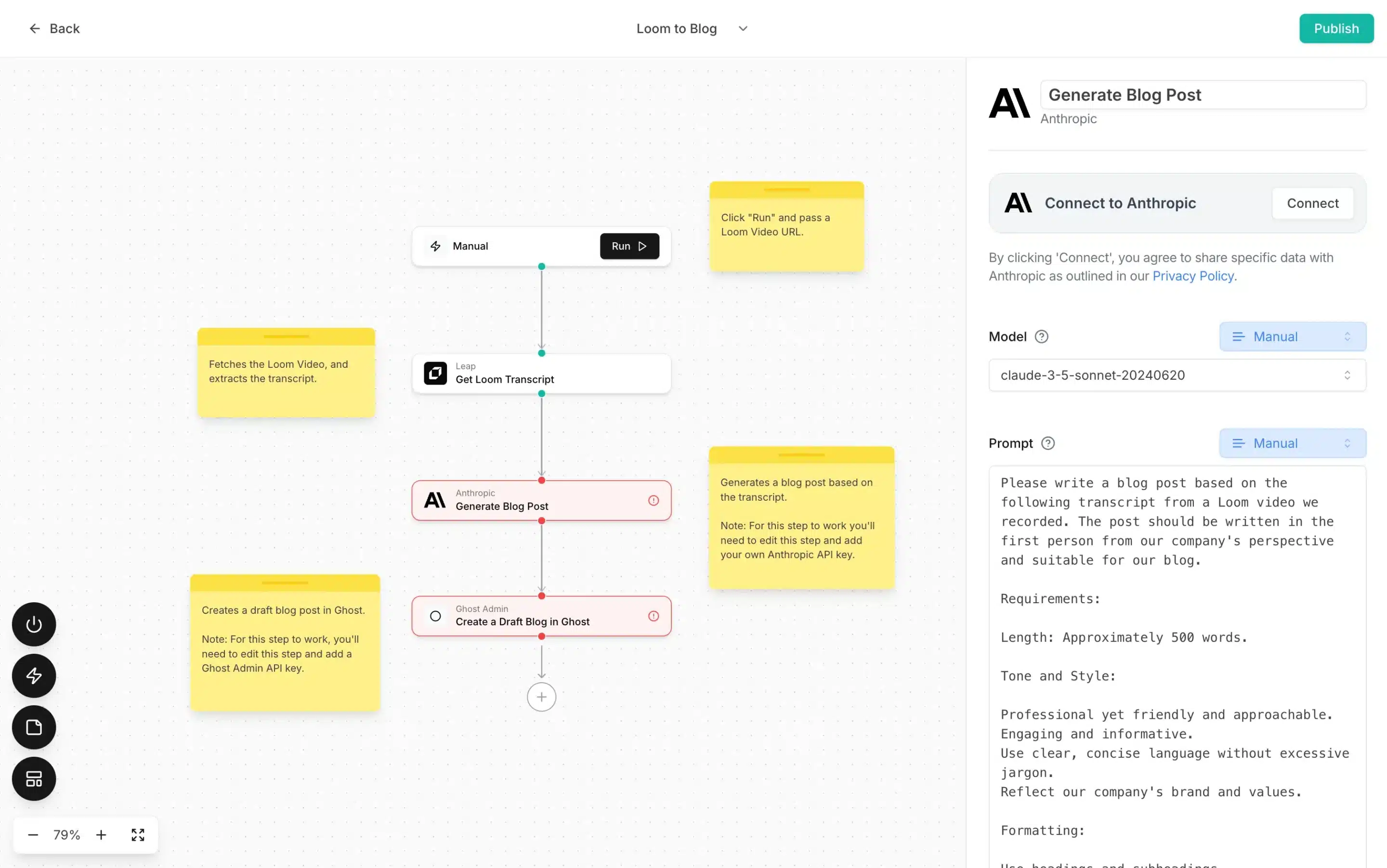
Leap AI feature overview
Leap AI is a tool for automating repetitive content tasks, especially when you’re creating and repurposing content across multiple channels. Instead of manually turning blog posts, emails, or videos into social media content, Leap AI helps you set up workflows that do this work for you using AI.
Their AI Content Detector is a must-have tool for marketers and writers who want to ensure their work remains authentically human. On the flip side, Leap’s AI Image Generator is a game-changer for visual content creation., especially when you need assets fast.
Here are Leap AI’s key features:
- Build no-code AI workflows to automate social media and content marketing tasks without engineering support.
- Automate content creation and repurposing by turning existing assets (blog posts, videos, emails, documents) into social media posts and multi-format content.
- Scale content production for SEO and distribution using AI to generate, adapt, and optimize marketing content across channels.
- Use pre-built marketing workflows to get started quickly without designing automations from scratch.
- Connect Leap AI with existing tools through native integrations (e.g., Gmail, OpenAI, Anthropic, marketing platforms) to centralize content workflows.
- Trigger workflows automatically or run them on autopilot to support consistent publishing and campaign execution.
- Monitor workflow performance with real-time analytics to understand efficiency and output.
- Reduce manual work and production costs by automating repetitive content marketing tasks at scale.
What I like about Leap AI
Leap AI is often praised in reviews for its no-code approach to automation and how quickly non-technical teams can build AI-powered workflows, and I understand why. Users also highlight time savings when setting up custom workflows and appreciate that AI helps reduce manual effort during workflow creation, even for complex use cases.
What users are saying about Leap AI’s pros:
- “I am mostly using Zapier for my workflows, but recently used Leap AI for a specific use case… and the workflow worked very smoothly. The AI function of Leap AI helps me to reduce the time while writing this workflow.” – Ashutosh S., Associate Director (Source)
- “The best thing I liked about Leap AI is the usage inthe medical industry.” – Mohd A., Digital Specialist Engineer (L1) (Source)
- “No code tool. Easy to develop automation workflow even for non-coders.” – Verified User, Information Technology and Services (Source)
What I dislike about Leap AI
Most of my concerns relate to setup complexity and ecosystem depth, and I foud that reflected in reviews as well. Some users mention that building workflows can require multiple steps, deployments can feel complex, and the range of native integrations is still limited compared to more established automation platforms.
What users are saying about Leap AI’s cons:
- “Sometimes it takes multiple steps to set up a card in workflow, for example, Slack integrations.” – Ashutosh S., Associate Director (Source)
- “There are some things which I dislike about Leap AI, such as we used to get a lot of complexity while deploying.” – Mohd A., Digital Specialist Engineer (L1) (Source)
- “Needs integration with more tools as current integration is limited.” – Verified User, Information Technology and Services (Source)
Leap AI pricing
- Offers a free plan
- Paid plans start at $99/month
5. Jasper – Best AI writing assistant for social media captions and campaigns
Who is Jasper best for?
Jasper works particularly well for freelance writers and content marketers who need to produce a high volume of on-brand content quickly and use AI as a drafting and editing partner rather than a hands-off writing replacement.
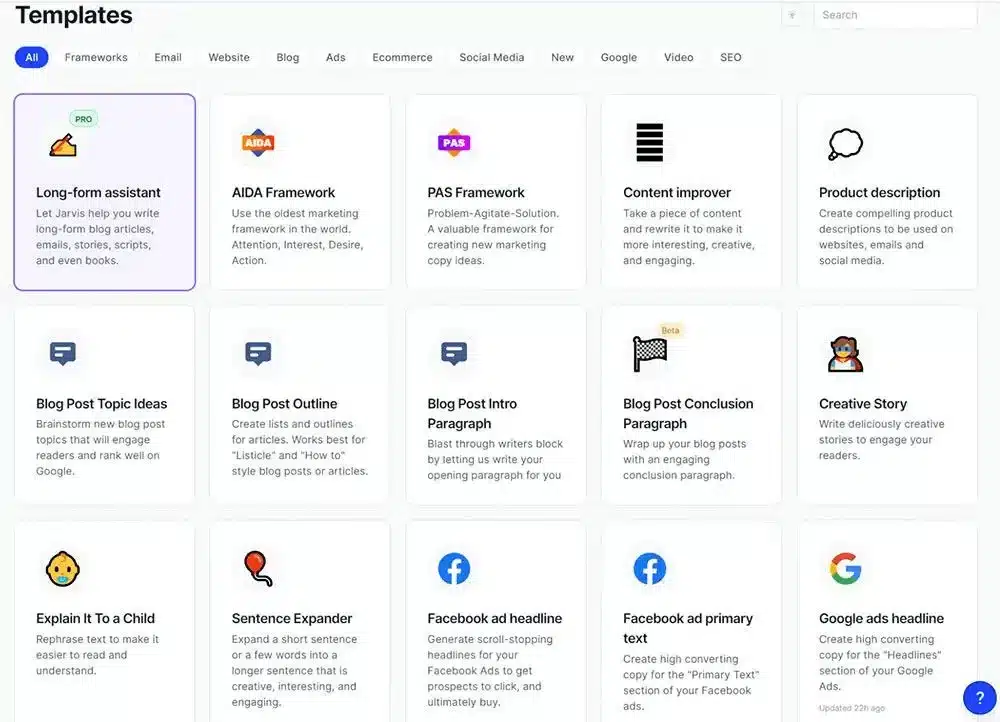
Jasper feature overview
Jasper is an AI writing tool that’s mainly useful when you need to create a lot of content without losing your brand’s voice. I’ve found it works best for drafting captions, campaign copy, and longer pieces where consistency matters just as much as speed. Features like brand voice, tone settings, and audience context help keep everything sounding cohesive instead of generic.
I don’t see Jasper as a one-click writer. It’s better as a first-draft and rewriting partner that helps you move faster, then refine with human input. Used this way, it makes scaling content much easier without flattening your messaging.
Here are Jasper’s key features:
- Define and apply audience insights and brand voice at scale using Jasper IQ, with dynamic audiences, tone rules, formatting guidelines, and style guides that keep content consistent across channels.
- Ground AI outputs in your organization’s knowledge with multi-modal company knowledge, allowing Jasper to reference uploaded text, images, video, audio, and data assets.
- Generate marketing-ready content using Jasper’s LLM-optimized architecture, built specifically for marketing best practices and capable of creating or repurposing content in 30+ languages.
- Create, edit, and collaborate on content in a marketing-focused editor, with real-time collaboration, version history, document sharing, tagging, and project status labels.
- Speed up content creation and repurposing with rewrite, rephrase, remix, and chat tools, making it easier to adapt posts for different platforms and audiences.
- Design and deploy custom AI workflows and no-code marketing apps through Jasper Studio, or use 100+ pre-built marketing apps tailored to common use cases.
- Maintain visual consistency with visual guidelines and a full AI Image Suite, including image generation, editing, background removal and replacement, upscaling, text removal, packshot compositing, and format resizing.
- Protect originality and quality with plagiarism checking, usage analytics, and personal or team-level performance insights.
- Extend Jasper across your stack with API access, integrations, and browser extensions, connecting tools like Google Docs, Slack, Zapier, Make, Webflow, Sheets, and more.
- Manage teams at scale with advanced admin controls, user permissions, workspace governance, usage analytics, and backup history for content recovery.
What I like about Jasper
Jasper speeds up content creation without losing brand consistency, and that’s something many other users and I appreciate. Reviews repeatedly mention tone control, templates, and SEO-focused writing as core strengths. Many users describe Jasper as a reliable first-draft engine that reduces brainstorming time and helps teams scale content across channels, especially when consistency and volume matter.
What users are saying about Jasper’s pros:
- “I like Jasper’s AI-driven content generation because it really speeds up writing and helps maintain a consistent tone… The tone and style customization options are great, ensuring our content matches our brand voice seamlessly.” – Nabin P., CEO (Source)
- “I use Jasper for SEO content creation, and it helps me write optimized content faster, saving me time on many occasions.” – Tanuj K., SEO Associate (Source)
- “The user interface is very clean and easy to navigate, even for someone new to AI writing tools. The learning curve was surprisingly low.” – Tamim Ahmed S., Content Moderator (Source)
- “With the help of Jasper AI, I have saved a lot of time and resources and improved my work.” – Hassan I., Freelancer (Source)
- “It consistently delivers first drafts that align perfectly with our tone of voice… It feels like having an extra teammate who truly understands your brand.” – Ana C., Marketer (Source)
What I dislike about
I start feeling the trade-offs in refinement rather than usability. Some users note that Jasper’s outputs can sound generic or repetitive without editing, especially for technical or niche topics.
What users are saying about Jasper’s cons:
- “Jasper can occasionally produce generic or repetitive content, and fine-tuning outputs for very technical topics can require extra editing.” – Nabin P., CEO (Source)
- “Sometimes the content needs manual editing to sound more natural.” – Tanuj K., SEO Associate (Source)
Jasper pricing
- Offers a 7-day free trial
- Paid plans start at $69/month/seat
6. QuillBot – Best AI-powered rewriting and content refinement tool
Who is QuillBot best for?
Based on the features and user feedback, QuillBot is best suited for freelance writers, students, and marketers who already have ideas or drafts and need a fast, affordable way to refine, rewrite, and repurpose content.
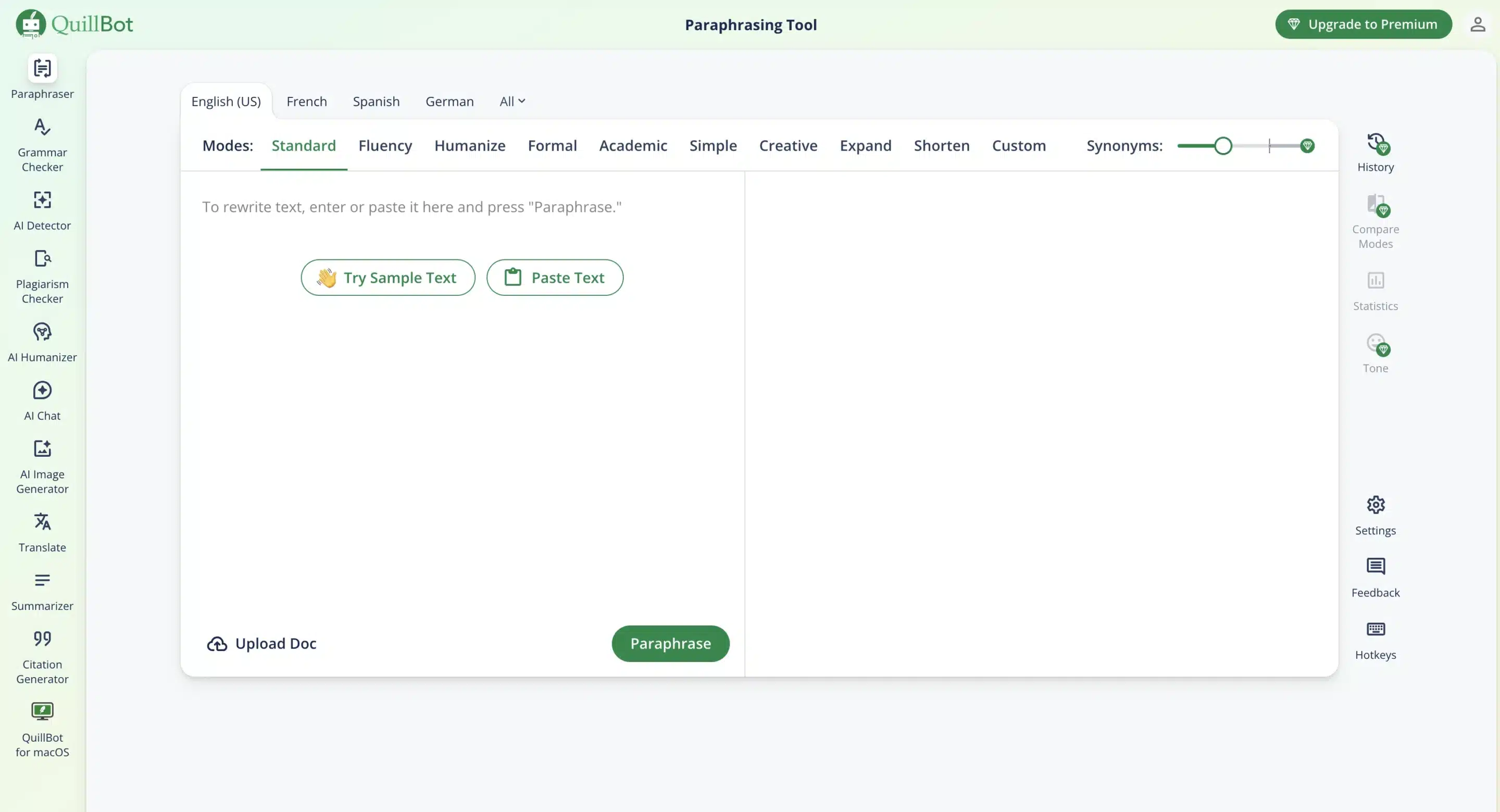
QuillBot feature overview
QuillBot is the tool I open when the idea is already there, but the wording needs work. It’s built around AI-powered rewriting, so instead of starting from scratch, I use it to clean up drafts, adjust tone, shorten long text, or turn one piece of content into several variations. That makes it especially handy for repurposing captions, emails, and longer posts without losing the original meaning.
What stands out is how flexible the AI feels. You can experiment with different tones, tighten language, or simplify complex paragraphs in seconds, while still keeping control over the final version.
Here are Quillbot’s key features:
- Brainstorm ideas, draft copy, research topics, and overcome writer’s block using AI Chat, Ask AI, and AI Search, with conversational, cited responses.
- Write, rewrite, and refine text with AI writing and editing tools, including paraphrasing, grammar checking, summarizing, rephrasing, humanizing, and tone adjustments.
- Generate social media–ready content with dedicated tools for captions, hashtags, social posts, bios, taglines, slogans, quotes, and short-form copy across platforms like Instagram, TikTok, LinkedIn, X, and YouTube.
- Create long- and short-form marketing content using AI generators for blog posts, listicles, scripts, ad copy, product descriptions, landing pages, newsletters, press releases, and promotional copy.
- Support video and creator workflows with AI tools for YouTube and TikTok scripts, video descriptions, hooks, outlines, and repurposing content into multiple formats.
- Produce visual assets with the AI Image Generator, image prompt generator, logo generator, and basic image-to-text (OCR) conversion.
- Improve originality and credibility using plagiarism checking, AI detection, citation generation, and translation tools for multi-language content.
- Speed up marketing and business writing with AI generators for emails, outreach, follow-ups, push notifications, proposals, briefs, summaries, and creative concepts.
- Work with documents using PDF editing, conversion, and Chat with PDF, plus speech-to-text for turning audio into written content.
- Organize ideas and workflows with AI tools for content briefs, content ideas, checklists, goals, and planning support.
What I like about Quillbot
Others agree with me that Quillbot is a practical writing utility for polishing, rewriting, and tightening content fast. Users consistently mention paraphrasing, grammar support, summarization, and tone options, plus the convenience of integrations (like browser extensions and API access) for keeping writing consistent across workflows.
What users are saying about QuillBot’s pros:
- “I love QuillBot’s fast paraphrasing, grammar correction, and summarization. The easy integration via API or browser extensions is great, as it keeps technical content clear and consistent across all documentation.” – Nabin P., CEO (Source)
- “What I like most about Quillbot is that it helps me find grammar mistakes and rewrite a paragraph more clearly.” – MAYUR S., Mechanical Design Engineer (Source)
- “The best thing that I like about QuillBot is that it rewrites my content quickly and gives me the option to rewrite in multiple tones… Integration is easy while I need to use it with other tools.” – Karansinh J., Business Analysts (Source)
- “It corrects my mistakes and enables me to write effectively… It’s quite advanced in several languages… I appreciate how easy it is to set up.” – Jean J. (Source)
- “It helps me improve my writing without taking control away from me, allowing me to see clear alternatives and choose what works best.” – Lovepreet S., Sr IT Operations Consultant (Helpdesk & Power BI Lead) (Source)
What I dislike about Quillbot
My dislikes tend to center on reliability and limits. Some users also say paraphrases can drift in meaning or sound unnatural, especially with technical language, so review is still necessary. Others mention UI/navigation friction, performance lag, and a free version that feels restrictive enough that upgrading becomes the practical option.
What users are saying about QuillBot’s cons:
- “QuillBot can sometimes misinterpret technical jargon or code comments, and advanced paraphrasing for highly specialized content may require extra review.” – Nabin P., CEO (Source)
- “I don’t like QuillBot’s subscription, because it feels like I can’t use it 100% without paying.” – MAYUR S., Mechanical Design Engineer (Source)
- “They need to do a little work on the navigation side and a little bit on the UI side, otherwise the rest is good.” – Karansinh J., Business Analysts (Source)
- “It might be a bit laggy when you use it on the Internet.” – Jean J. (Source)
- “Some paraphrased results can sound slightly unnatural or change the original meaning… The free version is also quite limited… QuillBot could improve by making paraphrased outputs sound more natural and better preserving nuance.” – Lovepreet S., Sr IT Operations Consultant (Helpdesk & Power BI Lead) (Source)
QuillBot pricing
- Offers a free plan
- Paid plans start at $19.95/month
7. Jacquard – Best AI-generated performance-optimized social copy
Who is Jacquard best for?
Jacquard is best suited for mid-market and enterprise teams that run high-volume, performance-driven social and lifecycle campaigns and need tight control over brand language, testing, and optimization.
Jacquard feature overview
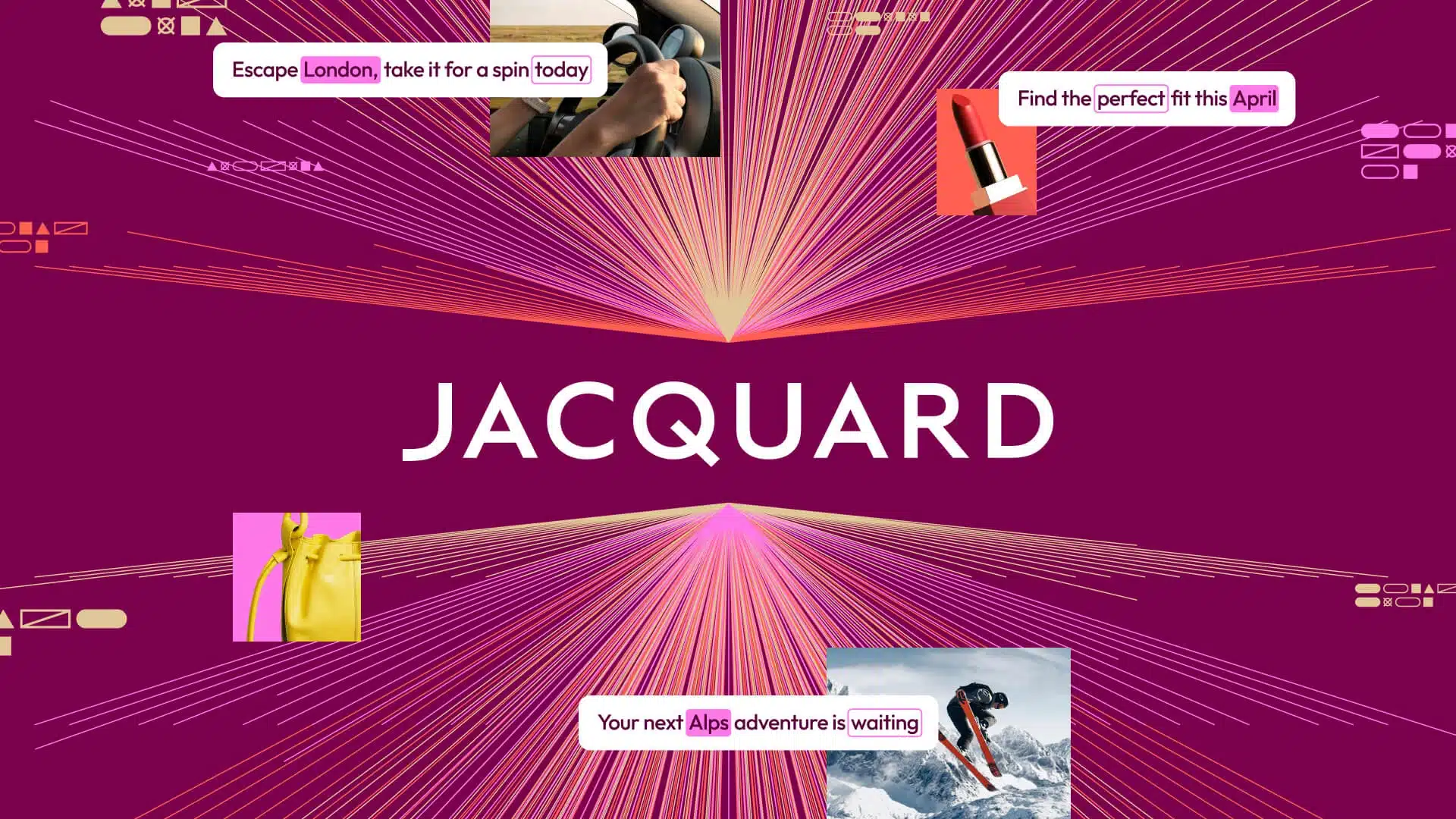
messages. Instead of guessing which captions or messages might work best, it uses AI to generate, test, and optimize language automatically across channels like social, push notifications, email, and in-app messaging.
What makes it useful is how it removes manual testing from the process. Jacquard predicts which wording is most likely to drive engagement and adapts messages based on performance, while keeping brand tone and compliance consistent.
This works especially well when social media is part of a larger engagement strategy and teams need to keep messaging fresh without constantly rewriting or experimenting by hand.
Here are Jacquard’s key features:
- Generate brand-safe, compliant message content at scale using a purpose-built language engine designed specifically for below-the-line messaging such as push notifications, email, and in-app messages.
- Create high-performing copy from a single brief, without manual prompting or rewrites, by combining generative AI with deterministic rules for tone, structure, and compliance.
- Support multi-language content creation from one source, enabling consistent messaging across regions and channels.
- Predict message performance before sending using Neural², which leverages billions of historical data points to forecast open and click rates while avoiding fatigue and repetition.
- Continuously improve results through automated testing and learning, balancing performance, diversity, and long-term engagement.
- Deliver contextually relevant, 1:1 personalized messaging by factoring in brand, product, personal, and situational attributes for each user.
- Optimize content and delivery decisions automatically with predictive intelligence and automated decisioning, reducing manual experimentation.
- Distribute messages across channels without complex integrations, supporting faster execution across push, email, and in-app environments.
- Maintain creative control at scale with Jacquard’s neuro-symbolic architecture, blending rule-based governance with large language models for reliability and consistency.
What I like about Jacquard
I usually praise Jacquard for its focus on performance-driven messaging. Users consistently mention data-backed optimization, automated testing, and the platform’s ability to improve engagement by selecting and delivering the best-performing message variants in real time.
What users are saying about Jacquard’s pros:
- “Focus on data-driven optimization that brings improvements in your messages to bring closer audience to your business. It creates real-time optimization. Phrasee (now Jacquard) allows you to test different versions of your messages and automatically deliver the best performing to every recipient.” – Aqib W., Sales Specialist (Source)
- “Its ability to generate marketing language that is optimized for engagement and conversion.” – Md. Shahbaz K., Geologist / Hydrogeologist (Source)
- “Phrasee (now Jacquard) has enabled us to improve the performance and scalability of marketing by generating amazing AI content.” – Preksha S., Mid-Market User (Source)
- “Phrasee (now Jacquard) is giving AI-based services through which any user can easily interact with the easy interface of this web application.” – Shivani S., Software Engineer (Source)
What I dislike about Jacquard
The main drawbacks tend to reflect cost, setup, and reliance on AI. Some users point out that pricing can be high for smaller businesses, customization is limited in certain areas, and results depend heavily on the quality of input data and technical setup, and I agree.
What users are saying about Jacquard’s cons:
- “This is totally AI-generated software, so it may lack human intelligence… The use of Phrasee (now Jacquard) needs investment and needs technical knowledge to use it.” – Aqib W., Sales Specialist (Source)
- “Customization options are limited in certain aspects, although these limitations are relatively minor compared to the overall value that Phrasee brings to marketing campaigns.” – Md. Shahbaz K., Geologist / Hydrogeologist (Source)
- “It is little overpriced especially for small scale businesses.” – Preksha S., Mid-Market User (Source)
Jacquard pricing
- Contact Jacquard for pricing
8. Optimove – Best AI-powered customer journey and campaign optimization
Who is Optimove best for?
If your priority is running highly personalized, data-driven social and lifecycle campaigns at scale (and you have the resources to support a complex setup), Optimove makes the most sense for mid-market and enterprise teams.
Optimove feature overview
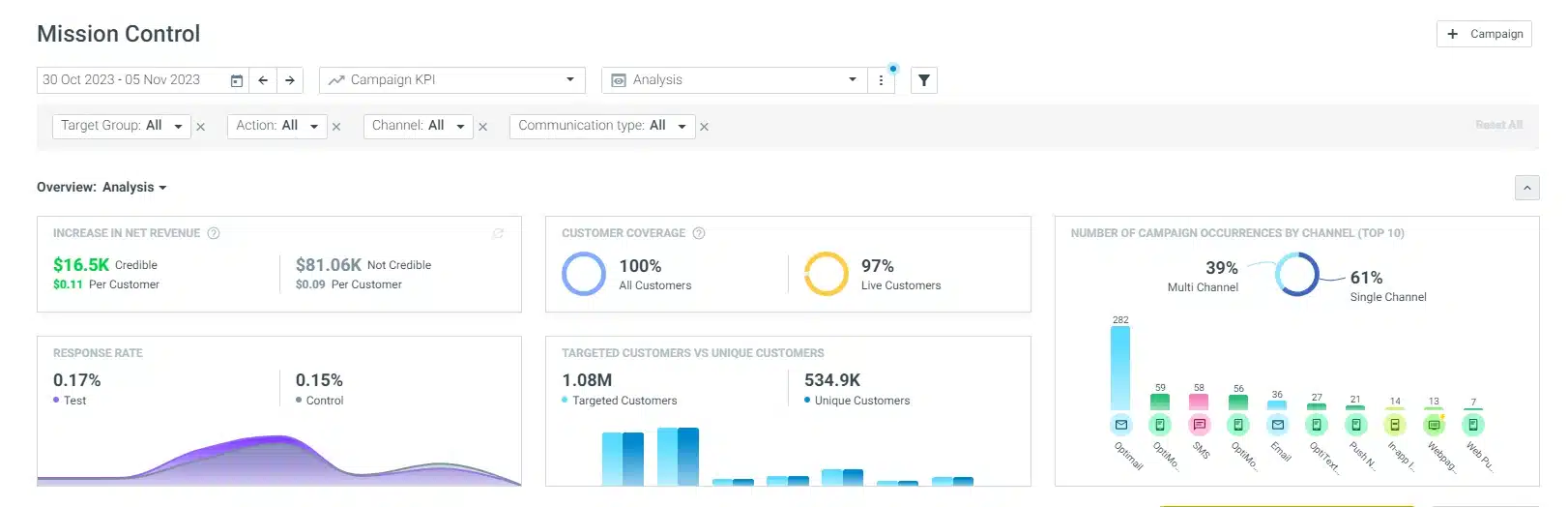
Optimove is built for teams that see social media as one piece of a much bigger customer journey. Its AI brings customer data from different systems into one place and uses it to decide who should get which message, on which channel, and at what moment. Social posts, ads, emails, and mobile messages are all planned together instead of managed separately.
What stands out is how the AI guides decisions behind the scenes. It helps teams personalize campaigns at scale, adjust messaging based on behavior, and understand how social activity connects to retention and revenue.
Here are Optimove’s key features:
- Orchestrate social media and cross-channel campaigns from a single marketing view, managing journeys, audiences, and messaging across paid, owned, and digital channels in one command center.
- Build unified customer profiles by connecting identity, behavior, transactions, and real-time interactions, enabling more relevant social and lifecycle messaging.
- Use AI-driven decisioning and next-best-action logic to determine when, where, and how each customer should be engaged on social and adjacent channels.
- Discover and activate the right audiences for social campaigns using AI that analyzes behavior, timing, lifecycle stage, and predicted value.
- Create personalized social and digital content with AI-powered generation tools for copy, visuals, and messaging that stay aligned with brand guidelines.
- Deliver real-time and “right-time” personalization, adjusting message timing, content, and channel selection based on live customer signals.
- Manage multichannel journeys in a visual canvas, connecting inbound and outbound interactions across social, email, web, mobile, and ads.
- Run A/B/n testing and continuous experimentation to optimize social messages, journeys, and creative based on real performance data.
- Measure incremental impact beyond vanity metrics, tracking ROI, revenue lift, CLTV, and engagement through multi-touch attribution and control groups.
- Integrate with your broader tech stack using native and API-based connectors, ensuring social media activity is tied to business outcomes, not siloed metrics.
What I like about Optimove
I like how well Optimove connects customer data, segmentation, and execution into a single system. Reviewers also consistently point to strong audience building, clear visibility into behavioral impact, and the ability to run coordinated, data-driven campaigns across multiple channels. Support quality also comes up repeatedly, which matters given how much is happening under the hood.
What users are saying about Optimove’s pros:
- “I like that Optimove shows results and impact on user behavior. The contact we have is very professional and helpful. I find segmentation is easy, and it allows vast options with a lot of attributes.” – Noa K. (Source)
- “I’m a daily Optimove user and what I appreciate most about Optimove is the extensive ecosystem it offers. Nearly all the features I require are already built in, so I rarely need to rely on third-party integrations, and setup is straightforward. Additionally, the platform is highly intuitive, and I have consistently found the Optimove team to be very supportive.” – Piotr Andrzej T., CRM Manager (Source)
- “What I like the most about Optimove is its ability to centralize all customer data and automate personalized marketing campaigns across multiple channels. It helps create targeted and data-driven customer journeys, which improves retention and engagement efficiently.” – Carlos G., Retention Leader (Source)
- “It is an intuitive and easy-to-use tool that allows you to generate customer analysis, generate commercial campaigns based on the customer life cycle, and easily manage communication channels to have multi-channel campaigns.” – Favian Andres G., CRM Lead (Source)
- “What I like most about this platform is its ability to automate and personalize campaigns, allowing us to reach our customers more effectively and with less effort. The interface is quite user-friendly and accessible, even for those of us who aren’t tech-savvy.” – Jesus R., IT Reporting & Analytics (Source)
What I dislike about Optimove
Optimove’s scale and complexity are a downside for many, including me. Several users mention data processing reliability, a steeper learning curve at the start, and slower or limited integrations in certain areas. It’s powerful software, but not something you fully “pick up” in a day.
What users are saying about Optimove’s cons:
- “Data processing is problematic. We experience a lot of issues with it. The daily process works well most days, but every once in a while, it breaks down and it affects our activity.” – Noa K. (Source)
- “One area where Optimove could enhance its offering is by providing a broader selection of native data integration options.” – Piotr Andrzej T., CRM Manager (Source)
- “The platform can be quite complex to set up and manage at first. It requires time to understand how all the triggers, segments, and campaigns connect.” – Carlos G., Retention Leader (Source)
- “At first it can be a bit overwhelming to understand all the features and settings.” – Jesus R., IT Reporting & Analytics (Source)
Optimove pricing
9. Narrato – Best AI content planning and workflow management platform
Who is Narrato best for?
Based on what I’ve seen in user feedback and day-to-day use cases, Narrato works best for solo marketers, freelance writers, and small to mid-sized teams that want AI-assisted content creation and reliable social media scheduling in one place, without managing multiple tools or complex workflows.
Narrato feature overview
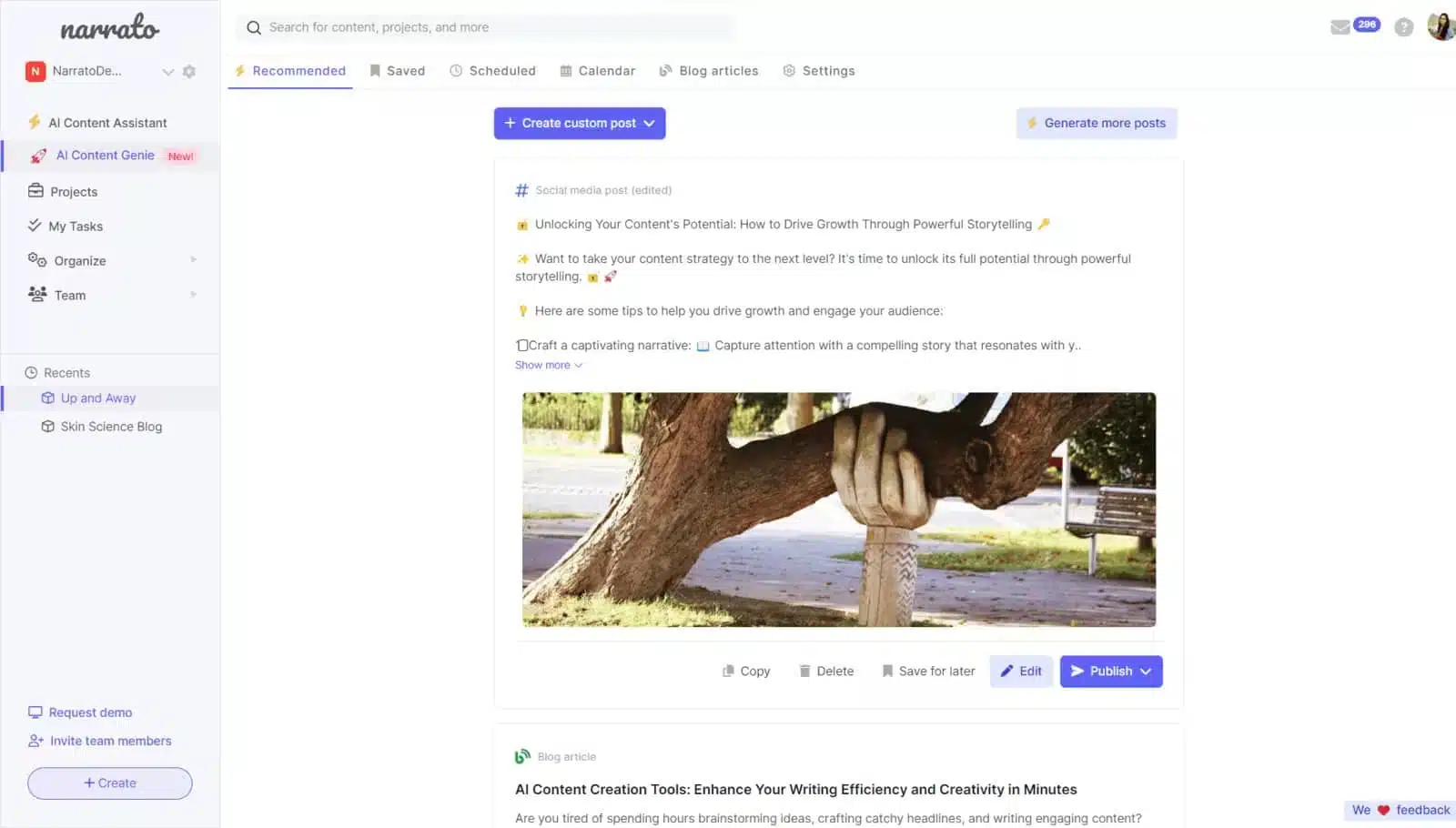
Narrato is the kind of tool I reach for when content creation and social media publishing need to live in the same place. Instead of juggling separate AI writing tools, calendars, and schedulers, Narrato pulls planning, creation, and posting into one workflow that actually holds up in day-to-day use.
What stands out to me is how practical the AI feels. Content Genie can keep social feeds active on autopilot, while the writing assistant, summarizer, and SEO briefs help turn rough ideas into usable posts faster.
Here are Narrato’s key features:
- Manage unlimited users, projects, and content items, making it suitable for both small teams and growing content operations.
- Create content faster with an AI writing and planning assistant, supporting large character limits, bulk AI content generation, and custom AI templates for repeatable workflows.
- Use Narrato AI Content Genie to automatically generate and refresh social media and blog content for selected projects.
- Generate visuals with AI image creation and AI vision content generation, allowing content to be created from text prompts or image inputs.
- Plan SEO-driven content using AI-powered SEO content briefs, readability checks, grammar tools, and plagiarism detection.
- Maintain consistency with brand voices, guidelines, and an assets repository, ensuring content stays aligned across social channels.
- Organize work using folders, calendars, templates, and version history, with longer retention on higher-tier plans.
- Collaborate through built-in messaging, comments, public share links, and content approvals, supporting team-based workflows.
- Publish content directly to social media accounts, as well as platforms like WordPress and Webflow.
- Streamline processes with custom workflows, automations, API access, and Zapier integrations for scalable content operations.
- Export content easily with download options and HTML output, supporting reuse across multiple platforms.
What I like about Narrato
After using the tool and going through user reviews, a few patterns stand out for me. Narrato is consistently reliable, easy to use, and genuinely helpful for day-to-day social media and content work. Users often highlight how smoothly scheduling works across channels and how the AI features, especially Content Genie and summarization, reduce manual effort without getting in the way of their own input.
What users are saying about Narrato’s pros:
- “This is the only social media content scheduler that hasn’t given me any trouble. I love being able to create and schedule my posts on my favorite channels, knowing that they will actually get posted when I want them to… I especially loved their AI Content Genie, which is capable of generating social media content on autopilot.” – Maxim K., Small-Business (Source)
- “Narrato is capable of creating on-brand content that can be easily adapted for various use cases. When compared to other general-purpose AI content creation tools, this makes a big difference for marketing work.” – Jerra G., Administrator (Source)
- “The AI summarizer helps me a lot with generating bite-sized summaries for any content in just a few minutes. It extracts the most crucial information and gives a short, succinct version with key takeaways.” – Gouri S., Mid-Market (Source)
- “The AI writing suggestions save me hours of work, and I can easily change the tone to fit my audience… formal, casual, witty, sarcastic, or anything else.” – Olivia P., Freelance Writer (Source)
- “The SEO feature is fantastic, and the article generator is incredibly helpful for coming up with new ideas when writer’s block strikes. It’s intuitive and very user-friendly, even for someone new to AI.” – Janice G., Customer Service Specialist (Source)
What I dislike about Narrato
I, alongside other users, think that AI-generated content still benefits from human editing, especially for more complex topics. That aligns with what I generally see across AI content tools, that it’s a productivity layer, not a full replacement.
What users are saying about Narrato’s cons:
- “The AI-generated content usually needs some adjustments, especially for complex topics. But that’s the same for all AI tools. The human input is necessary.” – Olivia P., Freelance Writer (Source)
Narrato pricing
- Offers a 7-day free trial
- Paid plans start at $48/month
10. Whatagraph – Best AI-assisted social media analytics and reporting
Who is Whatagraph best for?
Whatagraph is best suited for marketing agencies, consultants, and in-house teams that need to report on performance across multiple channels and clients without spending hours cleaning data or building slides.
Whatagraph feature overview
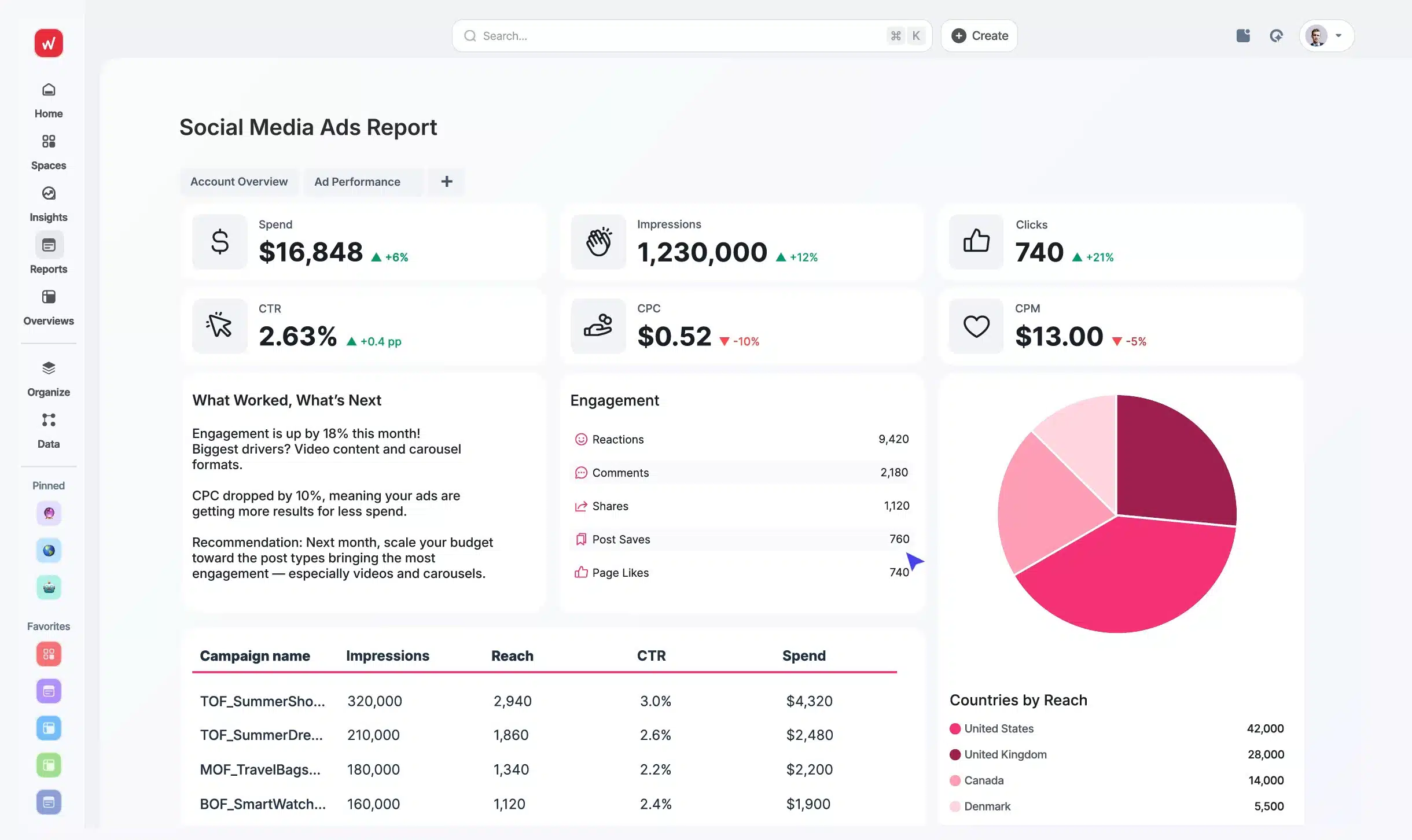
Whatagraph is the tool I use when I want reporting to stop being a chore. Instead of pulling numbers from different platforms and stitching them together in spreadsheets, it pulls everything into one place and turns it into clean, easy-to-share reports.
Connecting social and ad accounts takes minutes, and the built-in AI summaries help highlight what’s actually worth paying attention to.
Here are Whatagraph’s key features:
- Connect and centralize data from 55+ native integrations, with custom connections via API, Google Sheets, and BigQuery, all in one secure platform
- Unify and normalize data across channels with consistent naming, reusable transformations, custom formulas, and blended cross-channel metrics
- Get instant insights through AI-powered performance overviews by country, team, product, or channel, plus auto-generated summaries for stakeholders
- Use Whatagraph IQ chat to query performance data and get fast, plain-language answers without manual analysis
- Set goals and alerts to monitor KPIs and get notified when performance changes require action
- Build reports using drag-and-drop dashboards, AI-generated reports, tabs, and widgets, supported by a library of pre-built templates
- Create visually consistent, on-brand reports with auto-branding themes, flexible visualizations, and cross-channel widgets
- Share insights via automated report sends, live dashboard links with filters, Slack and Notion queries, or exports to BigQuery and Looker Studio
- Work in a zero-code, marketer-friendly interface with built-in guidance designed for fast setup and everyday reporting, not technical BI teams
What I like about Whatagraph
From my experience and the reviews I’ve gone through, the same strengths come up again and again: Whatagraph makes reporting faster, cleaner, and far less painful than traditional spreadsheets or slide decks. Users consistently highlight how easy it is to connect multiple data sources, build polished dashboards, and send client-ready reports without manual work.
What users are saying about Whatagraph’s pros:
- “The dashboards are clean, easy to build, and perfect for client reporting. It pulls in data from Google Ads, Meta, LinkedIn, and even TikTok without any hassle. I love how I can set up automated reports that look great and are client-ready. No more fiddling with spreadsheets or wasting time building slides.” — Bruhith I., Digital Marketing Specialist (Source)
- “Whatagraph’s drag-and-drop widgets are so simple to use, they practically make the report for you… The customer support team is lightning fast… the most noteworthy benefit of using Whatagraph is saving billable hours. I don’t have to stitch data from multiple platforms and then prettify it elsewhere.” — Brinda G., Content Writer (Source)
- “It is extremely flexible, the visuals are beautiful, and it makes complex data easy to digest for clients. The team even reworked their API for us so we could pull very specific data. I’ve never seen a platform go that far for an agency.” — Patrick C., Director of Performance Marketing (Source)
- “The platform offers a multitude of metrics that cater to our various needs, and the integrations and implementation are very easy. Their support is exceptionally helpful and keeps our workflow smooth.” — Verified User, Marketing and Advertising (Source)
- “Whatagraph is a highly intuitive reporting tool that makes it easy to monitor key marketing KPIs. Integrating multiple data sources and creating customized reports quickly is a big advantage, and the support team is always responsive.” — Paweł M., CEO (Source)
What I dislike about Whatagraph
I’ve noticed (and many others agreed) that Whatagraph has collaboration issues when multiple people edit reports at once, gaps in certain ad platform integrations, and occasional friction around pricing or settings. I personally don’t think these block day-to-day reporting, but they’re worth noting for larger teams or very complex setups.
What users are saying about Whatagraph’s cons:
- “If two people are editing a report at the same time, the widgets can glitch or break, which is frustrating on tight deadlines. It also doesn’t support X Ads yet, which limits full-funnel reporting.”
— Bruhith I., Digital Marketing Specialist (Source) - “As a solopreneur, I can’t afford Whatagraph long-term. I’d also like to connect personal media accounts, though I understand the privacy limitations.”
— Brinda G., Content Writer (Source) - “Sometimes we have problems with regional time settings.”
— Verified User, Marketing and Advertising (Source)
Whatagraph pricing
- Offers a free plan
- Paid plans start at $286/month
11. Midjourney – Best AI image generation tool for custom social media visuals
Who is Midjourney best for?
Midjourney is best suited for creatives, designers, and marketing teams that rely heavily on visual content and want full control over how images look and feel.

Midjourney feature overview
Midjourney is an AI image generation tool that helps you create custom visuals from text prompts. You type in what you want to see, and it generates images you can use for social media posts, ads, and brand visuals without needing design software or stock photos.
I use it when visuals need to carry more weight than just “looking nice.” With the right prompts, Midjourney can produce anything from stylized illustrations to realistic, photo-like images that feel intentional and on-brand.
According to G2’s guide on Midjourney vs DALL·E, “Midjourney tends to do better with photorealism, especially when it comes to textures, lighting, and depth. It produces images that feel more cinematic and emotionally rich, and hence, is a great choice for stock photos.”
Here are Midjourney’s key features:
- Generate high-quality AI images from text prompts, with a strong focus on artistic, cinematic, and photorealistic visuals.
- Create images in a wide range of styles, including illustration, photography, 3D renders, concept art, fashion, product visuals, and abstract designs.
- Control image output using advanced prompt parameters such as aspect ratio, style strength, seed values, chaos, quality, and version settings.
- Iterate on visuals using variations, upscaling, re-rolling, and prompt refinement to gradually reach the desired result.
- Produce high-resolution images suitable for social media, ads, branding, mood boards, and marketing assets.
- Maintain visual consistency across outputs by reusing prompts, seeds, and style references.
- Generate images collaboratively through Discord-based workflows, with shared prompts and community inspiration.
- Explore and remix public generations to learn prompt structures and creative approaches.
- Support fast experimentation at scale, enabling multiple image generations per prompt for rapid ideation.
- Export images for use in external design, social media, and content creation tools.
What I like about Midjourney
I think Midjourney stands out for one thing above all else: image quality. Users consistently point to its ability to produce highly artistic, detailed, and visually striking images that feel closer to creative direction than simple image generation. For social media, branding, and concept work, that creative edge is what keeps people coming back.
What users are saying about Midjourney’s pros:
- “It produces the most interesting artistic images. It is truly one of a kind.” — Eliot A., Sales / Outbound Marketing (Contract) (Source)
- “If used right Midjourney can help create images that look really realistic and can save a lot of time. It’s simple to use once you learn how to give it the right prompts.” — Sierra G., Social Media and Marketing Manager (Source)
- “Midjourney has completely transformed the way we approach product imagery… We can now generate hyper-realistic product visuals tailored to specific audiences or seasonal campaigns… which translates directly into better conversion rates and brand consistency.” — Verified User, Graphic Design (Source)
- “Midjourney consistently produces visually stunning, high-resolution images that often exceed expectations in terms of detail and quality… making it invaluable for generating visuals that can inspire or enhance creative projects.” — Axel N., Fashion and Corporate Photographer (Source)
- “I used Midjourney to generate more than 3,000 images… most of the images were really beautiful and impressive.” — Maicon S., Mid Full Stack Developer (Source)
What I dislike about
I saw trade-offs around control and workflow, and reviews confirmed it. Several users mention that getting very specific results takes time, prompt experimentation, and multiple generations. Others point out limitations with consistency, text handling, and integrations, which can slow things down when images need to move quickly into production or social workflows.
What users are saying about Midjourney’s cons:
- “It takes time to understand how to create the images you want.” — Eliot A., Sales / Outbound Marketing (Contract) (Source)
- “Sometimes the images don’t look realistic.” — Sierra G., Social Media and Marketing Manager (Source)
- “Iterating toward highly specific visual outputs often requires multiple generations and fine-tuning, which can be time-consuming if you’re working under tight deadlines.” — Verified User, Graphic Design (Source)
- “The biggest limitation with Midjourney is its lack of integration with other design software… achieving specific details or iterations can be challenging without trial and error.” — Axel N., Fashion and Corporate Photographer (Source)
- “Problems with texts, some specific details and consistency… when I want to create a sequence of images or a very similar illustration, it’s been very difficult.” — Maicon S., Mid Full Stack Developer (Source)
Midjourney pricing
- There is no free trial
- Paid plans start at $10/month
Frequently asked questions
1. What mistakes to avoid when using AI for social media?
When using AI for social media, avoid mistakes like letting AI publish without review, writing vague prompts, ignoring your brand voice, skipping fact-checking, and over-automating replies or post volume. Those shortcuts usually create generic, “samey” post-based content and can hurt trust with your target audience.
2. What’s the best AI for social media?
If you want an AI social media management tool that helps you do all your tasks from one tab, SocialBee is the best choice. You can schedule and publish posts, reply to comments and DMs, collaborate with your team, approve content, and track performance all in one place.
SocialBee’s AI assistant also creates a custom strategy for your brand and helps you generate captions, design images, and produce content quickly so you spend less time on busywork and more time on the creative stuff that matters.
3. How can I use AI for my social media?
Use AI to generate ideas, draft captions, create content variations for multiple channels, and repurpose one concept into platform-specific posts. Then use AI to refine tone, shorten/expand copy, and produce quick creative assets, while you handle strategy, approvals, and community context.
The simplest setup is: define your target audience + brand rules, draft with an AI content assistant, human-edit, then schedule posts in batches and review performance weekly so AI supports your business processes instead of replacing them.
Which AI-powered social media management tool will you choose?
AI can be a strong advantage in social media when it supports real workflows instead of replacing them. The tools covered in this guide show how AI is most effective when it helps with planning content, speeding up creation, maintaining consistency, and understanding performance, while leaving strategy and final decisions to people.
If social media distribution is where things start to break down, the priority should be getting everything into one clear system. SocialBee is an AI social media management tool that brings content creation, structured scheduling, engagement management, and analytics together in a single platform, making it easier to stay consistent across platforms.
Start your 14-day free SocialBee trial and build a social media workflow that is easier to manage and scale.