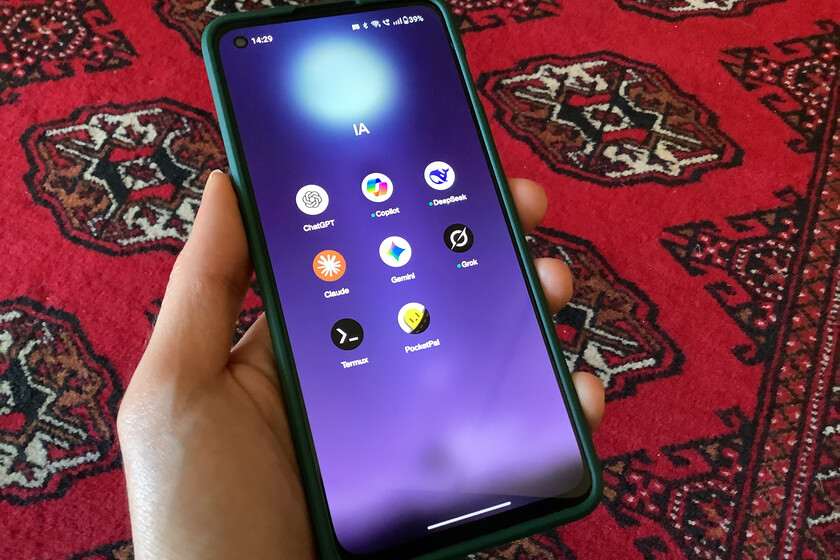
In addition to all the commercial AI language models that we have at our disposal (ChatGPT, Gemini, Claude, etc.), there is a whole world of open source language models that can be used for a lot of applications, both at home and business level. I’ve been tinkering with LLMs locally for quite some time and the truth is that having one working without the need for an Internet connection can be really good for us.
The point is that installing an LLM locally and on our mobile phone is easier than it seems. Today we can find tools that are very easy to use and have a very friendly interface for any user. Furthermore, you don’t need a smartphone with very high technical specifications to run a small model. Below this text I explain how to do it and what sense it makes to have a local AI on your mobile.
What is PocketPal and what is the point of having an AI locally?
One of the tools that makes this possible is called PocketPal AI, and the best thing is to install it and start it does not require technical knowledge. The app is free for iOS and Android and allows artificial intelligence models to be installed directly on the mobile phone, so that the user can use them without an Internet connection, with total privacy and without their conversations reaching external servers.
The key to all this is to use reduced versions of some of the language models that we know. These small models are intended to run directly on the CPU or GPU of a consumer device. They don’t have the same reasoning capabilities as the most advanced OpenAI or Anthropic model, as that would be impossible right now on phone hardware, but they do. They are capable enough for a wide variety of everyday tasks: summarize texts, answer questions, translate, help write, generate simple code or simply have a conversation.
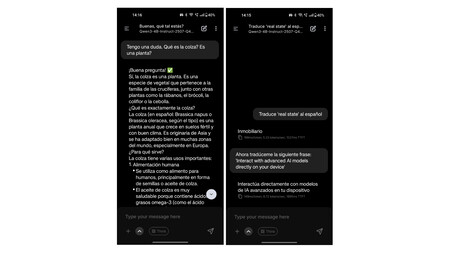
The proposal is useful in more situations than it seems. Imagine that you are on the subway without coverage, on a trip abroad without data or in a rural area. With an AI installed locally on the mobile you always have at hand a kind of intelligent encyclopedia: someone to consult with, think out loud or resolve doubts in the moment. And what is equally important: with complete privacy. All processing happens entirely on the device. Conversations, prompts and data never leave the phone or are stored on external servers.
What mobile do you need
Before you start downloading the app, it is worth checking if your device has what you need. Running an AI model locally requires that the device have a series of more or less important technical specifications, although we do not need to go to the highest range of devices to run them. I myself am using PocketPal on a modest, but more than capable OnePlus Nord 2.
AI models are considerably large files, so some free internal storage space is needed, and local processing demands hardware power. But wow, as long as you have a considerable amount of RAM and a CPU that’s not worth it, you’re more than enough.

The requirements vary greatly depending on the model you want to install, but as a general guide:
- RAM: Minimum 6 GB for small models (1-3B parameters). For medium models with 7B parameters, it is advisable to have at least 8 GB.
- Free storage: Between 2 and 5 GB for the lightest models. A PocketPal AI model usually takes up between 1 and 4 GB per installation.
- Processor: Any upper-mid range from the last four or five years works. For more demanding models and with more parameters, a very powerful processor is recommended.
- Operating system: To use PocketPal specifically, Android 7.0 (Nougat) or higher is required on Android, and it is also available for iPhone starting with iOS 15.1.
The good news is that lighter models, such as Qwen2.5-1.5B, They can work even on more modest devices. The PocketPal team itself recommends it as a starting point. The thing is to try. For example, I installed Qwen3-4B and it works quite well on a 5-year-old mid-range phone.
How to install PocketPal step by step
To have PocketPal working correctly on your mobile you don’t have to do much. Below these lines we tell you how to do it step by step:
1. Download the app
PocketPal AI is available on both the Android Play Store and the Apple App Store. Links for Android and iOS.
2. Download an AI model
Once inside, the app will ask you to download a model to get started. In ‘Models’ a list of available models appears. On that list you will not find names like Gemini or GPT, which are proprietary models. Instead you will see their open source versions: Gemma is the open version of Google’s Gemini; Llama is the Meta model, the same AI that WhatsApp and Instagram use; Phi is Microsoft’s open model; and Qwen is from Alibaba, among others.
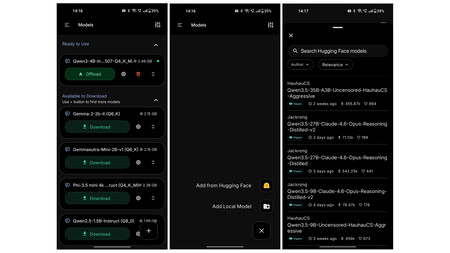
If you are new and want to try, perhaps one of the most recommended and lightest is Qwen2.5-1.5B. It gives good results for simple queries and is quite fast (if your phone’s hardware is more or less up to par). If your phone has more than 6 GB of RAM and plenty of free space, you can try models with 3B-4B parameters such as Llama 3.2 3B, which offers more elaborate responses.
The good thing is that also you have the entire Hugging Face repository to test by pressing the button in the lower right corner. Here we can install any model directly from Hugging Face, such as Qwen3-4B-Instruct, which is the one I installed on the Nord 2, or try others from DeepSeek or Mistral. Everything works from the app, without leaving it.
Important: Downloading the model does require an Internet connection. You just have to be connected at that first moment. From there, everything works locally.

3. Load the model and start chatting
Once downloaded, click on the model to load it into memory. Then, go to the Chat section, type your message and the AI will respond by processing it entirely on your phone. You can check this by turning off WiFi and data.
What performance can you expect?
It is advisable to be realistic. A local AI on mobile is not ChatGPT. The answers They will arrive slower and the phone will heat up a little more than usual due to intensive use of the processor. The models generate between 5 and 20 tokens per second on high-end mobile phones, enough to maintain a fluid conversation, but far from the speed of a server with a GPU.
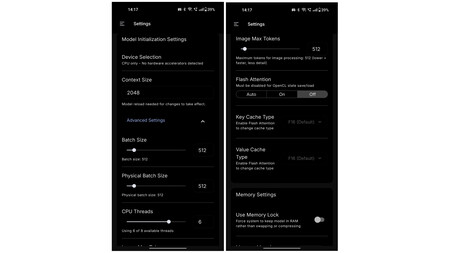
To get more performance on iPhone, there is the option to activate Metal, Apple’s hardware acceleration API, and increase the “Layers on GPU” parameter to around 80. With this change, iOS moves part of the processing from the CPU to the device’s GPU, which noticeably speeds up text generation. On some recent devices, also enabling the ‘Flash Attention’ option may add an additional improvement.
As for what file sizes work best, the sweet spot on smartphones and tablets is to use .gguf format templates approximately 4 GB. Above that figure things slow down significantly.
Amazon believes that having a robot picking up things, folding clothes and playing with your dog has a Price: $50,000″ width=”375″ height=”142″ src=”https://i.blogs.es/cf58ef/sprout1/375_142.jpeg”/>
PocketPal is not the only option
PocketPal is probably the most accessible app to start with, but we also have other alternatives. On Android, MNN Chat also stands out, with multimodal support. For those who use iPhone they also have Private LLM, although it is paid and includes optimized models taking advantage of quantization techniques to perform better on more modest devices.
If what you want is to do the same but on a computer, there are two references: Ollama and LM Studio. With them it is very easy to have a local AI on your PC. LM Studio has a very friendly visual interface; Ollama is more technical but more flexible. Both are free and allow you to run models with up to 13B parameters or more depending on your computer’s hardware.
It’s worth it, with nuances
A local AI on mobile does not replace the great assistants we knowat least for now. For complex tasks, long documents, or sophisticated reasoning, server versions are still superior. But for everyday use (resolving a question, summarizing a paragraph, searching for ideas, translating something quickly or simply having a conversation), the small models do a more than decent job. However, prepare yourself for hallucinations.
In WorldOfSoftware | They said that generative video AI would kill Hollywood. At the moment the fight is on the side of tradition