
Image editing
Hootsuite and Sprout Social both offer a range of image editing features designed to enhance social media visuals. Users can crop and resize images to match the requirements of different platforms. Both tools provide a selection of filters and effects, as well as options for adjusting brightness, contrast, saturation, and blur for more precise editing.
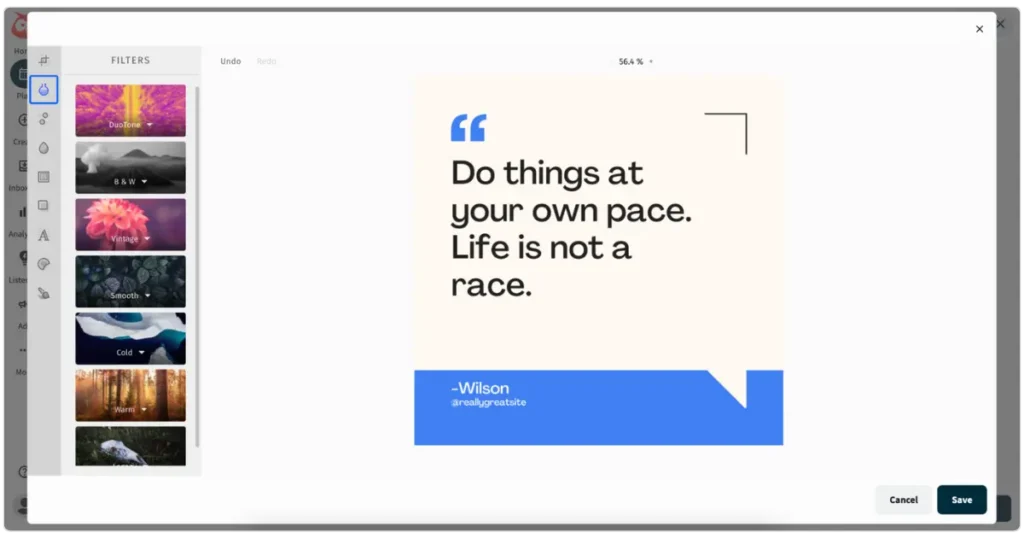
Additionally, users can add text overlays with various fonts and colors, apply texture overlays, and use stickers and shapes to emphasize certain parts of an image. Both platforms also integrate with Canva, enabling direct editing and import of visuals from within the post editor.
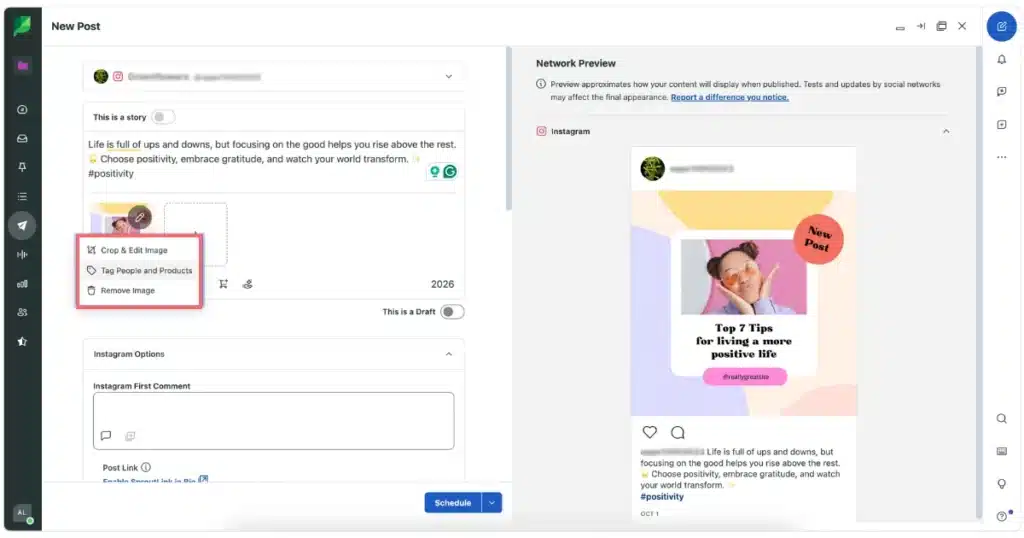
The differences between these platforms are mostly in what you can do with the images. For instance, Sprout Social lets you tag people and products in Instagram images, while Hootsuite doesn’t.
On the other hand, when it comes to Facebook images, both Sprout Social and Hootsuite allow you to add alt text. However, Hootsuite offers an extra feature that lets you choose which Facebook album the images will be uploaded to.
Video editing
Both Hootsuite and Sprout Social offer video editing features with a similar range of options. The editing tools are user-friendly, allowing you to trim, crop, and splice clips with ease. You can also enhance your videos with effects and filters.
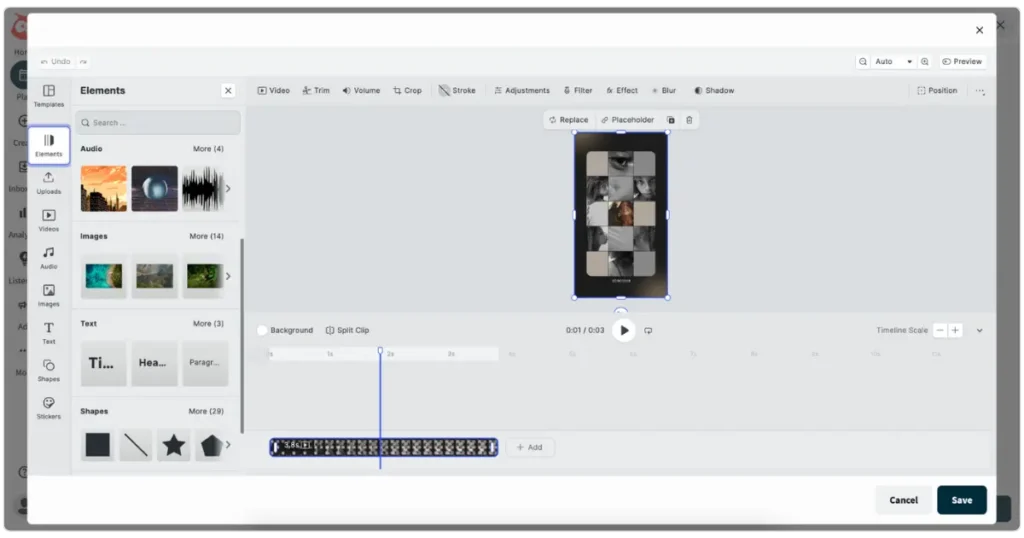
Both platforms enable you to add overlays such as text, shapes, stickers, images, or even other video clips.
In Hootsuite, you can upload your own videos or choose from their library, though the selection of available clips is limited. The same applies to audio; you can either upload your own files or pick from a limited sound library. Hootsuite also provides a set of four video templates that you can customize. In contrast, Sprout Social does not offer any built-in videos, audio options, or video templates.
Sprout Social and Hootsuite both offer options for users to add custom thumbnails to their videos, either by selecting a frame from the video or uploading a separate image. They also provide features for adding subtitles to Facebook videos, enhancing accessibility and engagement.
Media library
Before we explore the media library features of each tool, it’s important to note that Hootsuite offers this feature exclusively to its custom Enterprise plans, which are quite expensive, starting at $399/month. Similarly, Sprout Social provides access to the “Asset Library” only to users on the Professional or Advanced plans, which also begin at $399/month, matching the starting price of Hootsuite’s Enterprise plan.
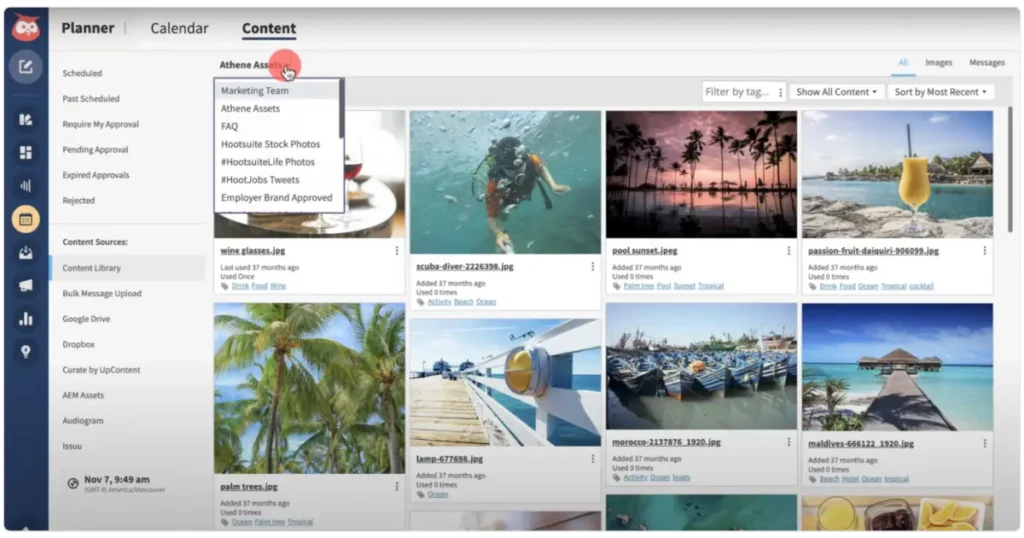
Sprout Social’s Asset Library and Hootsuite’s Media Library both aim to simplify asset management for social media teams, offering a central place to store, organize, and manage content like images, videos, and text.
They both allow admins to control who can access and manage these assets, making sure the right people have the right level of control.
Source
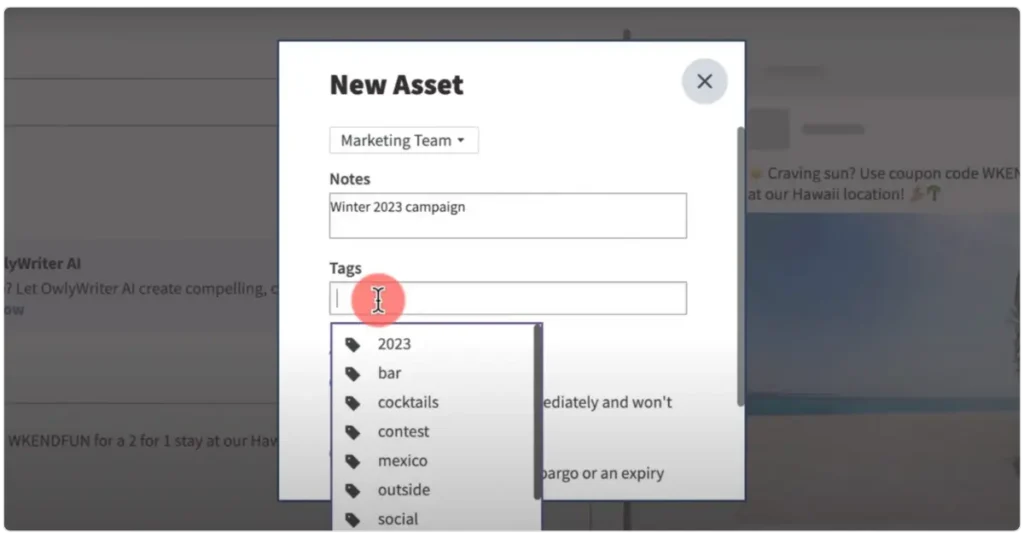
You can tag assets on both platforms to make them easier to find, and they both let you share content with specific teams to keep everyone on the same page.
Additionally, they each offer features for setting availability and expiration dates on assets, so you can control when certain content is used. Internal notes are also a nice touch on both platforms, giving team members guidance on how and when to use the assets. Plus, you can easily view details like upload date, usage, and tags.
Source
Despite these similarities, there are some key differences between the two social media management tools. A standout Sprout Social feature is the “Auto Save to the Asset Library from Compose,” which automatically saves media added to a post for future use.
Sprout also has a built-in image editor, so you can tweak your images right from the Asset Library.

Sprout even lets you create complex folder hierarchies to keep everything neatly organized and allows direct sharing of assets via links. On the flip side, Hootsuite’s Media Library focuses more on flexibility through its post templates, letting you create templates that include text, social accounts, links, images, tags, and even scheduling details.
Hootsuite, unlike Sprout Social, shows you how many times an asset has been used, providing some useful insights into content usage.
If you need to make changes to multiple assets at once, Hootsuite gives you the ability to tag them or set availability time frames in bulk. This feature is not available with Sprout Social.
One thing to note, though, is that you can’t upload video files directly into the Hootsuite library like you can in Sprout Social—you have to save them within post templates instead.
Best posting time recommendations
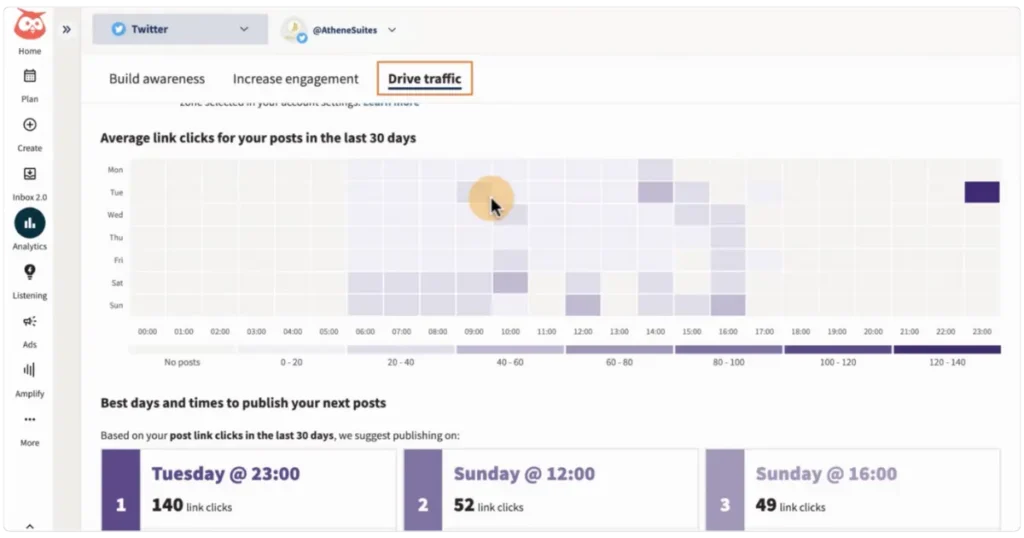
Hootsuite’s posting time recommendations are tailored based on the performance of your previous content. This feature is part of Hootsuite Analytics, so you start by selecting the right network and account. After that, you choose a goal that aligns with your social media objectives, like boosting engagement or driving traffic.
Source
The tool presents this information in a heatmap, where darker shades indicate the times your posts performed best. It even highlights the top three times for you to post, making it easier to schedule important content, such as a product launch, on days when you’re more likely to get clicks.
The more you use Hootsuite for posting, the more accurate it becomes at identifying the best times for your audience, increasing your chances of capturing their attention.
Sprout Social’s “Optimal Send Times” feature is available on the Professional and Advanced plans, which start at $399 per month. In contrast, Hootsuite offers best posting time recommendations on its more affordable plan, starting at $149 per month.
Sprout analyzes interactions like comments, likes, and messages to suggest the top seven times to post for each profile. You can quickly access these suggestions in the Compose window on both the web and mobile apps.
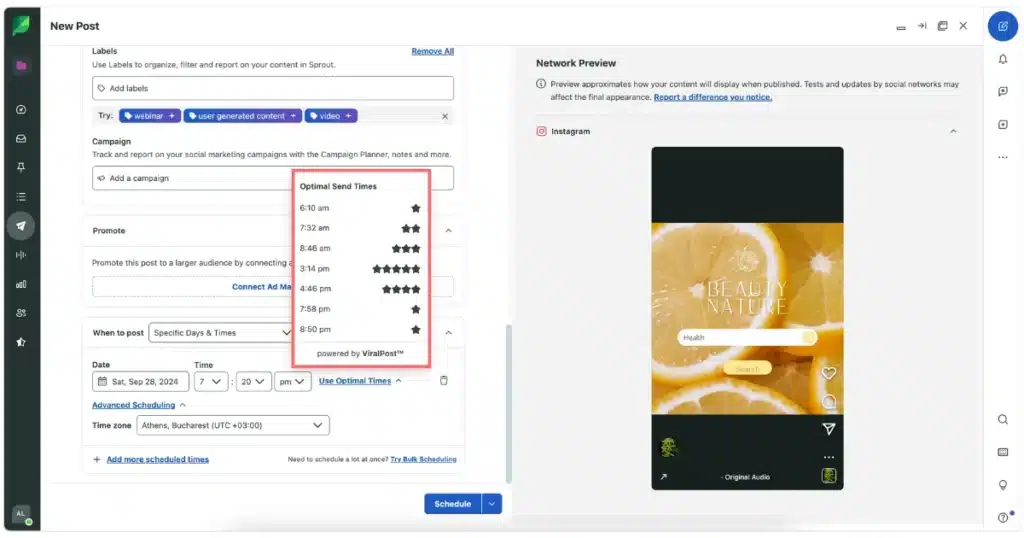
Using it is simple—just select your network(s) in the Compose window, choose “Specific Days and Times,” and you’ll see a list of recommended times, each marked with stars to indicate the potential for higher engagement. If you’re posting to multiple profiles, you can use the “Schedule + Duplicate” option to adjust the optimal times for each one.
This feature continuously updates based on changes in your audience’s behavior, so the suggested times are always current. If there’s not enough engagement data for a profile, Sprout falls back on global trends to give you the best possible posting times. Plus, it takes your specified time zone into account for accurate recommendations.
Content resharing
Hootsuite allows you to reshare content from Instagram and Twitter using its “Streams” dashboard. This feature lets you find and share posts from other Instagram creators to your own Facebook or Instagram accounts.
To get started, navigate to the Streams dashboard, click “Add stream,” select the social media platform (Instagram or X), and enter a hashtag to search. Social feeds of posts using that hashtag will appear, and you can reshare any of them to your accounts.
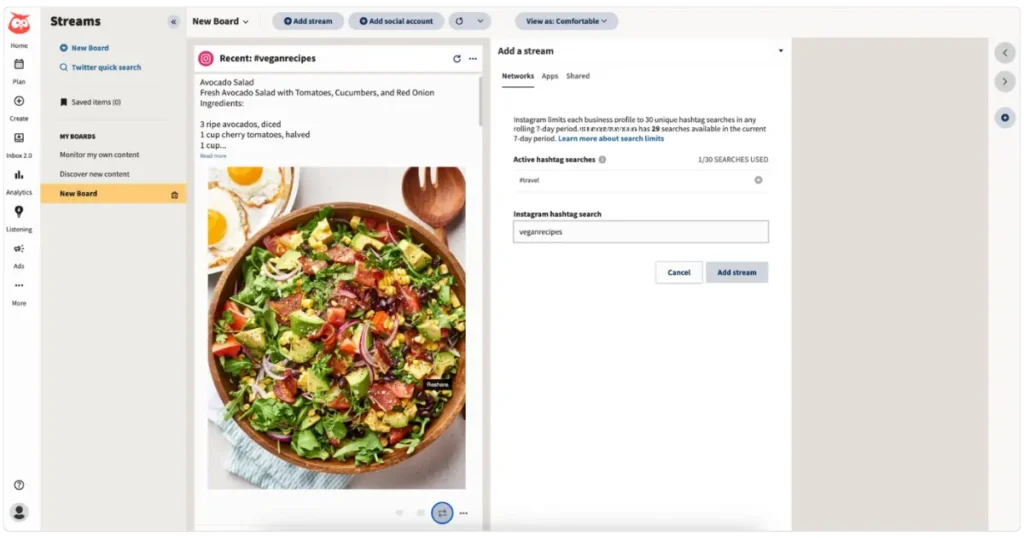
The reposting feature for X (formerly Twitter) is straightforward: you can either share someone else’s post directly with your followers or add your own comment by quoting it.
Quoting allows you to include the original post as an image within your new post before sharing it. This feature is also useful for resurfacing or reusing your own posts, making it easier to bring back content that has already been approved.
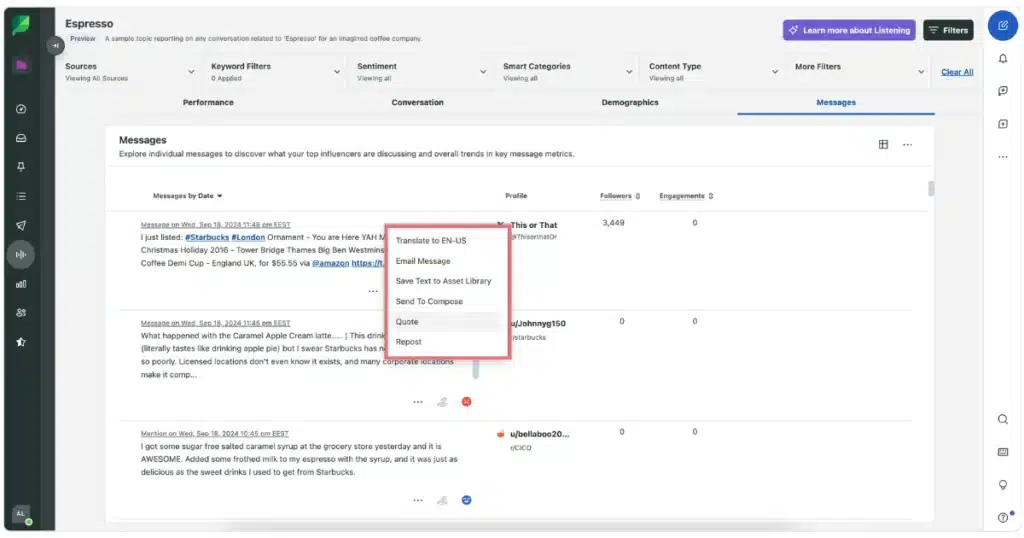
The Sprout Social dashboard for social listening, allows you to discover content related to topics that interest you across the web and social media platforms such as Facebook, Instagram, X, YouTube, LinkedIn, Reddit, and Tumblr.
Sprout Social’s Listening feature is a powerful tool for curating and resharing content across your social platforms. By monitoring relevant conversations, you can take action directly within the platform. For example, if you come across a message that resonates with your brand, you can easily quote or repost it to your own X, Facebook, or Instagram profiles with just a few clicks.
Content curation
Hootsuite enables you to curate and reshare Instagram and Twitter posts directly from the Streams dashboard. It also integrates with tools like Pocket (free for Enterprise plans or $2.99/month), RSS Autopublisher (free for Enterprise plans or $6.99/month), and UpContent (free), making it easy to collect web content and store it in Hootsuite for future sharing.
As previously mentioned, Sprout Social’s Listening dashboard helps you discover and curate content from across the web and social platforms like Facebook, Instagram, X, YouTube, LinkedIn, Reddit, and Tumblr. It allows you to monitor relevant conversations and quickly quote or repost content to your profiles with just a few clicks.
Additionally, if a message contains valuable quotes, hashtags, or URLs, you can save it to the Asset Library for future use. The Listening feature also lets you send content directly to Compose, making it simple to turn discovered messages into posts for your social profiles.
Plus, with Sprout’s browser extension, you can easily collect and save content from anywhere on the web for use later.