2. NapoleonCat
Who is NapoleonCat best for?
NapoleonCat is a social media scheduling tool best for mid-sized to large brands, agencies, and in-house social media teams that handle high volumes of comments, messages, and ads.
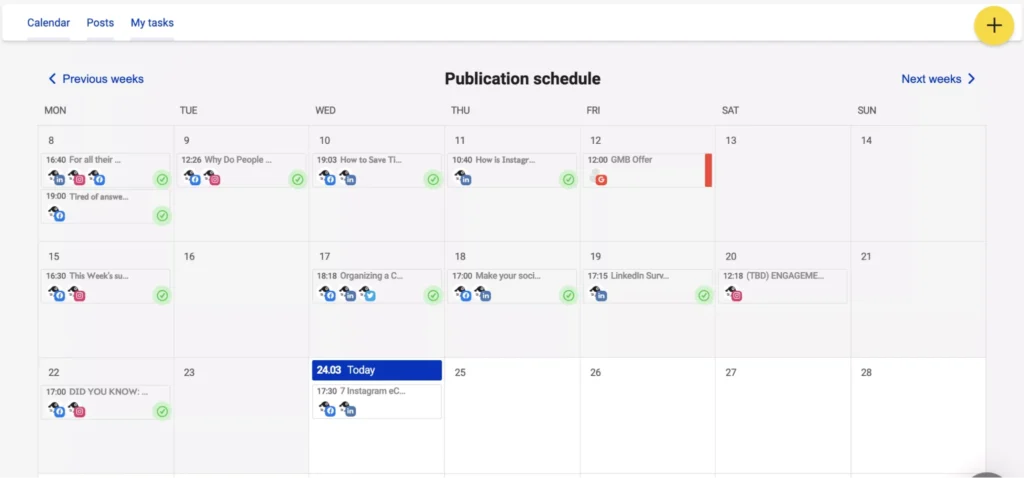
NapoleonCat feature overview
From everything I’ve looked into, NapoleonCat works best as a scheduler that’s closely tied to inbox and moderation tools, rather than a platform built around content creation. It’s clearly designed for teams that manage social media at scale and need to stay on top of conversations, not just publishing.
You can plan posts weekly or monthly across Facebook, Instagram, TikTok, LinkedIn, and Google Business Profile, including formats like Stories, carousels, videos, and Instagram Reels. What I like here is the flexibility. You can adjust captions per platform, group posts into campaigns, and keep everything organized in one place, which makes collaboration feel structured instead of chaotic.
The calendar also shows posts published directly on Facebook and Instagram, so you always know what’s live and what’s coming up across your social media channels.
Where NapoleonCat really stands out is what happens after posts go live. Based on user feedback, the unified Social Inbox is a big reason people stick with the tool. You can manage comments, messages, reviews, and even paid ad interactions from a single dashboard, assign conversations to teammates, and respond faster using saved replies.
The moderation and automation features are especially valuable for busy brands and agencies. You can automatically hide spam, filter abusive comments, flag messages by sentiment, and keep conversations focused on meaningful engagement instead of noise. This makes it much easier to manage high volumes of interactions without burning time on manual moderation.
NapoleonCat also supports larger teams well. You can translate messages into over 100 languages, tag and prioritize conversations, monitor page performance and engagement trends, and generate reports for clients or internal stakeholders. Overall, it feels like a tool built to keep social media under control once content is live, especially when multiple people are involved.
Here are NapoleonCat’s best social media features:
- Plan posts weekly or monthly using a shared calendar across multiple social media platforms, including posts, Stories, Reels, carousels, and videos.
- Customize captions per platform, group posts into campaigns, and manage drafts with your team across multiple accounts.
- Track scheduled posts alongside content published directly on Facebook and Instagram, so you always know what’s live and what’s coming next across your social media accounts and business pages.
- Reply to comments, messages, reviews, and ad comments from a unified inbox without switching tools.
- Assign conversations to teammates, add internal notes, and use saved replies to respond faster, even when managing several social accounts at once.
- Set rules to automatically hide spam, remove abusive comments, reply to common questions, and flag messages based on sentiment.
- Translate messages into over 100 languages, use sentiment and custom tags to prioritize conversations, and manage moderation on both organic posts and paid ads across each social platform.
- Use optional AI tools to generate caption ideas and suggested replies, making it easier to auto-post updates and keep responses consistent with your brand tone.
- Monitor page performance, Instagram Stories metrics, and competitor activity across social media. Compare engagement trends and export data for deeper analysis, including visibility into what drives reach and interaction.
- Generate branded PDF reports, schedule recurring email reports, and export social media analytics or inbox data for clients, stakeholders, or internal teams, keeping performance and social media shares in safe hands.
- Work with multiple team members using role-based access, Slack notifications, mobile apps, and enterprise-level security, onboarding, and support options, making it easier to manage social media at scale.
What are NapoleonCat’s pros?
NapoleonCat’s strengths are clear in day-to-day community management. People highlight how easy it is to use, how smoothly it centralizes comments, messages, and mentions into one inbox, and how strong its moderation tools are.
Teams also value the visual content calendar, flexible inbox filters, and how simple it is to collaborate and onboard new members.
What users are saying about NapoleonCat’s pros:
- “NapoleonCat is simple to use and keeps all my social media profiles in one place. It supports many platforms, and new team members can be onboarded easily.”
– Ewa S., Online Marketing Specialist (source) - “What I like most about NapoleonCat is how it centralizes all social interactions in one unified inbox, making moderation, customer care, and team collaboration efficient.”
– Raquel B., Growth Consultant (source) - “As a Social Media Manager, I really value that NapoleonCat brings all the essential aspects of my work into one tool. The wide range of moderation features makes team collaboration seamless, while the content calendar and visual previews help me plan and organize social media posts more effectively.”
– Karolina S., Senior Social Media Manager (source) - “It’s a great tool for day-to-day community management, with an intuitive and easy-to-grasp layout, plus helpful filters that let you tailor your inbox feed to your needs.”
– Marcin C., Community Manager (source) - “I love the automatic moderation tools. It’s easy to use, supports multiple users and accounts, and really helps with community management. The team is also very responsive when I have questions.”
– Ella M., Digital Content Manager (source)
What are NapoleonCat’s cons?
NapoleonCat’s main cons come down to speed, flexibility, and usability. Users mention occasional lag when moderating or posting, limited support for Facebook Groups, and sentiment analysis that’s harder to read at a glance. Some also find the interface less intuitive, with occasional account disconnects and reporting that’s difficult to customize or edit.
What users are saying about NapoleonCat’s cons:
- “It’s not very fast. Sometimes it takes time to upload a comment or complete an action.”
– Patryk, Social Media Specialist (source) - “There is no possibility to connect Facebook Groups.”
– Ewa S., Online Marketing Specialist (source) - “I can’t easily identify the number of comments by sentiment in the tool. It’s possible to filter them, but the count doesn’t appear. The sentiment chart also merges inbox messages and public comments together.”
– Raquel B., Growth Consultant (source) - “The platform’s UX could be more polished, as some elements feel less intuitive than they could be. I’ve also experienced situations where connected profiles disconnect on their own, which can disrupt the workflow when managing multiple accounts.”
– Karolina S., Senior Social Media Manager (source) - “There’s no way to customize the tool to individual needs, especially when it comes to report visualization or generating reports in a more editable format.”
– Verified User, Social Media Marketing and Advertising (source)
NapoleonCat pricing:
3. Planable
Who is Planable best for?
Planable is best for agencies and in-house marketing teams that need a visual way to plan content and manage approvals.
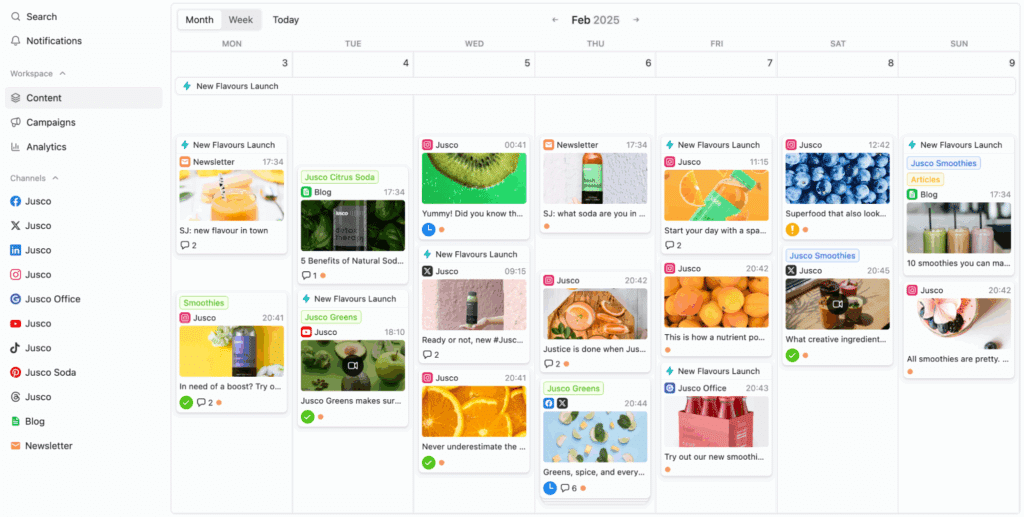
Planable feature overview
Based on what I’ve seen while reviewing the platform, works great for teams that work with multiple stakeholders, and tight publishing timelines.
Planning and scheduling are straightforward. You can organize weekly or monthly content across multiple social media platforms, then preview everything before it goes live using feed, grid, calendar, or list views. Being able to see how an Instagram grid or a full month of posts will look makes it easier to catch issues early, and it’s something users mention often.
Collaboration is where Planable feels strongest. Unlimited users, in-post comments, text annotations, version history, and flexible approval workflows make it easy to collect feedback in context instead of chasing it across email or chat.
AI features for rewriting captions and generating posts help speed things up, though they feel more like a bonus than the main draw.
Here are Planable’s best social media features:
- Plan and schedule posts across multiple social media platforms.
- Preview how posts will look before publishing using visual views like calendar, feed, grid, and list, so you can spot issues early.
- Create and edit content faster with built-in AI tools for rewriting or generating captions, plus a media editor for quick visual edits.
- Organize content into campaigns and labels to group posts by theme, launch, or initiative and keep your strategy easy to follow.
- Reuse and automate recurring content by scheduling repeat posts and automatically adding first comments, such as hashtags or follow-up text.
- Store and manage media in one place by uploading images and videos to a shared library and syncing previously published posts for full calendar visibility.
- Collaborate with teams and stakeholders using unlimited users, comments, annotations, version history, and flexible approval workflows, including bulk approvals on higher plans.
- Manage engagement from one inbox by replying to comments, organizing conversations by status or sentiment, and using AI reply suggestions when available.
- Track your social media performance and share reports with post-level and account-level analytics, audience demographics insights, and customizable reports for teams or clients.
- Scale securely as you grow with enterprise features like SSO, advanced permissions, custom workspaces, onboarding support, and flexible billing options.
What are Planable’s pros?
What users like most about Planable is how visual and collaborative it feels from the start. Teams can separate clients into workspaces, map out content visually, rearrange posts easily, preview Instagram grids, and handle feedback and approvals in one place, with light AI help for captions and hashtags to save time.
What users are saying about Planable’s pros:
- “It’s genuinely easy to separate clients into workspaces. Mapping out a content plan is simple, and being able to shuffle posts around and see everything visually just works.”
– Damon W., Agency Owner (source) - “I enjoy Planable’s month overview because it lets me see how my company’s Instagram grid will look. The approval buttons also make it easier to get feedback from managers without having to chase them in internal messaging tools.”
– Verified User, Marketing and Advertising (source) - “I really like the automation features, such as caption and hashtag generation, which make the process much more efficient.”
– Dwi H. (source) - “I like being able to see the grid view and keep track of all my upcoming posts, as well as getting direct feedback from other team members.”
– Verified User, Food & Beverages (source) - “Easy to use, and a really visual platform, which is key for a marketing lover like me.”
– Sara S., Founder (source)
What are Planable’s cons?
Planable’s main downsides show up as teams grow or rely more on mobile. Users mention a learning curve at the start, confusing pricing as clients and workspaces are added, occasional bugs on both desktop and iOS, and a mobile app that can feel unreliable, especially when posting Stories or managing published posts.
What users are saying about Planable’s cons:
- “There was a bit of a learning curve. We’re still figuring some things out, but overall it’s manageable once you get familiar with the features.”
– Verified User, Hospital & Health Care (source) - “The payment plans are a little confusing and hard to manage as you grow with clients.”
– Damon W., Agency Owner (source) - “While I use Planable every day for my job, it can be buggy and frustrating. The iPhone app reloads frequently or won’t display posts, and the desktop app sometimes fails to open without multiple reloads.”
– Verified User, Marketing and Advertising (source) - “The price can add up quickly for small businesses once you start adding people and workspaces. There’s also a limit on Instagram photos and some clunky auto-posting behavior.”
– Verified User, Marketing and Advertising (source) - “The mobile app needs improvement, especially when posting Stories. If you leave and return to the app, the page refreshes and marking posts as published becomes frustrating.”
– Verified User, Marketing and Advertising (source)
Planable pricing:
- Offers a free trial
- Paid plans start at $39/month
4. StoryChief
Who is StoryChief best for?
StoryChief is best for content-driven teams, agencies, and B2B marketers who prioritize SEO, structured collaboration, and multi-channel distribution.
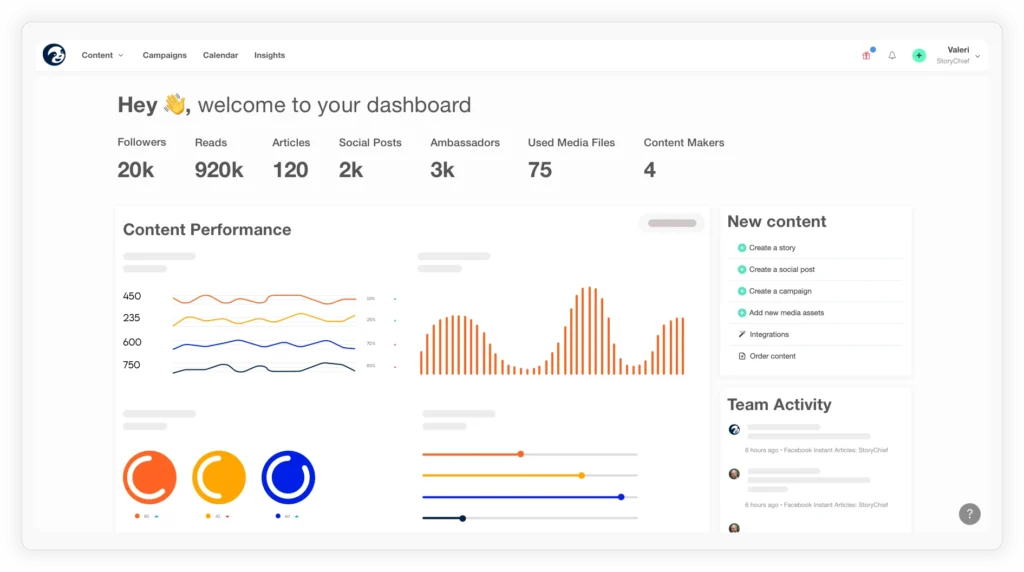
StoryChief feature overview
StoryChief is a content marketing and social media publishing tool built for teams that treat content as a long-term growth channel, not just something to post and move on from.
It’s especially well suited to content-driven teams that care about SEO, consistency, and distributing the same piece of content across multiple channels without constantly duplicating work.
At its core, StoryChief acts as a lightweight social auto poster that connects your website and your social media platforms in a practical way. It brings blogs, newsletters, and social posts into one shared calendar, making it easier to plan campaigns as a whole instead of managing everything in silos across tools and social media accounts.
Writing happens inside a rich editor that supports images, embeds, and video, with built-in SEO tips, keyword suggestions, and readability scores guiding you as you work. That focus shows up clearly in user feedback.
Many teams mention that it helps them publish content that’s actually optimized for search, not just nicely formatted.
Once a new post goes live, you can auto-post blog posts and other WordPress content across your connected social network with just a few clicks.
StoryChief works well beyond basic blog publishing too. It supports custom post types, including other custom post types like WooCommerce products, which makes it useful for businesses with more complex WordPress setups.
For social distribution, you’re not locked into one format. You can tailor a custom message and adjust the message format for each platform, manage posts account individually, and publish across multiple accounts or business pages without everything sounding the same. Fetching pictures from your content and turning new content or old content into social media shares is straightforward and doesn’t require jumping between tools.
Collaboration is a big part of the workflow as well. You can assign tasks, set goals, collect feedback, and run approvals directly inside the platform, instead of relying on long email threads. This makes day-to-day social posting activities easier to manage, especially for teams working together across different channels.
I should also note that StoryChief integrates with over 100 tools and lets you publish or schedule social posts tied to each article in just a few clicks. With Google Analytics campaign tracking built in, teams can see exact traffic coming from their social posts, so performance isn’t guesswork. Overall, it keeps content distribution in safe hands and makes multi-channel publishing feel manageable, not overwhelming.
Here are StoryChief’s best social media features:
- Plan blogs, newsletters, and social accounts together in a shared content calendar, making it easier to manage automated social media posting across channels instead of working in silos.
- Write and format posts with a rich editor that supports images, embeds, and videos, helping teams focus on high quality content rather than just formatting.
- Use built-in SEO tips, keyword suggestions, and readability guidance to improve visibility and reach more people through search and social.
- Assign tasks, set goals, and manage campaigns as a team, keeping workflows clear and content production moving without bottlenecks.
- Publish press releases or announcements via a branded newsroom page and automatically share updates across other social media platforms when needed.
- Integrate with 100+ apps such as Google Business, WordPress, Shopify, HubSpot, and Mailchimp, making it easy for WordPress users to connect their WordPress site and distribute a WordPress post without jumping between tools.
- Auto post content from blogs and newsletters, reuse old posts, and keep fresh content flowing with minimal manual effort.
- Track engagement and conversions with automated reports, giving teams a clearer view of what drives maximum reach and results over time.
- Run content audits to clean up outdated or duplicate social media content, helping teams focus on what still performs instead of publishing more content for the sake of it.
- Use AI tools to refine ideas, improve writing, and generate captions for social media profiles, especially when you need a faster way to get content out the door.
What are StoryChief pros?
What stands out most about StoryChief is how tightly it connects writing, SEO, and distribution. Users like having SEO and readability guidance built into the editor, clear calendars for planning, quick approvals with less back-and-forth, and one-click publishing that pushes content across websites and social channels without extra steps.
What users are saying about StoryChief’s pros:
- “It is obvious that their number one priority is SEO and ensuring that my content is bulletproof for Google. Not only that, they make everything super seamless for me and my clients. Web and social content are a breeze. Calendars are easy to create, upload, and share. Their approval and feedback system has saved me countless emails. I highly recommend StoryChief as a go-to tool for content marketing and SEO.”
– Morgan S., Founder (source) - “It makes my content management and writing a breeze, not to mention all the other added features they have.”
– Hendrico V., Marketer (source) - “We’ve been using StoryChief for over five years, and as an agency working with content-driven clients, it has been an invaluable tool. We especially like the built-in SEO guidance, readability analysis, and the ability to trickle-publish and syndicate content across multiple channels over several weeks.”
– Juergen B., Co-Founder and Creative Director (source) - “It makes it easy for multiple stakeholders to review and approve content quickly and efficiently. It also makes it easy to involve colleagues from across the business.”
– Verified User, Pharmaceuticals (source) - “I value StoryChief because it helps teams write better content using built-in SEO and readability scores. Content distribution is simple. You can write posts for each article and publish or schedule them across your chosen channels in one click.”
– Michael S. (source)
What are StoryChief’s cons?
What users point out about StoryChief’s downsides is that it can feel limiting as teams grow. Pricing may be a stretch for early-stage startups, SEO research inside briefs is fairly basic, collaboration relies on comments rather than live editing or suggestions, and analytics are less detailed than some competing tools.
What users are saying about StoryChief’s cons:
- “Pricing is fair for the features you get when using StoryChief. For new startups with limited funds, it could be a slight hurdle.”
– Verified User, Consulting (source) - “I wish the existing content brief for each story included SEO keyword research and content grading recommendations.”
– Juergen B., Co-Founder and Creative Director (source) - “I’m using StoryChief with a really big team where we go through many rounds of editing with multiple editors. Not being able to add suggestions, only comments, makes it much slower to clean up versions. You also can’t have more than one person editing a document at the same time.”
– Cassandra A., Digital Marketing and Sales Manager (source) - “The analytics function remains underdeveloped, especially compared to other competitors.”
– Verified User, Online Media (source)
StoryChief pricing:
- Offers a free plan
- Paid plans start at €29/month per user
5. Vista Social
Who is Vista Social best for?
Vista Social is best for agencies and mid-sized marketing teams that manage multiple social accounts and need strong scheduling, inbox automation, and social listening in one tool.
Vista Social feature overview
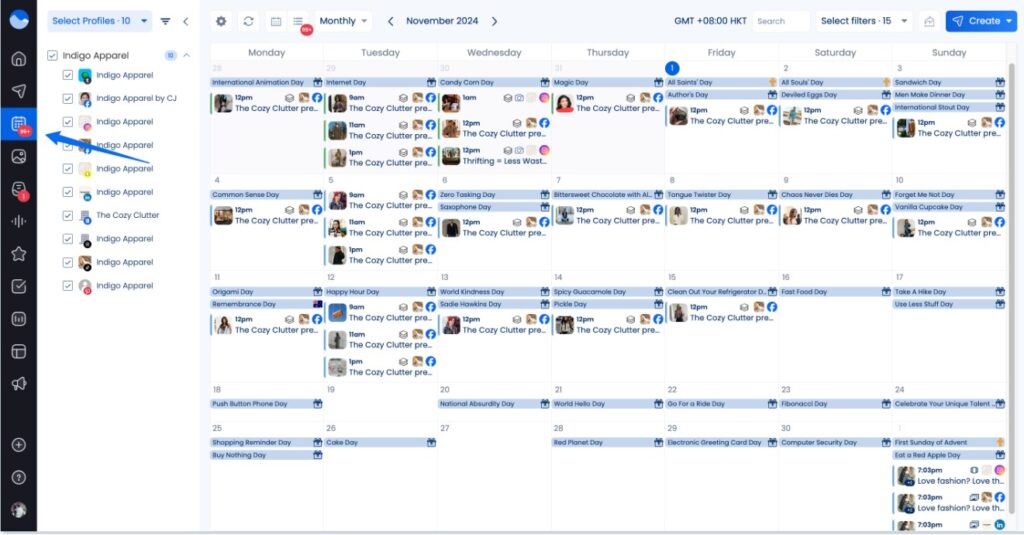
Vista Social gives you a lot of flexibility. You can plan unlimited posts using a visual calendar, adjust captions and media for each platform, and bulk schedule content when you want to get ahead.
I found the posting schedules and timing suggestions especially useful when managing multiple accounts, since they remove a lot of guesswork around when to publish. Having a central library for drafts, visuals, hashtags, and captions also helps keep everything organized over time.
Where Vista Social really earns its spot is in engagement. The unified inbox brings together comments, mentions, direct messages, and reviews, and the automation tools help handle repetitive replies without making interactions feel robotic.
The listening features add another layer, making it easier to understand what people are saying about your brand, not just what lands in your inbox.
Here are Vista Social’s best social media features:
- Plan and auto-post content in advance using a visual calendar, bulk scheduling tools, and posting schedules tailored to each profile across major social media platforms.
- Customize each single post before publishing by editing captions, media, tags, and targeting, so every custom message and message format fits the social platform it’s going to.
- Manage content for multiple accounts and business pages from one place, keeping day-to-day social posting activities organized with zero extra effort.
- Keep all content assets in safe hands by saving drafts, captions, hashtags, media, and fetched pictures in a shared library you can reuse across campaigns.
- Create and edit visuals easily by importing designs from Canva, Google Drive, OneDrive, or Dropbox, making it simple to prepare new content or refresh old content.
- Use AI to speed things up with caption ideas, hashtag suggestions, posting recommendations, and trend discovery, helping teams act faster without overthinking every post.
- Post at the right time with data-backed recommendations based on when your audience is most active across each social network.
- Collaborate and approve content smoothly with comments, notes, and flexible approval workflows, allowing teams to work account individually while staying aligned.
- Manage messages, comments, mentions, and reviews from a unified inbox, with automation to automatically share replies, filter spam, and handle high volumes across social accounts.
- Track brand mentions and conversations with built-in social listening and sentiment analysis, giving better visibility into how your social media shares are landing.
- Measure performance and share results through post-level analytics, competitor benchmarks, scheduled reports, and Google Analytics campaign tracking to understand exact traffic and impact.
- Create link-in-bio pages with custom domains and tracking for clicks and conversions, helping turn social activity into measurable outcomes.
- Easily connect Vista Social with tools like Slack, Zapier, and reporting platforms, so it fits into existing workflows without friction.
- Get support when you need it through documentation, training resources, and dedicated assistance on higher plans, which matters when managing social media at scale.
What are Vista Social’s pros?
Vista Social’s biggest strengths come from how much it centralizes day-to-day social work. Users point to the unified inbox for handling messages and mentions in one place, useful DM automation, built-in social listening, clear content calendars, optimal posting time insights, and agency-friendly features that make managing multiple clients easier.
What users are saying about Vista Social’s pros:
- “I really love the unified inbox. It lets me see all incoming messages, comments, and mentions from all social media platforms and reply without switching tabs. I was especially impressed by the DM automation feature, which handles common questions and first responses without feeling generic.”
– Wajeeh Armaghan A., Marketing and Ecommerce Specialist (source) - “I like the ability to integrate with other marketing tools and CRMs. The interface is user-friendly, customer support is easy to reach, and the content calendars are straightforward to use. The built-in listening and engagement tools also make it easier to put social media strategies into action.”
– Fiza H., Digital Marketing Manager (source) - “It’s a complete social media management tool that’s easy to set up and use. The interface is intuitive, it includes campaign management and social listening, and the unified inbox is helpful for managing responses. The agency plans also make it easier to manage multiple clients.”
– Uli K., Director, Online Media (source) - “The listening feature is honestly a highlight. It gives me a clear picture of what people are saying about my clients and the topics around them, all in one place.”
– Marcia F., Owner, Small Business (source) - “The ability to see optimal posting times and turn scheduled posts into evergreen content is very effective for my content strategy.”
– Sonja C., Marketing and Advertising (source)
What are Vista Social’s cons?
Vista Social’s main cons are tied to complexity, flexibility, and cost. New users can feel overwhelmed by the number of features, especially around inbox automation. Some reviewers find the AI fairly basic, reporting limited in customization, and published posts impossible to reschedule. Pricing can also feel high for freelancers.
What users are saying about Vista Social’s cons:
- “The platform is feature-rich, so for new users the breadth of functionality can feel overwhelming at first, especially for teams new to advanced inbox management and DM automation. Some features take time to fully understand, though support and guidance help.”
– Wajeeh Armaghan A., Marketing and Ecommerce Specialist (source) - “One thing I found a bit basic is that the AI automation isn’t very advanced. In some cases, you still have to do manual work that I’d expect the tool to handle.”
– Fiza H., Digital Marketing Manager (source) - “Once scheduled posts have been published, you can’t reschedule them to another date. You have to start the entire process again and create a new post.”
– Paulo G., Senior Community Manager (source) - “For me, the only real downside is the price. Compared to tools I’ve used before, it’s a bit more expensive, especially if you’re a freelance social media manager.”
– Marcia F., Owner, Small Business (source) - “I rely on this tool daily, but the reports lack customization. Seeing total engagement is easy, but breaking it down by likes, shares, post type, or campaign requires manually adding up numbers from different reports.”
– Verified User, Research (source)
Vista Social pricing:
- Offers a 14-day free trial
- Paid plans start at $79/month
6.
Who is best for?
is best for creators, small teams, and brands that rely heavily on visual platforms like Instagram, TikTok, and Pinterest and want an easy, visual-first way to plan, create, and schedule content.
feature overview
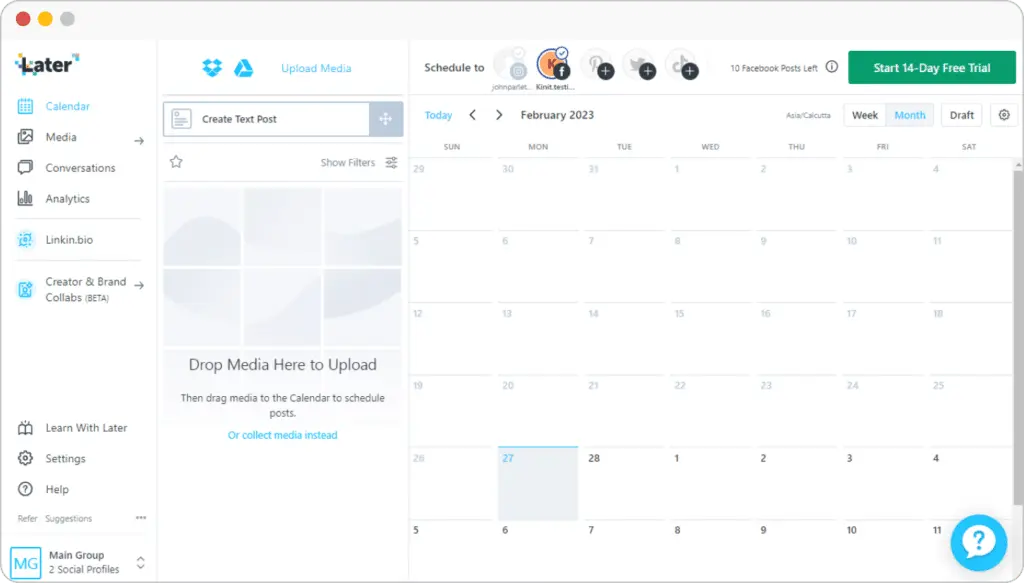
’s drag-and-drop calendar feels intuitive, and being able to preview posts laid out ahead of time helps catch gaps or overload before anything goes live.
As a social media scheduling and post planner tool, it makes day-to-day social media management feel lighter than in more complex scheduling tools, especially for social media marketers managing multiple client accounts or other social media accounts at once.
Drafting posts, saving captions and hashtags, and pulling from a media library all happen in one flow. That simplicity makes it easier to manage social media across platforms and maintain a steady social presence without overthinking every post. For many brands, that alone is a huge time saver when running ongoing social media campaigns.
also does a good job supporting content creation. The built-in media editing tools are useful for quick tweaks, and the automatic hashtag suggestions and best-time-to-post insights help optimize posts and improve audience engagement.
These features won’t replace dedicated social listening tools like Sprout Social or a full Hootsuite dashboard, but they cover the core features most teams actually use day to day.
The AI tools aren’t revolutionary, but they’re helpful when you need a starting point or new ideas.
Collecting and automatically reposting user-generated content is another strong plus, especially for brands that rely on social proof to drive social engagement and reach potential customers.
also includes light social analytics, letting you track follower growth, post performance, and identify top performing posts across platforms. For teams focused on visual content and reputation management rather than deep reporting, this strikes a good balance.
Here are ’s best social media features:
- Schedule posts across Instagram, Facebook, TikTok, Threads, YouTube Shorts, Pinterest, LinkedIn, and Snapchat.
- Publish Stories, Reels, Shorts, and Pins with auto-publish support for major social media platforms.
- Plan and preview posts visually with a drag-and-drop content calendar and intuitive interface.
- Save captions, hashtags, and post ideas in a reusable media library.
- Draft and refine post content before scheduling across social media networks.
- Get automatic hashtag suggestions and best-time-to-post insights to optimize posts.
- Store unlimited images and videos to support ongoing content creation.
- Edit media with built-in cropping, filters, text, and trimming tools.
- Import Canva designs and curate content using a Chrome extension.
- Collect and automatically repost user-generated content from Instagram mentions, hashtags, and tags (on certain features and plans).
- Track post performance, social engagement, and basic social analytics.
- Use social media inboxes to manage comments and managing DMs on Instagram, Facebook, and TikTok.
- Collaborate with teams using shared calendars, approval stages, notes, and external review links.
- Build customizable Link in Bio pages to drive engagement and support social strategy.
What are ’s pros?
’s main pros are ease of use, visual content planning, and straightforward publishing. Based on what I’ve seen in user feedback, people like how quickly they can get started, plan posts visually, and publish content consistently without juggling extra steps or settings.
What users are saying about ’s pros:
- “I use Social to manage social accounts for multiple businesses. I find the content search option great and appreciate the ability to share posts externally for review. I like that it’s simple, makes it easy to sign into different accounts, and offers customizable Linkin.bio pages that help keep each client on brand. The initial setup was super easy.”
– Ginny G. (source) - “I use Social for content scheduling, analytics, and content trend news. The easy-to-understand scheduling platform and in-depth analytics have simplified my day-to-day work by keeping posts automated and consistent. The scheduling UI really stands out.”
– Tyler M. (source) - “I enjoy being able to organize media using labels and upload multiple images at once, which speeds up my content workflow. The automatic image resizing is a standout feature and saves a lot of time when preparing posts.”
– K. E. (source) - “Content creation is much easier thanks to the app’s AI captioning and writing features.”
– Fabio R., Communication Strategist (source) - “I appreciate Social because the team is constantly improving the product and introducing new features that enhance the overall user experience.”
– José H. (source)
What are ’s cons?
’s main cons are limited platform coverage, missing publishing features, and value for money. Based on my research, it falls short when you need YouTube or X scheduling, deeper analytics, or tools like Canva, which makes the price harder to justify.
What users are saying about ’s cons:
- “It would be great to see follower analytics broken down by country for reporting. Also, when tagging people or companies, I wish the platform could search as I type to make sure the correct page is tagged. Right now, I have to go back and tag people on Facebook after the post is published.”
– Ginny G. (source) - “I don’t have any major dislikes, but it would be very helpful to be able to re-download assets we’ve uploaded. Since everything is so well organized in , it’d be great to easily retrieve files if we lose them on our end.”
– Verified User, Architecture & Planning (source) - “I continue to get kicked off the platform, which is frustrating and eventually led me to stop using it. The platform also doesn’t allow me to add music to posts and videos, which feels limiting.”
– Markie B. (source) - “The price feels high for the value, especially since the loss of Twitter (X) means we’re now only using it for two platforms.”
– Verified User, Retail (source) - “I’d like to see an integration with Canva.”
– Silvia D., CEO (source) - “I don’t like that Social doesn’t support scheduling YouTube videos.”
– Gina L. (source)
pricing
- Offers a 14-day free trial
- Paid plans start at $25/month
7. Planoly
Who is Planoly best for?
Planoly is best for creators and small teams who want a visual, easy-to-use planner for batching and scheduling social media content, especially on Instagram, without needing advanced analytics or approval workflows.
Planoly feature overview
At its core, Planoly is a visual social media scheduler that helps you organize, schedule, and manage posts across popular platforms like Instagram, TikTok, YouTube, Facebook, LinkedIn, Pinterest, Threads, and X, all from one dashboard.
It works well as a lightweight social media auto poster for teams and creators who want a more structured way to manage their social media networks without overcomplicating things.
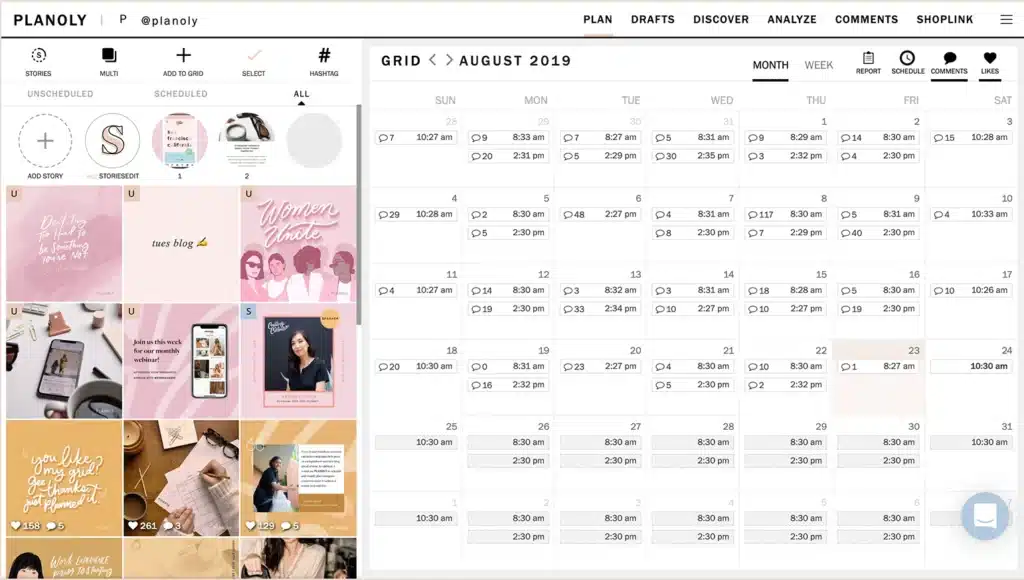
The drag-and-drop interface makes post scheduling feel intuitive. You can map out content weeks in advance, shuffle posts around, and batch everything in one sitting. I found it especially useful for planning time off.
You can schedule a full month of posts and let automated social media publishing handle the rest, which helps maintain a consistent online presence with less effort and zero extra effort day to day.
Planoly keeps things intentionally simple. You can edit visuals directly in the platform, pull in designs from Canva, add images, use templates, save hashtag groups, and generate captions based on tone and audience. These tools won’t replace a full creative suite or an image generator, but they’re practical for everyday content creation and help save valuable time on tasks that would otherwise be time consuming.
Here are Planoly’s best social media features:
- Plan and organize your posts with a drag-and-drop interface, switching between weekly, monthly, or list views.
- Schedule posts to publish automatically across multiple social media platforms, helping you maintain a consistent online presence.
- Manage content for Instagram, TikTok, YouTube, Facebook pages, LinkedIn, Pinterest, Threads, and X (Twitter) from one dashboard.
- Organize drafts by different categories so post content stays easy to find before publishing.
- Use built-in tools to crop, resize, apply filters, and add images or text overlays to visuals.
- Design and import visuals directly from Canva to speed up content creation.
- Save hashtag groups and reuse them across posts for faster publishing.
- Generate captions based on tone, audience, and post title.
- Track engagement, follower growth, and basic performance metrics, including click counts.
- Invite team members, assign roles, and collaborate on approvals without extra effort.
- Use the Planoly browser extension to save and organize content from around the web.
What are Planoly’s pros?
Planoly’s main pros are visual planning, simple bulk scheduling, and easy cross posting. People like being able to map out their feed visually, batch and reschedule posts in a few steps, plan a full month of content and simply have a strong social media presence without needing to check in every day.
What users are saying about Planoly’s pros:
- “Planoly is one of the best tools to manage social media. I can easily connect multiple social media accounts and post on all accounts at the same time in very few steps. I can also reschedule posts.”
– Prem K., Accountant (source) - “The bio link feature is unique, creating a similar Instagram grid instead of just a link landing page.”
– Verified User, Restaurants (source) - “Very easy-to-use interface. It gives you optimal times to post based on your audience and date. You can pre-plan and schedule batches of content, which is especially helpful when you’re on vacation.”
– Michelle D., CEO and Founder (source) - “I loved the visual feed on Planoly. It allowed me to batch content and map everything out easily. I also liked being able to add placeholders, drop content in bulk, rearrange posts, and work on each one as needed.”
– Nicole E., Owner (source) - “Planoly helps you visually plan all your social media content in one place. The auto-post feature lets you plan content for the whole month and leave it on autopilot.”
– Namrata A., Director, Health, Wellness and Fitness (source)
What are Planoly’s cons?
Planoly’s main cons are unreliable scheduling, confusing analytics, and limited team controls. Users report that auto-posting can fail, analytics lack clarity, there’s no built-in approval process, and the price can feel high for smaller teams managing multiple accounts.
What users are saying about Planoly’s cons:
- “The analytics are somewhat confusing. It’s unclear whether they’re pulling data from all time or only since the Planoly account was subscribed.”
– Verified User, Real Estate (source) - “The paid plan is a little high-end. It might be outside the budget for small businesses.”
– Namrata A., Director, Health, Wellness and Fitness (source) - “Media organization is a bit confusing, and the visual planner can feel overwhelming. Compared to ’s visual planner and media library, Planoly’s could use some work. There’s also no approval process, which is why we ended up leaving Planoly for another tool.”
– Verified User, Restaurants (source) - “The most frustrating thing about Planoly was that it wasn’t reliable. Posts often failed to auto-schedule, and when managing multiple accounts, I had to go back and manually post everything.”
– Nicole E., Owner (source) - “Sometimes social media accounts get disconnected, although it’s easy to reconnect them.”
– Elizabeth S., Admin Assistant (source)
Planoly pricing
- Offers a 14-day free trial
- Paid plans start at $16/month
Frequently asked questions
Does scheduling social media posts hurt engagement?
Scheduling itself doesn’t reduce engagement. What affects engagement is what you post, when you post it, and how you follow up after it goes live.
Social platforms don’t penalize scheduled posts, and there’s no meaningful difference in how algorithms treat scheduled versus manual publishing. In fact, scheduling can help engagement by making it easier to post at the right times and stay consistent, two factors that matter far more than whether a post was published manually.
What features should I look for in a social media auto-posting tool?
At a minimum, a social media auto-posting tool should make it easier to plan content ahead of time and publish it reliably.
Beyond basic scheduling, the features that matter most in a social media management platform are the ones that reduce repetitive work and help you stay consistent over time.
A social media auto-posting tool should have the following key features:
- Multi-platform scheduling from one dashboard
- Platform-specific post customization
- Bulk scheduling to plan weeks of content at once
- Best-time-to-post recommendations based on past performance
- A unified inbox for comments, mentions, and messages
- Basic analytics to understand what’s working
- Drafts, approvals, and collaboration features
What are the benefits of social media auto-posting?
Social media auto-posting removes the pressure of posting in real time. You can plan content when you have focus and time, then let it publish automatically while you work on other priorities.
It also makes consistency realistic. Instead of posting sporadically, you can schedule weeks of content in advance and show up regularly across platforms, even during busy periods or time off.
Finally, auto-posting scales. The more accounts or platforms you manage, the more valuable it becomes to schedule once, customize where needed, and avoid repeating the same work every day.
Ready to get started with social media auto-posting?
Social media auto-posting is no longer about convenience. It is about control. The ability to plan content ahead of time, publish consistently, and manage multiple platforms without constant manual work is what separates sustainable social media workflows from reactive ones.
The tools in this list solve that problem in different ways. Some prioritize collaboration and approvals. Other social media posting tools focus on moderation, analytics, or visual planning. The right choice depends on what slows you down most right now, whether that is content creation, scheduling, engagement, or reporting.
If consistency, multi-platform scheduling, and time savings are your main bottlenecks, starting with a tool like SocialBee makes sense. It covers planning, publishing, engagement, and analytics in one place, without adding unnecessary complexity.
If you want to see whether that workflow fits your day-to-day reality, you can start with SocialBee’s 14-day free trial and test it using your own accounts, content, and schedule.