2025 was a significant year of advancement for Apple’s software, with a noticeable focus on visual design, productivity, and communication.
While Apple introduced and continued to iterate on a wide range of features throughout the year, several additions stood out for their scope and practical impact across multiple devices. As the year comes to an end, these five new features provide a useful lens for weighing up what the company focused on this year and how far its platforms evolved in 2025.
Liquid Glass
This year’s most immediately visible change is the introduction of Liquid Glass, a new system-wide visual design language applied across Apple’s operating systems. Liquid Glass replaces many of the flat, opaque UI elements introduced over the past decade with layered translucency, subtle refraction, and motion-responsive surfaces that react to underlying content.
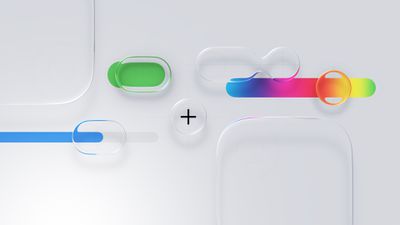
Navigation bars, sidebars, control panels, and system overlays now appear as semi-transparent sheets that blend into their surroundings rather than sitting on top of them. Apple framed this as a unifying material across platforms rather than a purely aesthetic refresh, with the same visual logic appearing on iPhone, iPad, Mac, Apple Watch, and Apple TV.
In practice, it is one of Apple’s biggest visual redesigns since the original iOS 7 shift away from skeuomorphism, and it signals a renewed focus on making the interface feel fresh, spatial, playful, and responsive rather than static.
Revamped iPad Multitasking
On the iPad, the most consequential change is the introduction of an all-new multitasking system with windows and a macOS-style Menu Bar and cursor in iPadOS 26.
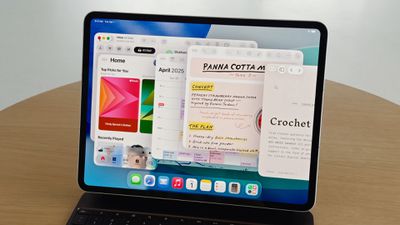
Apps can now run in freely resizable windows rather than being constrained to fixed split-screen layouts, allowing multiple overlapping windows to coexist on screen. Alongside this, a Menu Bar appears at the top of the display when invoked, exposing app commands in a structured, searchable format similar to macOS.
Instead of asking users to adapt desktop workflows to a touch-first model, Apple has now explicitly imported desktop interaction styles into iPadOS, addressing a significant number of user complaints about the software limitations of the iPad. For users who want to use the iPad with true multitasking and desktop-style workflows, this is one of the most substantive capability upgrades the platform has ever received.
More Powerful Mac Spotlight
On the Mac, Spotlight received its most extensive overhaul to date, transforming it from a passive search tool into an actions-first command interface, similar to third-party apps like Alfred or Raycast.
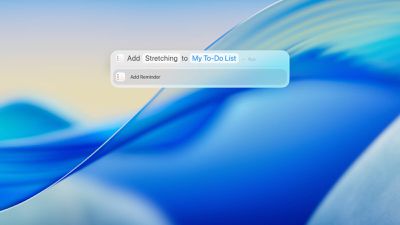
Spotlight in macOS Tahoe can now execute hundreds of actions directly from the search field. Users can create and edit notes, send emails and messages, start timers, run Shortcuts, adjust system settings, and perform app-specific commands, without opening the corresponding app.
Apple also redesigned Spotlight’s results presentation with richer, more structured browsing views. Instead of returning a flat list of matches, Spotlight now surfaces grouped results for files, applications, actions, and suggestions, allowing users to scan and refine results more quickly.
Spotlight now includes a built-in clipboard history, allowing users to view and reuse previously copied text or images directly from the Spotlight interface. Apple also integrated an app library-style view, providing a centralized, searchable overview of all installed applications.
Live Translation
Another major addition is Live Translation. Real-time translation now operates inside Messages, FaceTime, and the Phone app, translating both text and spoken audio during conversations.
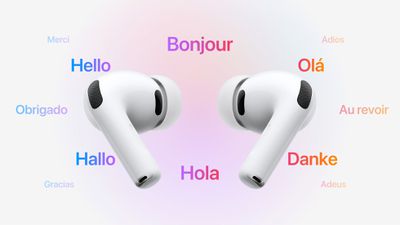
In Messages, incoming and outgoing text can be translated inline. In FaceTime, Live Translation provides real-time translated captions during video calls, allowing participants to speak naturally while reading translations as the conversation unfolds. In phone calls, spoken dialogue can be translated in near real time, with translated audio and on-screen text presented during the call.
Apple also extended Live Translation to AirPods, enabling real-time spoken translation directly through the earbuds during in-person conversations. When Live Translation is active, speech from another language can be translated on the paired iPhone and played back in the user’s AirPods, while the user’s responses can be translated and spoken aloud by the iPhone for the other participant.
Communication Screening and Hold Assist
Call Screening allows the iPhone to automatically answer calls from unknown numbers on the user’s behalf. The system asks the caller to identify themselves and explain the reason for the call, then presents the user with a live transcript of the response before the call is connected.
With Hold Assist, when a user is placed on hold during a phone call, the iPhone can remain in the queue on their behalf and monitor the call until a live agent becomes available. Once the system detects that the call has resumed, it notifies the user to return to the conversation.
In Messages, Apple introduced more aggressive screening for unknown senders. Messages from numbers that are not in the user’s contacts are automatically routed into a separate area, keeping potential spam and scam attempts out of the main conversation list.