In our previous blog AI Can Write Code Fast. It Still Cannot Build Software., we documented why AI coding assistants hit a wall: “3 days to MVP” became “full rearchitect required” after just 2.5 weeks for a moderately complex platform. Through analysis of over 2,500 hours of AI coding usage, we revealed consistent failure patterns (focus dilution, architectural drift, and confidence miscalibration) that occur without governance infrastructure.
But here’s the question that article didn’t answer: Is this experience universal, or did we just get unlucky?
The answer comes from rigorous research across thousands of developers, production codebases, and controlled experiments. The findings are both shocking and consistent:
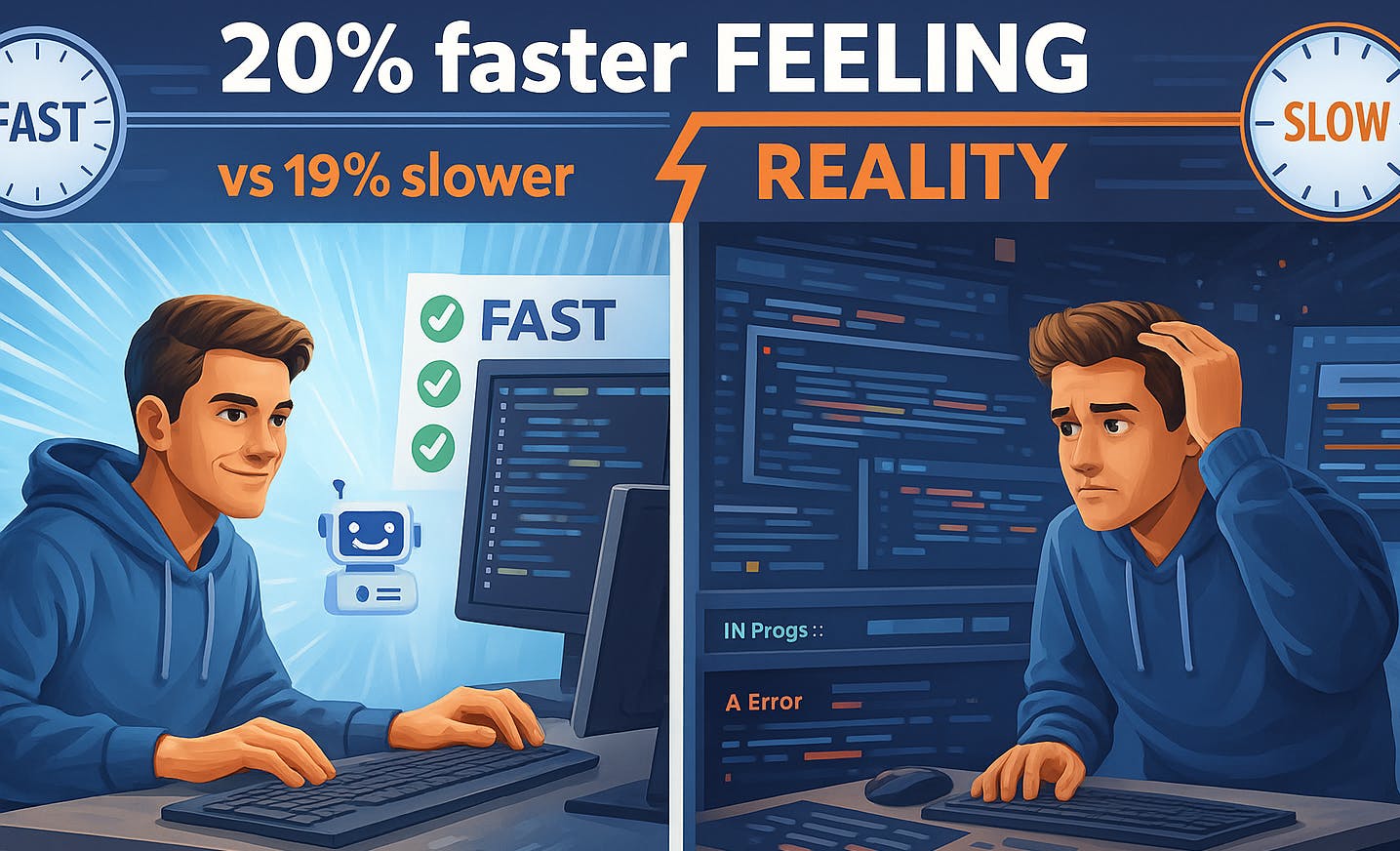
When objectively measured, AI-assisted development was slower. When surveyed, 69% claim productivity gains, yet 45% say debugging AI-generated code is time-consuming.
We’ve analyzed four major research studies that reveal this productivity paradox. The implications are profound for any team betting on even the most advanced AI-assisted development.
The Productivity Paradox: What Research Shows
Study 1: METR Developer Productivity Analysis (2025)
If you’re going to challenge the narrative that AI makes developers faster, you need solid methodology. A 2025 preprint from METR (Model Evaluation and Threat Research) offers exactly that: a randomized controlled trial with experienced developers working on codebases they knew intimately. (Note: this study has not yet been peer-reviewed.)
Unlike many AI productivity studies that use unfamiliar codebases or synthetic problems, this study focused on experienced contributors working on projects they knew well. The methodology offers an informative perspective, though it represents one specific context among many.
Methodology:
The study used a randomized controlled trial with 16 experienced open-source developers who had contributed to their repositories for multiple years. They completed 246 real tasks (bug fixes, features, refactors averaging ~2 hours each) on established codebases with 1M+ lines of code and 22K+ GitHub stars.
Important Caveats (from METR):
The researchers were careful to note the limitations of their study:
- No claim that findings generalize to “a majority or plurality of software development work” (METR, 2025)
- Open-source repositories differ from deployed production systems (operational constraints, compliance, legacy integrations)
- Results may improve as developers gain more experience with AI tools (learning curve effects)
Key Findings:
The study measured both actual task completion time and developer perception. Before starting each task, developers predicted how much faster (or slower) they expected to be with AI assistance. After completing the task, they reported how much faster they felt they had been.
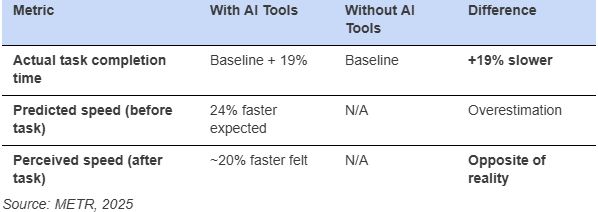
Critical Insight: Developers using AI tools took 19% longer to complete tasks, yet both before and after, they believed they were approximately 20% faster.
This isn’t a small measurement error. This is a fundamental perception-reality inversion. A 39-point gap between what developers believe is happening and what’s actually happening.
Why the Slowdown?
Time analysis revealed where the hours actually went. Developers spent less time actively coding and more time on AI-related overhead:
- Prompt engineering: Articulating requirements to AI systems (often multiple iterations)
- AI response evaluation: Reviewing generated suggestions (many rejected, requiring re-prompting)
- Wait states: During AI generation cycles
- Debugging: Correcting subtle errors in plausible-looking code
Across these studies and experiments, common contributing factors include: AI generates code quickly, but developers spend additional time validating, debugging, and re-prompting.
Net result: More total time, but it feels faster because you’re typing less.
Study 2: GitHub Copilot Impact Analysis
You’ve probably seen informal summaries framed as “GitHub Copilot makes developers 55% faster!” It appears in pitch decks, blog posts, and executive presentations everywhere. GitHub’s 2024 research clearly limited this finding to isolated coding tasks, though that nuance is often lost in broader discussions.
The methodology matters as much as the numbers. When you dig into what was actually measured, the picture gets more nuanced.
Read the methodology carefully, because what you measure determines what you find.
GitHub’s study focused on a narrow slice of the development process: completion time for isolated, well-defined coding tasks in controlled benchmark scenarios. Essentially, they measured initial code generation speed.
What the study did not measure tells a different story:
- Integration testing time
- Code review and validation overhead
- Debugging time for AI-generated issues
- Refactoring effort when initial approach doesn’t scale
- Long-term maintenance burden
- Production incident rates
The implication is significant: AI tools accelerate initial code generation but may not reduce overall development cycle time when accounting for complete software lifecycle activities.
Analogy: Measuring a writer’s productivity by how fast they type sentences, then being surprised when the larger work still requires substantial editing.
Study 3: McKinsey Complexity Analysis 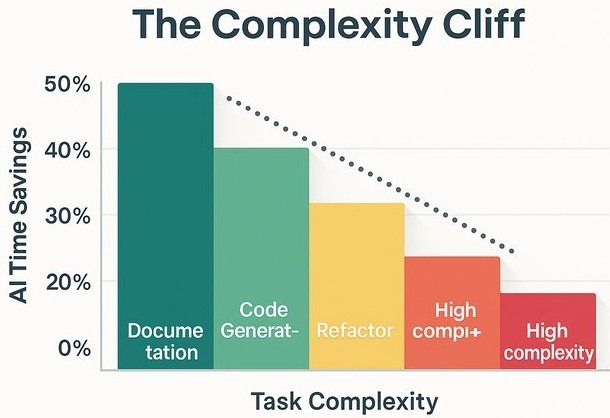
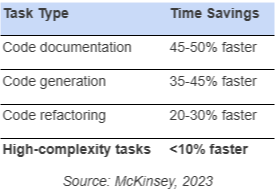
According to McKinsey’s 2023 analysis of generative AI in software development, productivity gains vary significantly by task type. Their methodology: 40+ developers completing bounded tasks over several weeks.
Findings by Task Type:
The critical finding often lost in headlines:
“Time savings shrank to less than 10 percent on tasks that developers deemed high in complexity due to, for example, their lack of familiarity with a necessary programming framework.”, McKinsey, 2023
Similarly, for junior developers: “in some cases, tasks took junior developers 7 to 10 percent longer with the tools than without them” (McKinsey, 2023).
The study also noted developers had to “actively iterate” with the tools to achieve quality output, with one participant reporting he had to “spoon-feed” the tool to debug correctly. Tools “provided incorrect coding recommendations and even introduced errors” (McKinsey, 2023).
The pattern: AI accelerates simple, well-defined tasks. Gains diminish sharply with complexity (<10%). For junior developers, AI assistance can be net negative.
Study 4: Stack Overflow 2025 – The Debugging Tax
The previous three studies used controlled experiments. The Stack Overflow 2025 Developer Survey reveals what nearly 50,000 developers actually experience in the field.
The productivity claim:
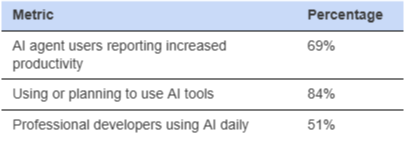
Source: Stack Overflow 2025 Press Release
Sounds like success. But here’s the counterweight:
The debugging tax:
“45% of developers identified debugging AI-generated code as time-consuming, contradicting claims that AI can handle coding tasks entirely.” , Stack Overflow, 2025
This is the “time shifting” pattern from our analysis made explicit: nearly half of developers report that debugging AI output consumes significant time.
The math doesn’t add up: If 69% claim productivity gains but 45% say debugging AI code is time-consuming, where’s the net gain? The answer: developers perceive the fast code generation as productivity, while discounting the debugging time that follows.
Study 1 explains this. Developers who are objectively 19% slower report feeling 20% faster. The 69% claiming productivity gains are self-reporting from the same population with a 39-point perception gap. The 45% reporting debugging overhead is closer to objective reality, they’re measuring actual time spent, not how fast it felt.
Analysis: Time Shifting vs. Time Saving
The research reveals a consistent pattern across all four studies: time shifting rather than time saving.
The Mechanism:
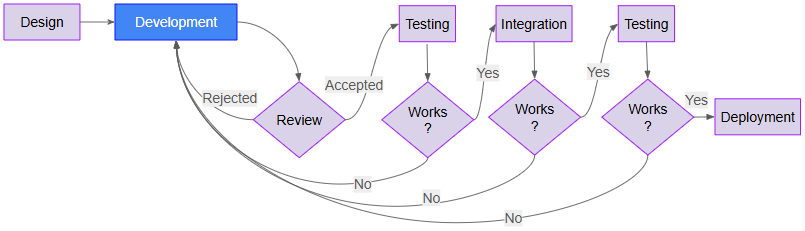
Compare the two workflows below, traditional development without AI vs AI-assisted development. Keeping the steps and flow at a high level here and focused on the main points of design, development, reviews, testing, integration, and deployment.
Traditional Development:
 AI-Assisted Development:
Replaces manual development with prompt, AI-code generator, and debugging of AI code, with many reviews and tests to see if the solution works (red).
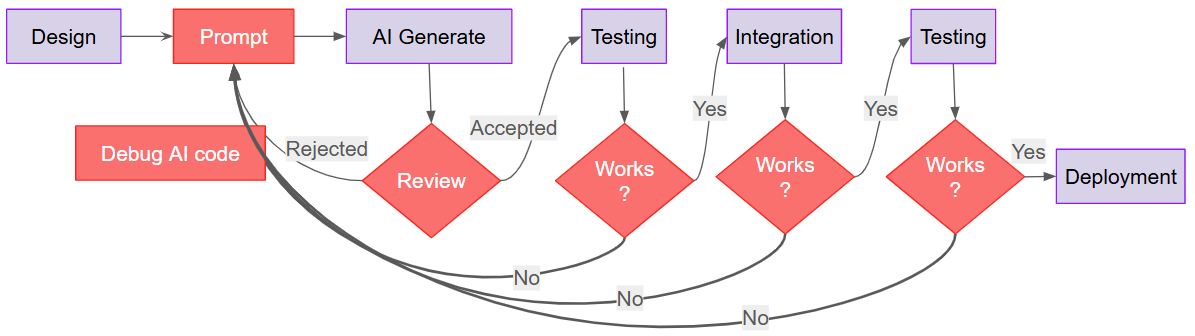
AI generation is fast, but the review-debug-test cycle (red) consumes more time than was saved. Every “No” loops back to Prompt, work shifts from creating code to correcting code.
Why Developers Feel Faster
If developers are objectively slower, why do they report feeling faster? The answer lies in how our brains perceive work. Several cognitive biases compound the perception gap:
- Visible Activity Bias: Watching code generate feels productive
- Cognitive Load Reduction: Less typing feels like less work
- Novelty Effect: New tools feel exciting and effective initially
- Attribution Bias: Success attributed to AI, failures to other factors
- Sunk Cost: After investing in AI tools, developers rationalize the investment
The trap: Subjective feeling of productivity becomes divorced from objective delivery metrics.
Implications for Different Stakeholders
For Engineering Leadership
Challenge: ROI calculations based on developer perception systematically overestimate actual value.
If your team perceives they’re 20% faster with AI but they’re actually 19% slower, your business case for AI tooling licenses may be significantly misestimated.
Recommendation: Measure What Matters
Track the metrics that reflect actual business value, not developer sentiment:
- End-to-end delivery time (story kickoff to production deployment)
- Bug/Errors rates and production issues
- Completed feature velocity (not story points, actual shipped features)
- Technical debt accumulation rates and total
- Code review turnaround time
If these metrics don’t improve compared to pre-AI tools, then AI tools are creating busy-work, not value.
Warning sign: Teams report feeling productive while delivery metrics stagnate or decline.
For Development Teams
Pattern Recognition:
The AI productivity trap looks like this:
- ✅ AI generates code quickly (feels productive)
- ❌ Debugging takes disproportionately longer (feels frustrating)
- ❌ Integration reveals architectural mismatches (requires rework)
- ❌ Net result: More effort for equivalent or reduced output
Strategic Approach:
Based on the research, here’s where AI actually helps versus where it hurts, at least currently:
Use AI for:
- Well-defined, low-complexity tasks (boilerplate, documentation, single file at a time)
- Repetitive patterns you’ve implemented before
- Initial scaffolding and setup
Don’t use AI for:
- Complex multi-step solutions (accumulates technical debt while reporting “complete”)
- Long-horizon tasks (drifts from original scope, architecture, and design over time)
- Adding features to existing complex systems (ignores existing specs, creates conflicting patterns)
- Architectural decisions (starts coherent, degrades as context grows)
- Logic with subtle edge cases (implements when prompted, forgets in subsequent iterations)
- Legacy system integration (lacks context for undocumented constraints and dependencies)
- Novel problems without precedent (training bias pushes toward common patterns, resists novelty)
Golden Rule: Treat AI as advanced autocomplete, not an autonomous developer. Validate all outputs with more rigor than a junior developer’s code.
The Two Paths Forward
Organizations face a strategic choice:
Approach A: Strategic Use of Existing AI-Coding Assistants
Work within current limitations by being selective about when and how you use AI:
- Recognize that even better models, data, context-windows, and prompts won’t solve the fundamental problems
- Decompose tasks by AI suitability (low/medium/high complexity)
- Use AI aggressively where it excels (boilerplate, docs, simple CRUD)
- Apply human oversight and zero-trust policies where AI struggles (architecture, integration, novel problems)
- Match task granularity to model capability (~500 LOC, <30 min bounded tasks)
Approach B: Address the Core Issues, Improve Platform
Build infrastructure that compensates for AI’s limitations:
- Address current limitations with AI-coding frameworks
- Implement fully observable and controllable platform
- Deploy real-time observability and deviation detection
- Enforce zero-tolerance compliance with automated validation
- Create adaptive feedback loops for constraint-guided regeneration
This series explores a combined strategy: Strategic task decomposition (Approach A) paired with AI-governance infrastructure (Approach B) to work at scale. Effective strategy requires tooling to enforce it.
Episode 2 examines the research evidence for why model improvements alone won’t solve these systematic limitations.
What This Means for Your Team
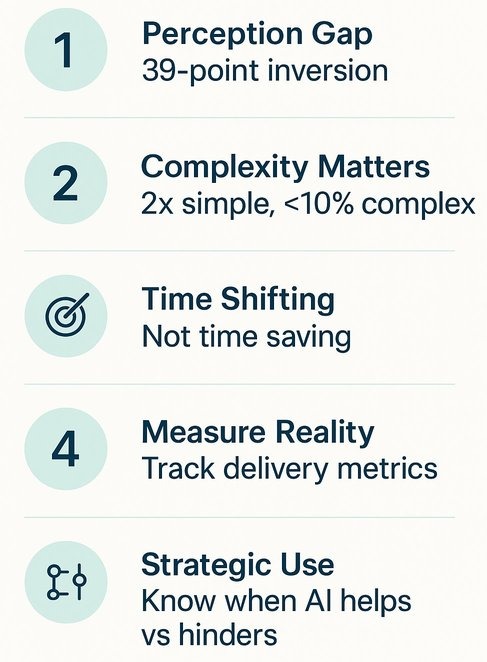
Here are the five key takeaways from the research:
- The Perception Gap is Real: Developers felt ~20% faster while actually performing ~19% slower (METR, 2025)
- Complexity Matters: AI effectiveness inversely correlates with problem complexity, up to 2× on simple tasks, <10% on complex tasks (McKinsey, 2023)
- Time Shifting, Not Saving: Work moves from coding to prompt engineering, validation, and debugging
- Measurement is Critical: Subjective assessments, including anonymous surveys, are systematically inflated; track objective delivery metrics
- Strategic Application Required: Success requires knowing when AI helps versus when it hinders
Bottom Line: Without governance infrastructure, AI tools create busy-work, not business value.
What’s Next: Episode 2
Episode 2: Why Scaling Won’t Fix It
Many assume that more powerful models, better prompts, or larger context windows will solve AI’s limitations. “GPT-5 will solve everything!” “Just improve your prompts!” “1 million tokens changes everything!”
The research tells a different story.
We’ll examine three scaling promises that fail:
- Bigger Models: Why model improvements don’t address architectural drift, and why errors compound exponentially across decisions
- Better Prompts: Why prompt engineering hits O(N²) complexity at scale and can’t encode graph structures in linear text
- Larger Context Windows: Why at 32K tokens, 10 of 12 models drop below 50% of short-context performance (as covered in Episode 2, citing NoLiMa, ICML 2025)
The fundamental issue: Semantic understanding degrades with complexity regardless of model size, prompt quality, or context capacity. This is an architectural problem requiring governance infrastructure, not a resource problem requiring more scale.
References
- METR (2025). “Measuring the Impact of Early-2025 AI on Experienced Open-Source Developer Productivity.” https://metr.org/blog/2025-07-10-early-2025-ai-experienced-os-dev-study/
- GitHub (2024). “Research: Quantifying GitHub Copilot’s Impact on Developer Productivity and Happiness.” https://github.blog/news-insights/research/research-quantifying-github-copilots-impact-on-developer-productivity-and-happiness/
- McKinsey & Company (2023). “Unleashing Developer Productivity with Generative AI.” https://www.mckinsey.com/~/media/mckinsey/business functions/mckinsey digital/our insights/unleashing developer productivity with generative ai/unleashing-developer-productivity-with-generative-ai.pdf
- Stack Overflow (2025). “2025 Developer Survey: AI.” https://survey.stackoverflow.co/2025/ai
- Stack Overflow (2025). “Stack Overflow’s 2025 Developer Survey Reveals Trust in AI at an All Time Low.” https://stackoverflow.co/company/press/archive/stack-overflow-2025-developer-survey/
Part of the “AI Coding Assistants: The Infrastructure Problem” research series.
Documenting systematic research on AI-assisted development effectiveness, with focus on governance infrastructure as solution to measured limitations. Based on 20+ years of AI/ML infrastructure experience across commercial and defense domains.
Up Next: Episode 2, Why Scaling Won’t Fix It: Why bigger models, better prompts, and larger context windows don’t solve semantic understanding degradation.