USB chargers power the world. From phones to laptops and even bike lights, the gadgets we use every day increasingly rely on USB connections for power, making chargers an indispensable tool to keep your life running.
Though the U in USB stands for “universal,” you sadly can’t expect every USB charger to work with every USB device. Modern devices use different charging speeds, protocols and ports. That means if you’re still relying on the brick that came with your phone from a decade ago, it’s time for an upgrade. A high–quality USB charger will cover all your bases to charge devices quickly and safely, all in a compact package.
At a glance
Why you should trust me
I have been testing consumer electronics for about a decade, and many of them use USB for power or charging. I know firsthand how frustrating it is to pair a device with an underpowered charger, and how to find one that works with your device – and I’ll share some tips on that below. I understand what makes these devices tick, but I also reached out to the UL Solutions, an independent testing body, to learn some of the important details for safe operation for this type of device.
How I tested
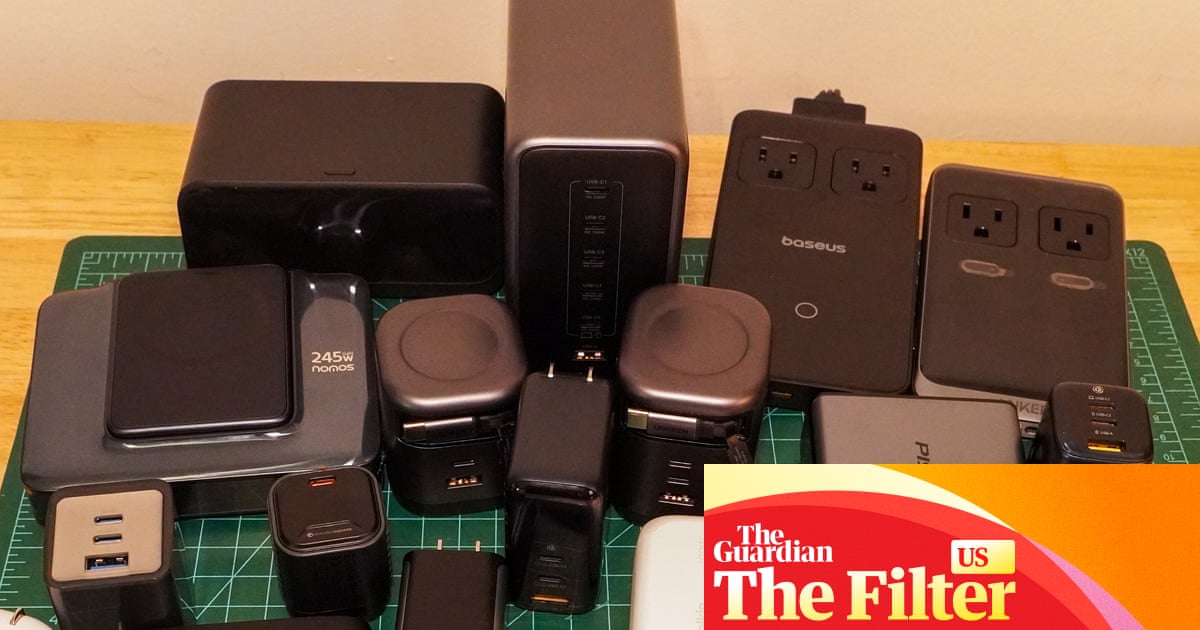
I gathered 22 chargers from big-name brands, buzzy upstarts, and aggressive value contenders. The diverse range of models included everything from tiny chargers for topping off your phone on the go, to heavy-duty bricks that can power a gaming laptop.
To stress these chargers to their limits, I had to go beyond phones and laptops, which vary their power draw too much to use for comparison. Instead, I designed a sophisticated testing setup with a dummy load – a glorified heater – that let me dial in exactly how much electricity to draw, as well as a 100W studio light with a USB-C connection. I used this setup to confirm each charger would deliver its advertised peak wattage.
By measuring both power into the charger and out, I could also calculate efficiency: how much electricity does it waste as heat? I tested each charger at 20W – a common level for phones and tablets – for an hour, using an infrared thermometer to check for hotspots after 30 minutes and 60 minutes.
Finally, I gave all but the three lowest power chargers (30W and below) a high-wattage stress test powering the studio light for 30 minutes, pushing them all to max output. Could they run at redline without overheating?
At the end of testing, I donated the chargers to La Casa Norte, a Chicago community center for youth and families experiencing homelessness, except for a handful of top performers that will undergo long-term reliability testing.
The best USB chargers in 2026
Best overall USB charger:
Baseus PicoGo AE11
Baseus
PicoGo AE11
from $29.99

Despite its compact size, this portable, affordable all-arounder packs enough ports and wattage to power everything from phones to laptops and tablets with ease.
Why we love it
The Baseus PicoGo AE11 is only a little larger than many 20W chargers, yet offers a peak of 67 watts through a pair of USB-C ports and one USB-A port. Folding wall prongs and weight of just 0.26lbs (0.12kg) mean you’ll barely notice it in your backpack or luggage. Its mix of charging protocols, voltages and ports offer good versatility, so you can spread its capacity across multiple devices at once, or focus all of its power into one larger device, such as a laptop.
In my testing, it was happy to send out 20W of power for an hour straight without getting very hot, and proved capable of sustaining its peak wattage over the course of half an hour. Having a dependable little charger that can work for a host of devices is all that most of us need, and the Baseus PicoGo AE11 provides that while still looking and feeling solid.
It’s a shame that … It gets pretty hot under full load. After 30 minutes, I measured a 152F (67C) hotspot and found the charger uncomfortable to hold, though not painful. Heat is simply a fact of life for small, high-wattage chargers.
Single-port peak: 67W
Ports: 2x USB-C, 1x USB-A
Weight: 0.26lbs
Certified: TÜV Rheinland

Baseus
PicoGo AE11
from $29.99
Best budget USB charger:
Anker 511 Nano 3

Anker
511 Nano 3
from $15.99

Only need to power one device? The Anker 511 Nano 3 is a simple, elegant charger to reach for. Its single USB-C port delivers up to 30W of power, which is plenty for most phones and tablets.
Why we love it
Minuscule, lightweight and affordable, the Anker 511 Nano 3 (not to be confused with other 511 models) goes above its peers in a very crowded space.
At a featherweight 0.08lbs, it weighs less than an Amazon Basics 20W charger and only a hair over Anker’s 20W version, yet delivers 50% more power. If you measure power per pound, that makes it the second best on our list, after the rather expensive RollingSquare Supertiny. And even though it’s not the absolute smallest, its folding wall prongs make it as easy to pack up as its 20W competitors.
It lives up to the 30W label in testing, too, readily sustaining that output for our half-hour test. At 20W, it remained under 130F for the entire hour. It also supports voltages that other chargers this size don’t, ensuring compatibility with the most devices.
It’s a shame that … It doesn’t have a second port. The competing Pisen Bolt Lite PT-C63 matches its 30W output and performed well in our testing, plus it gives you a USB-A port. Unfortunately didn’t have any third-party lab certifications, which posed safety concerns.
Single-port peak: 30W
Ports: 1x USB-C
Weight: 0.08lbs
Certified: TÜV Rheinland
Anker
511 Nano 3
from $15.99
Best high-capacity USB charger:
Baseus Blade Power Strip

Baseus
Blade Power Strip
from $89.99

You’ll always have enough power – and cord – with the Baseus Blade Power Strip. It offers three USB-C ports and a USB-A port, plus two pop-up AC outlets for higher-wattage electronics, and a lengthy cord of its own, bringing power to where you need it.
Why we love it
The Baseus Blade Power Strip checks a lot of boxes and then adds new boxes to check. It can supply up to 140W through a single port, which is more than many laptops will call for, or enough to keep a laptop charging while you pile on a phone, earbuds and other low-power devices that need juice. A small display even shows you how much power each port is supplying.
In testing, the Baseus Blade Power Strip stayed cool while providing 20W for an hour, and hit 145F after 30 minutes at about 100W – toasty but not burning. The peak wattage drops a bit if you plug in multiple devices, but the headroom means you’ll never want for watts.
Travelers will love the 5ft cord, which conveniently brings all your ports within reach when the nearest outlet is hiding behind a bed or nightstand. Two AC ports can provide pass-through power for other devices including lamps, so if the only outlet is occupied, you can simply unplug it and plug it into the Baseus. This feature becomes a superpower at busy cafes, where you’ll end up adding outlets instead of hogging them. The slim design also makes the Baseus Blade Power Strip easy to travel with.
It’s a shame that … The extra thin and packable AC cable is proprietary, which means it will be annoying to replace if you ever lose it. Adding a retractable USB-C cable would also have really knocked this one out of the park.
Single-port peak: 140W
Ports: 3x USB-C, 1x USB-A, 2x AC
Weight: 1.01lbs
Certified: TÜV Rheinland
Baseus
Blade Power Strip
from $89.99
Best laptop USB charger:
Ugreen Nexode X606

Ugreen
Nexode X606
from $54.95

If you’re tired of coiling and uncoiling a USB cable every time you shift spots with your laptop, the Ugreen Nexode X606 is a powerful charger with the convenience of a nearly 2.5ft retractable USB-C cable built in.
Why we love it
The Ugreen Nexode X606 is a pretty great all-in-one solution: you never need to worry about remembering a power cable, much less whether you’ve got the right power cable. A built-in retractable cable just spools right out of the end, and then snaps back inside with a tug when it’s time to go. Two extra USB-C ports and a USB-A port ensure you’ve got more options for how you charge and what you charge, and the power prongs even fold.
The Nexode X606 also does its job well. It happily supplied 100W for half an hour without getting very hot, only reaching a hotspot of 134F. For our 20W sustained test, it also stayed cool at just 93F after an hour. At $59, it’s even a decent deal.
It’s a shame that … It’s so heavy. At 0.66lbs, the Ugreen Nexode X606 is over 50% heavier than Belkin’s BoostCharge Pro 3-Port 100W charger or the BaseusPicoGo AE21 100W charger. But the extra bulk lets the Nexode X606 stay cooler and run longer at high wattages, sustaining 100W for half an hour where those two alternatives had to down-regulate.
Single-port peak: 100W
Ports: 2x USB-C, 1x USB-A, 1x retractable USB-C cable
Weight: 0.66lbs
Certified: TÜV SÜD
Ugreen
Nexode X606
from $54.95
Best desktop USB charging station:
Anker Nano 7-in-1 Charging Station

Anker
Anker Nano 7-in-1 Charging Station
from $79.99

For laptop owners who spend most of their time working in one place, the Anker Nano 7-in-1 Charging Station (100W) is a one-stop charger and power strip for your desk. Tethered by a 5ft power cord, the boxy dock provides twin 2.3ft retractable USB-C cables for charging at up to 100W total, three grounded AC outlets, and even a display to indicate charging rates.
Why we love it
The Anker Nano Charging Station is considerately designed by people who understood the assignment: look clean. Resting on a desk, the display faces forward while the AC outlets hide in back. The retractable cables easily pull out then completely disappear when not in use, making it easier to maintain a tidy desk. While it’s bulkier than most devices built for travel, it wouldn’t be unreasonable to slip into a backpack.
In testing, the extra size seemed to help fend off heat. It held 100W of output for half an hour without getting very hot, and it stayed temperate over an hour at a 20W output. At $79, it’s not the cheapest way to get 100W of charging power, but it’s still a decent value.
It’s a shame that … It can’t handle higher wattages. Make no mistake, 100W will cover the vast majority of devices that need USB-C charging, but 140W would keep a high-performance laptop happy with more headroom for additional devices. Anker does have the more powerful Prime Charging Station, but it comes with a bulky wall adapter, lacks retractable cables, and costs a lot more.
Single-port peak: 65W
Ports: 1x USB-C, 1x USB-A, 2x Retractable USB-C cables
Weight: 1.33lbs
Certified: TÜV Rheinland
Anker
Anker Nano 7-in-1 Charging Station
from $79.99
The best of the rest
Best for: The most watts per pound
Rolling Square Supertiny

Rolling Square
Supertiny
from $49.90

For travel minimalists trying to fit life in a personal-item-sized backpack, no charger delivers more wattage per pound than the RollingSquare Supertiny. At just 0.17lbs, it’s as small as some of the 20W chargers I tested, yet it’s capable of delivering 65W of power, which is enough for fast-charging plenty of devices and should even keep a lot of laptops plugging along.
In 20W testing, it only heated up to 108F – no surprise considering it was also the most efficient charger on our list at 94.35% (but most chargers were within the margin of error).
It didn’t make the final cut because … It’s just not quite as versatile as our top pick, which offers more ports for less money. And its compact design all but ensured it got quite hot under peak load, exhibiting a 168F hotspot.
Single-port peak: 65W
Ports: 1x USB-C
Weight: 0.17lbs
Certified: CE
Rolling Square
Supertiny
from $49.90
Baseus PicoGo AE21
Best for: Highly portable, 100W charging

Baseus
PicoGo AE21
from $59.99

The larger sibling of the top-rated AE11 also provides two USB-C ports and a USB-A port, but ups the wattage to 100W – enough to power most laptops. It also includes a display to show real-time power usage, and remains quite compact for a higher-wattage charger. It’s small enough to slip into a pocket and weighs just 0.37lbs.
Even if your laptop doesn’t need 100W, that output gives the AE21 enough headroom to power two larger devices at once, such as a laptop and tablet. The extra USB-A port earns it points for versatility.
It didn’t make the final cut because … It can’t sustain full output indefinitely. Running at a constant 100W output, the charger eventually down-regulates itself to a much lower wattage. It’s good to see a working safety mechanism like that, but if your device needs a consistent 100W, you might not get it here.
Single-port peak: 100W
Ports: 2x USB-C, 1x USB-A
Weight: 0.37lbs
Certified: TÜV Rheinland
Baseus
PicoGo AE21
from $59.99
Best for: Higher-wattage applications
Pisen Bolt Pro TP-C81

Pisen
Bolt Pro TP-C81
$57.70

For a no-nonsense charger that can just put down serious wattage, the Pisen Bolt Pro TP-C81 does the job. It’s reasonably priced at $69, and it offers up four USB-C ports. It even includes a high-wattage USB-C cable.
It can send up to 140W over a single port to power hungry devices, and or hit 160W across its ports, giving you flexibility to charge other devices at the same time.
It didn’t make the final cut because … It’s a bit big, a bit bulky and it doesn’t offer a USB-A port, which plenty of devices still use. It also showed a lower efficiency (84%) than many of its competitors in our 20W test, and notably lacks certification from a tasting laboratory.
Single-port peak: 140W
Ports: 4x USB-C
Weight: 0.65lbs
Certified: N/A
Pisen
Bolt Pro TP-C81
$57.70
Best for: Bulk, stationary charging
Ugreen Nexode 500W Desktop Charger

Ugreen
Nexode 500W Desktop Charger
from $199.99

Sometimes you just need to charge everything all at once. For that, Ugreen makes the Nexode 500W Desktop Charger. It has five USB-C ports and a USB-A port, and it can put out serious power while keeping its cool, hardly warming up at all with either a 20W or 100W sustained load.
It’s capable of 240W output on a single port, something none of the other chargers tested could do (and no device I had handy could even accept). And unlike most other chargers, which don’t offer much capacity above their single-port charging limit, the Nexode can reach up to 500W of output. It can even do its 240W charging while also supplying power to two 100W and one 60W device.
It didn’t make the final cut because … Unless you need to charge five laptops at once, it’s not a sensible option for most people. It’s a big hulking piece of hardware and pretty expensive at $200.
Single-port peak: 240W
Ports: 5x USB-C, 1x USB-A
Weight: 4.16lbs
Certified: TÜV SÜD
Ugreen
Nexode 500W Desktop Charger
from $199.99
What other products did The Guardian test?
What you need to know about USB chargers
What should I look for in a USB-C charger?
If you find a USB charger promising high wattage, loads of ports, and hitting a price point that’s well below everything else you see, be wary. There’s a good chance there’s a catch. Sometimes it can’t achieve that wattage on a single port. Sometimes cheap products forgo rigorous safety testing.
How can I tell if a charger is safe?
According to Ibrahim Jilani, UL Solutions’ consumer technology director, USB chargers should be tested to the IEC 62368-1 standard, a rigorous protocol used by many testing firms. In addition to being on the lookout for UL certification, you can also look for SGS, Intertek, TÜV and others from this list of additional Osha-recognized testing labs. You should see clear labeling on the product itself.
What are some signs of a malfunctioning USB charger?
Jilani said to watch out for discoloration, scorching, looseness, hissing and burning smell from the chargers, as well as erratic behavior, such as sudden shutdowns. Chargers like this should never exceed 170F (77C) at any point.
How can I prevent safety issues?
Even well designed products can run into issues if used improperly. Jilani recommended ensuring chargers aren’t covered or confined, should be paired with appropriate cables, should be unplugged when not in use, and should be kept away from water, pets and small children.
Why doesn’t my USB-C charger work with my USB-C device?
There are plenty of reasons a charger might not power your device, but the biggest culprit is usually a charger that can’t meet the device’s power requirements.
While chargers usually advertise their wattage, your device may be particular about the voltage it will receive. Voltage times amperage equals wattage. But a 45W charger that supplies 15V at 3 amps won’t work on a laptop that requires 20V, even if the laptop claims to need 45W.
Don’t rely on wattage alone. Look up the voltage and amperage your device demands, then make sure the charger you’re considering supplies them. The supported voltages (sometimes a range) and max amperage should be listed on the charger. The voltage must match, but it’s OK if the charger supplies more amps than the device needs.
Will any cable work with these chargers?
No. You need to pair the wattage of a charger with a cable that can handle at least that wattage if you want full speed.
Unfortunately, USB-C cables can vary wildly, and they don’t always clearly show their capabilities on a label. When buying a cable, check the peak wattage it is capable of to ensure it will work in your setup. Low-wattage cables may still work with your devices, but they will limit charging speed.
If you see a really cheap, thin cable claiming high wattage, be careful, even if it seems to work with your setup. Running too much power through too small a cable is a recipe for heat and potential fires.
What are all those codes in the product details?
Along with some other headline details on USB chargers, you’ll probably see a lot of charging protocols listed, such as PD 3.1, QC 3.0 and SuperVOOC. These tell you what standards the chargers will follow with compatible devices. Many chargers will support a variety of standards, giving them a better chance of supporting a wide range of devices.
Explaining every standard is beyond the scope of this guide, but the most important protocol is PD (power delivery) as this is part of the USB standard, so many devices will support it in some form. USB PD3.1 offers charging rates as high as 240W, but to get that speed, you need to make sure your charger supports the protocol.
Mark Knapp is a freelance writer and longtime reviewer of consumer electronics. He has spent the last decade writing about, reading about, and testing just about anything that relies on a steady stream of electrons to function. He has extensively tested phones, desktop computers, laptops, projectors, speakers, headphones, monitors, keyboards, mice, scooters, e-bikes and more. His interest in consumer electronics is only matched by his determination to get the best value when making almost any purchase, and that motivates his efforts to share great products and deals with readers.