The “Localhost” Bias
We’ve all been there.
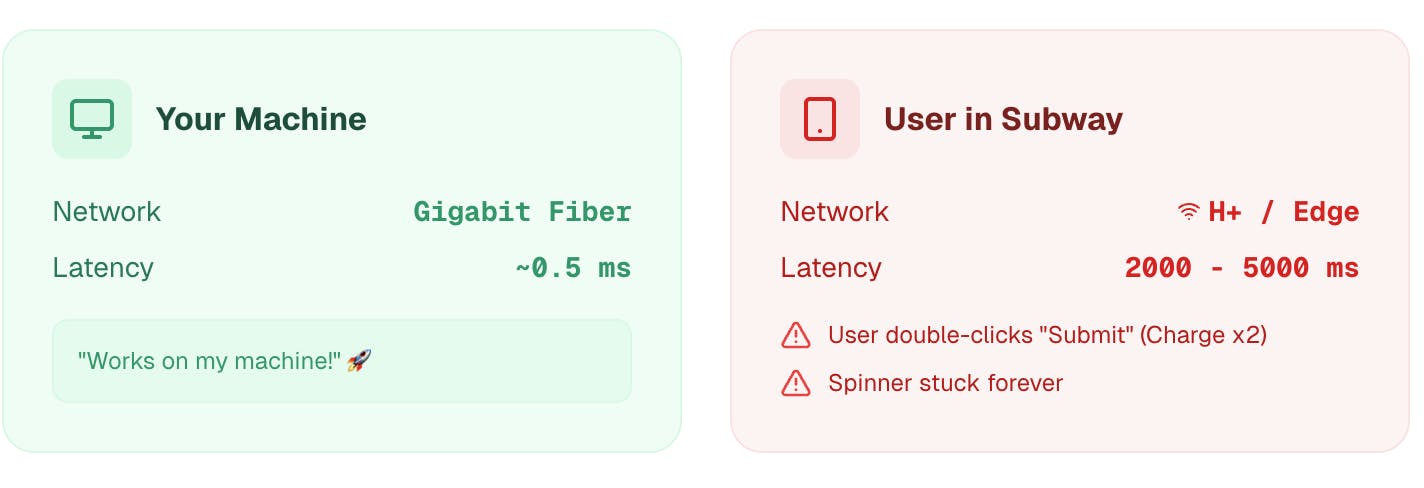
On your machine, the API responds in 5ms. The UI updates instantly. You click “Submit,” the modal closes, and you move on to the next ticket. Status: Done. ✅
But on a user’s 4G connection in a subway tunnel, that same API call takes 2 seconds.
Because you tested on localhost (Gigabit Fiber), you missed critical race conditions:
- 🖱️ The Double-Click Bug: The user clicks “Submit” twice because “nothing happened,” charging their credit card twice.
- 🔄 The Infinite Spinner: The loader gets stuck forever because a packet was dropped.
- 🏎️ Race Conditions: Data arrives out of order, overwriting the user’s input.
Your app feels fast because you are cheating. 0ms latency is a lie.
The Wrong Solution: time.sleep() n I often see tests that look like this: n
# ❌ Don't do this
page.click("#submit")
time.sleep(2) # Simulating "network lag"
expect(page.locator(".success")).to_be_visible()
Why this fails: sleep() just pauses the test execution script. The browser engine itself is still blazing fast. It doesn’t simulate network queues, slow handshakes, or constrained bandwidth. You aren’t testing the network; you’re just making your test suite slower.
The Right Solution: Network Throttling (CDP)
To test this properly in automation, you need to talk directly to the browser engine. You need to tell Chrome: “Pretend you are on a terrible 50kb/s connection.“
We can do this using the Chrome DevTools Protocol (CDP) within Playwright. This forces the browser to handle packet delays and loading states exactly as a real user would experience.
The Code (Python + Playwright)
Here is how to inject a “Bad 3G” connection into your test: n
from playwright.sync_api import Page, expect

def test_slow_network_handling(page: Page):
    # 1. Connect to Chrome DevTools Protocol (CDP)
    # This gives us low-level access to the browser
    client = page.context.new_cdp_session(page)

    # 2. 🧨 CHAOS: Emulate "Bad 3G"
    # Latency: 2000ms (2 seconds)
    # Throughput: 50kb/s (Very slow)
    client.send("Network.emulateNetworkConditions", {
        "offline": False,
        "latency": 2000,
        "downloadThroughput": 50 * 1024,
        "uploadThroughput": 50 * 1024
    })

    page.goto("https://myapp.com/search")

    # 3. Trigger the slow action
    page.fill("#search-box", "Playwright")
    page.click("#search-btn")

    # 4. Resilience Assertion

    # Check 1: Does the UI prevent double submission?
    expect(page.locator("#search-btn")).to_be_disabled()

    # Check 2: Does the user get immediate feedback?
    expect(page.locator(".loading-spinner")).to_be_visible()
Why this matters: This test proves your UI provides feedback. If a user clicks a button and waits 2 seconds with no visual feedback, they will assume the app is broken.
But wait, what about Mobile Apps?📱
The script above is perfect for automated CI pipelines running Chrome. But CDP has a major limitation:It doesn’t work on a physical iPhone or Android device**.
If you are a Mobile Developer or manual QA, you can’t “attach Playwright” to the phone in your hand to simulate a subway tunnel.
The Manual Alternative (System-Level Proxy)
To test latency on a real device without writing code, you need a System-Level Proxy that sits between your phone and the internet.
You can use desktop tools like Charles Proxy (if you enjoy configuring Java apps and firewalls), or you can use a cloud-based tool like Chaos Proxy (which I’m building).
It allows you to simulate “Subway Mode” (2s latency) on any device—iPhone, Android, or Laptop—just by connecting to a Wi-Fi proxy.
The Workflow:
- Create a “Chaos Rule” (e.g., Latency = 2000ms).
- Connect your phone to the proxy via QR code.
3. Watch your app struggle (and then fix it).
Summary
- Stop trusting Localhost. It hides your worst bugs.
- Automated: Use Playwright + CDP to inject latency in your E2E tests.
- Manual/Mobile: Use a Chaos Proxy to test resilience on physical devices.
Happy Testing! 🧪
If you found this useful, check out my previous post: Stop Testing Success. Kill the Database.