Andy Walker / Android Authority
Beyond sticking my arm out of the window, an Android weather app is the best bet for predicting how warm, cold, or wet the air is likely to be during the day. However, not all apps are the same. These products vary in many ways, from the sources they use and the design philosophies they employ to the extent of the information they offer. There truly is a weather app for everyone, and after using my fair share, I’ve grown fond of more than a few.
While I certainly have a main app that’s my preferred port of call, I keep several others installed for redundancy, cross-referencing, or tracking particular events. Here’s a list of my favorite Android weather apps.
What weather app do you use?
1373 votes
Meteogram Weather Widget

Andy Walker / Android Authority
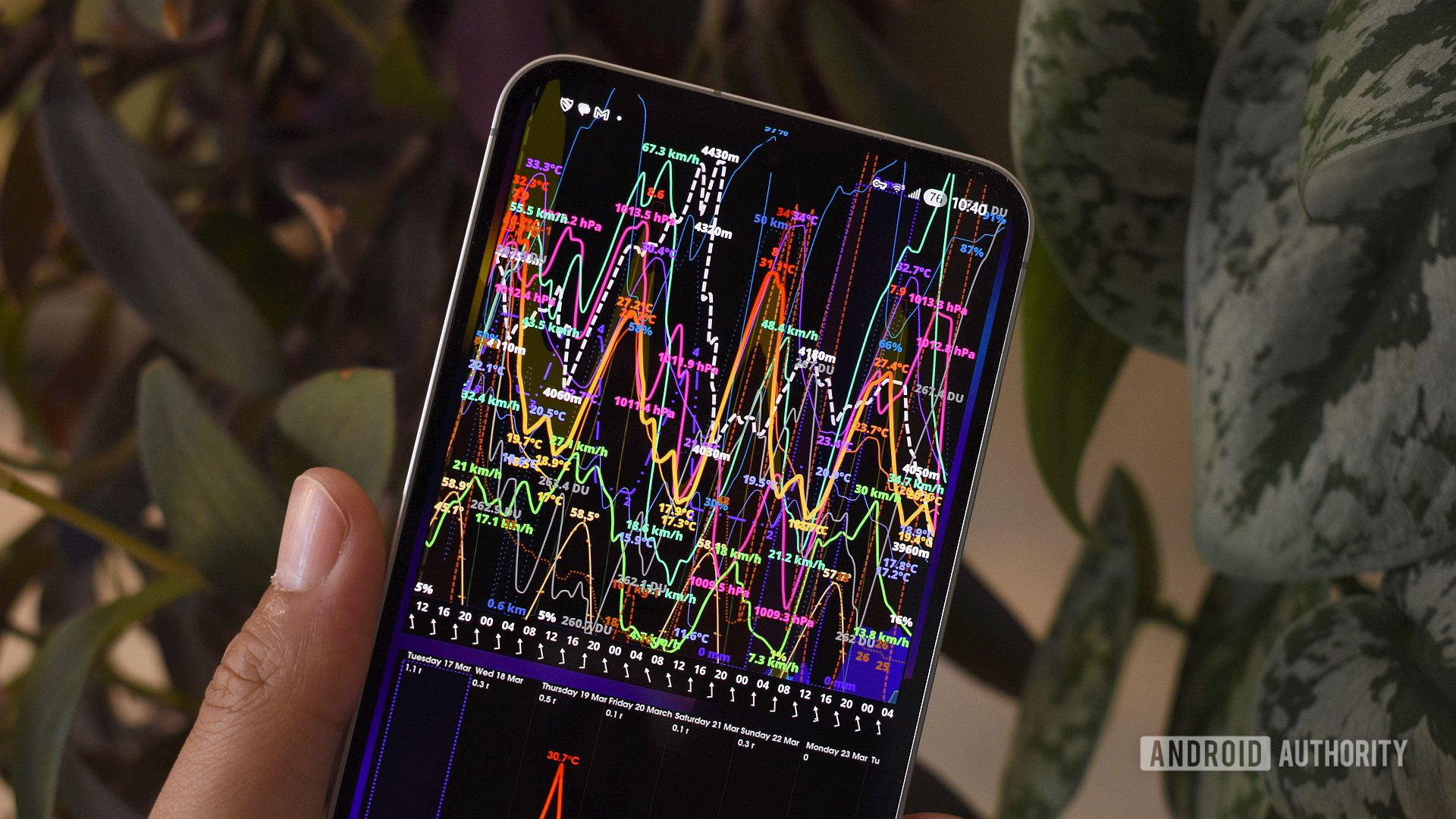
As its name suggests, it displays all weather data on a graph, also known as a meteogram. Time runs along the X-axis, while the Y-axis displays a weather metric or condition’s value. This makes it easy to view multiple weather conditions at a single point in time and get a holistic view of the weather at a glance hours ahead.
While seemingly rigid, the app’s design allows for multiple possibilities. You can have specific widgets that span a short period with rapid data updates, or a much longer, general look at conditions weeks in advance. Or, why not both!?
What powers all of this is Meteogram’s huge selection of sources that focus on a range of data, frequent updates, or specific indicators, like wet bulb temperatures. You can choose between raw models, national weather services, and proprietary solutions like Visual Crossing and Foreca. This means that wherever you are, you’ll likely find a highly accurate forecast or lengthier outlook.
I will admit — Meteogram is an acquired taste, and it’s probably not for everyone. It takes a bit of setup and some time to learn how to read the data. I’ve also made accommodations for it on my home page, as its widget is simply brilliant. But once you’ve mastered it, you won’t be able to go back to any other weather app.
Breezy Weather
Andy Walker / Android Authority
While Meteogram is a little left-field in its design philosophy, Breezy Weather is a far more traditional weather app. I consider it the best solution for most people.
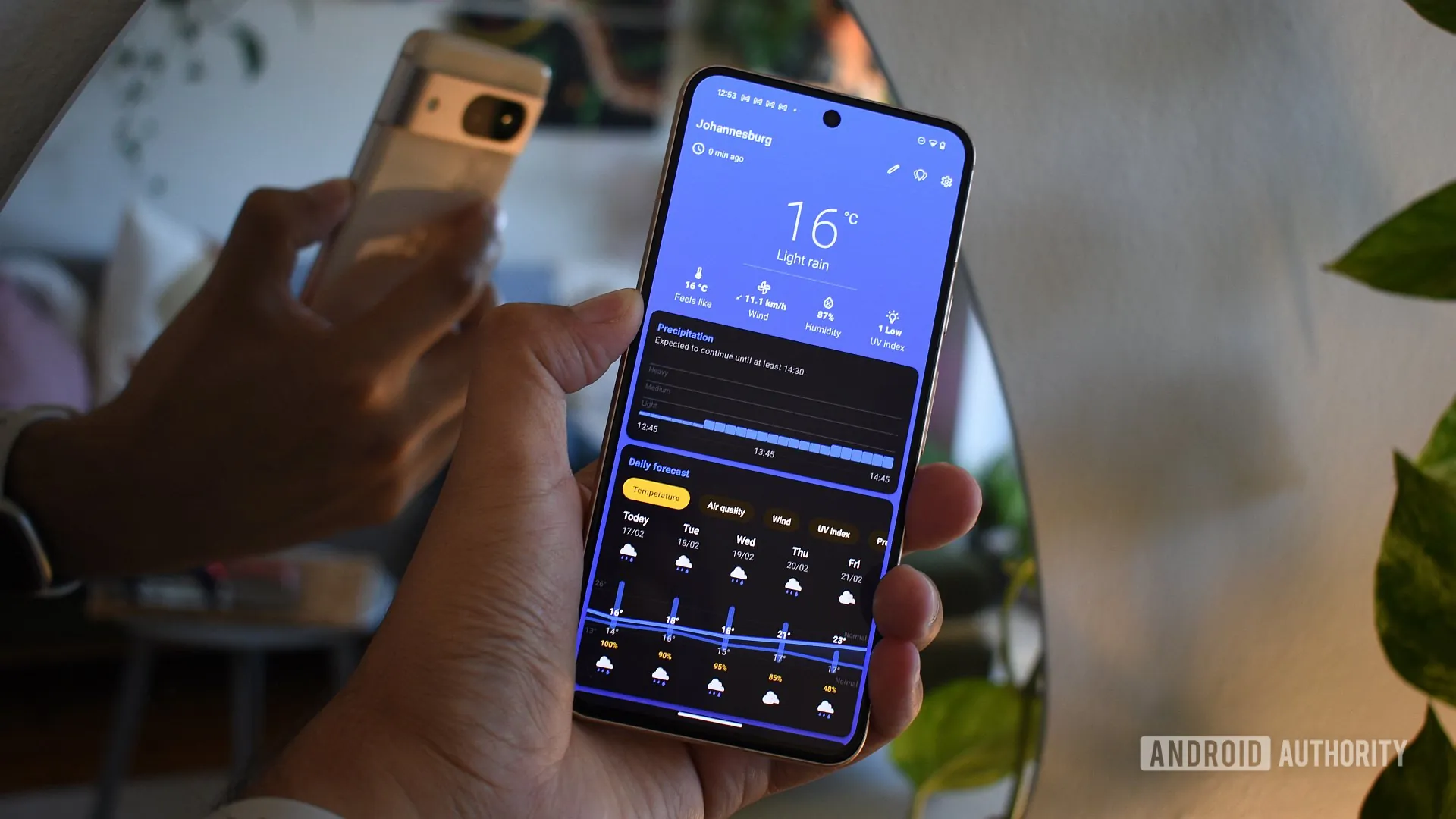
Once you install it, you’ll be greeted by a pleasant interface that puts current conditions front and center. The app animates and changes its background based on those conditions, displays national weather alerts when they’re available, and highlights daily and hourly forecast information. It also packs Pixel Weather-inspired widgets for key indicators such as wind, precipitation, and pressure.
You’ll find more advanced features the more you dig into the app. Breezy lets users choose from a handful of sources (albeit not as many as Meteogram), switch the interface to suit their needs, and even set that background animation as their live wallpaper.
Weather Master

Andy Walker / Android Authority
When Pixel Weather launched with the Pixel 9 series, I found it lacking. Not only did the app remove Google’s beloved frog, but it also limited users to a single, unchangeable source and a rigid layout that was more style than substance.
Enter Weather Master. Although this third-party Android weather app is heavily inspired by the Pixel solution, it’s far better in almost every way.
The home page features a cute scene with Google’s rehomed frog, an insights section highlighting a specific weather indicator to watch out for during the day, and a broader summary that succinctly encapsulates the day’s general weather outlook. Today, for instance, the insights section warns me about humidity levels, while the summary suggests that smog could be a problem in the evening. No other weather app on this list offers a verbal explainer quite like this.
Scrolling deeper, you’ll find more general weather details, including an hourly forecast breakdown, a daily forecast for the next eight days, and more Pixel Weather-like widgets that highlight current humidity, sunrise and sunset data, visibility, and other indicators.
Besides its unique summary features, what makes Weather Master a favorite weather app is its customizability. It offers a broad list of weather models and sources — far beyond what Breezy and Pixel Weather offer. There’s a host of tweaks for the app’s aesthetics, too.
Weather & Radar

Andy Walker / Android Authority
Graphical weather apps are better at tracking conditions in real time than those that rely solely on numbers, grids, or graphs. As far as these apps go, Weather & Radar is by far the best.
Its interface is simple yet provides all the controls and visualization types you could need. I usually keep it set to the radar view, as it offers the most comprehensive view of conditions, but it also highlights precipitation, temperature, humidity, and lightning strikes if you want. Users can also scrub along a timeline to visualize how a cold front may move over a region or when to expect the first drops of rain.
Zoom Earth

Andy Walker / Android Authority
You could argue that having Weather & Radar and Zoom Earth on the same list is redundant, but they do have different approaches. Yes, both rely on graphical data, but Zoom Earth is far more reliant on true-to-life imagery.
This seemingly minor difference makes Zoom far more useful for tracking specific phenomena, like tropical storms and fronts. The app also visualizes “hot spots,” or wildfires, which have become a major problem in my part of the world.
My favorite Zoom Earth feature is its almanac. You can pick a date and view AM and PM satellite imagery from that period. It’s not particularly useful in the moment, but it is interesting to gaze back into the past, especially as our planet slowly gets warmer.
Notably, Zoom also offers forecasts for particular points on the map that you highlight, but I wouldn’t necessarily use it for this.
Tropical Hurricane Tracker

Andy Walker / Android Authority
Many of you live in tropical regions and face seasonal spinning storms. These can develop rapidly, so unlike any other weather system, it’s perhaps a good idea to use an app dedicated to tracking them. That’s where Tropical Hurricane Tracker comes in.
This is by far the best tropical weather app for Android. It somehow caters to both enthusiasts and newcomers alike, and that balance is difficult to achieve. On the one hand, it covers multiple basins and includes digests for the major weather monitoring organizations across the Atlantic, Pacific, and Indian oceans. It also offers detailed infrared images, spaghetti model predictions, and various historical details. On the other hand, it includes a breakdown of some jargon, making it a great resource for those unfamiliar with tropical terms.
Unlike the other weather apps on this list, Tropical Hurricane Tracker doesn’t provide a forecast in the traditional sense, but rather focuses on providing specific details surrounding individual storms. It’s a perfect weather tool in that sense and a brilliant companion to Zoom Earth.
Avia Weather

Andy Walker / Android Authority
Some of the most reliable weather forecasts come from a region’s airport. Since these facilities accommodate large metal birds that harbor hundreds of people, these details must be accurate. It’s why I often look at METAR data — or Meteorological Aerodrome Reports — for a better sense of the oncoming weather conditions versus mere models. METARs are usually pretty accurate at forecasting less reliable weather conditions, such as scattered thunderstorms. An app that can read and translate this data is therefore pretty useful for travelers and residents alike.
This is where Avia Weather comes into play. Countless times, I’ve turned to Avia to corroborate another app’s precipitation prediction as it offers users a breakdown of METARs from practically any airport on the planet. These reports can be tricky to read, but Avia also breaks down these coded messages into weather data that the average person can understand.
Avia also details TAFs, or Terminal Area Forecasts, which provide a bit more insight into future weather conditions in and around the airport.
There are plenty of great Android weather apps out there, so I’m interested to hear which you use on your phone. Let the community know in the comments section below.
Don’t want to miss the best from Android Authority?


Thank you for being part of our community. Read our Comment Policy before posting.