

By using this site, you agree to the Privacy Policy and Terms of Use.
Accept
World of SoftwareWorld of SoftwareWorld of Software
  • News
  • Software
  • Mobile
  • Computing
  • Gaming
  • Videos
  • More
    • Gadget
    • Web Stories
    • Trending
    • Press Release
Search
  • Privacy
  • Terms
  • Advertise
  • Contact
Copyright © All Rights Reserved. World of Software.
Reading: This Handy Computer Gadget Will Speed Up Your Daily Tasks – BGR
Share
Sign In
Notification Show More
Font ResizerAa
World of SoftwareWorld of Software
Font ResizerAa
  • Software
  • Mobile
  • Computing
  • Gadget
  • Gaming
  • Videos
Search
  • News
  • Software
  • Mobile
  • Computing
  • Gaming
  • Videos
  • More
    • Gadget
    • Web Stories
    • Trending
    • Press Release
Have an existing account? Sign In
Follow US
  • Privacy
  • Terms
  • Advertise
  • Contact
Copyright © All Rights Reserved. World of Software.
World of Software > News > This Handy Computer Gadget Will Speed Up Your Daily Tasks – BGR
News

This Handy Computer Gadget Will Speed Up Your Daily Tasks – BGR

News Room
Last updated: 2026/02/23 at 6:06 PM
News Room Published 23 February 2026
Share
This Handy Computer Gadget Will Speed Up Your Daily Tasks – BGR
SHARE


tomeqs/Shutterstock

We may receive a commission on purchases made from links.

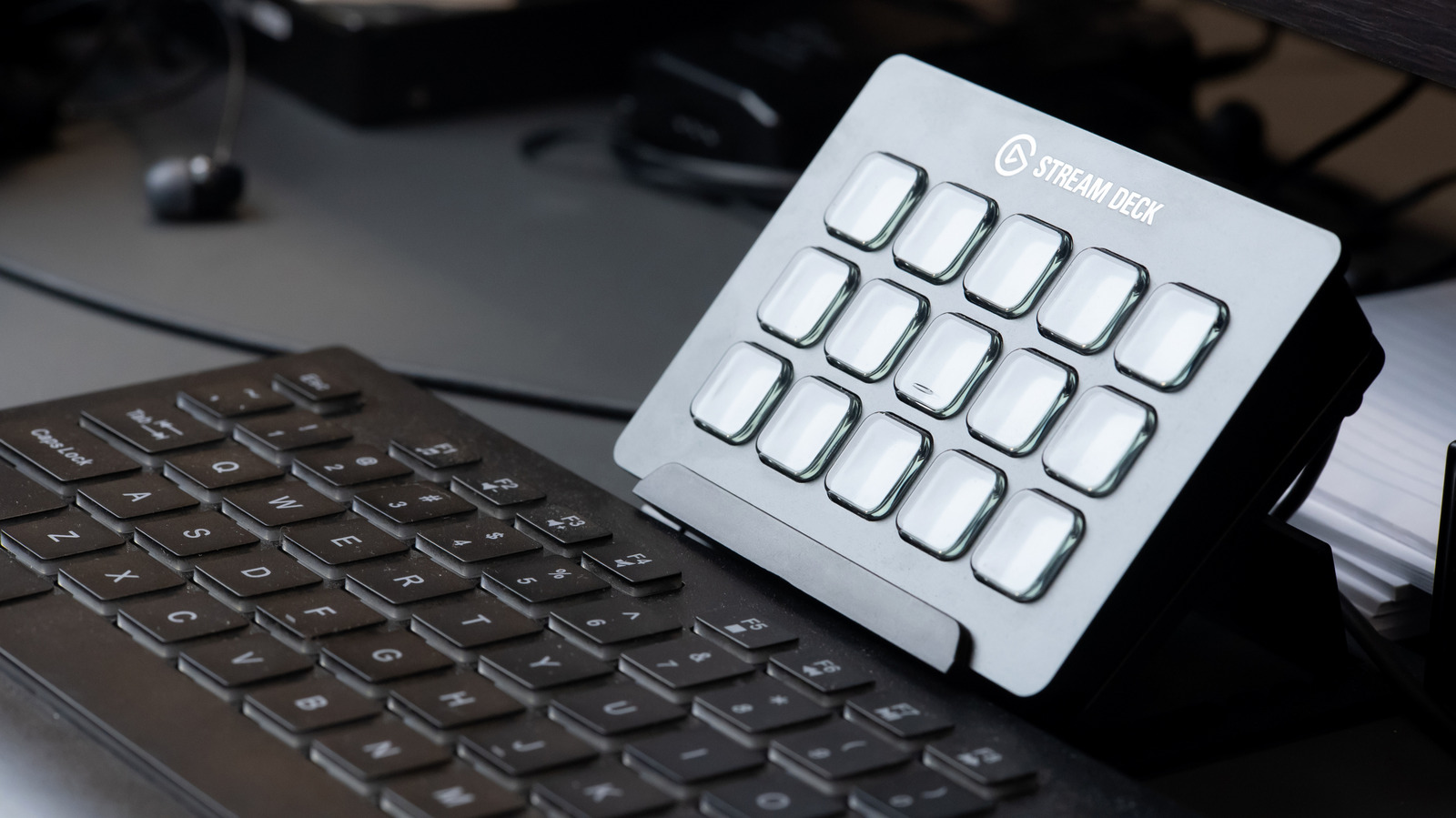
One of the most underrated gadgets for PC users is probably not what you’d expect. It has to do with hotkeys, or macros. Keyboards are great, and while you can buy them with a ton of unique hotkeys, like media-specific keys to change tracks, what can really save you time is knowing all the shortcuts, like Alt+Tab to switch between open windows or Alt+F4 to force close the current app. There is a device you can use that specifically allows you to create these shortcuts, called macros, so you can simply press a button and call on an application, game, or action of some kind. They’re referred to as macro pads or stream decks, and they’re one of the most useful USB gadgets you can find on Amazon.

Stream decks are so named because they allow streamers to quickly call upon frequently used actions in the middle of livestreams. The Elgato Stream Deck is one of the more popular examples in this category, and there’s even an Elgato USB foot pedal that works the same way to deploy actions. But Elgato isn’t the only company that offers devices like this. Keychron, a popular keyboard maker, offers the Q0 Plus, a wired number pad keyboard with macro support. The Glorious GMMK macro pad is remarkably similar. For a more industrial vibe, X-keys sells the XK-3, a tiny three-input USB controller you can map to macros.

So, there are a lot of options. But what truly makes them convenient is the ability to customize your macros. That means you can designate apps or actions to be carried out when you press a specific button. Like, say, opening Adobe Photoshop to edit photos with a quick tap or calling upon a game booster tool while you’re in the middle of a play session.

Macro pads aren’t just for gaming, they’re a huge help for productivity


Close up of fingers pressing buttons on a mechanical keyboard.
Ryan Padjo/Shutterstock

While macro pads are especially popular with streamers, video editors, and gamers, they can be a boon for just about anyone’s workflow. Being able to call upon your most used apps or tasks with the push of a button, fully customizable to your workflows, is a productivity game-changer. If you find yourself constantly working with a particular application, closing or minimizing it to do other tasks, you could set a macro button to bring it up.

You could also simplify common keyboard combinations. For example, to copy and paste, you’d normally press Ctrl+C and then Ctrl+V, but you could program a macro pad button to do both of those at once. Macro pads can fully automate repetitive tasks that you can call on with a single press, which would significantly enhance your daily workflows. Instead of mashing a series of buttons or hotkeys in order, you can program them to all work at once, going off at a single time. Create macros for character abilities in games, tasks you regularly carry out, opening apps or documents, you name it.

If you’re feeling resourceful, you can make your own macro pad with full guides on Instructables. Ultimately, however, it’s one of the best ways to save time throughout your day, and if you use them regularly, that time could really add up. There are even some mice that include programmable macro buttons to do similar actions, like the Logitech MX Master 4, which is one of the coolest new gadgets you’ll want for your desk, in office or at home. Realistically, most people could benefit from having a macro pad — they’re the polar opposite of those popular USB gadgets that are a waste of money.


Sign Up For Daily Newsletter

Be keep up! Get the latest breaking news delivered straight to your inbox.
By signing up, you agree to our Terms of Use and acknowledge the data practices in our Privacy Policy. You may unsubscribe at any time.
Share This Article
Facebook Twitter Email Print
Share
What do you think?
Love0
Sad0
Happy0
Sleepy0
Angry0
Dead0
Wink0
Previous Article Pricing Pages Play a Smaller Role in Conversions Than You Think | HackerNoon Pricing Pages Play a Smaller Role in Conversions Than You Think | HackerNoon
Next Article Armenians of Los Angeles Reflect on the Ethnic Cleansing of Artsakh – Knock LA Armenians of Los Angeles Reflect on the Ethnic Cleansing of Artsakh – Knock LA
Leave a comment

Leave a Reply Cancel reply

Your email address will not be published. Required fields are marked *

Stay Connected

248.1k Like
69.1k Follow
134k Pin
54.3k Follow

Latest News

Is The 3rd-Gen Apple TV 4K Still Worth It In 2026? Here’s What You Need To Know – BGR
News
The Galaxy S25 is finally catching up to the S26 with its latest beta update
News
Hands-on: This hub fixes the MacBook Neo’s biggest limitation – 9to5Mac
News
Irrigate Smarter, Save Water: IrriSense 2 Is Here to Save Your Lawn
News

You Might also Like

Is The 3rd-Gen Apple TV 4K Still Worth It In 2026? Here’s What You Need To Know – BGR
News

Is The 3rd-Gen Apple TV 4K Still Worth It In 2026? Here’s What You Need To Know – BGR

5 Min Read
The Galaxy S25 is finally catching up to the S26 with its latest beta update
News

The Galaxy S25 is finally catching up to the S26 with its latest beta update

3 Min Read
Hands-on: This hub fixes the MacBook Neo’s biggest limitation – 9to5Mac
News

Hands-on: This hub fixes the MacBook Neo’s biggest limitation – 9to5Mac

6 Min Read
Irrigate Smarter, Save Water: IrriSense 2 Is Here to Save Your Lawn
News

Irrigate Smarter, Save Water: IrriSense 2 Is Here to Save Your Lawn

5 Min Read
//

World of Software is your one-stop website for the latest tech news and updates, follow us now to get the news that matters to you.

Quick Link

  • Privacy Policy
  • Terms of use
  • Advertise
  • Contact

Topics

  • Computing
  • Software
  • Press Release
  • Trending

Sign Up for Our Newsletter

Subscribe to our newsletter to get our newest articles instantly!

World of SoftwareWorld of Software
Follow US
Copyright © All Rights Reserved. World of Software.
Welcome Back!

Sign in to your account

Lost your password?