By using this site, you agree to the Privacy Policy and Terms of Use.
Accept
World of SoftwareWorld of SoftwareWorld of Software
  • News
  • Software
  • Mobile
  • Computing
  • Gaming
  • Videos
  • More
    • Gadget
    • Web Stories
    • Trending
    • Press Release
Search
  • Privacy
  • Terms
  • Advertise
  • Contact
Copyright © All Rights Reserved. World of Software.
Reading: This Little-Known Trick Unlocks Dozens Of Apps And Games On Your Kindle – BGR
Share
Sign In
Notification Show More
Font ResizerAa
World of SoftwareWorld of Software
Font ResizerAa
  • Software
  • Mobile
  • Computing
  • Gadget
  • Gaming
  • Videos
Search
  • News
  • Software
  • Mobile
  • Computing
  • Gaming
  • Videos
  • More
    • Gadget
    • Web Stories
    • Trending
    • Press Release
Have an existing account? Sign In
Follow US
  • Privacy
  • Terms
  • Advertise
  • Contact
Copyright © All Rights Reserved. World of Software.
World of Software > News > This Little-Known Trick Unlocks Dozens Of Apps And Games On Your Kindle – BGR
News

This Little-Known Trick Unlocks Dozens Of Apps And Games On Your Kindle – BGR

News Room
Last updated: 2026/04/12 at 12:43 PM
News Room Published 12 April 2026
Share
This Little-Known Trick Unlocks Dozens Of Apps And Games On Your Kindle – BGR
SHARE


Marinel Sigue/BGR

On the outside, the Kindle looks just like a mini tablet, with its wide touchscreen, minimal buttons, and thin build but under the hood, the two devices are far from similar. A tablet is capable of writing emails, tracking habits, and playing games, but a Kindle is better for your eyes than a tablet. However, e-readers in general are good for one thing only: reading. 

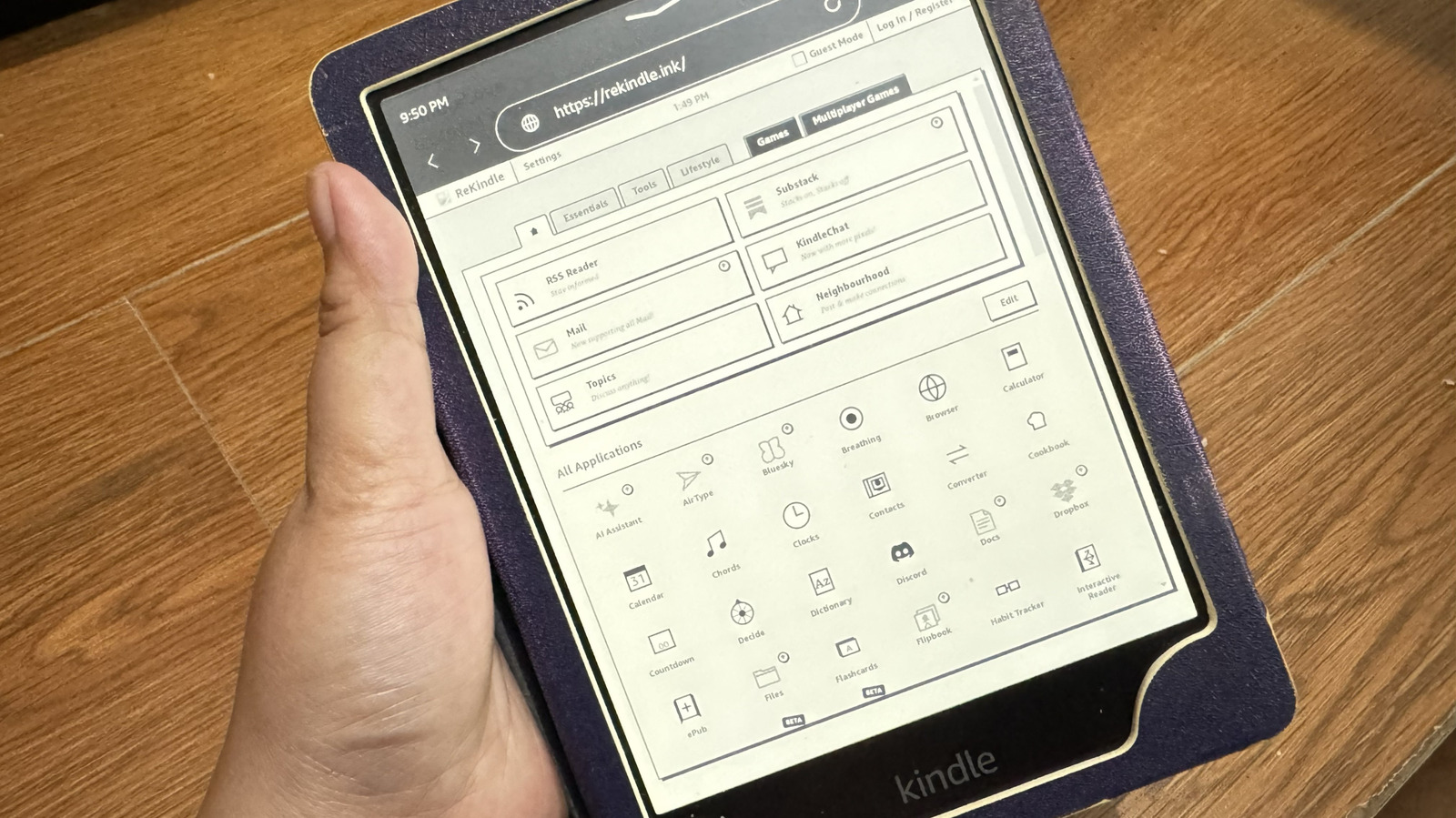
While that’s probably what you’ll use Amazon’s e-reader for, you can do more on a Kindle besides reading: You can write emails, track habits, and play games on it, all without jailbreaking or setting up complex third-party software. All you need is ReKindle, a website that allows you to use different apps — like Discord, Calendar, and Maps — right from your Kindle browser.

Since there’s no installation involved, you’re free to go back to reading your books anytime. As you’re only accessing a website, not messing with Kindle’s hardware or software in any way, using ReKindle won’t void your device’s warranty.

What is ReKindle and how does it work
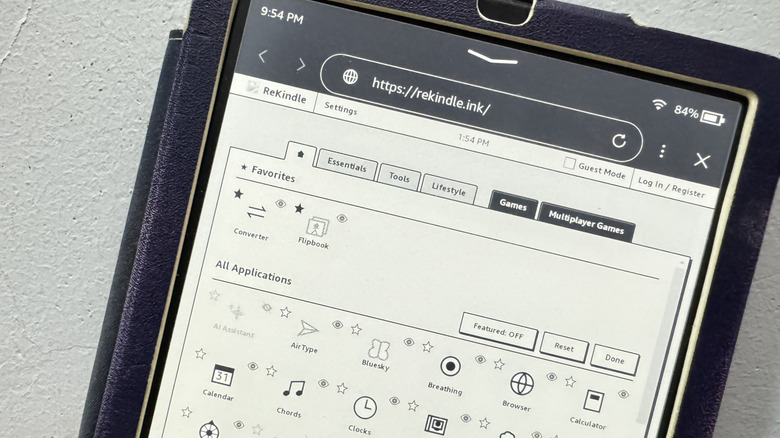

Editing ReKindle home screen on Kindle
Marinel Sigue/BGR

ReKindle is a freemium collection of web-based apps readily accessible from your Kindle’s built-in browser. Its minimal and colorless interface matches the Kindle aesthetic and is designed for e-ink screens as a whole, so ReKindle works on other e-readers that users swear by, such as Kobo and Boox. Since it can be run from any browser, you can actually access it from your computer, phone, or tablet, as well. You get essential features to enhance your literary experience, such as Reading Log and Reading List for keeping track of your to-be-read list and daily reading minutes, as well as a Library integration that lets you search for and download books.

ReKindle offers a wide range of apps, from tools and productivity to entertainment and social. Some fun apps include Note Pad, Word Games, and KindleChat, a platform for interacting with ReKindle users. You can even integrate the service with your Google account to sync with and use Google Tasks, Calendar, and Contacts. When using ReKindle, you can log into an account to use Cloud Mode and sync your data on the service across other devices. Otherwise, you can remain logged off and use the service in Guest Mode, which will keep saved data on your device instead.

The apps and services in ReKindle won’t respond as fast as they would on a tablet, and you’ll likely experience some lag here and there. Another downside of ReKindle is that some of its apps like Quick ToDo, Dropbox, AI Assistant, and Docs are locked behind a fee. As of this writing, you can get the ReKindle+ by paying $2 per month, $15 per year, or $30 for lifetime access.

How to access and use ReKindle
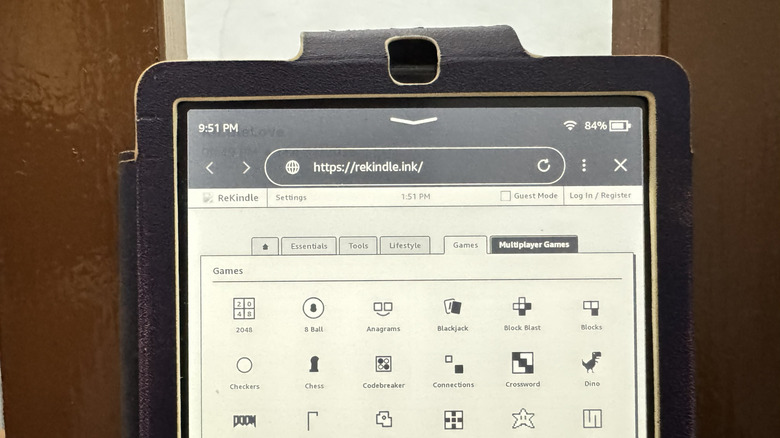

Games available on Kindle via ReKindle
Marinel Sigue/BGR

ReKindle keeps things plain and simple, so accessing and using it is pretty quick and easy. To open the web app, here’s what you need to do:

  1. Connect your Kindle to your Wi-Fi network.
  2. On your Kindle Home screen, press the More icon (three vertical dots) in the top right.
  3. Select Web Browser.
  4. Type rekindle.ink in the search bar.
  5. Hit the arrow to go to the web app.
  6. In the Timezone Not Set popup, choose Settings.
  7. Type your location.
  8. Press OK.

From here, you can explore the ReKindle interface. The tabs at the top (Essentials, Tools, Lifestyle, Games, and Multiplayer Games) take you directly to their specific apps. The Home page, on the other hand, is where you can see all available apps and games, with the featured ones at the very top. You can customize it to your liking:

  1. On the Home tab, press Edit.
  2. To hide the featured apps at the top, tap Featured: ON to turn it off.
  3. To pin your favorite apps at the top, hit the star icon next to your apps of choice.
  4. To hide certain apps from the Home tab, click the eye icon.
  5. Click on Done to save the changes.

You can always revert to the default Home tab look by pressing Edit and Reset. From the ReKindle Settings, you can set the theme from light mode to dark mode, turn on OpenDyslexic Font for readability, and even disable games if you aren’t a fan of gaming on the Kindle. If you’re using your browser for anything else other than ReKindle, it’s a good idea to bookmark the page for easier access later.


Sign Up For Daily Newsletter

Be keep up! Get the latest breaking news delivered straight to your inbox.
By signing up, you agree to our Terms of Use and acknowledge the data practices in our Privacy Policy. You may unsubscribe at any time.
Share This Article
Facebook Twitter Email Print
Share
What do you think?
Love0
Sad0
Happy0
Sleepy0
Angry0
Dead0
Wink0
Previous Article Apple Glasses to sport high-end designs using premium materials, at least four styles in testing – 9to5Mac Apple Glasses to sport high-end designs using premium materials, at least four styles in testing – 9to5Mac
Next Article Best AI Prompts for Bloggers, Writers & Content Creators (2026 Guide) Best AI Prompts for Bloggers, Writers & Content Creators (2026 Guide)
Leave a comment

Leave a Reply Cancel reply

Your email address will not be published. Required fields are marked *

Stay Connected

248.1k Like
69.1k Follow
134k Pin
54.3k Follow

Latest News

The Best M.2 SSDs (Solid State Drives) We’ve Tested for 2026
News
Fixing Indefinite Geolocation Hangs in React and React Native Applications | HackerNoon
Computing
Are Hard Drives Still Worth Buying In 2026? – BGR
News
AirPods Weekend Deals Include AirPods Pro 3 for 9.99 and AirPods Max 1 for 9.95
AirPods Weekend Deals Include AirPods Pro 3 for $199.99 and AirPods Max 1 for $399.95
News

You Might also Like

The Best M.2 SSDs (Solid State Drives) We’ve Tested for 2026
News

The Best M.2 SSDs (Solid State Drives) We’ve Tested for 2026

48 Min Read
Are Hard Drives Still Worth Buying In 2026? – BGR
News

Are Hard Drives Still Worth Buying In 2026? – BGR

5 Min Read
AirPods Weekend Deals Include AirPods Pro 3 for 9.99 and AirPods Max 1 for 9.95
News

AirPods Weekend Deals Include AirPods Pro 3 for $199.99 and AirPods Max 1 for $399.95

5 Min Read
Sutter Health and MemorialCare Hit With Class Action Over AI Transcription
News

Sutter Health and MemorialCare Hit With Class Action Over AI Transcription

5 Min Read
//

World of Software is your one-stop website for the latest tech news and updates, follow us now to get the news that matters to you.

Quick Link

  • Privacy Policy
  • Terms of use
  • Advertise
  • Contact

Topics

  • Computing
  • Software
  • Press Release
  • Trending

Sign Up for Our Newsletter

Subscribe to our newsletter to get our newest articles instantly!

World of SoftwareWorld of Software
Follow US
Copyright © All Rights Reserved. World of Software.
Welcome Back!

Sign in to your account

Lost your password?