By using this site, you agree to the Privacy Policy and Terms of Use.
Accept
World of SoftwareWorld of SoftwareWorld of Software
  • News
  • Software
  • Mobile
  • Computing
  • Gaming
  • Videos
  • More
    • Gadget
    • Web Stories
    • Trending
    • Press Release
Search
  • Privacy
  • Terms
  • Advertise
  • Contact
Copyright © All Rights Reserved. World of Software.
Reading: Use Edge Light for Better Video Calls in macOS
Share
Sign In
Notification Show More
Font ResizerAa
World of SoftwareWorld of Software
Font ResizerAa
  • Software
  • Mobile
  • Computing
  • Gadget
  • Gaming
  • Videos
Search
  • News
  • Software
  • Mobile
  • Computing
  • Gaming
  • Videos
  • More
    • Gadget
    • Web Stories
    • Trending
    • Press Release
Have an existing account? Sign In
Follow US
  • Privacy
  • Terms
  • Advertise
  • Contact
Copyright © All Rights Reserved. World of Software.
World of Software > News > Use Edge Light for Better Video Calls in macOS
News

Use Edge Light for Better Video Calls in macOS

News Room
Last updated: 2025/12/18 at 11:57 AM
News Room Published 18 December 2025
Share
Use Edge Light for Better Video Calls in macOS
SHARE

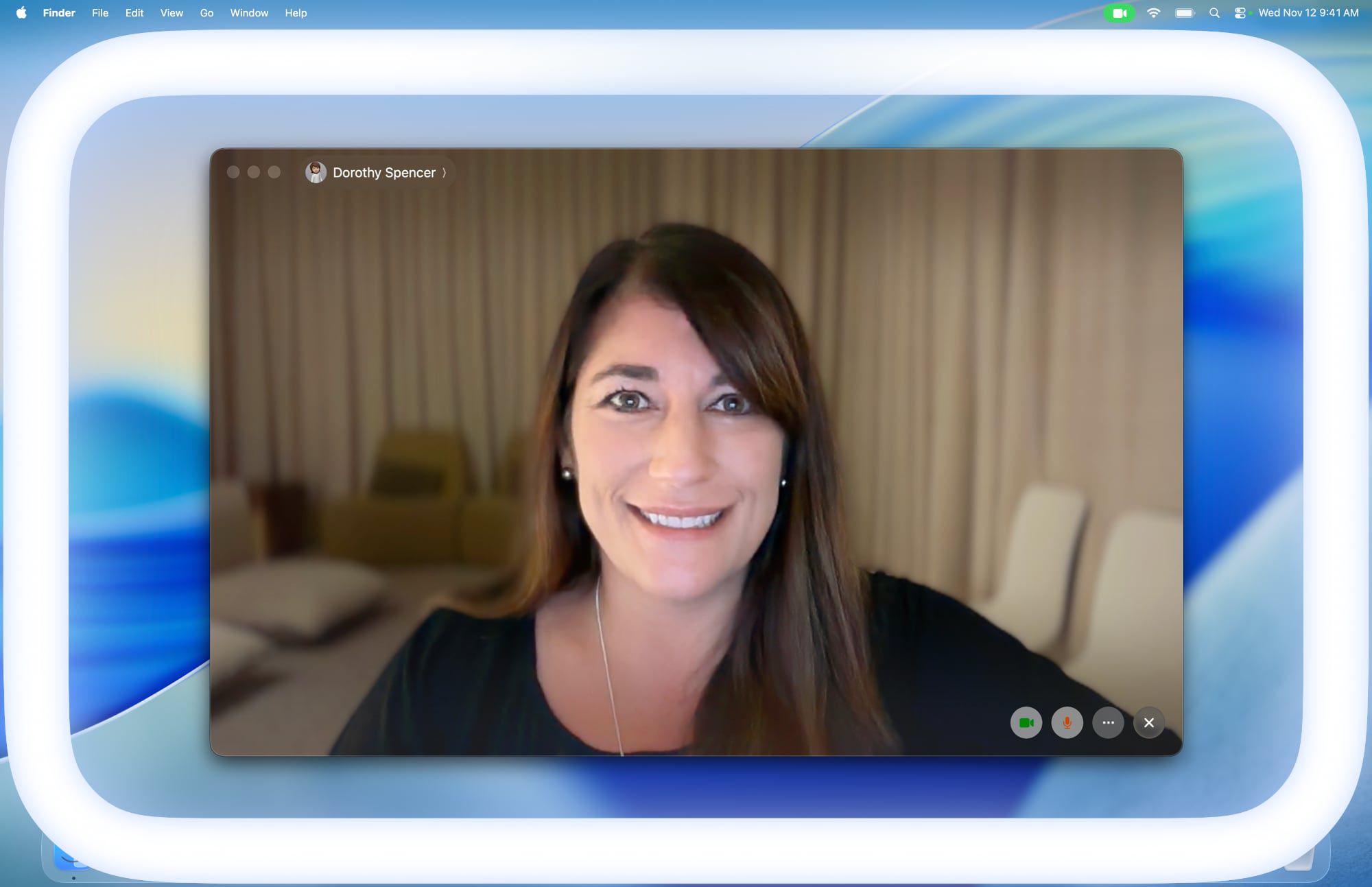
Apple in macOS Tahoe 26.2 introduced Edge Light, a clever new feature that turns your Mac’s display into a virtual ring light during video calls. Instead of fumbling with external lighting equipment, your Mac can now illuminate your face automatically when you’re sitting in a dark room.

Basically, Edge Light adds a soft glow around the edges of your display to brighten your face during video conferences. But it’s far from just a simple screen border effect. Edge Light uses your Mac’s Neural Engine to analyze your face, size, and position in the frame to deliver accurate lighting, while the Image Signal Processor fine-tunes brightness to match your environment.

The feature is even aware enough to know when your cursor approaches the display edge. When it does, Edge Light automatically recedes, allowing you to still access on-screen content without it interfering.

What You’ll Need

Edge Light works on any Mac with Apple silicon (M1 or later). It’s compatible with all video conferencing apps and even extends to external cameras and the Apple Studio Display when connected to an Apple silicon Mac.

How to Turn On Edge Light

Once you’ve updated to macOS Tahoe 26.2 or later, enabling Edge Light takes just a couple of clicks:

  1. Open a supporting video call app (FaceTime, Zoom, or WebEx, for example).
  2. Click the green video conferencing menu bar item at the top of your screen.
  3. Select Edge Light from the drop-down menu.

edge lightedge light

To adjust the lighting intensity and color temperature, click the down chevron next to Edge Light. You’ll see two sliders that let you customize the brightness and warmth of the effect to suit your preferences.

If you own a Mac released in 2024 or later, you can turn on automatic Edge Light activation. Once enabled, your Mac will detect when you’re in a dimly lit environment and turn the feature on without any manual input. Simply look for the automatic toggle in the video call dropdown menu, immediately below the expanded Edge Light options.

Sign Up For Daily Newsletter

Be keep up! Get the latest breaking news delivered straight to your inbox.
By signing up, you agree to our Terms of Use and acknowledge the data practices in our Privacy Policy. You may unsubscribe at any time.
Share This Article
Facebook Twitter Email Print
Share
What do you think?
Love0
Sad0
Happy0
Sleepy0
Angry0
Dead0
Wink0
Previous Article Why a high-profile discrimination case against Kuda was dismissed Why a high-profile discrimination case against Kuda was dismissed
Next Article Kuaishou e-commerce abolishes refund-without-return policy after long-running merchant complaints · TechNode Kuaishou e-commerce abolishes refund-without-return policy after long-running merchant complaints · TechNode
Leave a comment

Leave a Reply Cancel reply

Your email address will not be published. Required fields are marked *

Stay Connected

248.1k Like
69.1k Follow
134k Pin
54.3k Follow

Latest News

The Average Lifespan Of A MacBook Pro (& How To Make It Last Longer) – BGR
News
Kia and Hyundai will spend millions fixing old cars to stop ‘Kia Boyz’ thefts
News
Tencent opens beta recruitment for Final Fantasy XIV: Crystal World · TechNode
Computing
Meta sued over teens' suicides
News

You Might also Like

The Average Lifespan Of A MacBook Pro (& How To Make It Last Longer) – BGR
News

The Average Lifespan Of A MacBook Pro (& How To Make It Last Longer) – BGR

6 Min Read
Kia and Hyundai will spend millions fixing old cars to stop ‘Kia Boyz’ thefts
News

Kia and Hyundai will spend millions fixing old cars to stop ‘Kia Boyz’ thefts

2 Min Read
Meta sued over teens' suicides
News

Meta sued over teens' suicides

0 Min Read
Trump Media is merging with fusion power company TAE Technologies in B+ deal |  News
News

Trump Media is merging with fusion power company TAE Technologies in $6B+ deal | News

5 Min Read
//

World of Software is your one-stop website for the latest tech news and updates, follow us now to get the news that matters to you.

Quick Link

  • Privacy Policy
  • Terms of use
  • Advertise
  • Contact

Topics

  • Computing
  • Software
  • Press Release
  • Trending

Sign Up for Our Newsletter

Subscribe to our newsletter to get our newest articles instantly!

World of SoftwareWorld of Software
Follow US
Copyright © All Rights Reserved. World of Software.
Welcome Back!

Sign in to your account

Lost your password?