By using this site, you agree to the Privacy Policy and Terms of Use.
Accept
World of SoftwareWorld of SoftwareWorld of Software
  • News
  • Software
  • Mobile
  • Computing
  • Gaming
  • Videos
  • More
    • Gadget
    • Web Stories
    • Trending
    • Press Release
Search
  • Privacy
  • Terms
  • Advertise
  • Contact
Copyright © All Rights Reserved. World of Software.
Reading: What The Back Buttons On A Nintendo Switch 2 Pro Controller Are Actually For – BGR
Share
Sign In
Notification Show More
Font ResizerAa
World of SoftwareWorld of Software
Font ResizerAa
  • Software
  • Mobile
  • Computing
  • Gadget
  • Gaming
  • Videos
Search
  • News
  • Software
  • Mobile
  • Computing
  • Gaming
  • Videos
  • More
    • Gadget
    • Web Stories
    • Trending
    • Press Release
Have an existing account? Sign In
Follow US
  • Privacy
  • Terms
  • Advertise
  • Contact
Copyright © All Rights Reserved. World of Software.
World of Software > News > What The Back Buttons On A Nintendo Switch 2 Pro Controller Are Actually For – BGR
News

What The Back Buttons On A Nintendo Switch 2 Pro Controller Are Actually For – BGR

News Room
Last updated: 2026/03/19 at 8:32 AM
News Room Published 19 March 2026
Share
What The Back Buttons On A Nintendo Switch 2 Pro Controller Are Actually For – BGR
SHARE


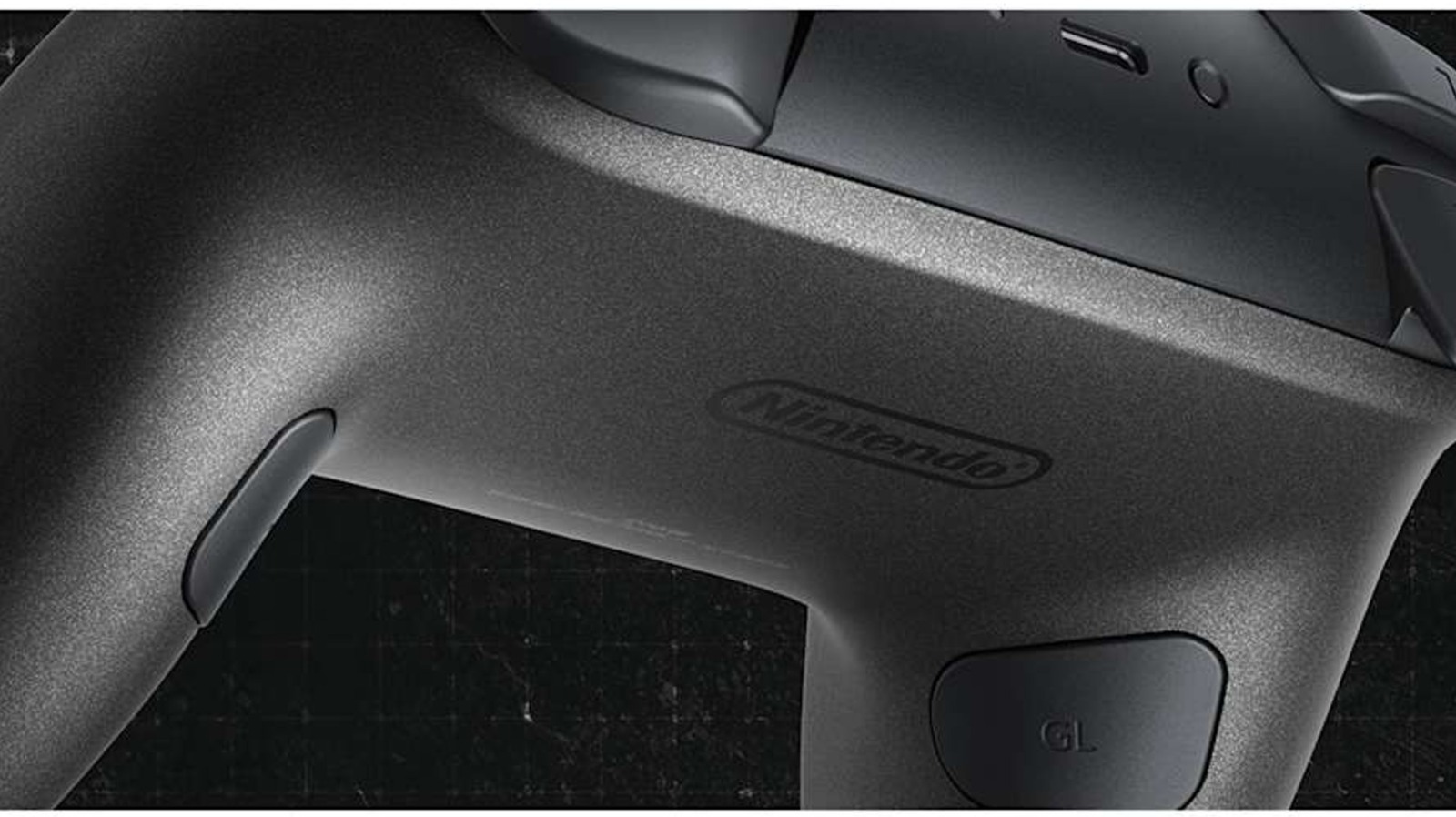
When the Nintendo Switch 2 released, it launched with several accessories, including a new Pro Controller. This peripheral is almost identical to the original Switch’s Pro Controller, but has some extra buttons, including two large paddles nestled inside the gripping handles. Out of the box, these buttons don’t serve a purpose, but you can give them functions if you wish.

These new buttons, labeled “GL” and “GR” (don’t ask us what the “G” stands for), are designed to work with the Switch 2’s button mapping functionality to give players more customizable and ergonomic ways to play. Let’s say you’re struggling with a platforming time trial and need help shaving a few milliseconds off your record. You could look up speed running strategies, or you could remap jumping to either GL or GR so you never have to take your thumb off the right analog stick, thus freeing you up to parkour through the virtual obstacle course.

The Switch 2 Pro controller is the first official Nintendo peripheral to use back buttons. If you wanted to use this feature on the original Switch, you had to either purchase a third-party Bluetooth accessory or use a special adapter to make your Xbox or PS5 controller work with the Nintendo.

How to set up the back buttons on your Nintendo Switch 2 Pro Controller

Since games rarely use the same button layouts — sequels notwithstanding — the best way to give the GL and GR buttons functionality is to use the Switch 2’s Quick Settings menu. While playing a game, hold the Home button until the menu pops up. Scroll down to the “GL/GR Buttons” tab and highlight the button you want to change. Select it, then press the button you want it to mimic. Repeat these steps for the other back button if you want, then exit Quick Settings. The game should recognize the GL and GR buttons as one of the bumper, trigger, or face buttons. If you tire of the function, just open the Quick Settings again, select the back button, and either pick a new function or press the appropriate GL or GR button to reset its function to nil.

Since the console is smart enough to remember games and their individual GL and GR functions (one of those things you probably never knew your Switch 2 could do), you can remap buttons on a game-by-game basis. However, if you would rather use a blanket function reassignment across all titles, you can do that from the console’s home screen. Open the “System Settings” menu, scroll down and select “Accessibility,” then highlight the controller you want to edit. Select “Edit Controller Mapping,” then “GL/GR Button Settings.” From there, remap the buttons as you would through the Quick Settings, return to the previous screen, then select “Save.” Once you’re done, you can use your custom GL and GR buttons for all games, even the ones you haven’t played yet.



Sign Up For Daily Newsletter

Be keep up! Get the latest breaking news delivered straight to your inbox.
By signing up, you agree to our Terms of Use and acknowledge the data practices in our Privacy Policy. You may unsubscribe at any time.
Share This Article
Facebook Twitter Email Print
Share
What do you think?
Love0
Sad0
Happy0
Sleepy0
Angry0
Dead0
Wink0
Previous Article Don’t Just Talk About AI. Measure Business Outputs. Here’s How. Don’t Just Talk About AI. Measure Business Outputs. Here’s How.
Next Article Inside the Week That Shook AI | HackerNoon Inside the Week That Shook AI | HackerNoon
Leave a comment

Leave a Reply Cancel reply

Your email address will not be published. Required fields are marked *

Stay Connected

248.1k Like
69.1k Follow
134k Pin
54.3k Follow

Latest News

Casio’s new 0 calculator is a work of art
Casio’s new $600 calculator is a work of art
News
Can a Showerhead Cure Zits and Make Your Hair Grow Back?
Gadget
Nation-State Cyber Threats Are Expanding Beyond Government Targets | HackerNoon
Computing
AppleCare One might be coming to Europe soon
News

You Might also Like

Casio’s new 0 calculator is a work of art
News

Casio’s new $600 calculator is a work of art

1 Min Read
AppleCare One might be coming to Europe soon
News

AppleCare One might be coming to Europe soon

2 Min Read
My MacBook Neo essential setup, including the best spec and the best accessories on a budget
News

My MacBook Neo essential setup, including the best spec and the best accessories on a budget

3 Min Read
Never Do Any Of These 8 Things On Your iPad – BGR
News

Never Do Any Of These 8 Things On Your iPad – BGR

13 Min Read
//

World of Software is your one-stop website for the latest tech news and updates, follow us now to get the news that matters to you.

Quick Link

  • Privacy Policy
  • Terms of use
  • Advertise
  • Contact

Topics

  • Computing
  • Software
  • Press Release
  • Trending

Sign Up for Our Newsletter

Subscribe to our newsletter to get our newest articles instantly!

World of SoftwareWorld of Software
Follow US
Copyright © All Rights Reserved. World of Software.
Welcome Back!

Sign in to your account

Lost your password?