By using this site, you agree to the Privacy Policy and Terms of Use.
Accept
World of SoftwareWorld of SoftwareWorld of Software
  • News
  • Software
  • Mobile
  • Computing
  • Gaming
  • Videos
  • More
    • Gadget
    • Web Stories
    • Trending
    • Press Release
Search
  • Privacy
  • Terms
  • Advertise
  • Contact
Copyright © All Rights Reserved. World of Software.
Reading: Why There’s A Key Icon On Your Android Phone’s Screen (And How To Turn It Off) – BGR
Share
Sign In
Notification Show More
Font ResizerAa
World of SoftwareWorld of Software
Font ResizerAa
  • Software
  • Mobile
  • Computing
  • Gadget
  • Gaming
  • Videos
Search
  • News
  • Software
  • Mobile
  • Computing
  • Gaming
  • Videos
  • More
    • Gadget
    • Web Stories
    • Trending
    • Press Release
Have an existing account? Sign In
Follow US
  • Privacy
  • Terms
  • Advertise
  • Contact
Copyright © All Rights Reserved. World of Software.
World of Software > News > Why There’s A Key Icon On Your Android Phone’s Screen (And How To Turn It Off) – BGR
News

Why There’s A Key Icon On Your Android Phone’s Screen (And How To Turn It Off) – BGR

News Room
Last updated: 2025/12/14 at 6:26 AM
News Room Published 14 December 2025
Share
Why There’s A Key Icon On Your Android Phone’s Screen (And How To Turn It Off) – BGR
SHARE


Marinel Sigue/BGR

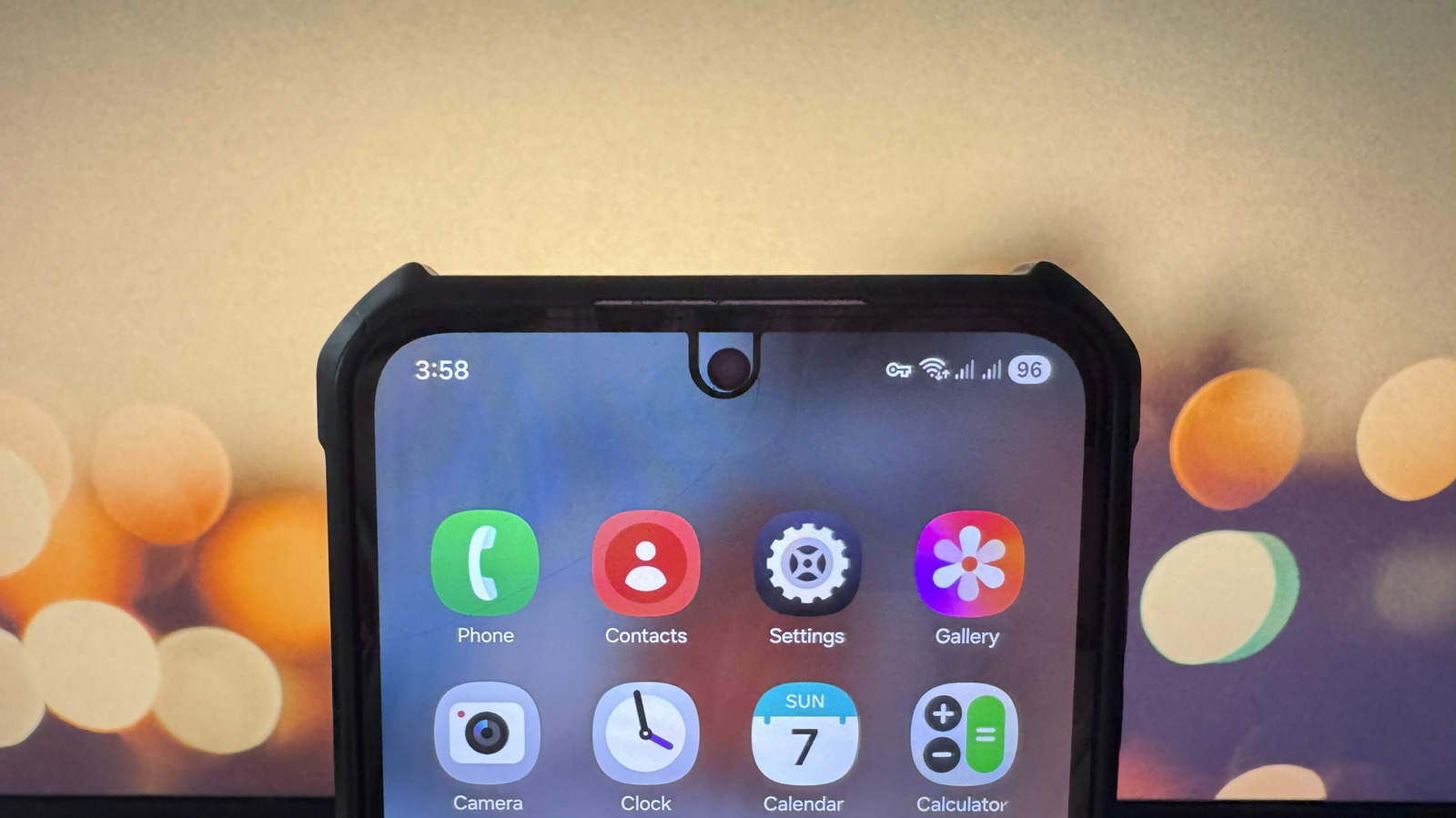
Your Android phone’s status bar tells you a lot about what’s currently happening on your device. It’s where you look to find out what time it is, how long until you need to recharge, and whether or not you’re connected to Wi-Fi. Besides these routine status bar icons, you might also notice others that appear from time to time. For instance, there’s an N icon on your Android screen when you’re using the built-in NFC function, and a rectangle with Wi-Fi icon during screen casting sessions. Another status bar icon you might encounter is one shaped like a key.

The key icon on your Android screen means you’re connected to a VPN service. VPN — which stands for Virtual Private Network — is a secure connection that safeguards you against online tracking and allows you to access region-restricted websites. This is made possible by masking your real IP address and using the VPN server’s IP address. Every time you turn on the VPN service on your Android phone, a key icon will appear in your status bar. But you can disable it just as easily. 

How to turn off the key icon on Android

If you installed a free VPN app on your Android phone, like Windscribe or ProtonVPN, and then turned it on, it’s relatively easy to remove the key icon from your status bar. Simply launch the third-party VPN app and hit the off or Disconnect button on the home screen.

If you set up a VPN directly via your phone’s settings and connected to it, you can turn off the key icon on your Android in the Settings app too. Open Settings, type VPN in the search bar, and select the result that comes up. Then, disable the active VPN service you’re using.

Certain Android phones like Google Pixel 7 and newer also include a built-in VPN service. To disable VPN on Pixel phones, here’s what you need to do:

  1. Go to the Settings app.
  2. Select Network & internet from the menu.
  3. Tap on VPN.
  4. Open VPN by Google.
  5. Toggle off Use VPN.

After disconnecting from the VPN service — whether it’s from a third-party app, manual setup, or built-in — the key icon on your Android screen should automatically disappear.




Sign Up For Daily Newsletter

Be keep up! Get the latest breaking news delivered straight to your inbox.
By signing up, you agree to our Terms of Use and acknowledge the data practices in our Privacy Policy. You may unsubscribe at any time.
Share This Article
Facebook Twitter Email Print
Share
What do you think?
Love0
Sad0
Happy0
Sleepy0
Angry0
Dead0
Wink0
Previous Article Linux 6.19-rc1 Released From Japan Linux 6.19-rc1 Released From Japan
Next Article The TechBeat: Linux Foundation Launches Agentic AI Group to Set Standards for Autonomous Systems (12/14/2025) | HackerNoon The TechBeat: Linux Foundation Launches Agentic AI Group to Set Standards for Autonomous Systems (12/14/2025) | HackerNoon
Leave a comment

Leave a Reply Cancel reply

Your email address will not be published. Required fields are marked *

Stay Connected

248.1k Like
69.1k Follow
134k Pin
54.3k Follow

Latest News

Code Smell 316 – The Syntax Police Review Anti-Pattern | HackerNoon
Computing
Do Smart TVs Come With A Built-In Antenna? – BGR
News
What is – or was – the best-ever internet meme?
News
Paying It Forward – Why Alpha Engineers Must Become Mentors | HackerNoon
Computing

You Might also Like

Do Smart TVs Come With A Built-In Antenna? – BGR
News

Do Smart TVs Come With A Built-In Antenna? – BGR

5 Min Read
What is – or was – the best-ever internet meme?
News

What is – or was – the best-ever internet meme?

0 Min Read
Here's an Early Look at the New Emoji Coming to Your iPhone in 2026
News

Here's an Early Look at the New Emoji Coming to Your iPhone in 2026

2 Min Read
Headed Back to the Office? 7 Things to Look for in a Laptop for Hybrid Work
News

Headed Back to the Office? 7 Things to Look for in a Laptop for Hybrid Work

24 Min Read
//

World of Software is your one-stop website for the latest tech news and updates, follow us now to get the news that matters to you.

Quick Link

  • Privacy Policy
  • Terms of use
  • Advertise
  • Contact

Topics

  • Computing
  • Software
  • Press Release
  • Trending

Sign Up for Our Newsletter

Subscribe to our newsletter to get our newest articles instantly!

World of SoftwareWorld of Software
Follow US
Copyright © All Rights Reserved. World of Software.
Welcome Back!

Sign in to your account

Lost your password?