
In today’s web-centric world, it feels weird not to be connected 24/7, even if you’re supposed to be on vacation. If you’ve just arrived at a hotel after a long day of traveling and the first thing you do isn’t collapse on the bed, you’re probably going to pull out your phone and check your messages and socials to see what happened while you were in transit. While your first inclination may be to connect to the hotel’s Wi-Fi signal, you might want to think twice, as hotel Wi-Fi is notoriously lacking in both security and privacy measures.
The only real purpose of hotel Wi-Fi is to give guests a means to quickly get on the internet with a phone, laptop, or other device. This means relatively little consideration is given to vital elements like protection against cyber attacks or hiding private information. Hackers can attack guest devices through unsecured signals, and sensitive information like passwords and payment details can be stolen through similar means. If you can help it, you should refrain from using hotel Wi-Fi entirely, but at the very least, you should keep your usage of it brief and shore up your devices with defensive measures.
Hotel Wi-Fi typically has lackluster security measures
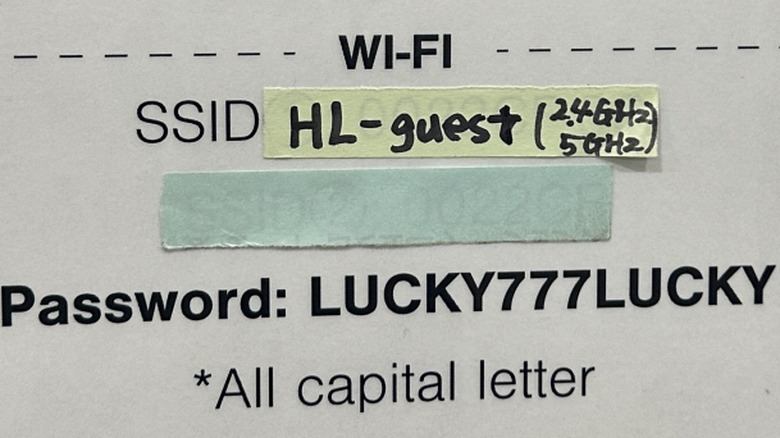
Consider your home Wi-Fi signal: Assuming you’ve had it set up fairly recently and it’s from a reputable brand that isn’t spying on you, you’ll find that it’s running with the latest hardware and software infrastructure, and has proper password protection. Hotel Wi-Fi, more often than not, is running on outdated hardware with little to no protection or security, possibly not even a password. Even if there is a password, it would likely be readily available on any room placard or otherwise easy enough to guess. When attempting to connect to hotel Wi-Fi, you may be stopped by a login page asking for consent to an agreement, an email address, or your room number, but these aren’t true security measures and can be easily subverted by those who know how.
Connecting to hotel Wi-Fi with your phone or laptop presents essentially the same risks as connecting to a public Wi-Fi signal, such as unsecured airport Wi-Fi. Hackers can intercept data sent over the connection, like private messages or sensitive account information, and use it to steal your identity or directly threaten you. A hacker could also attack the hotel’s Wi-Fi infrastructure through unsecured routers or wireless devices like printers, thus infecting anyone who connects to it with malware. Some ambitious hackers may even attempt to create entire fake Wi-Fi hotspots that look like the hotel’s Wi-Fi in an effort to trick unsuspecting guests.
If you have to use hotel Wi-Fi, take precautions and browse smart

As easy as it is to say “just don’t use hotel Wi-Fi,” the unfortunate fact of the matter is that we all need to get online sometimes, and that Wi-Fi may be your only option. If you absolutely have to use hotel Wi-Fi, you should take some precautions beforehand and play it very safe when browsing.
Firstly, make sure you’ve got the right Wi-Fi signal. As we mentioned, bad actors may try to make “evil twin” hotspots that pretend to be the hotel’s official Wi-Fi. Check with the hotel’s front desk to ensure you’ve got the right one before you connect. Secondly, if you can, shore up your device with defensive measures, including firewalls, antivirus utilities, and a premium VPN, rather than a free one. Anything you can do to hide your device activity from bad actors on the network will help, and extra defenses will alert you to any attempted attacks so you can swiftly disconnect and protect your data.
Finally, if you’re going to browse, browse smart and safe. Don’t access anything sensitive like online banking or confidential work documents, and try to refrain from logging into anything like streaming services or email. Casual browsing, like checking the news, Googling random things, or watching videos outside of your personal YouTube account, should all be fine. On a related note, while the convenience of logging into streaming services on a hotel room smart TV is tempting, you might want to refrain, as the TV itself could be compromised even if the Wi-Fi isn’t.