By using this site, you agree to the Privacy Policy and Terms of Use.
Accept
World of SoftwareWorld of SoftwareWorld of Software
  • News
  • Software
  • Mobile
  • Computing
  • Gaming
  • Videos
  • More
    • Gadget
    • Web Stories
    • Trending
    • Press Release
Search
  • Privacy
  • Terms
  • Advertise
  • Contact
Copyright © All Rights Reserved. World of Software.
Reading: You Can Now Edit Images, PDFs And Designs Directly In ChatGPT: Here’s How To Use
Share
Sign In
Notification Show More
Font ResizerAa
World of SoftwareWorld of Software
Font ResizerAa
  • Software
  • Mobile
  • Computing
  • Gadget
  • Gaming
  • Videos
Search
  • News
  • Software
  • Mobile
  • Computing
  • Gaming
  • Videos
  • More
    • Gadget
    • Web Stories
    • Trending
    • Press Release
Have an existing account? Sign In
Follow US
  • Privacy
  • Terms
  • Advertise
  • Contact
Copyright © All Rights Reserved. World of Software.
World of Software > Mobile > You Can Now Edit Images, PDFs And Designs Directly In ChatGPT: Here’s How To Use
Mobile

You Can Now Edit Images, PDFs And Designs Directly In ChatGPT: Here’s How To Use

News Room
Last updated: 2025/12/10 at 9:33 PM
News Room Published 10 December 2025
Share
You Can Now Edit Images, PDFs And Designs Directly In ChatGPT: Here’s How To Use
SHARE

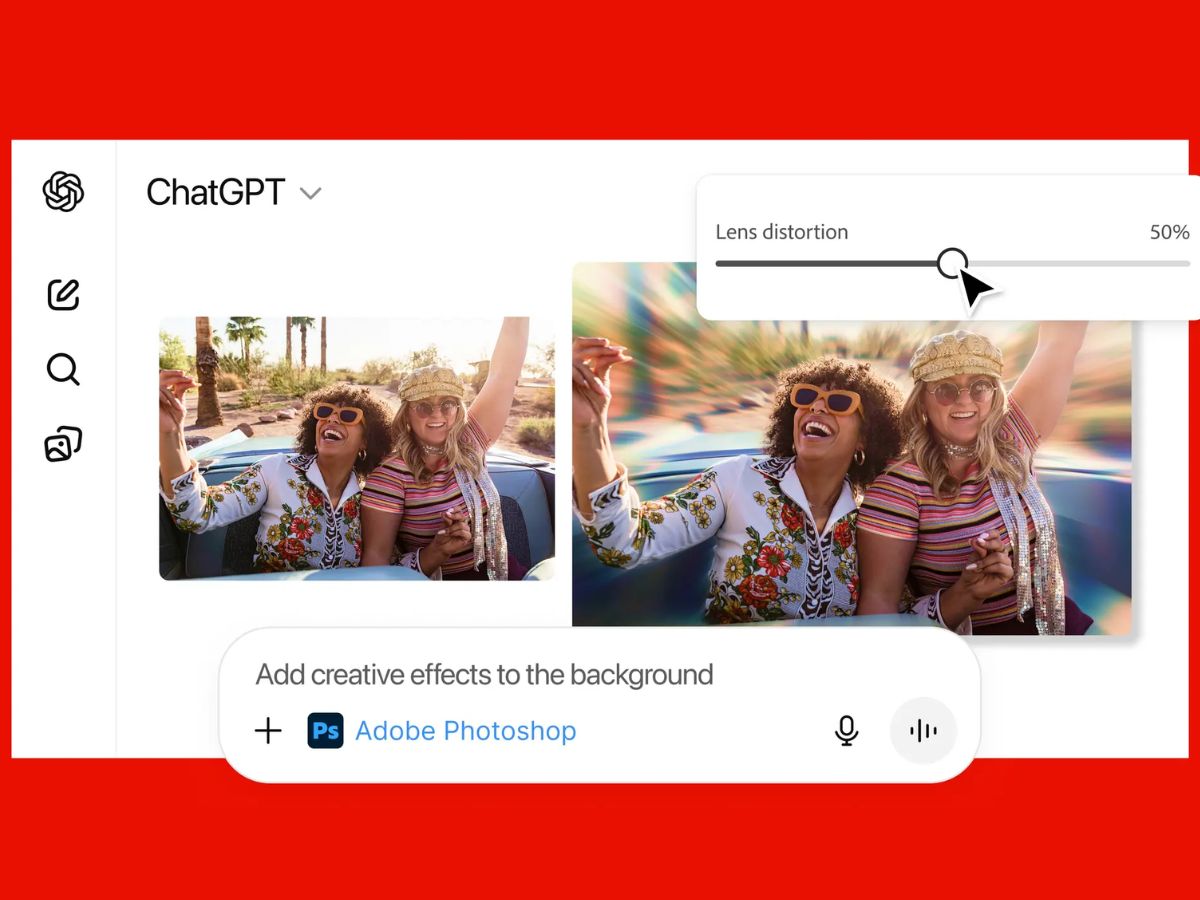
ChatGPT has quietly turned into a mini editing studio. Thanks to Adobe’s latest update, you can now edit photos, PDFs, and even design templates directly inside a ChatGPT conversation – without switching between Photoshop, Acrobat, or Express. The integration is available for free across desktop, web, and iOS, while Adobe Express support is already live on Android. Also Read: ChatGPT Now Lets Indian Users Pick From Eight Personality Presets: What Is It, How It Works

This latest addition is simply to make creative tools feel far less intimidating, especially for people who don’t usually work with full-fledged editing software. news Also Read: How To Start Group Chat In ChatGPT For Friends, Teams And More

How the new Adobe integration works

Using Adobe apps inside ChatGPT is as simple as uploading a file and typing what you want done. For example: “Adobe Photoshop, blur the background of this image.”

Once you activate an app in a chat, you don’t need to call it again. You can just continue giving instructions like:

  • “Make the image brighter”
  • “Remove the object on the right”
  • “Increase contrast slightly”

Depending on what you’re editing, ChatGPT may show additional UI controls such as sliders for brightness or effects, or multiple output options to choose from.

You can connect Adobe apps by going to Settings → Apps & Connectors, or simply trigger them with a prompt.

What you can do with Photoshop, Acrobat, and Express inside ChatGPT

Photoshop

You can edit specific areas of an image, adjust brightness/contrast/exposure, apply effects like Glitch or Glow, enhance details, or make simple creative edits – all without opening the full desktop app.

Acrobat

PDF editing becomes much easier. You can:

  • Edit text inside PDFs
  • Extract tables or content
  • Merge and organise files
  • Compress large documents
  • Convert images or documents into PDF
  • Redact sensitive details

Adobe Express

Express lets you design posters, social media graphics, invitations, and quick layouts. You can browse templates, replace images, change colours, add animations, and export your final design – all inside the chat window.

If you ever need deeper control, you can open the same project in Adobe’s standalone apps and continue editing there.



Sign Up For Daily Newsletter

Be keep up! Get the latest breaking news delivered straight to your inbox.
By signing up, you agree to our Terms of Use and acknowledge the data practices in our Privacy Policy. You may unsubscribe at any time.
Share This Article
Facebook Twitter Email Print
Share
What do you think?
Love0
Sad0
Happy0
Sleepy0
Angry0
Dead0
Wink0
Previous Article Semantic Instance Extraction: CLIP and DINO Features for 3D Mapping | HackerNoon Semantic Instance Extraction: CLIP and DINO Features for 3D Mapping | HackerNoon
Next Article Starlink in Your Tesla? Patent Hints at Roof Tech for Built-In Satellite Access Starlink in Your Tesla? Patent Hints at Roof Tech for Built-In Satellite Access
Leave a comment

Leave a Reply Cancel reply

Your email address will not be published. Required fields are marked *

Stay Connected

248.1k Like
69.1k Follow
134k Pin
54.3k Follow

Latest News

Samsung Is About To Waste A Huge Chance With The Galaxy S26 – BGR
News
Category Theory Explains a Common Oversight in Everyday Mathematics, Study Finds  | HackerNoon
Category Theory Explains a Common Oversight in Everyday Mathematics, Study Finds | HackerNoon
Computing
PSA: Don’t install One UI 8.5 on your Galaxy S25 if you love your Good Lock modules
News
Meituan’s next decade · TechNode
Computing

You Might also Like

Agentic AI Foundation, in progress
Mobile

Agentic AI Foundation, in progress

5 Min Read
the IT skills most in demand by companies in 2025
Mobile

the IT skills most in demand by companies in 2025

4 Min Read
There is now a standard to charge companies to take down the website
Mobile

There is now a standard to charge companies to take down the website

5 Min Read
The Lord of the Rings series experiences major progress
Mobile

The Lord of the Rings series experiences major progress

4 Min Read
//

World of Software is your one-stop website for the latest tech news and updates, follow us now to get the news that matters to you.

Quick Link

  • Privacy Policy
  • Terms of use
  • Advertise
  • Contact

Topics

  • Computing
  • Software
  • Press Release
  • Trending

Sign Up for Our Newsletter

Subscribe to our newsletter to get our newest articles instantly!

World of SoftwareWorld of Software
Follow US
Copyright © All Rights Reserved. World of Software.
Welcome Back!

Sign in to your account

Lost your password?