

By using this site, you agree to the Privacy Policy and Terms of Use.
Accept
World of SoftwareWorld of SoftwareWorld of Software
  • News
  • Software
  • Mobile
  • Computing
  • Gaming
  • Videos
  • More
    • Gadget
    • Web Stories
    • Trending
    • Press Release
Search
  • Privacy
  • Terms
  • Advertise
  • Contact
Copyright © All Rights Reserved. World of Software.
Reading: You Can Turn Your Raspberry Pi Into A TV – Here’s How – BGR
Share
Sign In
Notification Show More
Font ResizerAa
World of SoftwareWorld of Software
Font ResizerAa
  • Software
  • Mobile
  • Computing
  • Gadget
  • Gaming
  • Videos
Search
  • News
  • Software
  • Mobile
  • Computing
  • Gaming
  • Videos
  • More
    • Gadget
    • Web Stories
    • Trending
    • Press Release
Have an existing account? Sign In
Follow US
  • Privacy
  • Terms
  • Advertise
  • Contact
Copyright © All Rights Reserved. World of Software.
World of Software > News > You Can Turn Your Raspberry Pi Into A TV – Here’s How – BGR
News

You Can Turn Your Raspberry Pi Into A TV – Here’s How – BGR

News Room
Last updated: 2025/12/16 at 2:24 AM
News Room Published 16 December 2025
Share
You Can Turn Your Raspberry Pi Into A TV – Here’s How – BGR
SHARE


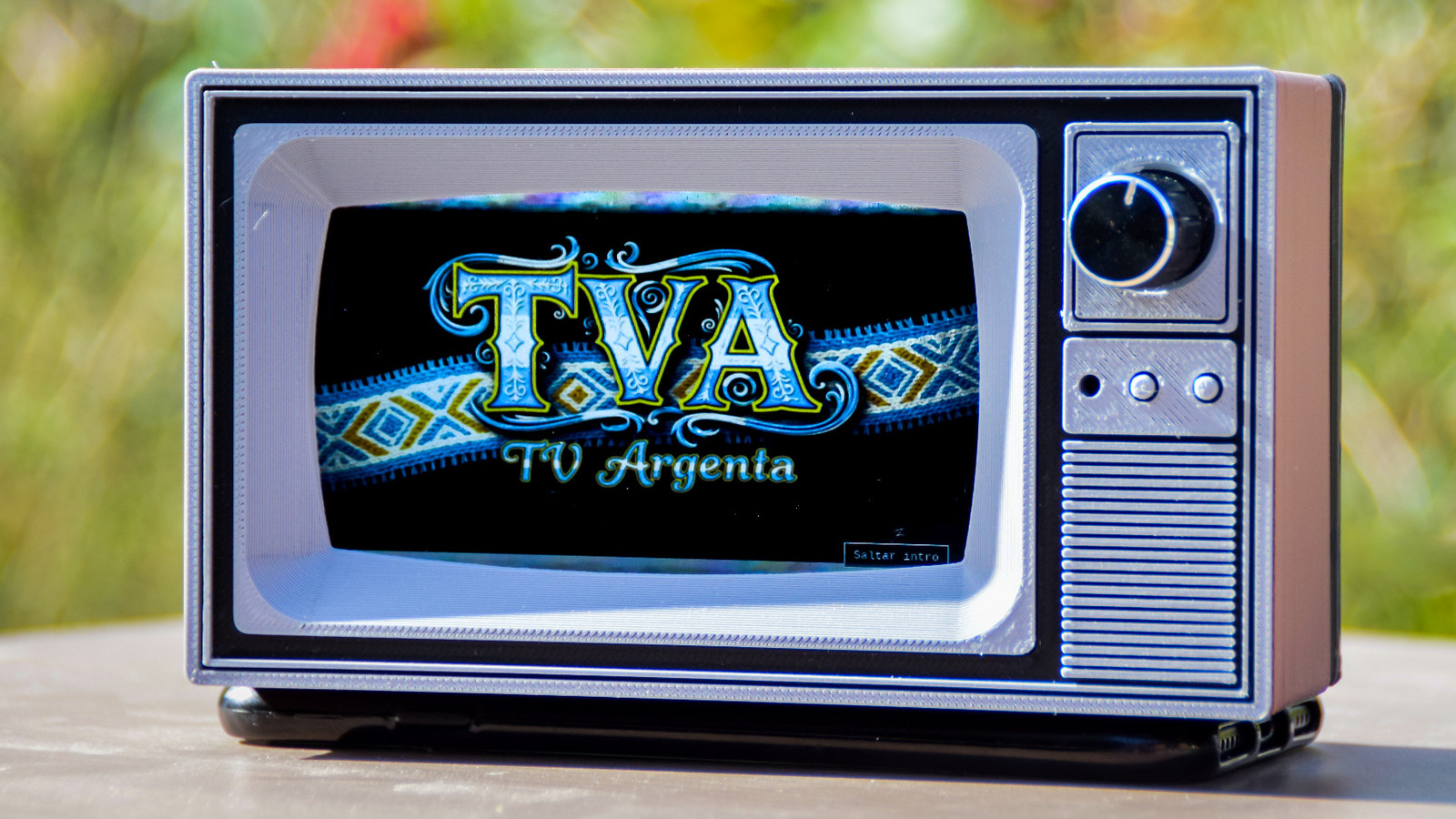
From arcade cabinets and retro gaming handhelds to retrofitted vintage camera flash devices, you can revive past tech with a Raspberry Pi computer. Projects, like these 10 Raspberry Pi projects to check out in 2025, are a great way to get started, but if you want to outfit your home with retro tech, take a look at projects like the TVArgenta, a CRT-style TV that runs on the Raspberry Pi computer.

The TVArgenta, which includes trappings like an old TV enclosure and channel-surfing knob, is made by Ricardo Sappia. This is a passion project designed to display popular Argentinian commercials from his childhood in the 1990s. Now in Germany, Sappia made TVArgenta as a way to preserve those memories and share with kids the commercials that remind him of home. TVArgenta may have been designed for commercials, but, for those with an imaginative mind, it has a lot more uses. While it’s an advanced project that requires multiple components and 3D-printed parts, it’s nonetheless a fun, inventive example of what’s possible with a Raspberry Pi. 

How does TVArgenta work?

If you regret throwing away your old CRT TV, TVArgenta looks and works much like the one you remember, albeit at a much smaller scale. You turn it on and use the knob to change channels. However, the tech used to make this possible is far from what CRT TVs used. For this project, Sappia used the following components:

  • Raspberry Pi 4
  • 4.3-inch display
  • Rotary encoder
  • Small audio amp and speaker 
  • Custom 3D-printed enclosure
  • Power supply, SD card, and mounting hardware

For a full list of components needed, as well as the 3D files to print the enclosure on your 3D printer, you can check out the project on Maker World. You can also visit the TVArgenta project on GitHub to download the files needed for the Raspberry Pi. 

After setting up TVArgenta on your Raspberry Pi and mounting the display and other components within the enclosure, you can use the web UI to manage content. Because TVArgenta runs completely offline, you’ll need to use the web UI to upload content. You can also tag content and create specific channels that group content, which makes turning the knob on the TV feel like the real thing. Changing the channel also introduces a bit of static and noise to sell the effect. If you wish, you can set up channel intros that play every time you change into a specific channel. Once you set everything up to your liking, you’ll hardly have to tinker with it, unless you want to add more content or create new channels. 

What can you do with TVArgenta?

The primary use case for TVArgenta is playing nostalgic commercials in the background, but if you’re not interested in commercials, you have options. The TVArgenta is not limited when it comes to the type of content it can display. The device stores content locally, so you can upload any video content via the web UI, including movies, anime, iconic football matches, F1 races, or your favorite YouTube clips. The possibilities are pretty much infinite. 

The TVArgenta is undeniably cool. It’s a conversation starter that deserves a prominent place in your home or workplace. You can leave the device running on your desk with old “Simpsons” reruns, or you can put it on your kitchen counter to display “Iron Chef” episodes that will get you in the mood to cook. Either way, once you build a TVArgenta, what you choose to do with it is up to you — it’s a fun way to repurpose an old Raspberry Pi.



Sign Up For Daily Newsletter

Be keep up! Get the latest breaking news delivered straight to your inbox.
By signing up, you agree to our Terms of Use and acknowledge the data practices in our Privacy Policy. You may unsubscribe at any time.
Share This Article
Facebook Twitter Email Print
Share
What do you think?
Love0
Sad0
Happy0
Sleepy0
Angry0
Dead0
Wink0
Previous Article Nvidia acquires Slurm developer SchedMD to enhance its software capabilities –  News Nvidia acquires Slurm developer SchedMD to enhance its software capabilities – News
Next Article WeChat bans 209 accounts allegedly using AI to impersonate public figures · TechNode WeChat bans 209 accounts allegedly using AI to impersonate public figures · TechNode
Leave a comment

Leave a Reply Cancel reply

Your email address will not be published. Required fields are marked *

Stay Connected

248.1k Like
69.1k Follow
134k Pin
54.3k Follow

Latest News

8 years later, this Netflix movie with Glen Powell is still the best romantic comedy the streamer’s ever made
News
Moltbook, agentic AI, and data privacy, explained
News
Diesel’s wired earbuds look exactly like wired earbuds from Diesel
News
How to Set Up an Apple Watch for Your Kids
Gadget

You Might also Like

8 years later, this Netflix movie with Glen Powell is still the best romantic comedy the streamer’s ever made
News

8 years later, this Netflix movie with Glen Powell is still the best romantic comedy the streamer’s ever made

6 Min Read
Moltbook, agentic AI, and data privacy, explained
News

Moltbook, agentic AI, and data privacy, explained

1 Min Read
Diesel’s wired earbuds look exactly like wired earbuds from Diesel
News

Diesel’s wired earbuds look exactly like wired earbuds from Diesel

1 Min Read
Ring Owners Are Returning Their Cameras – Here’s How Much You Can Get – BGR
News

Ring Owners Are Returning Their Cameras – Here’s How Much You Can Get – BGR

4 Min Read
//

World of Software is your one-stop website for the latest tech news and updates, follow us now to get the news that matters to you.

Quick Link

  • Privacy Policy
  • Terms of use
  • Advertise
  • Contact

Topics

  • Computing
  • Software
  • Press Release
  • Trending

Sign Up for Our Newsletter

Subscribe to our newsletter to get our newest articles instantly!

World of SoftwareWorld of Software
Follow US
Copyright © All Rights Reserved. World of Software.
Welcome Back!

Sign in to your account

Lost your password?