

By using this site, you agree to the Privacy Policy and Terms of Use.
Accept
World of SoftwareWorld of SoftwareWorld of Software
  • News
  • Software
  • Mobile
  • Computing
  • Gaming
  • Videos
  • More
    • Gadget
    • Web Stories
    • Trending
    • Press Release
Search
  • Privacy
  • Terms
  • Advertise
  • Contact
Copyright © All Rights Reserved. World of Software.
Reading: You Should Be Clearing Your PC’s Cache More Often – Here’s Why – BGR
Share
Sign In
Notification Show More
Font ResizerAa
World of SoftwareWorld of Software
Font ResizerAa
  • Software
  • Mobile
  • Computing
  • Gadget
  • Gaming
  • Videos
Search
  • News
  • Software
  • Mobile
  • Computing
  • Gaming
  • Videos
  • More
    • Gadget
    • Web Stories
    • Trending
    • Press Release
Have an existing account? Sign In
Follow US
  • Privacy
  • Terms
  • Advertise
  • Contact
Copyright © All Rights Reserved. World of Software.
World of Software > News > You Should Be Clearing Your PC’s Cache More Often – Here’s Why – BGR
News

You Should Be Clearing Your PC’s Cache More Often – Here’s Why – BGR

News Room
Last updated: 2026/04/10 at 12:37 AM
News Room Published 10 April 2026
Share
You Should Be Clearing Your PC’s Cache More Often – Here’s Why – BGR
SHARE


Alex Photo Stock/Shutterstock

Your PC contains a number of caches, a collection of frequently-accessed data files, usually temporary, to help speed up future requests. Basically, it improves performance. Your internet browsers do the same, and in Windows, the Windows Store maintains a cache, as well. As you use more apps, the PC cache, specifically, can grow, so it’s a good idea to tidy it up. Ideally, you should clear your PC’s cache about once a month. If your PC ever feels sluggish, clearing out the cache sooner may help.

It’s easy to clear out your PC’s cache in Windows 11. You can also do this in older versions of Windows, like Windows 10, by pressing the Windows Key + X, selecting Disk Management, highlighting the drive you want to clean, right-clicking and selecting Properties, and choosing Disk Cleanup in the General Tab. You can also use Disk Cleanup in Windows 11 if you prefer to clear the cache that way. This isn’t the only temporary files archive you should clean up, but it is the one that can help your system the most.

Don’t expect a huge performance boost, but doing this every so often can optimize your PC. It’s also considered good digital hygiene with positive security considerations, especially when the cache stores sensitive login details and user data. There are tools to clean up your other gadgets, with ways to clean the Android phone cache, or clean your iPhone’s cache if you use Apple devices. The same concepts apply there.

What other caches or temporary files should you clean on your PC?
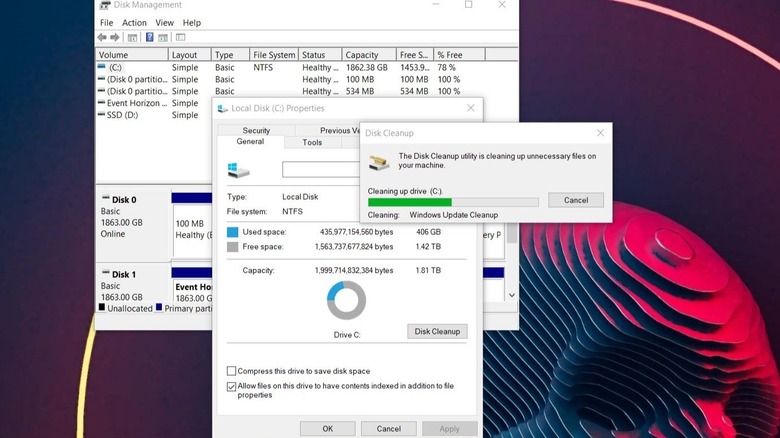

Screenshot of disk cleanup in Windows 10
Briley Kenney/BGR

In Windows 11, you might also want to clear the location cache for similar reasons — keeping things clean, secure, and optimal. You can do this from Settings > Privacy & Security, selecting Location in App Permissions, and clicking Clear under Location History.

If you’re having problems with the Microsoft Store (loading slowly) or you simply want to clear out its cache to keep things clean, there’s a pretty easy way to do this, as well. You can open the app in Settings >  Apps > Microsoft Store and choose the Reset option. Alternatively, press the Windows key + R to open the Run service, type “wsreset.exe” and then hit OK. A command prompt will open, the cache will be cleared, and then it should open the Microsoft Store automatically. It might take a minute for the window to load while it’s rebuilding the cache, but that’s it.

By making sure to clear your PC’s cache regularly, you’ll be improving general performance, including possibly boot times. It’s also a great way to give a number of devices a quick performance boost if they seem sluggish, from mini PCs and mobile devices to tablets, consoles, and beyond. You can even use a simple cache-clear trick to speed up a slow Roku TV. Caches are everywhere, man. By the way, you should probably clear the caches on your other devices monthly, too.




Sign Up For Daily Newsletter

Be keep up! Get the latest breaking news delivered straight to your inbox.
By signing up, you agree to our Terms of Use and acknowledge the data practices in our Privacy Policy. You may unsubscribe at any time.
Share This Article
Facebook Twitter Email Print
Share
What do you think?
Love0
Sad0
Happy0
Sleepy0
Angry0
Dead0
Wink0
Previous Article Meta says it will spend an additional B on CoreWeave’s AI infrastructure –  News Meta says it will spend an additional $21B on CoreWeave’s AI infrastructure – News
Next Article How Claude Mythos Found Thousands of Zero-Day Vulnerabilities: Inside Anthropic’s Project Glasswing – Chat GPT AI Hub How Claude Mythos Found Thousands of Zero-Day Vulnerabilities: Inside Anthropic’s Project Glasswing – Chat GPT AI Hub
Leave a comment

Leave a Reply Cancel reply

Your email address will not be published. Required fields are marked *

Stay Connected

248.1k Like
69.1k Follow
134k Pin
54.3k Follow

Latest News

The First Person Has Been Convicted Under a New US Anti-Deepfake Law
News
Claude vs ChatGPT 2026: The Ultimate Comparison for Developers, Writers, and Business Users – Chat GPT AI Hub
Computing
2026 M5 Pro 16-inch MacBook Pro with 48GB RAM plunges to best ,899
2026 M5 Pro 16-inch MacBook Pro with 48GB RAM plunges to best $2,899
News
Huawei’s car business swings to first-half profit on strong revenue growth · TechNode
Computing

You Might also Like

The First Person Has Been Convicted Under a New US Anti-Deepfake Law
News

The First Person Has Been Convicted Under a New US Anti-Deepfake Law

4 Min Read
2026 M5 Pro 16-inch MacBook Pro with 48GB RAM plunges to best ,899
News

2026 M5 Pro 16-inch MacBook Pro with 48GB RAM plunges to best $2,899

1 Min Read
The Best External Hard Drives and SSDs We’ve Tested for Mac in 2026
News

The Best External Hard Drives and SSDs We’ve Tested for Mac in 2026

37 Min Read
AT&T iPhone 17 Pro deal: Get the new Apple phone for free
News

AT&T iPhone 17 Pro deal: Get the new Apple phone for free

2 Min Read
//

World of Software is your one-stop website for the latest tech news and updates, follow us now to get the news that matters to you.

Quick Link

  • Privacy Policy
  • Terms of use
  • Advertise
  • Contact

Topics

  • Computing
  • Software
  • Press Release
  • Trending

Sign Up for Our Newsletter

Subscribe to our newsletter to get our newest articles instantly!

World of SoftwareWorld of Software
Follow US
Copyright © All Rights Reserved. World of Software.
Welcome Back!

Sign in to your account

Lost your password?