By using this site, you agree to the Privacy Policy and Terms of Use.
Accept
World of SoftwareWorld of SoftwareWorld of Software
  • News
  • Software
  • Mobile
  • Computing
  • Gaming
  • Videos
  • More
    • Gadget
    • Web Stories
    • Trending
    • Press Release
Search
  • Privacy
  • Terms
  • Advertise
  • Contact
Copyright Β© All Rights Reserved. World of Software.
Reading: Your Apple TV Is Probably Plugged Into The Wrong HDMI Port – Here’s Why – BGR
Share
Sign In
Notification Show More
Font ResizerAa
World of SoftwareWorld of Software
Font ResizerAa
  • Software
  • Mobile
  • Computing
  • Gadget
  • Gaming
  • Videos
Search
  • News
  • Software
  • Mobile
  • Computing
  • Gaming
  • Videos
  • More
    • Gadget
    • Web Stories
    • Trending
    • Press Release
Have an existing account? Sign In
Follow US
  • Privacy
  • Terms
  • Advertise
  • Contact
Copyright Β© All Rights Reserved. World of Software.
World of Software > News > Your Apple TV Is Probably Plugged Into The Wrong HDMI Port – Here’s Why – BGR
News

Your Apple TV Is Probably Plugged Into The Wrong HDMI Port – Here’s Why – BGR

News Room
Last updated: 2025/12/03 at 12:59 AM
News Room Published 3 December 2025
Share
Your Apple TV Is Probably Plugged Into The Wrong HDMI Port – Here’s Why – BGR
SHARE


Teacher Photo/Shutterstock

We may receive a commission on purchases made from links.

The Apple TV 4K is a highly-rated streaming device that gives you access to popular apps such as Netflix, Hulu, and HBO Max, on top of Apple ecosystem features that synergize with iPhones, MacBooks, and Apple HomeKit devices. That said, if you’re looking to get the best picture and sound quality when streaming with your Apple TV, you will want to make sure the device is connected to your TV’s HDMI Audio Return Channel (ARC) or Enhanced Audio Return Channel (eARC) port. You’ll also want to use an Ultra High Speed HDMI cable that’s rated for up to 48Gbps transfer speeds.

As the name implies, eARC is an “enhanced” version of ARC, but what exactly does that entail? As with most forms of data, the difference is the result of bandwidth and speed. An eARC port accepts much higher bandwidths, which means more data for less compressed audio. While you can hook up your Apple TV to any of your TV’s HDMI ports, connecting to HDMI ARC/eARC on your TVΒ ensures your Apple tech can process lossless audio streams up to 48kHz.

Do keep in mind that none of the older, non-4K Apple TVs support the HDMI ARC or eARC feature, and neither does the first-gen version of the Apple TV 4K that released in 2017.

ARC/eARC: The magic lane for your streaming device
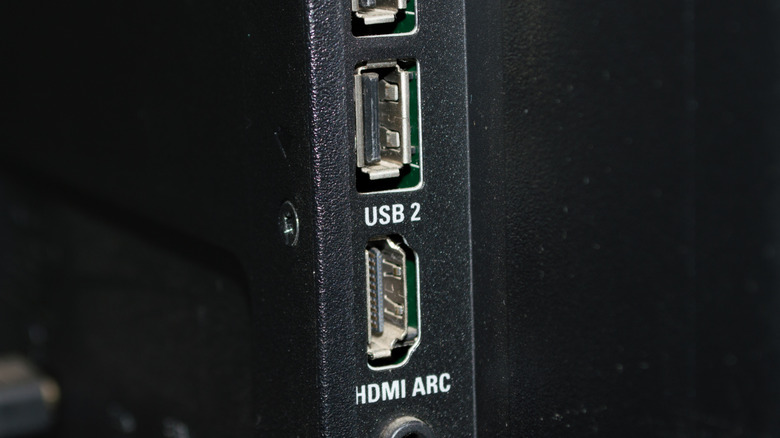

The HDMI ARC port on a TV.
lidiasilva/Shutterstock

Your TV’s HDMI ARC/eARC port uses HDMI technology to transmit visual and audio data simultaneously between a source device (like the Apple TV) and host hardware, be it a TV or projector.Β If you’ve ever wondered if it matters which HDMIΒ port you use on your TV, know that sometimesΒ the Apple TV 4K gets finicky when it’s not connected to an HDMI ARC or eARC port. The primary issue you’ll run into when not using the ARC/eARC port is diminished audio quality. You’ll still hear audio, but it won’t be taking advantage of the ports’ larger bandwidth, and it might sound a little muffled compared to the clarity that eARC provides. Additionally, though it may have more to do with the type of HDMI cable you use, some users report not being able to use HDR. If you’re seeing problems with your HDR, and you’re not plugged into the ARC/eARC port, consider making that simple swap.

Connecting your Apple TV 4K to your TV’s HDMI ARC or eARC port helps cut down on any annoying connectivity glitches you may encounter. When plugged into HDMI ARC/eARC, your TV treats the Apple TV 4K as a top-priority device, which often results in improved signal paths and fewer errors altogether.

One wrong port can ruin the party
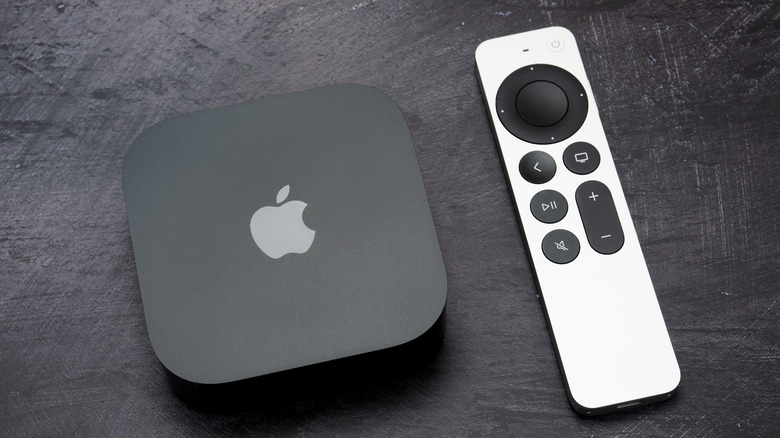

The Apple TV 4K and included Siri remote.
Teodor Costachioiu/Shutterstock

Fortunately, bypassing the ARC/eARC port isn’t a dealbreaker, but it can limit your Apple TV 4K’s capabilities. When you’re routing everything through a receiver or soundbar with HDMI switching, remember that not all HDMI inputs are created equal, even on high-end hardware. Many receivers reserve 4K/60Hz or 4K/120Hz support to just one or two ports, which means connecting the Apple TV to the wrong jack can bottleneck your video or block advanced audio formats entirely.Β This is why it’s worth taking an extra minute to map out your connections.Β 

When plugging everything in, make sure the Apple TV is feeding into a true 4K HDR-ready input on your receiver or soundbar, and that the receiver’s HDMI ARC/eARC output is using a proper 48Gbps Ultra High Speed Cable. This chain of compatibility helps ensure crisp HDR highlights, buttery framerates, and zero audio dropouts β€” exactly what you want when you’re invested in one of the streaming box’s best shows of the year.




Sign Up For Daily Newsletter

Be keep up! Get the latest breaking news delivered straight to your inbox.
By signing up, you agree to our Terms of Use and acknowledge the data practices in our Privacy Policy. You may unsubscribe at any time.
Share This Article
Facebook Twitter Email Print
Share
What do you think?
Love0
Sad0
Happy0
Sleepy0
Angry0
Dead0
Wink0
Previous Article The 15 best tech gifts in the US for moms, as requested by moms The 15 best tech gifts in the US for moms, as requested by moms
Next Article Cyber Monday Apple deal still live: At ,349, the 2025 M5 MacBook Pro is cheaper than the 2024 M4 version Cyber Monday Apple deal still live: At $1,349, the 2025 M5 MacBook Pro is cheaper than the 2024 M4 version
Leave a comment

Leave a Reply Cancel reply

Your email address will not be published. Required fields are marked *

Stay Connected

248.1k Like
69.1k Follow
134k Pin
54.3k Follow

Latest News

How to Tip Your Amazon Driver  for the Holidays at No Cost to You
How to Tip Your Amazon Driver $5 for the Holidays at No Cost to You
News
πŸ‘¨πŸΏβ€πŸš€ Daily – 72 hours to report fraud |
Computing
Need a Gift Card? These 6 Websites Let You Buy, Sell, and Swap Them
News
Top Home Depot Promo Codes for December 2025
Gadget

You Might also Like

How to Tip Your Amazon Driver  for the Holidays at No Cost to You
News

How to Tip Your Amazon Driver $5 for the Holidays at No Cost to You

3 Min Read
Need a Gift Card? These 6 Websites Let You Buy, Sell, and Swap Them
News

Need a Gift Card? These 6 Websites Let You Buy, Sell, and Swap Them

13 Min Read
Natural disasters across Asia prompt Apple CEO Tim Cook to promise donations
News

Natural disasters across Asia prompt Apple CEO Tim Cook to promise donations

1 Min Read
Cyber Monday Apple deal still live: At ,349, the 2025 M5 MacBook Pro is cheaper than the 2024 M4 version
News

Cyber Monday Apple deal still live: At $1,349, the 2025 M5 MacBook Pro is cheaper than the 2024 M4 version

3 Min Read
//

World of Software is your one-stop website for the latest tech news and updates, follow us now to get the news that matters to you.

Quick Link

  • Privacy Policy
  • Terms of use
  • Advertise
  • Contact

Topics

  • Computing
  • Software
  • Press Release
  • Trending

Sign Up for Our Newsletter

Subscribe to our newsletter to get our newest articles instantly!

World of SoftwareWorld of Software
Follow US
Copyright Β© All Rights Reserved. World of Software.
Welcome Back!

Sign in to your account

Lost your password?