Some days, LinkedIn content flows. Other days? The blinking cursor wins. 😵💫
If you’re a marketer or agency juggling deadlines, multiple social media accounts, and different brand voices, content creation can become a bottleneck. The good news? You’re not alone – and you’re not without tools.
According to LinkedIn’s 2024 B2B Marketing Benchmark, two in three marketers are already using generative AI in their workflows, with adoption rising more than 20% year over year.
In this blog post, we bring you 11 ChatGPT prompts for LinkedIn to speed up your content production and support everything from idea generation to engagement-boosting posts.
11 Best ChatGPT Prompts for LinkedIn You Can Use for Strategy and Content Ideas
Strategy & Planning Prompts
Before you create a single LinkedIn post, you need a clear strategy. These prompts help you define what to talk about, how often to post, and how to organize your ideas.
Prompt #1: Define LinkedIn Content Pillars
LinkedIn works best when your content revolves around 3–5 recurring themes. These “content pillars” act as guideposts to ensure your posts stay consistent, valuable, and on-brand—whether you’re posting for yourself or a client.
📝 Prompt:
“I manage a LinkedIn presence for a {name of your business or client’s brand} in the {industry/niche} space. Our target audience is {describe audience}, and we want to be known for {core brand values or goals}. Based on this, suggest 3–5 content pillars we should use to shape our LinkedIn content strategy. For each pillar, explain why it matters to our audience.”
Here’s this prompt in action👇
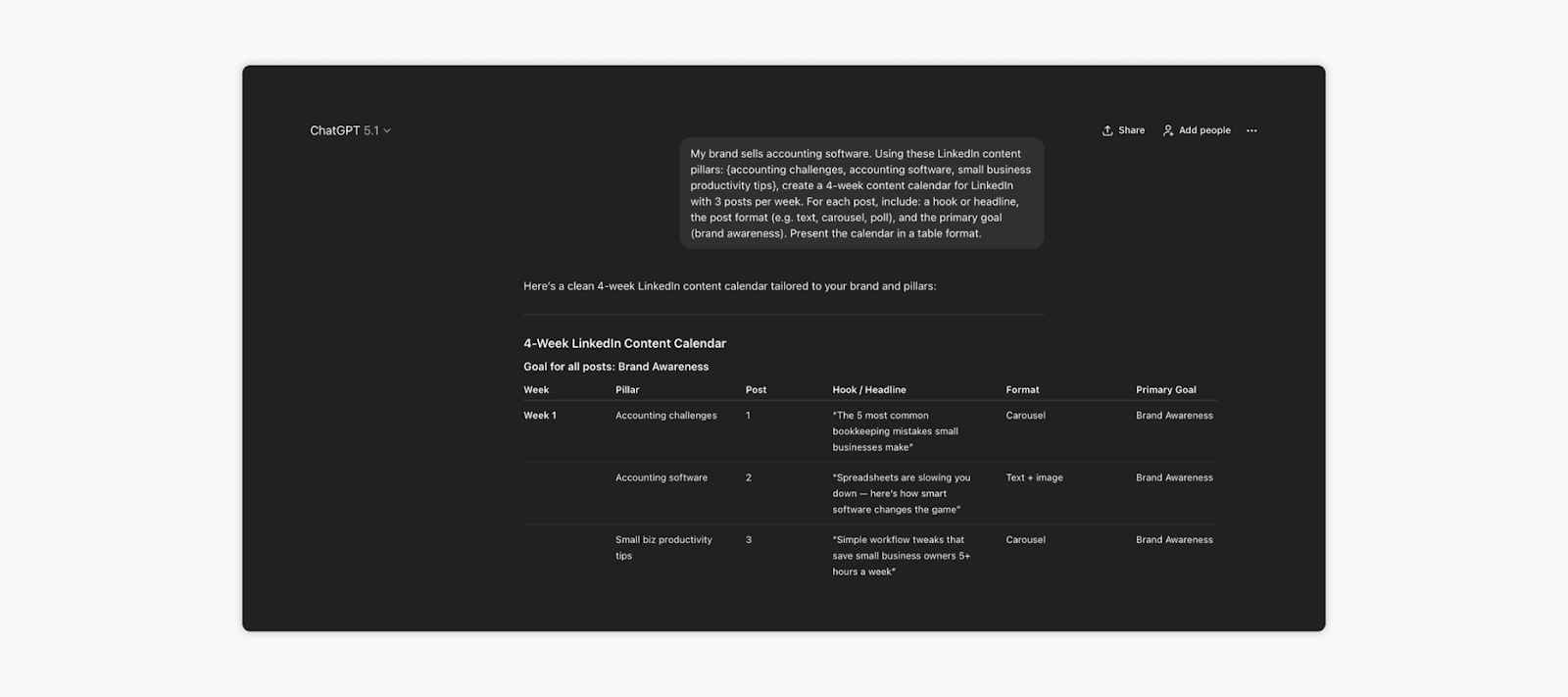
Prompt #2: Generate a 4-week LinkedIn Content Calendar
Once your content pillars are defined, it’s time to map out a posting plan. This prompt asks ChatGPT to create a four-week LinkedIn calendar using your pillars, with built-in variety and clarity on post goals.
📝 Prompt:
“My brand sells {insert your product or service}. Using these LinkedIn content pillars: {list your 3–5 pillars}, create a 4-week content calendar for LinkedIn with 3 posts per week. For each post, include: a hook or headline, the post format (e.g., text, carousel, poll), and the primary goal (e.g., brand awareness, lead generation, engagement). Present the calendar in a table format.”
Example output from this prompt👇
Prompt #3: Brainstorm Post Ideas by Content Pillar
If you need more post ideas or want to refresh an existing calendar, this prompt gets ChatGPT to generate multiple ideas per content pillar.
📝 Prompt:
“I manage LinkedIn content for a {your brand or client’s company} in the {industry/niche} space. Our target audience is {describe audience}, and our brand voice is {e.g., professional, witty, conversational}. Here are our LinkedIn content pillars: {list them}. For each pillar, generate 5 original post ideas. Each idea should include a suggested headline or first sentence, the ideal post format (text, carousel, or poll), and a 1-sentence explanation of the key message or value behind the post.”
📖 Related read: 6 Simple Brainstorming Exercises to Spur Creativity in Teams
Writing Prompts for Different Types of LinkedIn Posts
Once your strategy is set, it’s time to create the actual content. These next prompts are designed to help you write high-performing LinkedIn posts quickly, tailored to specific formats and goals.
💡 By the way, if you need help creating content across different social media platforms, check out our guide to 31 ChatGPT prompts for social media that work beyond LinkedIn.
Prompt #4: Write a Thought Leadership Post
Thought leadership posts are a LinkedIn staple. They showcase your unique perspective, signal authority, and often spark discussion when done well. This prompt helps you write a post that feels personal, valuable, and original.
📝 Prompt:
“I want to write a thought leadership post on LinkedIn about {topic or recent trend}. I’m writing on behalf of a {personal brand or company} in the {industry} space. The audience is {describe audience}, and the tone should be {e.g., insightful, bold, conversational}. The post should share a clear point of view, include a personal insight or experience, and end with a question or CTA to drive engagement.”
Prompt #5: Share a Client Win or Personal Story
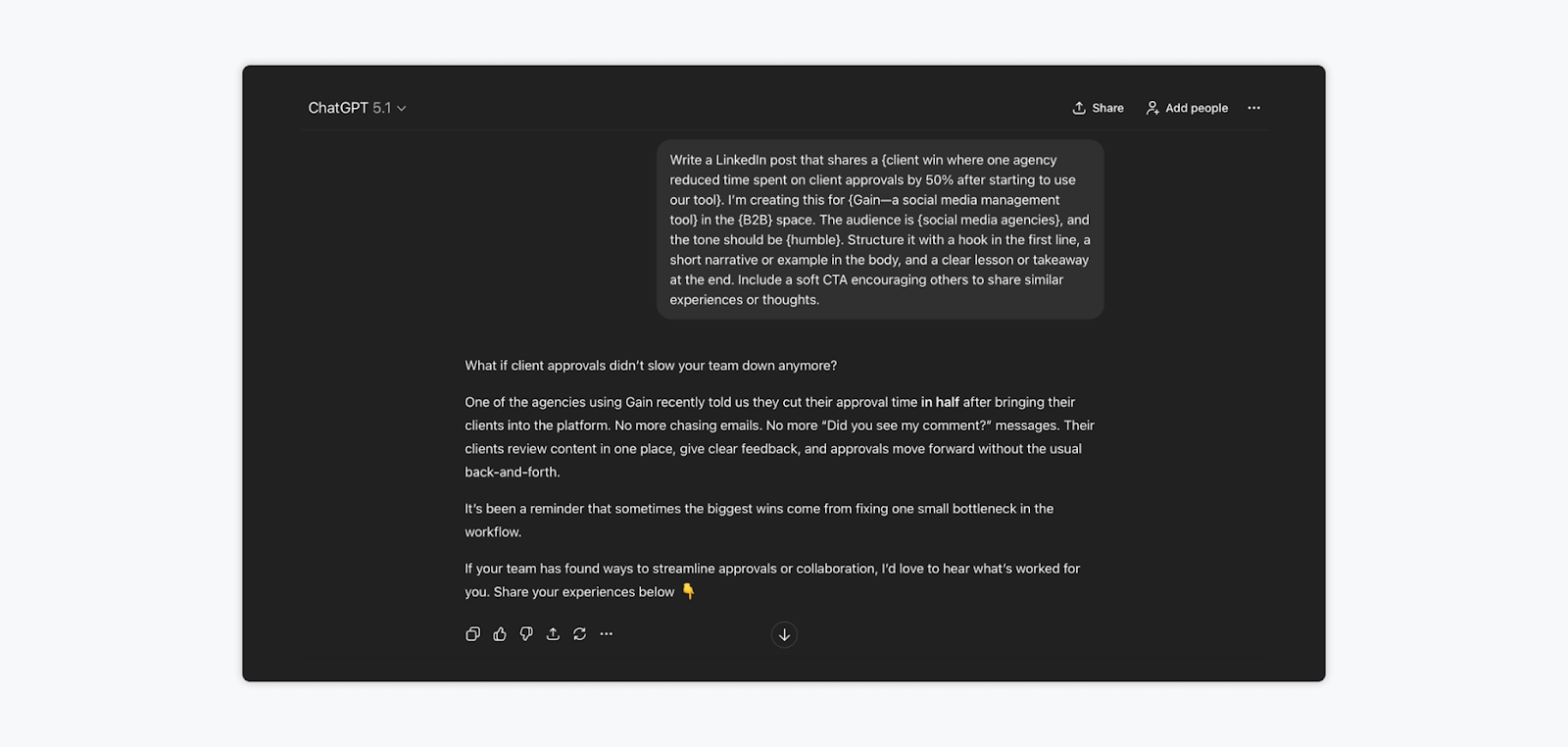
Story-driven posts are some of the best performers on LinkedIn. Whether you want to talk about a client who had success with your product or service or something you’ve accomplished as a business, this prompt will help you tell a story with a clear takeaway.
📝 Prompt:
“Write a LinkedIn post that shares a {client win/personal story/team achievement}. I’m creating this for a {brand/personal profile} in the {industry} space. The audience is {describe audience}, and the tone should be {e.g., authentic, humble, motivating}. Structure it with a hook in the first line, a short narrative or example in the body, and a clear lesson learned or takeaway at the end. Include a soft CTA encouraging others to share similar experiences or thoughts.”
Let’s see this prompt in action👇
📖 Related read: What to Post on LinkedIn to Win More Business (9 Ideas + Tips)
Prompt #6: Create a LinkedIn Carousel Post
Carousels are one of LinkedIn’s top-performing formats. They’re perfect for breaking down complex topics, frameworks, or step-by-step advice. This prompt helps you build a slide-by-slide structure that’s clear, helpful, and highly shareable.
📝 Prompt:
“I want to create a LinkedIn carousel post on {topic}. This is for a {brand or personal profile} in the {industry/niche} space, and our audience includes {describe audience}. The tone should be {e.g., educational, empowering, casual}. Structure it with a strong hook for the first slide, 5–7 short and engaging slides that explain the idea, and a final slide with a CTA to save, comment, or share.”
Prompt #7: Create a LinkedIn Post Around a Trending Topic
Jumping on a trending LinkedIn topic can help you stay relevant and expand your reach on LinkedIn. However, you’ve got to connect it to your brand or audience in a meaningful way. This prompt helps you react to what’s happening now without sounding generic or opportunistic.
📝 Prompt:
“I want to write a LinkedIn post about the trending topic: {insert topic}. I’m posting on behalf of a {personal brand/company} in the {industry or niche} space. Our target audience is {describe audience}, and our brand tone is {e.g., professional, opinionated, curious}. Help me write a post that 1) explains the trend simply, 2) ties it back to my industry or expertise, 3) includes a unique POV or insight, and 4) ends with a question or CTA to spark engagement.”
Prompt #8: Create a Poll Post That Drives Engagement
Polls are a smart way to boost engagement or spark quick conversations. This prompt helps you generate one that feels thoughtful, not clickbait-y.
📝 Prompt:
“I want to write a LinkedIn poll post about {topic}. This is for a {brand/personal profile} in the {industry} space. Our audience is {describe audience}, and the tone should be {e.g., curious, thoughtful, casual}. Suggest a bold or relatable question for the poll, 3–4 answer options, and a short intro paragraph that gives context. End with a question that encourages people to explain their answer in the comments.”
Content Repurposing & Optimization Prompts
Once your original content is published, there’s still more value to extract. These prompts help you turn long-form content into LinkedIn-ready posts, improve your hooks to boost visibility, and refine your posts before publishing.
Prompt #9: Turn a Blog Post Into a LinkedIn Post
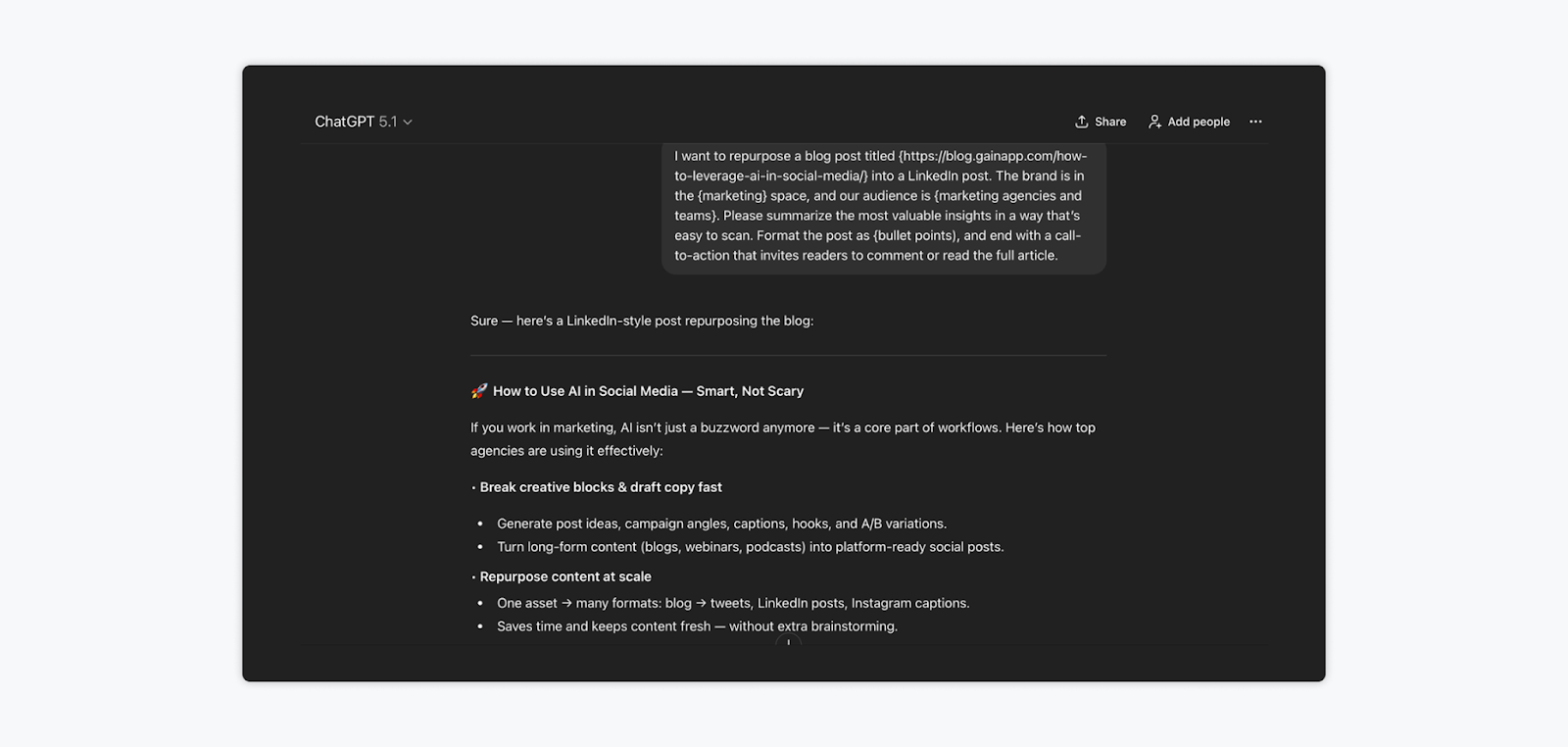
Repurposing blog content into LinkedIn posts helps you reach more people without reinventing the wheel. This prompt helps you extract the key takeaways and adapt them into a post that works for a skimmable, scroll-heavy feed.
📝 Prompt:
“I want to repurpose a blog post titled {insert title or link} into a LinkedIn post. The brand is in the {industry/niche} space, and our audience is {describe audience}. Please summarize the most valuable insights in a way that’s easy to scan. Format the post as {bullet points, a short paragraph, or a question-driven post}, and end with a call-to-action that invites readers to comment or read the full article.”
Example output from this prompt, where we asked ChatGPT to repurpose our blog post on different uses of AI in social media👇
Prompt #10: Generate Multiple Hook Variations for One Post
The first line of your LinkedIn post is make-or-break. This prompt helps you generate multiple attention-grabbing hooks so you can test, iterate, and choose the one that best stops the scroll.
📝 Prompt:
“Here’s the content of my LinkedIn post: {insert post or summary}. The topic is {topic}, and the tone should be {e.g., bold, curious, empathetic, expert-driven}. Can you write 5 different first-line hooks for this post? Focus on making them engaging, scroll-stopping, and true to the brand’s voice.”
Prompt #11: Improve a Draft Post for Clarity or Engagement
Already have a post written, but it feels a little flat? This prompt helps ChatGPT enhance it by improving flow, sharpening the tone, or making the CTA stronger.
📝 Prompt:
“Here’s a LinkedIn post draft I’m working on: {insert text}. The post is for a {brand/personal profile} in the {industry} space, and the audience is {describe audience}. Please improve the clarity, flow, and engagement level while keeping the core idea and voice intact. Feel free to suggest a stronger hook or CTA if needed.”
FAQs
The best way to use ChatGPT for LinkedIn marketing is by giving it context-rich prompts. Include your industry, audience, goals, and brand voice to get relevant results. Use it to brainstorm content pillars, write posts, create carousels, repurpose blog content, and improve engagement. Just remember: ChatGPT is a starting point. You’ll still need to edit for tone, accuracy, and originality.
Try this: “Act as a personal branding coach. Rewrite my LinkedIn headline and summary to attract {target audience}, highlight my experience in {industry}, and use a {professional/witty/human} tone. Make it SEO-friendly and easy to skim.” You can also use prompts for rewriting your work experience or creating a custom ‘About’ section that shows personality while staying on-brand.
No, you can start using ChatGPT for LinkedIn with a free account. However, the paid version (ChatGPT Plus) gives you access to more advanced models like GPT-5.1, which tend to produce sharper, more creative, and more accurate content, especially helpful if you’re creating posts frequently or managing multiple brands.
Put These ChatGPT Prompts for LinkedIn to Good Use
While ChatGPT can’t replace human creativity, it’s a great tool to break through writer’s block and generate strong first drafts. The key is using the right prompts – and now, you’ve got 11 of them.
Once your content is ready, the next step is getting it approved and out the door. That’s where Gain comes in. Gain is a social media management tool built for agencies and teams who need a smoother, more organized way to handle content reviews, client approvals, and publishing.
Try Gain for free to give your workflow the upgrade it deserves.