SocialBee feature overview
SocialBee is a social media management tool designed to help teams plan, publish, and manage content without juggling multiple tools. It covers the full workflow, from creating posts to scheduling, collaboration, engagement, and reporting, all in one place.
You can publish content to Instagram, Facebook, LinkedIn, X (Twitter), TikTok, Pinterest, YouTube, Threads, Bluesky, and Google Business Profile. SocialBee also supports Universal Posting, which lets you share content to channels many tools don’t support natively, like Facebook Groups, Reddit, or WhatsApp. This makes it easier to manage a broader social media presence without workarounds or manual posting.
Planning and scheduling are built for scale. Instead of relying on a single grid, SocialBee uses a visual content calendar combined with content categories, which act like folders for different post types. This setup makes bulk scheduling straightforward and helps keep content balanced across platforms, especially when you’re managing multiple clients or brands.
For content creation, SocialBee includes AI tools through Copilot. I mainly use it to speed things up when planning, such as generating post ideas, drafting captions, or outlining a posting strategy when starting a new account. It’s useful as a starting point when time is tight, not something that replaces your own input.
Beyond publishing, SocialBee includes a unified social inbox for managing comments, mentions, and messages in one place, along with in-depth analytics and exportable PDF reports. It also supports team collaboration with role-based permissions, post approvals, and separate workspaces, which helps agencies keep client work clean and organized.
Here are SocialBee’s key features:
- Schedule, publish, and manage posts across Facebook, Instagram, LinkedIn, X (Twitter), Pinterest, TikTok, YouTube, Threads, Bluesky, and Google Business Profile
- Create captions, hashtags, and visuals using AI-powered tools
- Customize posts per platform manually or with AI-assisted adjustments
- Create multiple versions of the same post for different channels
- Edit captions, resize images, update hashtags, tag profiles, add first comments, and set locations
- Save and reuse hashtag collections across campaigns
- Edit images, add alt text, and select custom video thumbnails
- Tag accounts and add location tags to improve visibility
- Get best posting time recommendations based on past content performance
- Recycle evergreen content and set expiration dates for time-sensitive posts
- Build custom posting schedules per social media profile
- Bulk schedule and edit multiple posts at once
- Save drafts and finish them later
- Import visuals via Canva, Unsplash, and GIPHY integrations
- Collaborate through comments, approvals, and content reviews
- Manage multiple clients or brands with separate workspaces
- Track performance with detailed analytics and export PDF reports
- Reply to comments, mentions, and messages from one social inbox
- Auto-import blog posts with pre-filled captions, images, and links
- Shorten and track links with support for 10+ URL shorteners
What I like about SocialBee
Based on what users consistently share, SocialBee stands out for its strong organization, flexible scheduling, and ability to manage multiple brands and social media accounts from one platform. Many marketers point to its content categories, approval workflows, AI-powered tools, and responsive customer support as standout strengths.
What users are saying about SocialBee’s pros:
- “Even though I’m mostly working solo, it’s great to have a structured system where drafts, approvals, and final versions are clearly separated. It helps keep everything organized when handling multiple companies.” – Elissa V., Content Marketeer (Source)
- “Automatization of scheduling, AI features.” – Marina P., Owner / Interior Design Consultant (Source)
- “SocialBee has been a game-changer for managing our multi-brand social presence. The interface is clean, intuitive, and built for efficiency. It allows us to customize content by platform while maintaining a consistent brand voice.” – Tom, Director of Sales and Marketing (Source)
- “Easy to create and organize social media content by content category and schedule by category too. SocialBee has also been amazing in terms of customer service. They are super responsive.” – Carey K., Co-founder (Source)
- “I like that I can post across multiple social media platforms at once, and customize each. It is simple enough for someone like me who isn’t a super tech wiz to use and figure out without having to watch tons of training videos. It was very easy to implement and immediately start using. I also love that you can upgrade to Concierge Bee or other options if you want to hire someone to help (which I did for several months, and would go back to again!).” – Dr. Jennifer Y., Adjunct Faculty (Source)
What I dislike about SocialBee
The most common drawbacks mentioned relate to the platform’s depth. Some users note a short learning curve and occasional performance slowdowns.
What users are saying about SocialBee’s cons:
- “Because SocialBee offers so many advanced features, it took me a little time to get familiar with everything.” – Elissa V., Content Marketeer (Source)
- “None except the odd glitch, which they help with right away.” – Carey K., Co-founder (Source)
- “There is a learning curve, and because the platform is so powerful, it might seem more difficult than it is… but SocialBee support is pretty amazing.” – John C., Social Media Manager (Source)
SocialBee pricing
2. Brand24 – Best for social listening and brand monitoring
Who is Brand24 best for?
Brand24 is best suited for agencies, PR teams, and brands that need real-time social listening, sentiment tracking, and reputation monitoring across a wide range of online sources.

Brand24 feature overview
Brand24 is a social listening and media monitoring tool built to track how brands are talked about online. It focuses on collecting mentions, measuring reach and sentiment, and turning large volumes of conversations into usable insights. I find it most useful for spotting trends, monitoring reputation, and reacting quickly when something starts gaining traction.
The real strength is coverage and speed. Mentions from social platforms, news sites, blogs, and forums show up in near real time, supported by alerts and AI-driven analysis. Filtering takes some tuning, and historical data access depends on the plan, but for PR, brand monitoring, and competitive analysis, Brand24 is purpose-built and effective.
Here are Brand24’s key features:
- Monitor brand mentions, keywords, and topics across a wide range of sources, including Facebook, Instagram, X (Twitter), LinkedIn, Reddit, TikTok, YouTube, blogs, news sites, forums, reviews, podcasts, newsletters, Twitch, Medium, and Quora.
- Track reach, engagement (likes, shares, comments), and mention volume to understand how widely your content and brand conversations spread online.
- Analyze conversation context with tools like word clouds, trending hashtags, most-shared links, and lists of the most active sites or profiles.
- Identify where discussions happen most through source analysis and see which authors or profiles drive the biggest impact with influencer analysis.
- Measure brand awareness using Presence Score and estimate PR value with AVE (advertising value equivalency).
- Explore audience demographics and geographic data, including age, gender, location, language, and interests.
- Use AI-powered features such as sentiment analysis, topic analysis, AI Insights, smart context search, and an AI Brand Assistant to uncover trends and actionable insights.
- Detect spikes and anomalies with event detection to quickly understand what’s driving sudden increases in mentions or coverage.
- Build and schedule automated reports (daily or weekly) and receive alerts via storm alerts, mobile push notifications, custom emails, Slack, or Microsoft Teams.
- Export and share insights through white-labeled reports, PDFs, Excel files, PowerPoint presentations, and QuickShare links.
- Filter and refine data using Boolean search, advanced filters (sentiment, reach, language, source), lightning-fast search, and flexible sorting options.
- Manage large volumes of mentions with bulk actions, tagging, grouping, and prioritization by importance or popularity.
- Access data through a web dashboard, mobile app, and API (available as a paid add-on) for deeper integrations and custom workflows.
What I like about Brand24
Across reviews, Brand24 is most often praised for how much visibility it gives teams with very little manual effort. Users consistently highlight real-time alerts, sentiment analysis, and the ability to track mentions across many online sources from a single, easy-to-read dashboard.
What users are saying about Brand24’s pros:
- “The thing I like most about Brand24 is how easy it is to track brand mentions across the internet without doing manual work. I don’t have to search Twitter, blogs, news sites, or forums separately. Brand24 collects everything on one dashboard, which saves a lot of time. Another good part is the real-time alerts… I can quickly see mention volume, reach, sentiment, and trends without reading long reports.” – Sanket P., Software Engineering (Source)
- “What I like best about Brand24 is how easy it is to monitor mentions across the web and social media in real time. The dashboard is clean and intuitive, and the sentiment analysis is surprisingly accurate. I love being able to track not only direct brand mentions, but also related keywords and competitors.” – Manila B., Digital Marketing Strategist (Source)
- “Easy to use and intuitive dashboard, real-time monitoring and alerts, comprehensive analytics.” – Saurabh B., Associate Project Manager (Source)
- “Brand24 is very helpful in my daily work. It allows me to efficiently track and manage brand mentions, social media conversations, and online discussions, which is essential for staying on top of trends and responding to customers in a timely manner.” – P. Barcikowski M., Head of the Advertising Department (Source)
- “It is a user friendly tool. All the information is displayed very well. Brand24 makes it easy to track what people are saying about my brand online.” – Karthik B., System Administrator (Source)
What I dislike about Brand24
The drawbacks mentioned tend to revolve around data noise, pricing, and depth of customization. Several users note that common keywords can pull in irrelevant mentions, sentiment analysis still needs human judgment in edge cases, and historical data access is limited on lower plans. Alerts and filters often need fine-tuning to avoid overload.
What users are saying about Brand24’s cons:
- “Sometimes irrelevant mentions appear in the result, especially if the keyword is common. It required some manual filtering to remove noise. The sentiment analysis is not always 100% accurate, especially for sarcasm or mixed-language content… historical data access is limited depending on the plan.” – Sanket P., Software Engineering (Source)
- “The data from some social platforms can be limited due to API restrictions, and historical data access is restricted in the lower-tier plans. While the interface is clean, it could benefit from more customization when filtering and visualizing large amounts of data.” – Manila B., Digital Marketing Strategist (Source)
- “The sentiment analysis isn’t always accurate, especially with sarcasm or mixed emotions.” – Saurabh B., Associate Project Manager (Source)
- “Sometimes the tool picks irrelevant information and it leads to some confusion and takes some time.” – Karthik B., System Administrator (Source)
Brand24 pricing
- Offers a 14-day free trial
- Paid plans start at $199
3. NapoleonCat – Best for moderation and customer support workflows
Who is NapoleonCat best for?
NapoleonCat is best suited for agencies and larger social media teams that handle high volumes of comments, messages, and reviews across multiple client accounts.
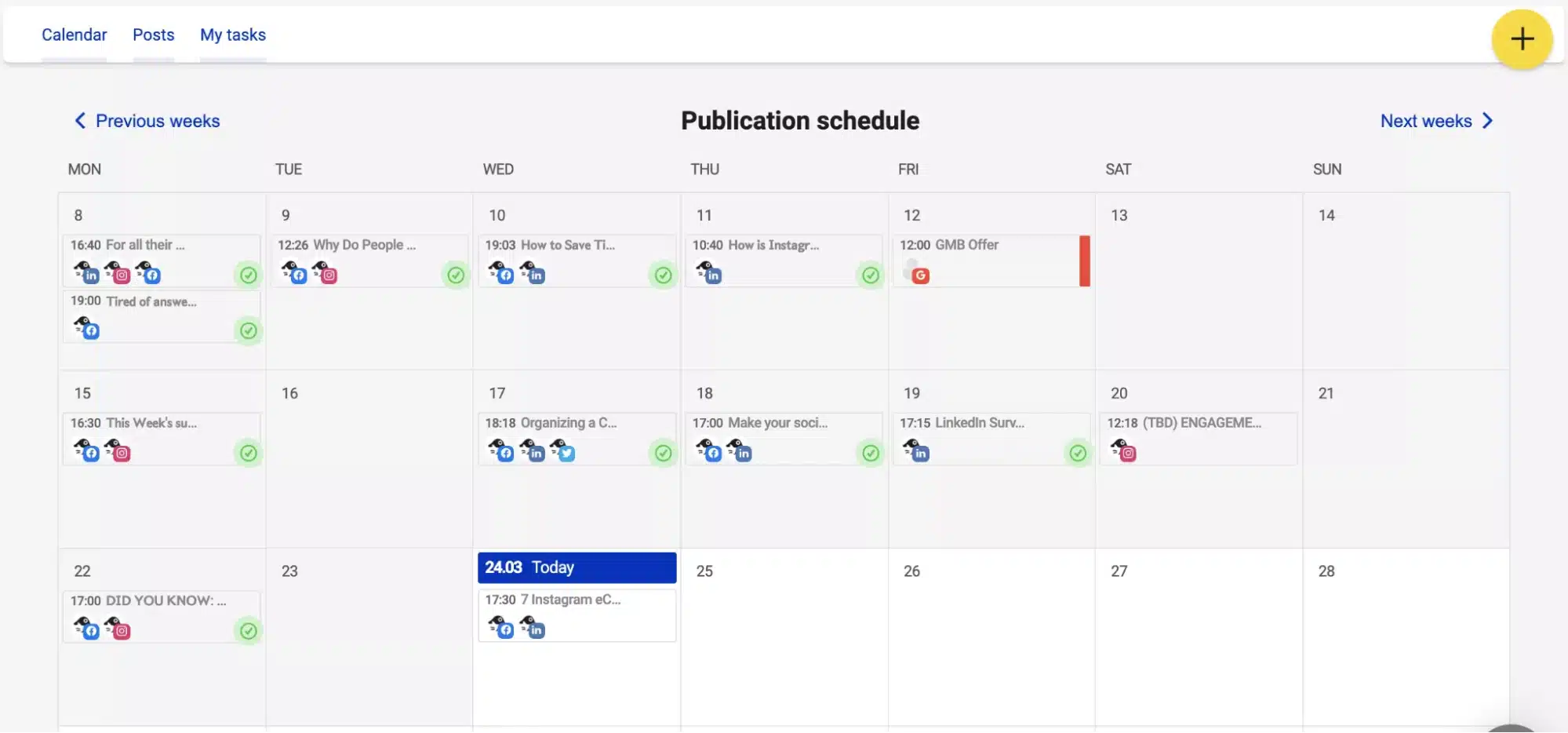
NapoleonCat feature overview
NapoleonCat feels like a social media marketing tool built specifically for engagement-heavy accounts. I see it work best when agencies are managing a lot of comments, messages, and reviews across multiple client profiles and need better control over moderation.
Everything runs from one dashboard, so teams can reply to comments and messages without jumping between platforms. What really stands out is automation. You can set rules to hide, delete, or respond to repetitive or inappropriate comments automatically, which takes a lot of manual work off the table.
NapoleonCat also uses AI to flag spam and negative sentiment, helping teams focus on conversations that actually need attention. Conversation history and user profiles make it easier to keep replies consistent, even with multiple people involved.
Publishing and reporting are handled through a shared calendar and branded reports, which makes planning content and showing results to clients straightforward.
Here are NapoleonCat’s key features:
- Manage comments, messages, and reviews from multiple social media channels in one inbox
- Automate moderation with custom rules for hiding, deleting, or responding to comments
- Use AI to detect spam and negative sentiment
- View full conversation histories and user profiles
- Plan and schedule posts using a shared content calendar
- Track performance across platforms with built-in analytics
- Create branded, scheduled reports for clients or teams
What I like about NapoleonCat
When I look at how agencies and consultants describe their experience with NapoleonCat, a few patterns show up consistently. Most users point to the centralized social inbox as the biggest time-saver, especially when they’re managing high volumes of comments, messages, and reviews across multiple client accounts. Strong moderation tools and fast, reliable customer support also come up frequently.
What users are saying about NapoleonCat’s pros:
- “I really enjoy using the support. They are quick, efficient, and always give a solid, helpful response.” – Verified User, Health, Wellness and Fitness (Source)
- “The organization of everything. I have all of my SM platforms in one area, and I can go from platform to platform to go over reviews & comments without having to go to my individual SM accounts. I can do whatever action I need (reply, archive, delete, report user, whatever) and go onto the next one. Probably cuts down on the time by at least 50%.” – Brian L., Tech Consultant (Source)
- “What I like most about NapoleonCat is how it centralizes all social interactions in one unified inbox, making moderation, customer care, and team collaboration efficient.” – Raquel B., Growth Consultant (Source)
- “Excellent customer service, clear analytics.” – Gosia, Content Creator (Source)
- “It translates to the preparation of professional and simple reports for clients. Plus excellent moderation. Great support, responds very quickly.” – Wojciech B., CEO (Source)
What I dislike about NapoleonCat
When I dig into the negative feedback, most of the concerns aren’t about core functionality, but about edge cases that matter once you’re managing social media at scale. Reporting flexibility, occasional platform delays, and incomplete data syncing come up most often, which can be frustrating when clients expect precise, up-to-date numbers.
What users are saying about NapoleonCat’s cons:
- “There are a few functionalities missing that are important to me, such as a daily report in a file after generating the weekly report.” – Verified User, Health, Wellness and Fitness (Source)
- “Once in a while I’ll get an alert that I can’t delete a post for a reason I don’t understand. There is a lag time for deleting stuff that there isn’t when I simply archive a post, but I’m not sure this is a NapoleonCat issue.” – Brian L., Tech Consultant (Source)
- “I can’t easily identify the number of comments by sentiment in the tool. It’s possible to filter them, but the count doesn’t appear. Also, the sentiment chart merges inbox messages and public comments together.” – Raquel B., Growth Consultant (Source)
- “They could work harder on compatibility with LinkedIn, comments appear with a delay.” – Gosia, Content Creator (Source)
- “Disconnects profiles, does not download all data, sometimes downloads partial data.” – Wojciech B., CEO (Source)
NapoleonCat pricing
- Offers a 14-day free trial
- Paid plans start at $89 per month
4. Social Champ – Best budget-friendly scheduler for multiple clients
Who is Social Champ best for?
Based on the user feedback I’ve reviewed, Social Champ is a solid option for solo marketers and agencies managing multiple brands on a tighter budget.
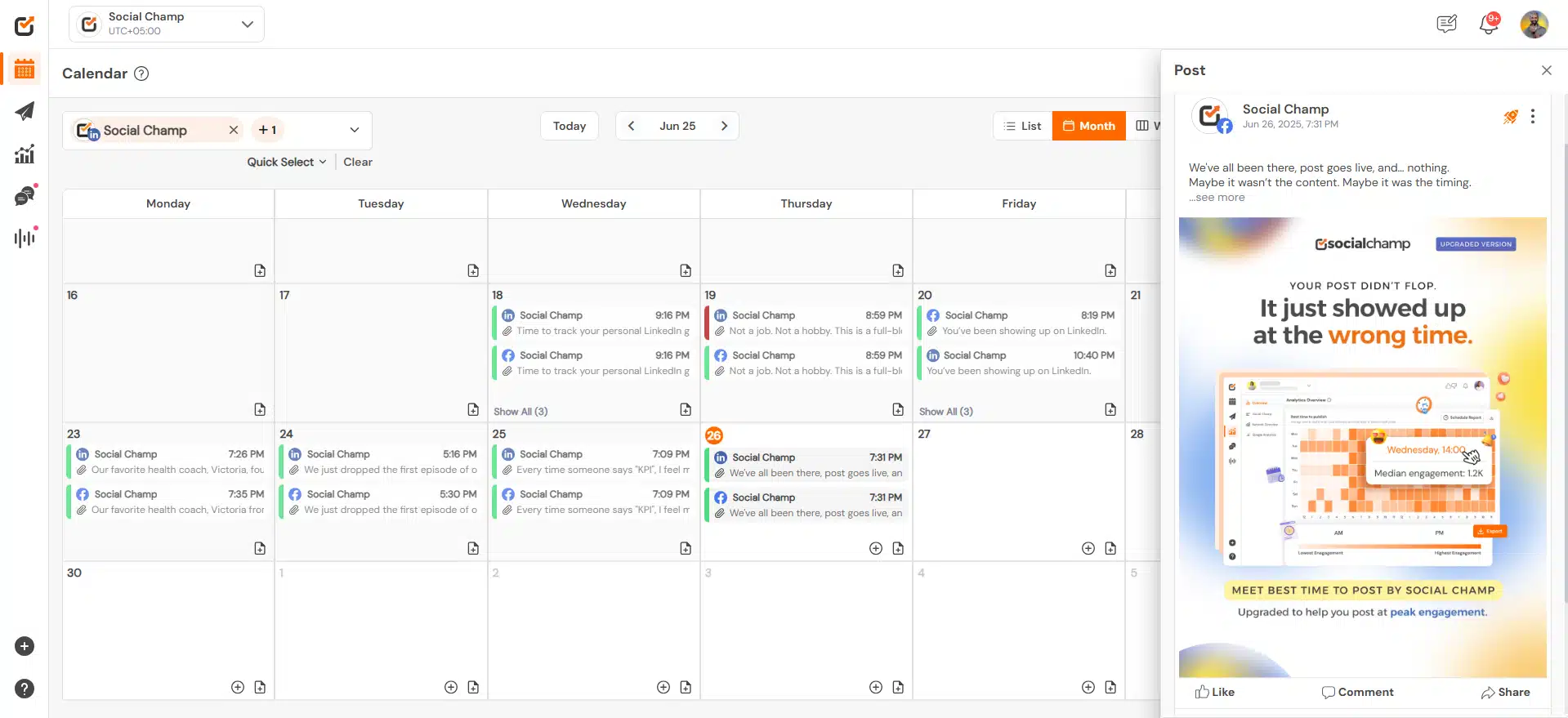
Social Champ feature overview
Social Champ feels like a practical option when I just need scheduling and automation to work without getting in the way. It’s built for managing multiple social media accounts reliably, especially if you don’t want to pay for features you’ll never use.
I like that it supports a wide range of platforms and makes bulk scheduling easy. You can queue posts, schedule threads, add first comments, and recycle evergreen content without much setup. For day-to-day publishing, it covers the essentials well.
For client work, Social Champ includes approvals, shared calendars, and a unified inbox for comments, messages, and reviews. Analytics stay fairly simple, but they’re enough to track engagement and export reports. The AI tools help speed things up, but the real value here is consistency and ease of use.
Here are Social Champ’s key features:
- Schedule and publish content across Facebook, Instagram, LinkedIn, X (Twitter), TikTok, YouTube, Pinterest, Threads, Mastodon, Bluesky, and Google Business Profile
- Manage unlimited scheduled posts, users, and workspaces on higher-tier plans
- Bulk schedule hundreds of posts and automatically queue them for optimal timing
- Create and schedule threads for X, Mastodon, Threads, and Bluesky
- Add polls, mentions, hashtags, alt text, image tags, and location tags to posts
- Schedule LinkedIn documents, first comments, and custom video thumbnails
- Reshare evergreen content using Smart Queues and Smart Repeating Posts
- Organize hashtags with a Hashtag Manager and edit visuals using the Image Editor
- Draft, save, and schedule posts collaboratively with shareable drafts and internal notes
- Store media with 10GB to unlimited storage, depending on plan
- Plan content using weekly or monthly calendars with filters, notes, and search
- Curate and publish content via RSS feeds, keyword searches, and royalty-free images
- Create reusable call-to-actions for curated content
- Use AI tools like AI Content Wizard, AI Imaginator, AI Suggested Time, and Sentiment Analysis
- Boost Facebook, Instagram, and LinkedIn posts and review ad performance insights
- Track engagement trends, individual post data, and up to two years of analytics
- Export PDF and PPT reports, generate white-labeled client reports, and run competitor analysis
- Manage comments, DMs, and reviews from major platforms using a unified social inbox
- Save replies, tag messages, and assign conversations to teammates
- Set up approval workflows, shared calendars, roles, and client workspaces
- Prevent duplicate actions with team collision detection and moderation rules
- Automate publishing with RSS and Atom feed imports
- Integrate with Canva, Dropbox, Google Drive, OneDrive, WordPress, HubSpot, Salesforce, and Zapier
- Access enterprise features like custom APIs, SSO, and dedicated account management
- Build customizable Instagram Link in Bio pages with branded buttons and visuals
- Monitor brand sentiment, hashtags, and conversations with social listening tools
- Track up to 100,000 mentions per month and store listening data for up to three months
- Get live chat support, onboarding training, and roadmap access, with dedicated managers on enterprise plans
What I like about Social Champ
After reviewing user feedback, the same themes come up repeatedly: Social Champ is easy to use, affordable, and capable of managing multiple social media accounts without friction. Users also appreciate that analytics are available even on lower plans and that the free tier is more generous than most competing tools.
What users are saying about Social Champ’s pros:
- “I love how simple and easy-to-use Social Champ is. Scheduling posts is super convenient, and the multi-platform support makes it effortless to manage all my social media accounts in one place. The analytics feature is a nice bonus, helping me track performance and make better content decisions.” – Abdul G., Administrative Clerk (Source)
- “I used to use Buffer, but I found the free tier too limited. Then I discovered Social Champ, which is way more generous in its free tier and has other interesting features that make it easier to share content regularly.” – Paolo C. (Source)
- “It allows us to do what we need to do with a better price than hootsuite.” – Curtis H., Owner (Source)
- “Love how easy it is to use and how clients can approve proofs without a lot of extra expense or confusion. AI tools are nice. Reliable, friendly support and most importantly, whenever we have made requests or suggestions, the tech team has taken our requests seriously and integrated some great solutions. Really great!! Nice solution for a small to mid-size social media team. So happy with Social Champ!!!” – Ann L., Owner and Executive Director (Source)
- “Social Champ just makes things easy. Its free plan lets you connect three social accounts. You can create one post to go on all three platforms and then tweak them individually for each channel. It’s easy to add and edit photos within the platform. You get a good preview. You can schedule things, and it’s easy to reschedule posts as needed. It’s honestly better than a lot of more expensive platforms I’ve used! … I would recommend Social Champ to anyone with a small budget who wants to get started with social media automation.” – Bethany D., Marketing Manager (Source)
What I dislike about Social Champ
Looking at the critical feedback, most drawbacks relate to reliability at scale. Users mention occasional delays in scheduled posts, a mobile app that feels limited compared to the desktop, and restrictions on the free plan. Others note that while Social Champ offers strong value, it doesn’t yet feel as polished or mature as higher-priced platforms.
What users are saying about Social Champ’s cons:
- “Sometimes, scheduled posts get delayed, which can be a bit frustrating. The free plan is quite limited, so you might need to upgrade to unlock more features. Also, the mobile app could use some improvements, especially in terms of speed and navigation.” – Abdul G., Administrative Clerk (Source)
- “It is not as fully baked as Hootsuite, but it is getting there.” – Curtis H., Owner (Source)
- “Very rarely have we encountered a tech issue, but support has always resolved it really quickly. So that’s a plus. No complaints here.” – Ann L., Owner and Executive Director (Source)
- “You can see a preview of your posts when you’re creating them. However, I wish it were easier to see a preview AFTER you’ve scheduled them. Sometimes I just want to be able to quickly look at what I already have scheduled for a certain day.” – Bethany D., Marketing Manager (Source)
Social Champ pricing
- Offers a 7-day free trial
- Paid plans start at $9
5. Hopper HQ – Best visual-first scheduling for Instagram teams
Who is Hopper HQ best for?
HopperHQ is best for teams that care primarily about planning and publishing content at scale, especially when visual scheduling, bulk uploads, and ease of use matter more than deep reporting or inbox management.
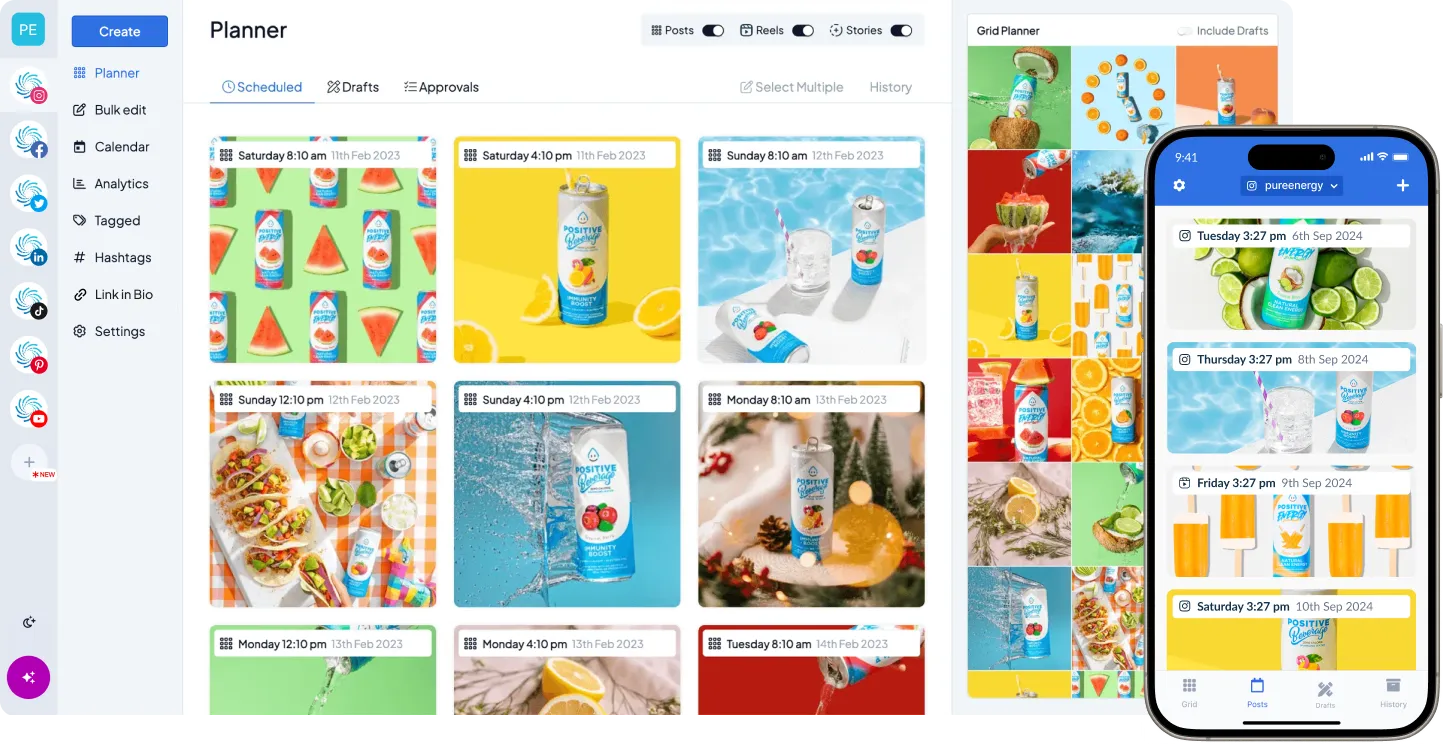
Hopper HQ feature overview
HopperHQ is a good fit when the main challenge is planning and publishing content across multiple platforms while keeping things simple. It’s built for teams that want a clear, visual way to schedule posts, keep content organized, and stay consistent without managing heavy workflows or advanced setup.
The calendar is the heart of the tool. Drag-and-drop planning, bulk uploads, grid previews, and multi-timezone scheduling make it easy to map out weeks or months of content at once. Built-in editing tools, AI caption support, and hashtag management help speed up creation without relying on external tools.
The trade-off is depth. Reporting stays focused on core performance metrics, and engagement features like a unified inbox aren’t a priority. For agencies and brands that value simplicity, speed, and predictable publishing, HopperHQ is a practical choice, especially since it comes at one of the lowest prices out there.
Here are Hopper HQ’s key features:
- Publish and schedule content across Instagram, TikTok, X (Twitter), Facebook, Pinterest, LinkedIn, YouTube Shorts, and Bluesky from one platform.
- Support all major content formats, including posts, Stories, Reels, Shorts, videos, carousels, images, and drafts.
- Customize posts with user tagging, Instagram collaborators, locations, captions, first comments, emojis, hashtags, and multi-platform posting options.
- Plan content using a combined calendar with weekly and monthly views, drag-and-drop scheduling, grid planning, bulk upload/editing, CSV imports, and multi-timezone support.
- Create and optimize visuals with built-in image editing tools, including cropping, filters, frames, text overlays, color adjustments, and TikTok watermark removal.
- Use AI-powered tools such as an AI content assistant, image upscaling, and a strategy planner to improve content quality and planning.
- Track performance with analytics covering reach, views, likes, follower growth, hashtag performance, and best times to post.
- Organize and research hashtags using basic and advanced search, hashtag groups, competition scoring, and access to a large indexed hashtag database.
- Collaborate with teams through notes, saved captions, teammates, permissions, post approvals, and post failure rules.
- Work seamlessly across desktop, web, and iOS/Android mobile apps for planning and publishing on the go.
What I like about Hopper HQ
HopperHQ is most often praised for its simplicity, visual planning experience, and ease of scheduling across multiple platforms. Reviewers consistently highlight the clean interface, drag-and-drop calendar, and how easy it is to manage multiple accounts without friction. Strong customer support also comes up repeatedly.
What users are saying about Hopper HQ’s pros:
- “HopperHQ has a user-friendly interface and robust scheduling capabilities, making planning and posting content across multiple social media platforms remarkably simple. I like the visual calendar and drag-and-drop features.” — Mark D., Business Consultant (Source)
- “The UI is so clean and easy to use. I love the calendar view. Hopper uses AI that can help users create captions and hashtags… Hopper’s mobile app is wonderful. Support has been excellent.” — Joe M., Digital Marketing Manager (Source)
- “Analytics. We usually post a lot on FB and having one board to see all analytics and stats is very impressive.” — David K., CEO (Source)
- “This software has significantly transformed the way we manage our social media presence… managing multiple social media accounts with just the click of a button has drastically improved our efficiency.” — Jason S., CEO (Source)
- “Really enjoying using Hopper to post to my socials. It definitely makes keeping active on social media heaps easier, especially since they’ve just added link in bio management.” — Verified User, Marketing and Advertising (Source)
What I dislike about Hopper HQ
The main limitations mentioned relate to analytics depth and engagement features. Some users would like more advanced reporting, a unified inbox, or broader collaboration options like workspaces. That said, several reviewers note that these gaps don’t significantly impact day-to-day scheduling workflows.
What users are saying about HopperHQ’s cons:
- “It would be great to see broader analytics and reporting options, especially for tracking performance beyond basic metrics.” — Mark D., Business Consultant (Source)
- “Workspaces would be cool, but the Team and Search features work very well.” — Joe M., Digital Marketing Manager (Source)
- “I would love to see an option to add comments on our post across all social platforms… a unified inbox would also be a great option.” — David K., CEO (Source)
Hopper HQ pricing
- Offers a 14-day free trial
- Paid plans start at $6
6. ContentStudio – Best for content discovery and multi-channel publishing
Who is ContentStudio best for?
From what I’ve seen in reviews and agency use cases, ContentStudio works best for marketing teams and agencies that want publishing, content discovery, and scheduling handled in one place. It’s a good fit when automation and content sourcing matter just as much as posting itself.
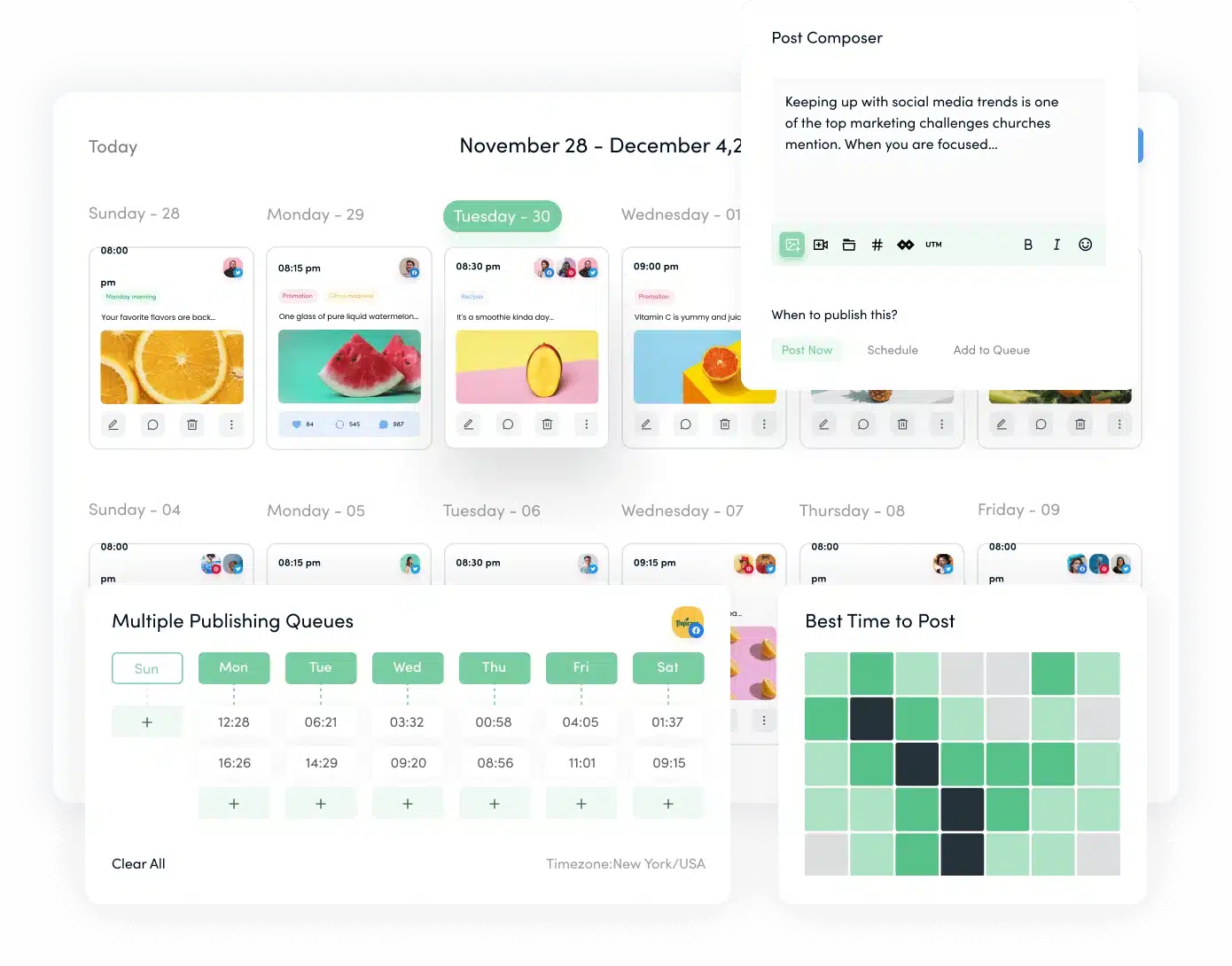
ContentStudio feature overview
ContentStudio feels like a step up from a basic scheduler. I like that it doesn’t just help you post, but also helps you figure out what to post. Content discovery, scheduling, and analytics all live in one place, which cuts down on switching between tools.
Planning is done through a visual calendar with multiple views, including grid previews for Instagram and TikTok. You can tweak posts with first comments, scheduling rules, and custom thumbnails. For content creation, the AI tools are useful for quick captions and hashtags, and the Canva integration makes visuals easier to handle.
Where ContentStudio really stands out for agencies is workflow. Approvals, client dashboards, notes, inbox management, and white-labeled reports make it easier to manage multiple clients without extra tools.
Here are ContentStudio’s key features:
- Connect and manage up to 25 social accounts across multiple workspaces, with unlimited users and unlimited posts
- Plan and publish using a visual calendar, plus list view, feed view, and Instagram/TikTok grid previews
- Customize posts with auto first comment, advanced scheduling settings, and custom video thumbnails
- Generate content faster with AI tools for captions, hashtags, and images, with allowances up to 125,000 words and 125 images
- Run evergreen campaigns and use hashtag suggestions plus best-time-to-post insights to increase reach
- Organize content using labels, categories, and a content library, or schedule in bulk via CSV uploads and RSS feeds
- Collaborate with approvals and client-friendly tools like approval workflows, client dashboards, shareable links, saved replies, internal notes, and tagging
- Create visuals in Canva or VistaCreate, and pull free stock assets from Unsplash, Pexels, GIPHY, and Flickr
- Track performance with platform analytics, audience demographics, competitor benchmarks, and export reporting via PDF or email, including white-label options
- Manage engagement through a unified social inbox, with replies, task assignment, and mobile access
- Integrate with tools such as Bitly, Pocket, Replug, WordPress, Feedly, and Google Calendar
- Work efficiently with iOS and Android apps, a Chrome extension, plus on-demand training and full onboarding support
What I like about ContentStudio
ContentStudio is most often valued for how much it combines into a single platform. Teams highlight the way content discovery, scheduling, and reporting sit together, which cuts down on tool switching. Canva integration, flexible publishing options, and competitor analytics are mentioned frequently.
What users are saying about ContentStudio’s pros:
- “Everything is easy to find in Content Studio. The integration of Canva is streamlined. It’s easy to categorize things, as well as view detailed analytical data on post types. As a social media manager, I’ve used many other platforms, this one has by far been my favorite.” – Patrick S., Owner, Small-Business (Source)
- “ContentStudio’s ability to schedule and plan content (with previews) is second to none. I love the additional features as well such as the ability to create the first comment on an Instagram post, carousel posts and Facebook posts with the coloured backgrounds.” – Jason B., Marketing Systems Manager, Small-Business (Source)
- “Ease of use, integrations, gives more tools to manage & schedule content. The competitive insights are excellent and I really like the ability to pull RSS feeds to keep up to date with the latest news within each niche.” – Alex B., Digital Marketer, Small-Business (Source)
- “I love the way all of the social/content marketing modules are tightly integrated.” – Dennis L., Advisor, Marketing and Advertising, Small-Business (Source)
- “It feels like a very mature platform with excellent UI and unique elements that make it stand out from similar schedulers.” – Lawrence G., Marketing Coordinator, Small-Business (Source)
What I dislike about ContentStudio
The trade-offs show up mostly around customization and refinement. Some users want more control over dashboards, deeper influencer workflows, or broader content sources. Others point out that certain upgrades sit behind higher-priced plans.
What users are saying about ContentStudio’s cons:
- “I wish that I could customize my dashboard. I also wish it wouldn’t continue to give me internal messages about unread messages on my accounts.” – Patrick S., Owner, Small-Business (Source)
- “I do wish that the Curated Topics had a few more sources to pull from, but having said that, my niche is a fairly unique one.” – Jason B., Marketing Systems Manager, Small-Business (Source)
- “Influencers tab needs some work for niche audiences and [should] have the ability to DM or manage a campaign or work with them.” – Alex B., Digital Marketer, Small-Business (Source)
- “There are still a few rough edges as far as UI/UX, but the tool is SO much better than other more widely recognized tools.” – Dennis L., Advisor, Marketing and Advertising, Small-Business (Source)
- “Upgrades and new features aren’t always included — many are locked behind paywalls and upsells.” – Lawrence G., Marketing Coordinator, Small-Business (Source)
ContentStudio pricing
- Offers a 14-day free trial
- Paid plans start at $29
7. Zoho Social – Best for CRM-connected social media management
Who is Zoho Social best for?
Based on the features and feedback, Zoho Social works particularly well for teams that value easy onboarding, clear scheduling, and a straightforward way to manage posts and engagement from one dashboard.
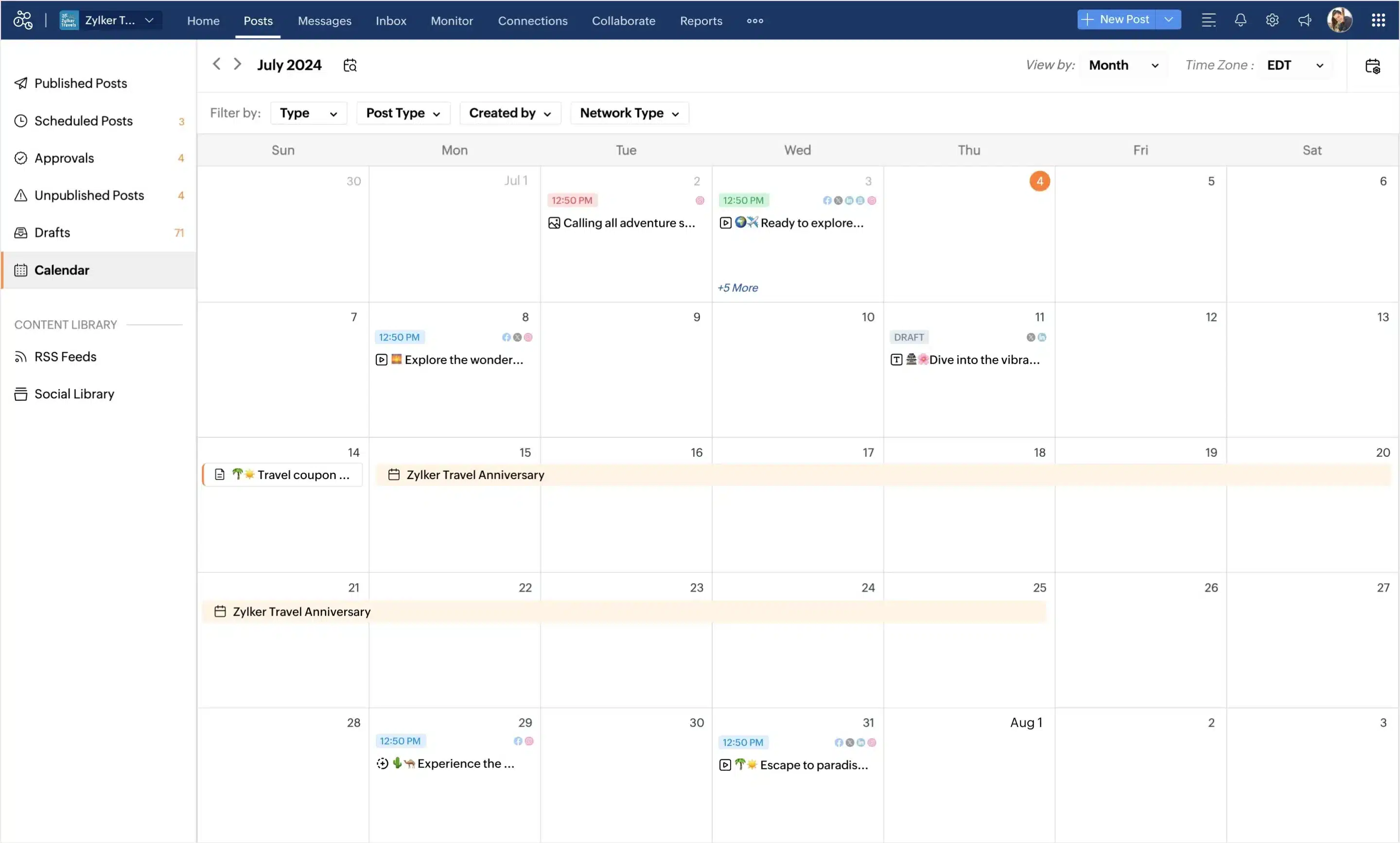
Zoho Social feature overview
Zoho Social feels like a practical tool for teams that want structure without complexity. I like how everything starts with a clear publishing calendar, where you can plan posts, reschedule them quickly, and see what’s already live at a glance. Managing engagement is also straightforward. Comments, mentions, and messages land in one inbox, and the built-in AI helper can speed up replies when you’re short on time.
Monitoring tools make it easy to follow brand mentions and keywords, while analytics and scheduled reports give you a basic but useful view of performance. Where Zoho Social can feel limiting is in report customization and advanced platform-specific features, but for everyday scheduling and engagement, it does the job well.
Here are Zoho Social’s key features:
- Plan and schedule social media content using a visual publishing calendar with drag-and-drop rescheduling, content previews, bulk scheduling, and content queues.
- Curate and share content efficiently through built-in curation tools and the zShare browser extension for posting directly from the web.
- Manage comments, mentions, and direct messages from all connected social media channels in a unified social inbox with conversation history and assignment workflows.
- Use Zia, Zoho’s AI assistant, to draft, rephrase, and respond to messages in real time directly from the inbox.
- Monitor brand mentions, keywords, reviews, and industry conversations using customizable listening dashboards and monitoring columns.
- Collaborate with teams through role-based permissions, task assignments, team discussions, and built-in chat, audio, and video communication.
- Track performance with detailed social media analytics, including audience insights, content performance, and engagement trends.
- Build, schedule, and export custom reports to share performance data with stakeholders or clients.
- Publish and engage on the go using iOS and Android mobile apps for scheduling, monitoring, and inbox management.
- Integrate with Zoho CRM to generate leads from social media, enrich contact records with social data, and connect social activity to revenue.
- Connect Zoho Desk to turn social messages into support tickets and streamline customer service workflows.
- Create and edit visuals directly through Canva integration, with assets saved to Zoho Social’s shared media library for team access.
What I like about Zoho Social
From what I see in reviews, Zoho Social stands out for its easy onboarding, clean interface, and straightforward scheduling. Users consistently mention how simple it is to set up, plan posts in a visual calendar, and automate basic publishing without feeling overwhelmed. The free plan and the jump to paid analytics are also seen as good value for getting started.
What users are saying about Zoho Social’s pros:
- “How easy and clear onboarding and everything else feels. Ease of both implementation, integration and setup was the biggest gateway for us.”– Verified User, Computer Games Industry (Source)
- “Zoho makes scheduling posts on various social networks very simple. I started using the free version, which I found quite generous, and then I tried the paid version, which offers additional advantages such as access to detailed statistics.” – Ever D. (Source)
- “I find Zoho Social incredibly user-friendly, and it helps me visualize my content calendar. I appreciate how the tools are efficient and straightforward, making scheduling posts and tracking engagement much easier than doing it manually. I also like how intuitive the dashboard is, providing a clear command center that simplifies managing my social strategy. It was very easy to set up.” – Michael B. (Source)
- “I appreciate the automation feature in Zoho Social, as it helps with scheduling, editing text, and adjusting image sizes. The initial setup was easy.” – SSRLTL T. (Source)
- “I like Zoho Social because it’s simple and doesn’t feel overwhelming. I appreciate the post scheduler and calendar management features. They help me plan a month’s posts in advance, tweak the timings, and fill in gaps I notice on quiet days. It also saves me time and keeps things organized. The initial setup was very easy.” – Diwash K., Faculty, School of Computer Science Engineering (Source)
What I dislike about Zoho Social
The most common issues relate to reporting depth and pricing. Several users point out missing or slow-to-update metrics and limited flexibility when building custom reports. Others feel pricing is still high for small brands, and that some platform-specific features, like Instagram Reels tools and bulk uploads, could be more polished.
What users are saying about Zoho Social’s cons:
- “Some metrics seem to take a longer time to compute, some metrics seem absent (Instagram’s views for static posts, for example). Overall, the biggest letdown so far has been with reports. It should be easier to build custom dashboards and with way more options for how to showcase the metrics. I’d like to be able to showcase one single ‘viewership’ metric that brings reach and impressions together, for example, and can’t seem to be able to for now.” – Verified User, Computer Games Industry (Source)
- “Although the prices are lower than those of the competition, in my opinion, they are still high.” – Ever D. (Source)
- “While the scheduling is great for photos, I would like to see more advancement in features associated with IG Reels, specifically having more native editing capabilities.” – Michael B. (Source)
- “I don’t like the pricing of Zoho Social; it should offer a lower price for small brands.” – SSRLTL T. (Source)
- “I think the bulk upload could be made simpler with a video guide and easier interface.” – Diwash K., Faculty, School of Computer Science Engineering (Source)
Zoho Social pricing
- Offers a 15-day free trial
- Paid plans start at €15/month for business plans and €320/month for agency plans
8. StoryChief – Best for content collaboration and distribution
Who is StoryChief best for?
StoryChief makes the most sense for marketing agencies, growing teams, and businesses that manage multiple types of content, not just social media. If you’re publishing blog posts, newsletters, and social updates side by side and want visibility into how everything connects, this tool fits that workflow well.
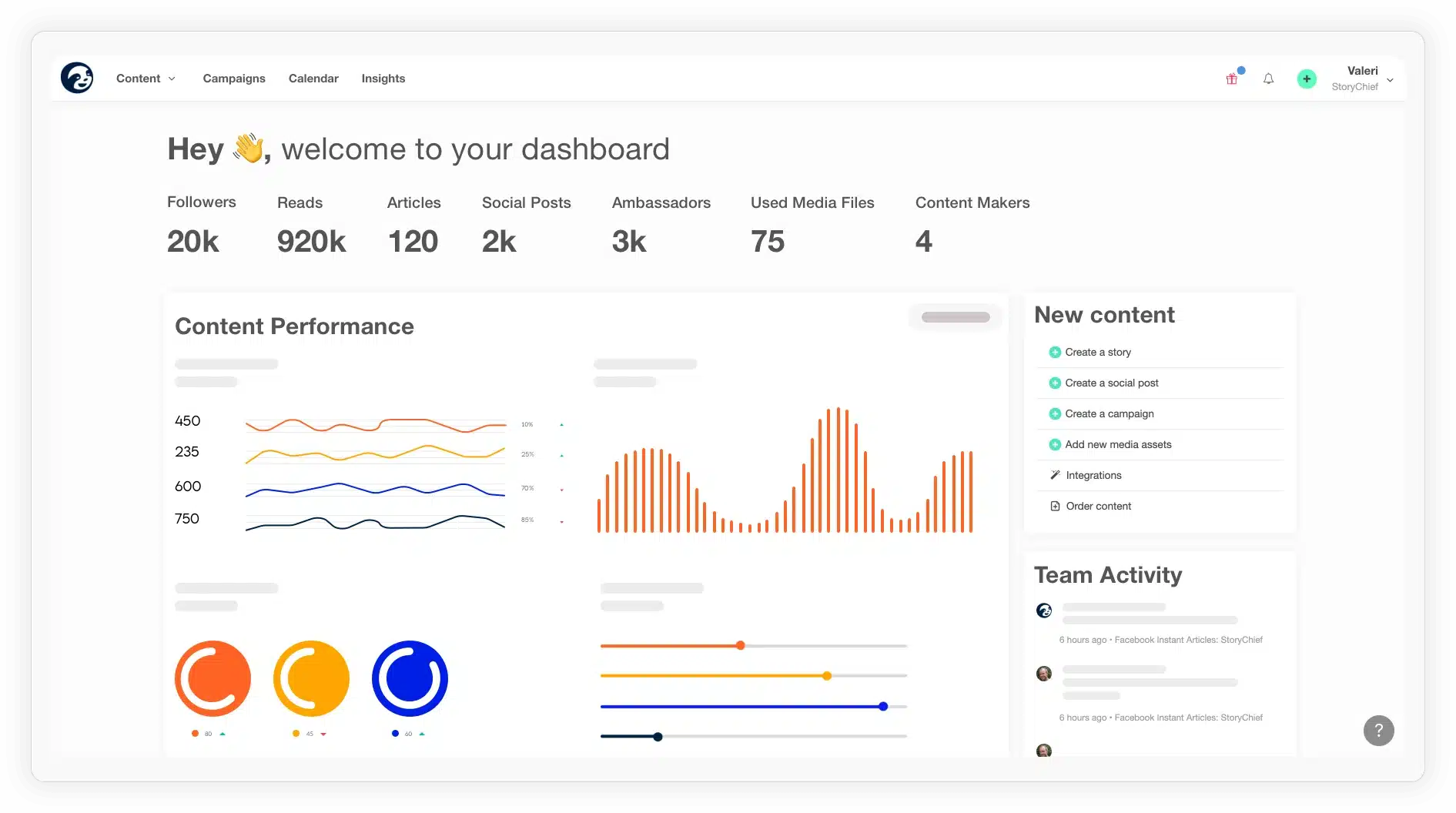
StoryChief feature overview
StoryChief is a good fit when I’m managing more than just social media. Instead of splitting work between separate tools for posts, blogs, and newsletters, everything lives in one shared calendar, which makes it much easier to see what’s going out and when.
Where StoryChief really stands out for me is SEO. While writing, I can check keywords, readability, and optimization before anything is published, which helps reduce guesswork around long-form content and organic performance.
Collaboration is another strong point. Tasks, approvals, and campaign views are built in, so teams don’t need an extra project management tool to stay aligned. Integrations with platforms like WordPress, Mailchimp, HubSpot, and Google Business Profile make distribution straightforward.
The trade-off is focus. StoryChief is an all-in-one content platform, not a lightweight social scheduler, so smaller teams may find it more than they need.
Here are StoryChief’s key features:
- Plan blog posts, newsletters, and social media content together in a shared content calendar
- Write and format content using an editor that supports images, embeds, and video
- Get built-in SEO guidance, including keyword suggestions and readability checks
- Assign tasks, manage approvals, and coordinate campaigns across teams
- Publish announcements and press releases through a branded newsroom
- Connect with 100+ tools, including Google Business Profile, WordPress, Shopify, HubSpot, and Mailchimp
- Track engagement and conversions with automated performance reports
- Run content audits to identify outdated or duplicate social media content
- Use AI tools to improve ideas, refine writing, and generate captions for social media
What I like about StoryChief
StoryChief is most often praised for its SEO tooling, content workflows, and hands-on customer support. Reviewers consistently highlight how well it combines writing, publishing, and collaboration, especially for teams managing blogs, social posts, and newsletters together.
What users are saying about StoryChief’s pros:
- “First of all, the product is a great product. The very best I have found for this type of program… the customer service is second to none.” – Joe L., Owner (Source)
- “I have used several publishing tools for blogging and social media, and none of them compare to StoryChief. It is obvious that their number one priority is SEO… Their approval and feedback system has saved me COUNTLESS of emails.” – Morgan S., Founder (Source)
- “It makes my content management and writing a breeze not to mention all the other added features they have.” – Hendrico V., Marketer (Source)
- “StoryChief is a content creation platform that helps businesses streamline their content marketing efforts… The added AI features make content creation fast and fun.” – Verified User, Consulting (Source)
- “I value StoryChief because it allows teams to write great content thanks to its built-in SEO and readability scores… Content distribution is made simple with just one click.” – Michael S., Software Test Engineer (Source)
What I dislike about StoryChief
The main limitations mentioned are about complexity and team workflows at scale. Some reviewers note that pricing can be a hurdle for smaller teams, while others point out constraints around collaboration, automation, or customization when working with larger editorial groups.
What users are saying about StoryChief’s cons:
- “The only slight question I have is the ability to use it to the fullest given that I am not a computer savvy person… but they have a top notch support team to help me.” – Joe L., Owner (Source)
- “Pricing is fair for the features you get… For new startups with limited funds, it could be a slight hurdle.” – Verified User, Consulting (Source)
- “To enable better marketing attribution goals, custom fields should be further developed… There are no options to schedule posts automatically.” – Michael S., Software Test Engineer (Source)
- “Not being able to put ‘suggestions’ but only comments makes it much slower… You also can’t have more than one person editing a doc at one time.” – Cassandra A., Digital Marketing and Sales Manager (Source)
StoryChief pricing
- Offers a free plan
- Paid plans start at €29/month per user
9. – Best for creator-style workflows and influencer-led campaigns
Who is best for?
If your priority is maintaining a strong visual brand and planning content visually rather than building complex workflows or reports, tends to feel intuitive and easy to adopt.
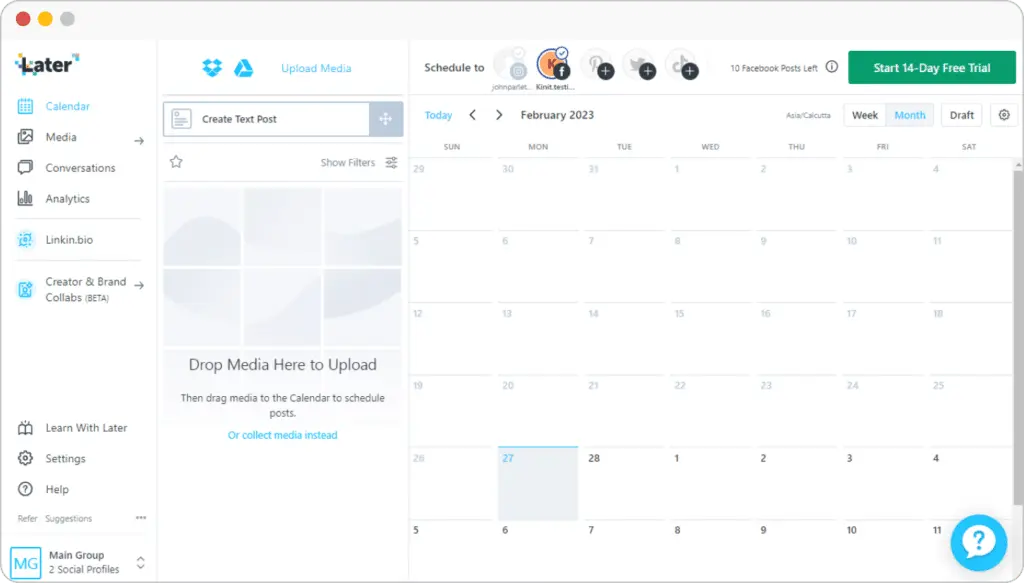
feature overview
works best for teams that prioritize visual planning and brand consistency. It’s built around helping you organize posts, preview content before it goes live, and keep feeds looking cohesive across visually driven platforms.
The visual content calendar is the core of the experience. Planning posts across Instagram, Pinterest, TikTok, LinkedIn, and other supported channels is quick thanks to drag-and-drop scheduling and reliable auto-publishing. Saved captions, drafts, and post previews make it easier to move fast without losing control over how content appears.
also supports brand-led workflows through media organization, Link in Bio customization, and light AI tools for captions and ideas. Analytics stay fairly basic on lower-tier plans, and automation options are limited. As needs grow, pricing and feature caps can become a consideration for teams that rely on deeper reporting or advanced workflows.
Here are ’s key features:
- Schedule and auto-publish posts to Instagram, Facebook, Threads, Pinterest, TikTok, LinkedIn, YouTube, and Snapchat
- Manage between 1 and 6 Social Sets (up to 48 social profiles total), depending on plan
- Publish up to 30 posts per profile per month on Starter plans, with unlimited posts on Scale
- Plan content using a visual calendar with multi-profile scheduling, drafts, saved captions, and post previews
- Get best-time-to-post suggestions for Instagram on all plans and TikTok on higher tiers
- Generate captions and content ideas using AI tools, with monthly credit limits by plan
- Use Instagram-specific publishing features like first comments, user and location tagging, and product tagging on Growth and Scale
- Store unlimited media and create visuals using built-in editing tools, Canva exports, and a Chrome extension
- Collect and organize user-generated content by profile, hashtag, tag, or mention on higher plans
- Track performance with platform-specific analytics for Instagram, TikTok, Facebook, Threads, and Pinterest
- Access up to two years of historical analytics data on the Scale plan
- Use custom analytics, competitive benchmarking, and future insights on Scale
- Monitor Link in Bio performance with analytics, location-based views, and Google Analytics integration
- Build customizable Link in Bio pages with buttons, featured media, affiliate links, email capture, and Mailchimp integration, without branding
- Collaborate with teams using shared calendars, notes, comments, activity logs, and approval workflows on Growth and Scale
- Manage conversations from Instagram, Facebook, and TikTok using a built-in social inbox on paid plans
- Secure accounts with two-factor authentication and Single Sign-On
- Plan and manage content on the go with iOS and Android mobile apps
What I like about
When I look at how users describe , most positive feedback centers on its visual scheduling, ease of setup, and support for visually driven social media platforms. Users also frequently mention post previews, media organization, and the flexibility of Link in Bio pages.
What users are saying about ’s pros:
- “I use Social to manage social accounts for multiple businesses. I find the content search option great and appreciate the ability to share posts externally for review.” – Ginny G. (Source)
- “ Social is robust in visual scheduling, where it coordinates with the calendar and plan or schedule for the day for content sharing, through posts.” – Sonalina C., Digital Marketing Manager (Source)
- “I particularly enjoy the ability to select media by labels and upload multiple pictures simultaneously, which streamlines my content organization and posting process.” – K. E. (Source)
- “ Social is a magnificent visual content planner or calendar, that guides companies on visualizing posts.” – Graziana C., IT Manager (Source)
- “I appreciate Social because the team continually innovates, constantly bringing fresh ideas and improvements that enhance the user experience.” – José H. (Source)
What I dislike about
From the critical feedback, the most common issues relate to limited analytics on lower plans, video formatting constraints, publishing limitations, and occasional account reconnections. These tend to matter more once teams start managing multiple clients or need more detailed reporting.
What users are saying about ’s cons:
- “It would be great to be able to see follower analytics that break down by country for my reporting.” – Ginny G. (Source)
- “ Social faces some shallow analytics criticism, which fails to capture the social media insights from this app.” – Sonalina C., Digital Marketing Manager (Source)
- “ Social has issues with video compression, and this hurts the quality of the video.” – Graziana C., IT Manager (Source)
- “Sometimes I need to reconnect my account for verification, which can be annoying for both myself and my clients.” – José H. (Source)
pricing
- Offers a 14-day free trial
- Paid plans start at $25
Frequently asked questions
1. What is the best social media management tool for agencies?
The best social media management tool for agencies is one that supports multiple clients, team collaboration, approvals, scheduling across platforms, and clear reporting. Agencies typically need client workspaces, role-based access, and analytics they can share. Tools like SocialBee, Sprout Social, and Zoho Social are often chosen because they combine publishing, engagement, and reporting in one platform.
2. What features should agencies look for in a social media management tool?
Agencies should prioritize features that reduce manual work and support scale, such as multi-account management, approval workflows, unified inboxes, bulk scheduling, and client-ready reports. Strong analytics, team permissions, and the ability to customize posts per platform are also important when managing multiple brands and campaigns.
3. Are social media management tools worth it for agencies?
Yes, social media management tools are worth it for agencies because they save time, reduce errors, and make client collaboration easier. Instead of switching between platforms, agencies can plan content, manage engagement, and track performance from one dashboard. This makes it easier to deliver consistent results and scale services without adding more manual work.
Get started with the best social media management tool for your agency
The right social media marketing strategy isn’t about using more tools, it’s about using the right ones for how your agency actually works. Whether you’re prioritizing scheduling at scale, engagement and moderation, social listening, or client-ready reporting, each tool on this list solves a different part of the workflow.
For most agencies, the real challenge is consistency: posting regularly, staying responsive, and proving results across multiple client accounts. That’s where an all-in-one platform like SocialBee makes a difference. By combining content creation, scheduling, engagement, and analytics in one place, it helps teams reduce tool sprawl and focus on execution.
If your current setup feels fragmented, start your 14-day SocialBee free trial, centralize your social media efforts, and build from there.


![Social Media DMs Strategy for Marketers in 2026 [Complete Guide]](https://bulk.ly/wp-content/uploads/2025/09/social-media-dms.png "Social Media DMs Strategy for Marketers in 2026 [Complete Guide]")