I already have a Windows PC and a 15-inch MacBook Air for home use. However, I travel a lot and could use something smaller, lighter, and cheaper that I can take on the road and in the air. With Apple’s announcement of the MacBook Neo, I think I’ve found it.
The Neo is a small and lightweight laptop that offers all the features I’ve been seeking in a secondary Mac. Here’s why I plan to grab one.
MacBook Neo ports (Credit: Brian Westover/PCMag)
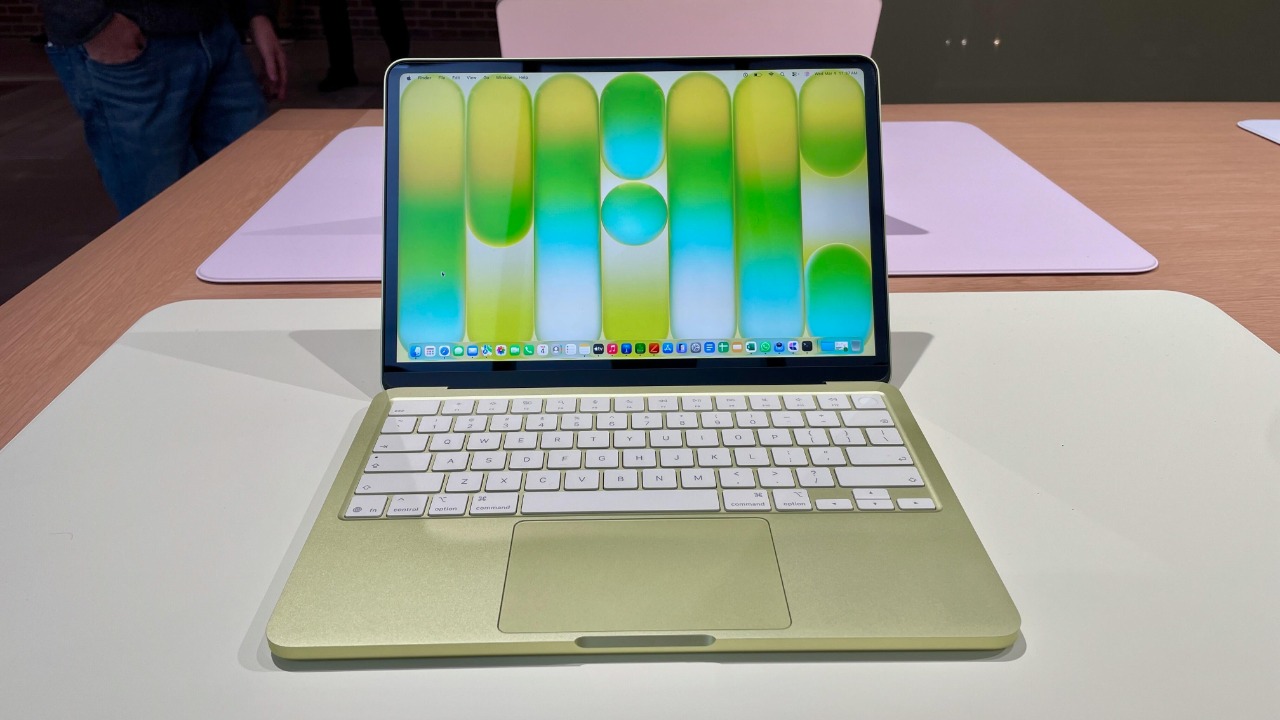
First up is the device’s size. When I travel, I already carry my main Windows laptop in my backpack. I’ve been looking for a MacBook I can add to my pack without adding too much weight or bulk, and its 13-inch display and 2.7-pound frame make it sound like a good candidate. Not too small, but light enough for me to use at a hotel, the airport, and especially on a plane (those pull-down trays don’t give you much room).

First Look at Apple’s New MacBook Neo, a Colorful and Budget Laptop
I also like that, despite its size, the screen quality is no slouch. You get a Liquid Retina display with a 2,408-by-1,506 resolution and 500 nits of brightness. This is important to me as I sometimes have to work in darker conditions. (Having the window shade up on a flight is apparently a serious faux pas these days.)
Apple’s more powerful MacBooks are now outfitted with the company’s latest M5 chip. In contrast, the Neo sports an A18 Pro, the same chip that powers my iPhone 16 Pro. And that’s fine with me. I won’t be using the Neo for any heavy-duty video editing or other CPU-intensive tasks. I plan to test the Neo at my local Apple Store before buying it to see how it performs, but I expect it will be more than enough for my needs.

MacBook Neo colors (Credit: Brian Westover/PCMag)
I’m also a stickler for battery life. As laptops have become thinner and lighter, longevity has suffered. I’ve owned a few Windows laptops where I was lucky to get five or six hours out of a single charge. Though electrical outlets are more ubiquitous at airports and on airlines these days, you can’t always count on them to work. So I need to know that the battery will last long enough for me to finish my work. Here, Apple promises “all-day” battery life—a hefty 16 hours before you need to juice it up again.

Get Our Best Stories!
Love All Things Apple?

By clicking Sign Me Up, you confirm you are 16+ and agree to our Terms of Use and Privacy
Policy.
Thanks for signing up!
Your subscription has been confirmed. Keep an eye on your inbox!
I’ll also sometimes use my MacBook for video calls, which frees up my Windows laptop for other tasks. For this, the Neo includes a 1080p FaceTime HD camera. There’s also a headphone jack for wired audio, two USB-C ports, and Wi-Fi 6E—a good overall feature set for working across airports and hotels.
It also doesn’t hurt that the Neo comes in four colors: blush, indigo, silver, and citrus. After using Windows laptops that typically are painted a dull black or gray, I think I’d enjoy using a MacBook with a splash of color.
Recommended by Our Editors


So far, the only unknown factor is the keyboard. As a quick and hard typist, I tend to pound away at the keys, so I need a keyboard that’s comfortable and durable. With today’s crop of thin and light laptops, keyboard quality often suffers. That’s why I usually stick with Lenovo for my core machine. The Neo is outfitted with Apple’s Magic Keyboard, the same style used on other MacBooks, including my Air. I’m already a fan, so if the one on the Neo feels and performs as expected, I should be happy with it. Still, I’ll test it in person before I buy.

And that brings me to probably the best part of all—the price tag. The Neo starts at just $599 for the 256GB version and rises only to $699 for the 512GB flavor with Touch ID. That’s a budget-friendly price that should attract a lot of buyers, me included.
You can already preorder the Neo on Apple’s website, but if you want to first try it out in person like me, it will hit stores on Wednesday, March 11. If all goes well, that’s likely when I’ll buy one so I can have it ready for my next trip.
About Our Expert

Lance Whitney
Contributor
Experience
I’ve been working for PCMag since early 2016 writing tutorials, how-to pieces, and other articles on consumer technology. Beyond PCMag, I’ve written news stories and tutorials for a variety of other websites and publications, including , ZDNet, TechRepublic, Macworld, PC World, Time, US News & World Report, and AARP Magazine. I spent seven years writing breaking news for as one of the site’s East Coast reporters. I’ve also written two books for Wiley & Sons—Windows 8: Five Minutes at a Time and Teach Yourself Visually LinkedIn.
I’ve used Windows, Office, and other Microsoft products for years so I’m well versed in that world. I also know the Mac quite well. I’m always working with iOS, iPadOS, watchOS, and Android on my various mobile devices. And these days, I write a lot about AI, so that’s become another key area for me.
My wife always jokes about all the tech products we have around the house, but I manage to put them to good use for my articles. I like Lenovo computers, so I own a couple of Lenovo desktops and several laptops. I have three MacBooks and a Mac mini. For my mobile life and work, I use an iPhone 16 Pro, iPad Pro, and iPad mini as well as an Apple Watch. But since I write about Android, I own several Android phones and tablets. Like any tech person, I have a cabinet full of cables, wires, and assorted mysterious gadgets. And when it’s time to take a break from writing, I have an old Xbox 360 and Nintendo Wii, both of which I use for exercise and fitness games.
Read Full Bio