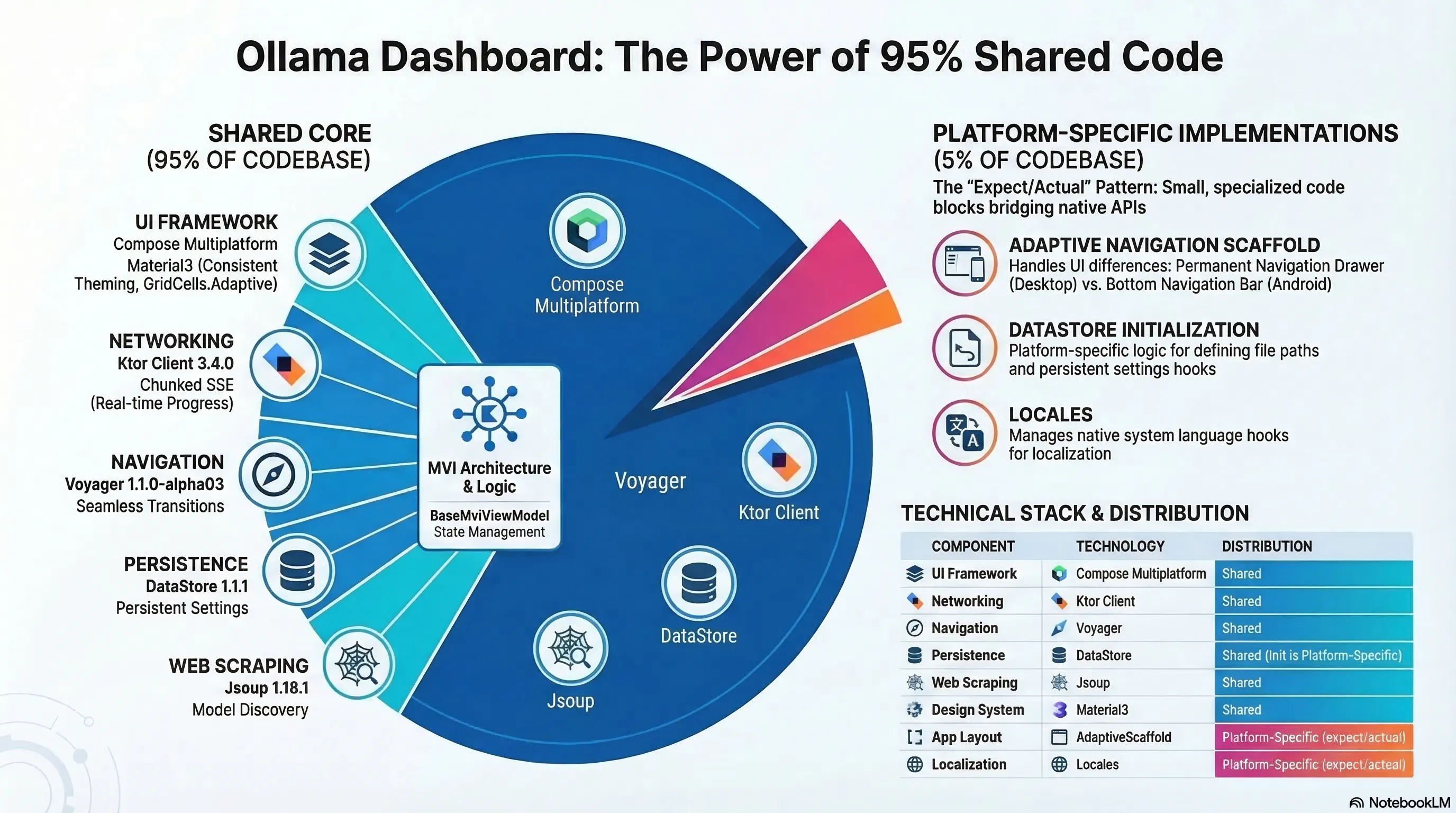
Local LLMs are great – until you have to manage them on multiple machines. Ollama makes it easy to run models like Qwen, Mistral, and Gemma on consumer hardware, but most tools stop at “chat UI”. This tutorial shows how to build a production-ready admin dashboard for Ollama that runs on Android and Desktop with about 95% shared Kotlin Multiplatform code.
You will:
- Build a Compose Multiplatform app with a shared UI layer for Android and Desktop.
- Implement MVI for predictable state, navigation, and one-time effects.
- Integrate with Ollama’s API for model lifecycle, registry discovery, VRAM monitoring, and streaming downloads.
:::tip
Full source code is here: HerdManager
:::
Prerequisites and Project Setup
You should be comfortable with Kotlin, coroutines, and basic Compose. Ollama must be installed and running on at least one machine.
Install and start Ollama:
ollama serve
Verify:
ollama list
The default API endpoint is http://localhost:11434/api.
Step 1: Project initialization
:::tip
The source code for step 1 is here: PHASE-1
:::
Create a new Compose Multiplatform project (Android + Desktop):
kmp init HerdManager --compose
This generates a shared codebase targeting Android and Desktop (JVM). Add versions to libs.versions.toml for consistent dependency management:
[versions]
kotlin = "2.3.0"
compose = "1.10.0"
ktor = "3.4.0"
voyager = "1.1.0-alpha03"
datastore = "1.1.1"

[libraries]
ktor-client-core = { group = "io.ktor", name = "ktor-client-core", version.ref = "ktor" }
voyager-navigator = { group = "cafe.adriel.voyager", name = "voyager-navigator", version.ref = "voyager" }
jsoup = { group = "org.jsoup", name = "jsoup", version = "1.18.1" }
Target stack:
- Kotlin 2.3.0+ and Compose Multiplatform 1.10.0
- Ktor Client 3.4.0
- DataStore 1.1.1
- Voyager 1.1.0-alpha03
- Jsoup 1.18.1
- Material3 for theming
Step 2: Implementing the MVI Core
:::tip
The source code for step 2 is here: PHASE-2
:::
To keep behavior consistent across platforms, the app uses Model‑View‑Intent (MVI). Every screen declares:
- Intent: user actions (e.g.,
PullModel,DeleteModel) - State: immutable snapshot of UI data
- Effect: one-time events (toasts, dialogs) that must not re-fire on recompositionTutorial-Building-a-Cross-Platform-Ollama-Dashboard.pdf+1
BaseMviViewModel
The shared base ViewModel encapsulates state and effect handling:
abstract class BaseMviViewModel<I : MviIntent, S : MviState, E : MviEffect> : ScreenModel {
    private val _state = MutableStateFlow(initialState())
    val state: StateFlow<S> = _state.asStateFlow()

    private val _effect = Channel<E>()
    val effect: Flow<E> = _effect.receiveAsFlow()

    abstract fun initialState(): S
    abstract fun onIntent(intent: I)

    protected fun reduceState(reducer: S.() -> S) {
        _state.value = _state.value.reducer()
    }

    protected fun sendEffect(effect: E) {
        screenModelScope.launch { _effect.send(effect) }
    }
}
Example contract for the Models screen:
sealed interface ModelListIntent : MviIntent {
    data object Refresh : ModelListIntent
    data class DeleteModel(val modelName: String) : ModelListIntent
    data class ConfirmDelete(val modelName: String) : ModelListIntent
}

data class ModelListState(
    val models: List<OllamaModel> = emptyList(),
    val isLoading: Boolean = false,
    val isDeleting: Boolean = false,
    val modelToDelete: String? = null,
    val error: String? = null
) : MviState

sealed interface ModelListEffect : MviEffect {
    data object ShowModelDeletionSuccess : ModelListEffect
    data class ShowDeleteConfirmation(val modelName: String) : ModelListEffect
}
This pattern gives you testable state transitions and clean one-time effects across Android and Desktop.
Step 3: Designing an Adaptive Cross‑Platform UI
:::tip
The source code for step 3 is here: PHASE-3
:::
Navigation should feel native on each form factor, but the UI logic stays shared. The app uses an AdaptiveScaffold abstraction with expect/actual implementations.
Shared declaration:
@Composable
expect fun AdaptiveScaffold(
    selectedRoute: String,
    onRouteSelected: (String) -> Unit,
    language: String,
    content: @Composable (Modifier) -> Unit
)
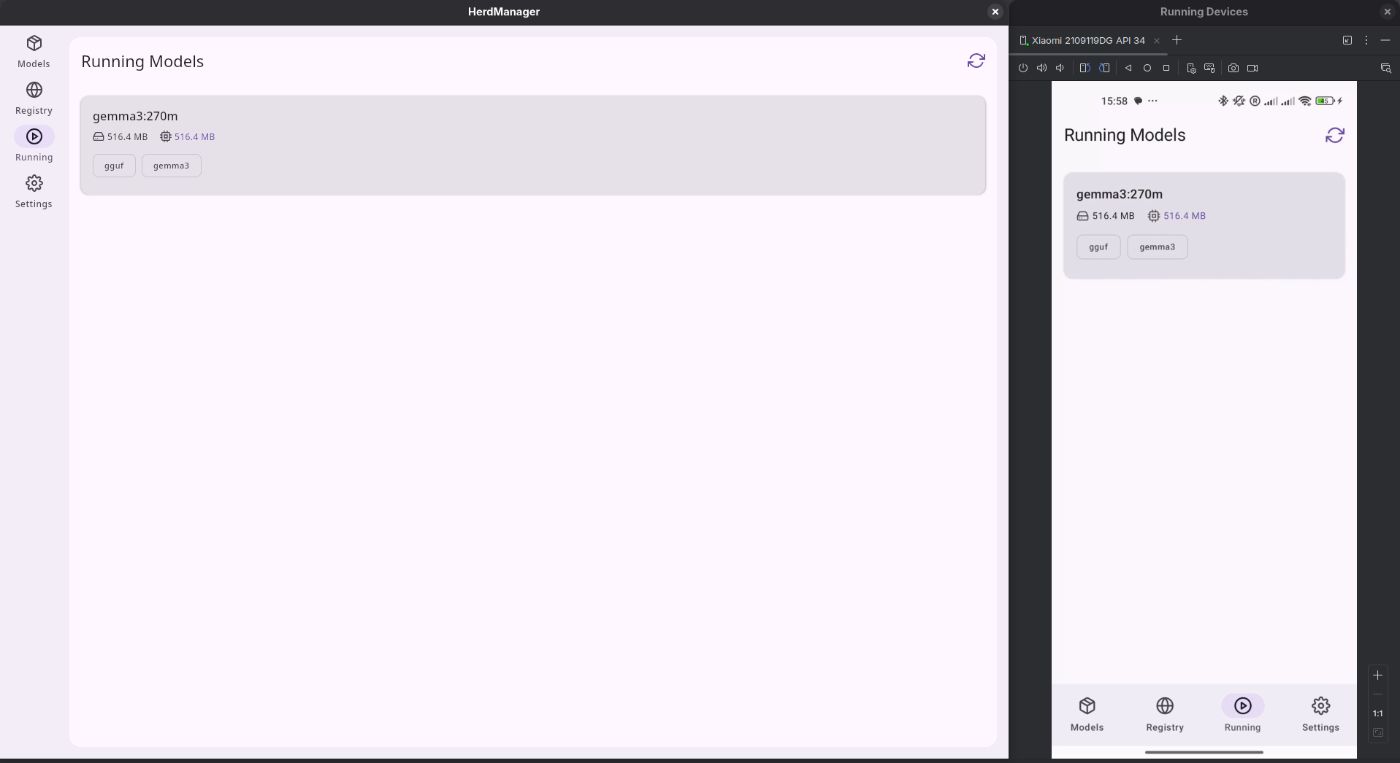
- On Desktop: renders a
PermanentNavigationDraweron the left. - On Android: renders a bottom
NavigationBar.
Inside each route, layouts reuse the same Compose components. The Models screen, for example, uses a responsive grid:
LazyVerticalGrid(
    columns = GridCells.Adaptive(minSize = 300.dp),
    contentPadding = PaddingValues(16.dp),
    verticalArrangement = Arrangement.spacedBy(16.dp),
    horizontalArrangement = Arrangement.spacedBy(16.dp)
) {
    items(models) { model ->
        ModelCard(
            model = model,
            onDelete = { viewModel.onIntent(ModelListIntent.DeleteModel(model.name)) },
            onShowDetails = { viewModel.onIntent(ModelListIntent.ShowDetails(model)) }
        )
    }
}
Step 4: Model Management and API Integration
:::tip
The source code for step 4 is here: PHASE-3
:::
The dashboard talks to Ollama through an OllamaApiService wrapper.
Typical endpoints:
/api/tags– list installed models/api/ps– list running models/api/delete– delete a model/api/show– model metadata
Ktor client calls:
suspend fun getModels(): List<OllamaModel> =
    client.get("/api/tags").body<OllamaModelsResponse>().models

suspend fun deleteModel(name: String) = client.delete("/api/delete") {
    setBody(DeleteRequest(model = name))
}

suspend fun getRunningModels(): List<RunningModel> =
    client.get("/api/ps").body<RunningModelsResponse>().models
Optimistic deletion
When the user deletes a model:
- Show a confirmation dialog via
ModelListEffect.ShowDeleteConfirmation. - On confirm, immediately remove the model from
state.models. - Call
/api/deletein the background. - If it fails, restore the original list and send an error effect.
This keeps the UI responsive while still handling failures gracefully.
Real‑time VRAM monitoring with polling
The Running tab polls /api/ps at a configurable interval (1–60 seconds) and highlights VRAM usage.
Polling job:
private fun startPolling() {
    pollingJob?.cancel()
    pollingJob = screenModelScope.launch {
        do {
            refresh() // fetch from /api/ps
            delay(state.value.pollingIntervalMs)
        } while (isActive)
    }
}
Settings driven behavior:
screenModelScope.launch {
    observeSettingsUseCase().collectLatest { settings ->
        val pollingIntervalMs = settings.refreshInterval * 1000L
        val pollingEnabled = settings.pollingEnabled

        reduceState {
            copy(
                pollingEnabled = pollingEnabled,
                pollingIntervalMs = pollingIntervalMs
            )
        }

        if (pollingEnabled) {
            if (isActive) startPolling() else stopPolling()
        } else {
            stopPolling()
        }
    }
}
Step 5: Registry Discovery and Streaming Pull Progress
:::tip
The source code for step 5 is here: PHASE-5
:::
Ollama does not expose an official registry API, so the app uses Jsoup to scrape https://ollama.com/search.
Registry scraping with Jsoup
object OllamaLibraryScraper {
    fun fetchModels(query: String, page: Int): Result<List<RegistryModel>> = runCatching {
        val url = when {
            query.isEmpty() && page == 1 -> "https://ollama.com/search"
            query.isEmpty() -> "https://ollama.com/search?page=$page"
            page == 1 -> "https://ollama.com/search?q=$query"
            else -> "https://ollama.com/search?q=$query&page=$page"
        }

        val html: String = runBlocking {
            httpClient.get(url) {
                headers { append("User-Agent", "Mozilla/5.0") }
            }.bodyAsText()
        }

        val doc = Jsoup.parse(html)
        parseModelsFromHtml(doc)
    }

    private fun parseModelsFromHtml(doc: Document): List<RegistryModel> {
        return doc.select("li[x-test-model]").mapNotNull { element ->
            // Extract name, description, pull count, capabilities
        }
    }
}
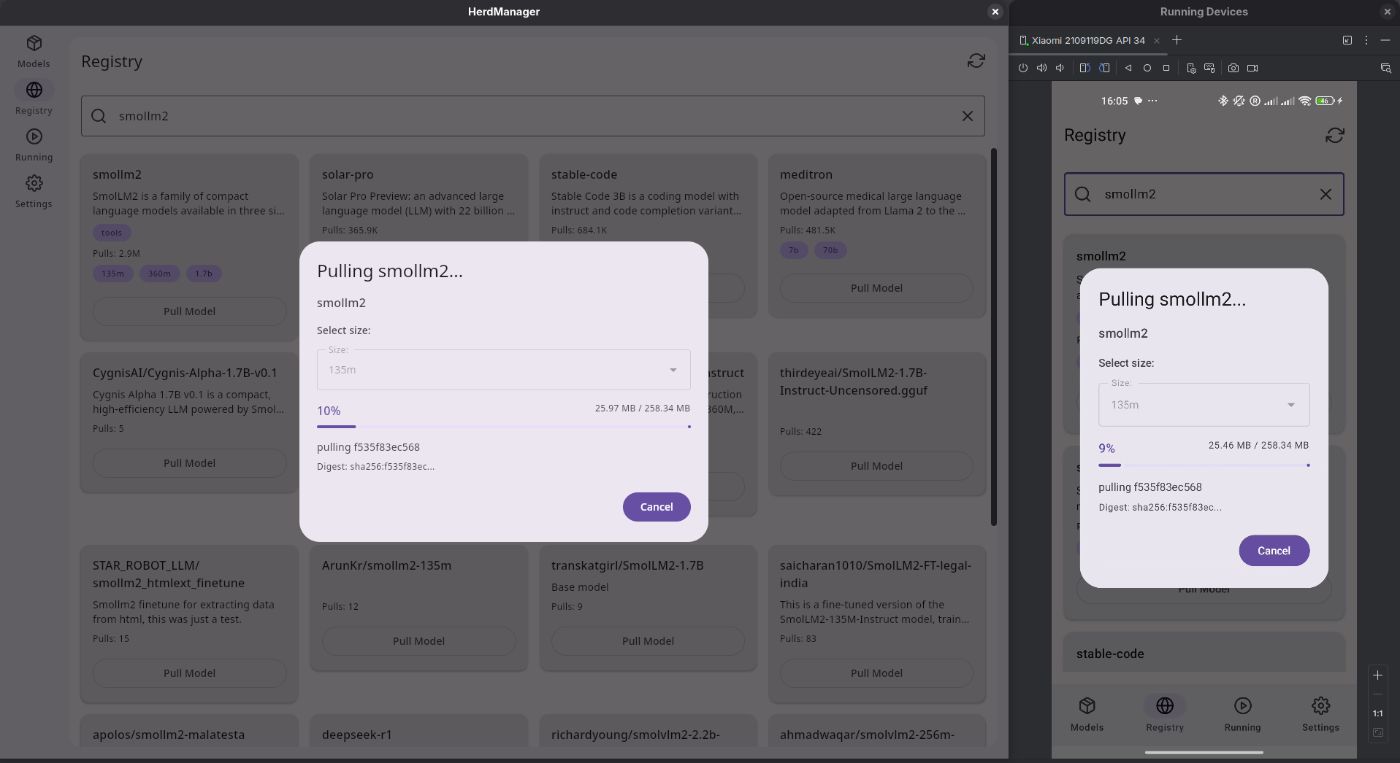
The UI adds real-time filtering and scroll-based pagination (e.g., 30 models per page).
Streaming /api/pull with SSE
Pulling a model streams progress as JSON lines over Server-Sent Events. The app uses preparePost and a custom parser:
fun pullModel(modelName: String): Flow<Result<PullProgress>> = callbackFlow {
    val call = client.preparePost("/api/pull") {
        timeout {
            requestTimeoutMillis = INFINITE.inWholeMilliseconds
            connectTimeoutMillis = 30_000
        }
        contentType(ContentType.Application.Json)
        setBody(PullRequest(model = modelName, stream = true))
    }

    call.execute { response ->
        val channel = response.bodyAsChannel()
        var buffer = ByteArray(4096)
        var position = 0
        var partialLine = ""

        while (true) {
            val bytesRead = channel.readAvailable(buffer, 0, buffer.size - position)
            if (bytesRead < 0) {
                if (partialLine.isNotEmpty()) {
                    trySend(json.decodeFromString<PullProgress>(partialLine).let { Result.success(it) })
                }
                break
            }

            position += bytesRead
            val fullData = buffer.decodeToString(0, position)
            val lines = fullData.split('n')

            partialLine = lines.last()
            lines.dropLast(1).forEach { line ->
                val trimmed = line.trimEnd('r')
                if (trimmed.isNotEmpty()) {
                    try {
                        val progress = json.decodeFromString<PullProgress>(trimmed)
                        trySend(Result.success(progress))
                    } catch (e: Exception) {
                        trySend(Result.failure(e))
                    }
                }
            }

            val remaining = partialLine.encodeToByteArray()
            buffer = ByteArray(4096)
            remaining.copyInto(buffer)
            position = remaining.size
        }
    }

    awaitClose { cancel() }
}.flowOn(Dispatchers.IO)
The UI subscribes to this Flow to render:
- Percentage completed
- Total size
- Pulling details
Step 6: Configuration, Theming, and Localization
:::tip
The source for step 6 is here: PHASE-6
:::
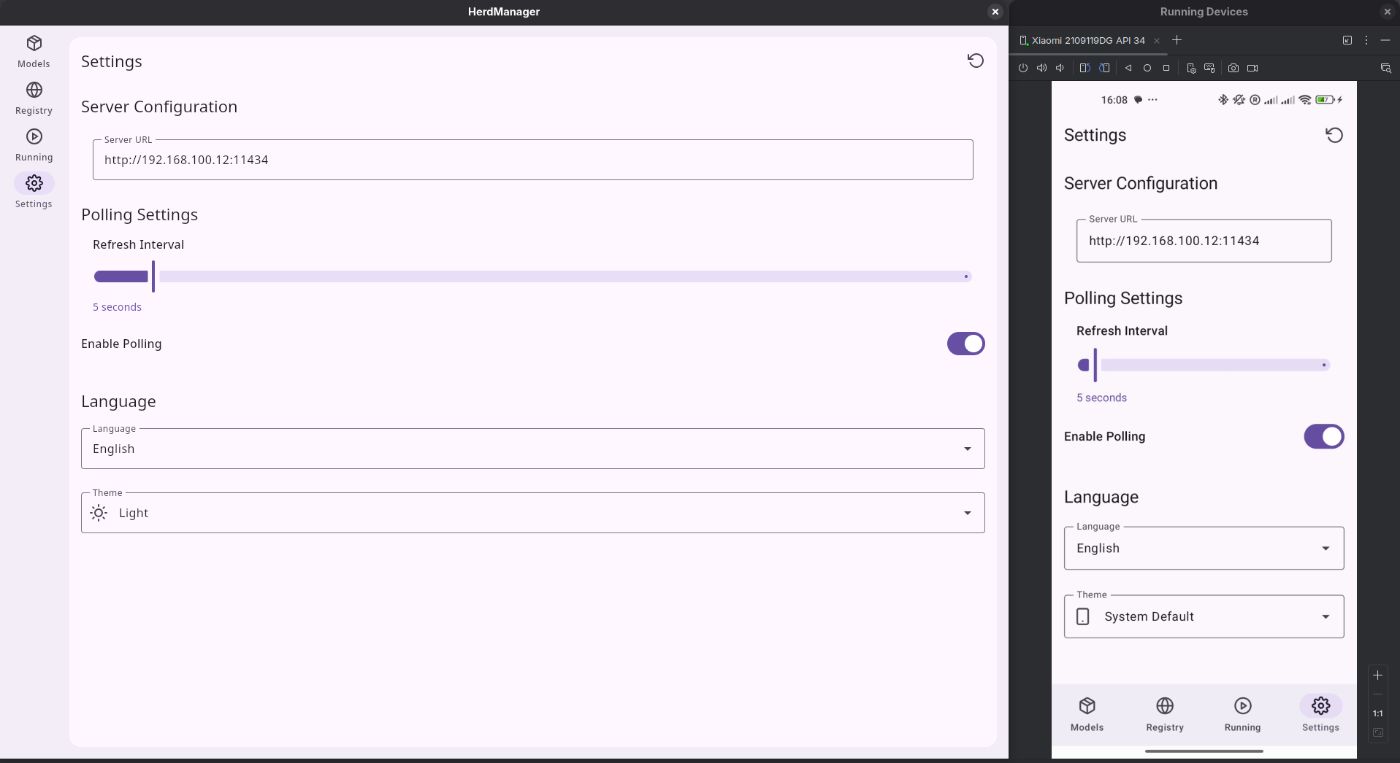
The Settings screen centralizes configuration shared across platforms.
Settings model and DataStore
data class Settings(
    val serverUrl: String,
    val refreshInterval: Int,
    val pollingEnabled: Boolean,
    val language: String = "en",
    val themeMode: ThemeMode = ThemeMode.SYSTEM
)
Persist settings:
suspend fun saveSettings(settings: Settings) {
    dataStore.edit { prefs ->
        prefs[SERVER_URL_KEY] = settings.serverUrl
        prefs[POLLING_ENABLED_KEY] = settings.pollingEnabled
        prefs[REFRESH_INTERVAL_KEY] = settings.refreshInterval
        prefs[LANGUAGE_KEY] = settings.language
        prefs[THEME_MODE_KEY] = settings.themeMode.name
    }
}
Dirty-state tracking shows Save/Discard buttons only when there are unsaved edits.
Theme mode and Material3
val isDarkTheme = when (settings?.themeMode) {
    ThemeMode.LIGHT -> false
    ThemeMode.DARK -> true
    else -> isSystemInDarkTheme()
}

val colorScheme = if (isDarkTheme) darkColorScheme() else lightColorScheme()

MaterialTheme(colorScheme = colorScheme) {
    // App content
}
Localization uses Compose Resources with @StringResource and expect/actual for locale handling so the UI recomposes when language changes.
Wrap‑Up
With Compose Multiplatform and MVI, you now have an Ollama admin dashboard that:
- Manages model lifecycle (list, pull, delete) with streaming progress.
- Discovers registry models via scraping when no official API exists.
- Monitors running models and VRAM in real time with configurable polling.
- Shares around 95% of the codebase between Android and Desktop while still feeling native on each platform.
Clone the repository, point it at your Ollama server, and start managing local LLMs like a proper multi-platform service instead of a single chat window. Contributions, issues, and feature ideas are welcome in the GitHub repo – his dashboard is designed to grow with the Ollama ecosystem.