
I’ve been running a long-term experiment: can a single person, using neural networks, develop and maintain a massive codebase that matches banking solutions in reliability, while shipping features at the speed of a pet project? These are, of course, hardly compatible things, but my goal is to at least walk the path of a startup with 0 employees and tight deadlines.
Currently, I’m working on a pet project, called Cynosure — an AI runtime in Golang aimed at running agents in the cloud, at scale, for a large number of users. Architecturally, it’s a highly complex project, and the speed of prototyping often harshly conflicts with code hygiene. It was initially designed following Domain-Driven Design (DDD) principles. It’s a complex architecture from a design standpoint, and the implementation contains a lot of boilerplate. However, it has one killer advantage: DDD assumes you have a team of dozens of people who barely understand each other’s context, but individually must be able to assemble self-contained components. Swap “people” for “agents,” and what do you get? Exactly: a multi-agent system for a large codebase!
The Scale of The AI Quality Problem
Since I’m developing solo, my main bet was on aggressive automation and AI agents. For a long time, linters were intentionally ignored — the focus was on testing hypotheses and achieving a fast time-to-market.
Once, I started adding a fix for MCP clients so they could make tool calls asynchronously from the main agent loop. But something bad happened: I tasked the agent with implementing the feature, the feature was added, but the result? Well, the payback didn’t take long.
The price for speed arrived right on schedule: Gemini simply couldn’t add the changes properly without my help. One change broke the tests, another fixed those but broke others. The problem wasn’t the model: I tried Claude Opus, and Codex also failed on the first try. It became clear: either I write documentation (which is essentially double the work), or I clean up the code so it becomes self-documenting.
It was time to pay down the technical debt, but first, I needed to understand its actual size. Let’s take a look:
First, I added a very, very, VERY strict configuration for golangci-lint. 83 linters, configured to whip any code into perfect shape. Essentially, this configuration feels like the Rust compiler: one step out of line from perfect code, and the linter slaps your hands. (Shoutout to Ayaz Ayupov, who helped create this config for golangci; his work saved a lot of time avoiding building it from scratch).
Second, I decided to stash my current changes and see what the overall state of my project was. A basic baseline measurement (git checkout main && golangci-lint run ./...) highlighted the catastrophic scale of the accumulated tech debt: 2,611 issues. Qodo, the code review tool I use, kept warning me about this, but I ignored it. Now, ignoring it was no longer an option.
Let’s make some calculations
Let’s calculate the ROI of manual labor. If we allocate a modest average of 3 minutes for thoughtfully reading, fixing, and verifying a single issue, a manual fix would take about 3 min * 2611 issues ≈ 130 hours of pure time. 130 hours! That’s almost a month of full-time work spent exclusively on satisfying a static analyzer. And this is just my pet project! I don’t want to be a hostage to my codebase; I want to build it! 🤯
So, I was faced with a challenge: bring the issue counter down to absolute zero (yes, I’m a maximalist) without freezing product development for a month. The obvious solution seemed to be delegating this routine to AI. But, as practice showed, the scale of the problem requires a systematic engineering approach, not just blindly throwing an agent at it.
Quotas: “This little maneuver is gonna cost us 51 daily limits”
Realizing the scale of the tragedy, I tackled the problem in the most obvious and lazy way worthy of any programmer: I decided to unleash the AI on the entire project at once.
My main tool right now is Antigravity — a fork of VSCode with absolutely nothing special about it, except the models are “free” if you have a Google AI subscription. (Important note: after experimenting with Cursor, Claude Code, Gemini CLI, and VSCode Copilot, I realized there is NOTHING that significantly distinguishes these editors from one another. So when I say “Antigravity,” I genuinely mean any editor with an agent plugin). In Antigravity (as everywhere else), the agent works in the classic ReAct (Reason + Act) loop: it runs a command in the terminal, reads the output, analyzes it, and goes to edit the code. So let’s ask the model to fix all the errors:
use `golangci-lint run --fix`, target is zero issues
That plan was great, it was freaking ingenious if I understand it correctly. it was a swiss watch. So, wasting no time, I went to get some coffee, made myself a cup, grabbed some snacks, came back, and… Quota for the next 5 hours exhausted! Wait, what? How?
The bottleneck wasn’t the model’s intelligence, but the “pipe” the data was flying through.
The linter, finding 2,611 errors, spat out a giant wall of text into stdout. The agent, following its loop, dutifully read these thousands of lines of output after every iteration. The context window instantly bloated to incredible sizes. The most frustrating part: Antigravity (like other editors) has a failsafe — if the output is too long, it packs it into a file and gives the model a link to it. But in my case, it didn’t trigger: The golangci output was just slightly under the threshold for this protection to activate, so the entire raw output flew straight into the agent’s context.
The model started “choking” on garbage context, which led to the inevitable: first, I blew through my 5-hour token limits, and then, after trying to restart the process, I hit the hard weekly API quotas. Fortunately, weekly quotas only apply to Pro models, so without wasting a second, I started thinking: how do I structure this process?
The conclusion was clear: feeding the entire technical debt to the AI at once is physically impossible. You simply won’t have enough quotas. To automate this process, the AI agent needs a strict diet — a data flow filtration system and smart task routing. I needed to start managing the context.
So, What Do We Need?
To stay within limits, keep my sanity, and, most importantly, force the agent to work with surgical precision, the entire process had to be radically rebuilt. If the AI chokes trying to swallow an elephant whole, we will feed it in strictly measured bite-sized pieces.
I arrived at a system that can be called Double Isolation:
Namespace Isolation (with DDD)
Lord, thank you that I wasn’t afraid of boilerplate and a bloated codebase! I agree that DDD is ultimately an enterprise architecture, and doing it by hand might drive you crazy. But! A strict architecture with a clear segregation into layers (Domain, Infrastructure, Usecases) allowed me to algorithmically narrow the context. So I officially admit: ==sometimes, by increasing the codebase, you can win through logical transparency.== This isn’t advice for every project (building libraries, protocols, etc., with DDD is a bad idea, trust me), but if we are talking about End User Software — the code that is directly used, not imported — it is a more than sound decision. But only if you aren’t afraid of boilerplate and understand how to work with it correctly, OR if you have a team of at least 7-12 people (and we of course include multi-agent systems in this list).
Instead of throwing the agent at the whole repository, I started restricting its scope to one specific package. The prompt transformed from a global “fix everything” to a local, crystal-clear task:
fix linters at `./internal/domain/accounts/usecases`
This INSTANTLY solved the quota problem. The linter output for a single package might contain 80-100 errors, but it’s certainly not 2,600. The agent calmly reads stdout, understands the context of the specific use case, makes an isolated fix, and moves on. Quotas were still consumed very quickly, but at this stage, the main advantage appeared: you can process at least 2-3 packages per quota and still have time for code review (which, by the way, is critically important, but more on that later).
Triage Isolation (Multi-config golangci)
But spatial isolation wasn’t enough. Very quickly, I noticed that 83 linters are not a monolithic mass. They require a fundamentally different level of cognitive load from both a human and an AI. It’s funny that at one point Gemini literally wrote to me: “I fixed warnings actually, but next time please split the linters up.”
I broke all errors down into three categories (Tiers) and configured a specific agent pipeline for each.
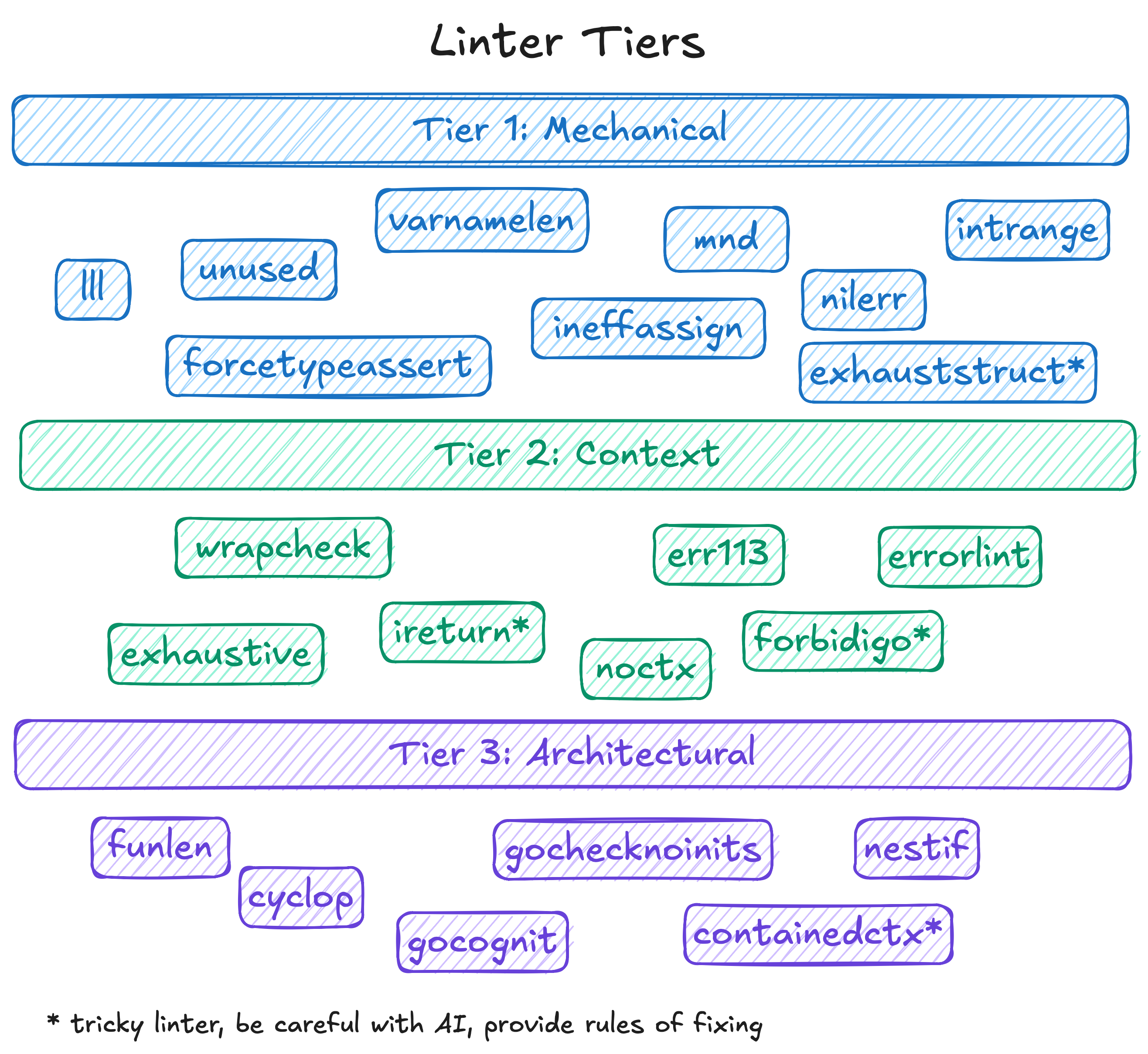
- Tier 1 (Mechanics): This included linters like
unused,thelper,govet,nolintlint. It’s syntactic garbage. The agent doesn’t need to think about architecture here at all. We run it almost “blindly” across the entire package. It methodically deletes unused variables and places helpers in tests. Reviewing such pull requests takes seconds—you skim the diff and hit Approve. - Tier 2 (Context): This is handling errors and return values (
err113,wrapcheck,ireturn). Here, the AI needs to somewhat understand the call context. For example, when the agent rewrites the oldgithub.com/pkg/errorsto the standardfmt.Errorf("%w", err), it must not break the wrapping logic. The model handles this perfectly 95% of the time, but during review, you actually have to engage your brain. - Tier 3 (Architecture): The most interesting and dangerous tier. Linters of cognitive complexity:
gocognit,funlen,nestif,cyclop. When a function balloons to 100 lines with 5 levels of nesting, the linter sounds the alarm. And here, the AI starts to blatantly “drift” and hallucinate. To satisfy the linter and reduce nesting, the agent is capable of ruthlessly shredding beautiful business logic into a dozen meaningless micro-functions, or worse, breaking architectural patterns.
The difficulty here lies in composing the configuration properly so you can easily invoke the linter with either Tier 1 or Tier 3. I decided to be clever and generated the config via cuelang. It’s not the only right solution, but it was convenient for me to have a single dynamic config that I could change as needed. Plus, you can add DO NOT EDIT or something similar to the YAML output so the agent doesn’t even try to mess with the configs. By the way—NEVER allow the model to change configs on its own! Otherwise, the model gets “lazy” and starts modifying the config to bypass errors instead of fixing the code.
Review of Changes
The biggest risk when refactoring 2,600 warnings is losing control over the changes, breaking package interface contracts, and consequently breaking dependent packages. We definitely don’t want that, so we need some protection. Naturally, we need to review. But how do you review fixes that address so many issues? It’s essentially reviewing the entire project from scratch!
The first option is to use the AI diff provided by all VSCode forks; the chat shows everything the model edited. However, after a while, you’ll notice (or already have, if you use an IDE heavily!) that working with these diffs is extremely inconvenient:
- The diff actually shows what has already been deleted, not what is proposed. That is, the physical file on disk is already in the state the model generated. If you close the editor or a bug occurs — the entire diff is lost, or rather, “automatically applied”.
- Any model I’ve tried absolutely loves shuffling the order of functions, types, and so on. This is a massive problem: you look at the code and see 1000+ additions and 1000+ deletions, but the model didn’t actually change the code; it just moved things around (e.g., to fix linter warnings). But
git diffuses an algorithm that doesn’t see logical rearrangements; git works with byte sequences, and uses byte comparison algorithm, not business logic. - The scariest part — if you are building a library rather than an end application, the model can, without any malicious intent, completely destroy your release. A new field added here, a method option removed there, an “optimized” output elsewhere… It may kill the library compatibility and ruin your reputation with users!
These are very serious problems. So much so that undertaking such a massive refactoring is simply dangerous, yet we want sufficient agency and autonomy from the neural network. What to do?
I took a different route. Since the agent makes changes directly to the files anyway, I started automatically “approving” all its edits in the editor, completely ignoring the AI diff. That diff hinders more than it helps. Besides, there is a more reliable, convenient, and popular solution: the classic git diff. In VSCode, it is incredibly convenient to stage changes not by whole files, but granularly, by individual hunks, clicking the “+” next to the required block. This allowed me to carefully separate the wheat from the chaff.
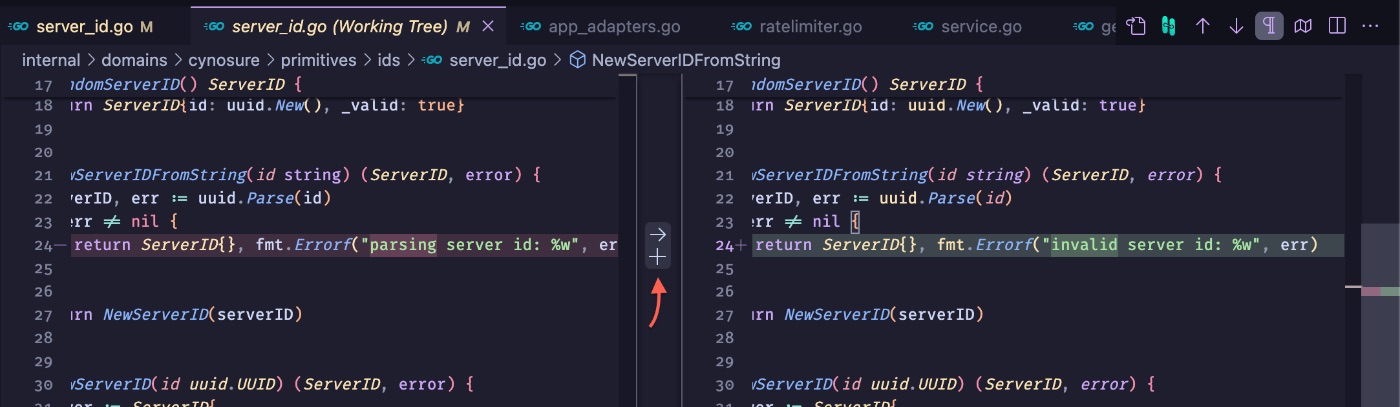
This is where the Triage matrix (mentioned earlier) came in handy. The process was divided into stages:
- Diff-friendly run: First, I unleashed the agent on linters like
lll,varnamelen,wsl. Their fixes are predictable, don’t break the structure, the order of code doesn’t change, and the edits are very easy to review and stage with a standardgit diff. - Structural run: Then came the heavyweights—
gocognit,cyclop,funlen. Trying to reduce cognitive complexity, the agent regularly shuffled the order of declarations and radically changed function architecture. In a standard git diff, this turned into a bloody mess of empty and added lines. To understand the essence of the edits, I found two incredibly cool review tools:difftasticandSemanticDiffs. Their trump card is comparing files not as a set of bytes, but at the Abstract Syntax Tree (AST) level, showing logical differences rather than textual permutations.
The work went DRAMATICALLY faster. While I previously passed the time between quotas by doing long, thoughtful reviews, after SemanticDiffs I could just skim to ensure the code looked good, check test coverage, and calmly approve the changes.
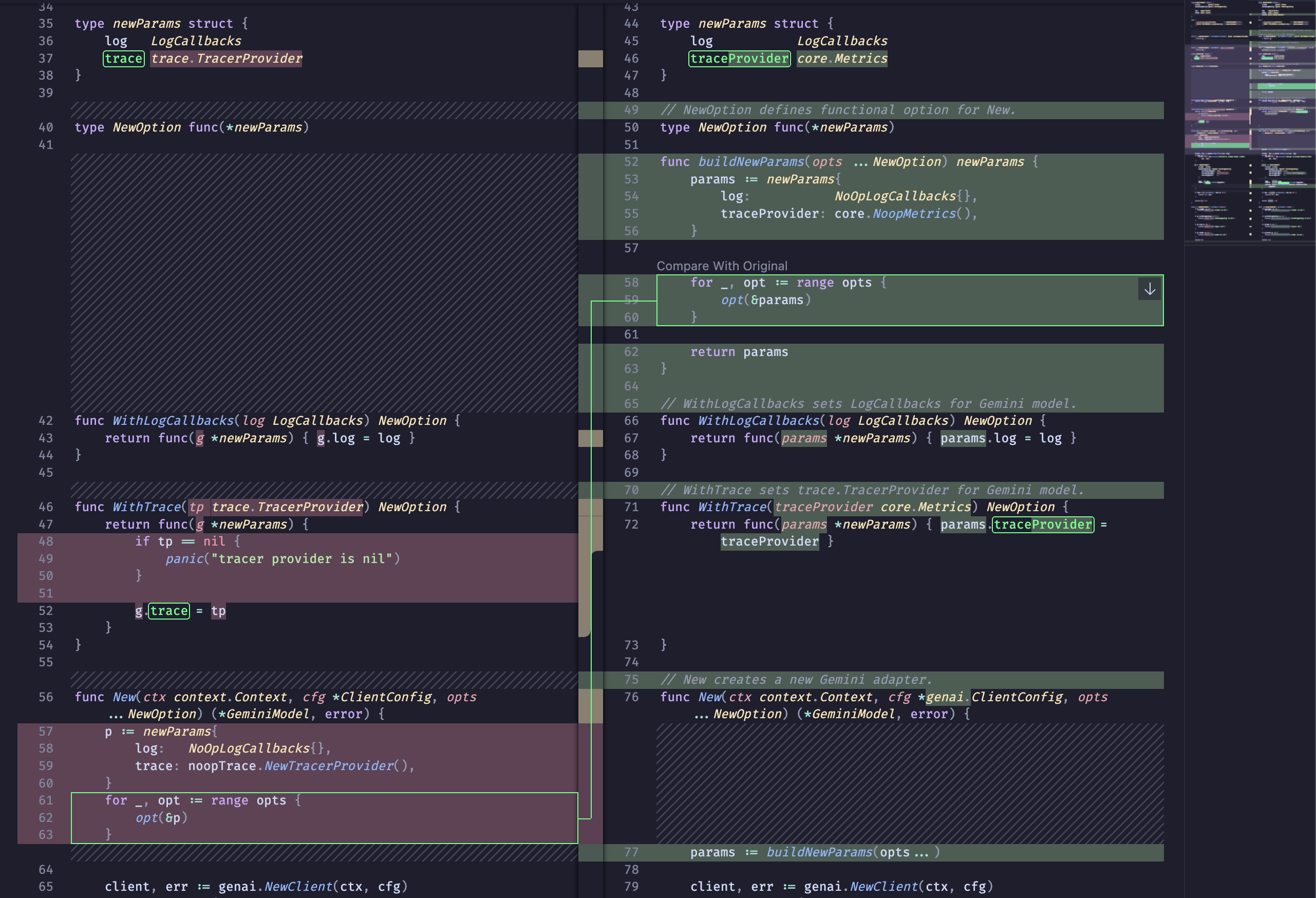
However, after some time, I noticed a new problem: the model started thinking, “If this is an internal package, then I can probably change this method entirely, and just fix it in the other importing packages!” But once the fix began, it completely forgot to search for ALL usages of a given function. For example: when I was refactoring the LLM client adapter, the model found a Stream() method that was poorly documented. Its logic: “Aha, well, since it’s streaming, it’s probably in the Kafka adapter. No? Well then I have nothing to change!”
While this example shows how crucial naming is (especially when AI writes code), it is very telling: the neural network didn’t realize it was streaming a response from VertexAI, and that it was streaming text, not messages. But for some reason, it stubbornly refused to use grep across the entire project.
Teaching the model how to work with grep is inefficient: the command’s output can be too large for the task’s context, and such a search isn’t really the right tool for checking compatibility anyway. So, I decided to use golang.org/x/exp/cmd/apidiff to verify that compatibility wasn’t broken. This tool, although built by Golang contributors, has some usability quirks—the most serious being that it doesn’t know how to work with git natively. But that is outweighed by the fact that it does its job absolutely perfectly. I started piecing it into a pipeline workflow:
- State Saving and Verification Flow:
  # 1. Checkout a stable commit and export an API snapshot
  go install golang.org/x/exp/cmd/apidiff@latest
  git checkout <stable_commit>
  apidiff -w ./path/to/pkg/api.diff ./path/to/pkg

  # 2. Stash current changes (the agent's work), return to the branch, and pop changes
  git stash
  git checkout -
  git stash pop

  # 3. Compare the package's current API with the saved snapshot
  apidiff ./path/to/pkg/api.diff ./path/to/pkg
- Example of a caught AI error:
  Incompatible changes:
  - NewToolID: changed from func(AccountID, github.com/google/uubid.UUID, ...ToolIDOption) (ToolID, error) to func(AccountID, github.com/google/uuid.UUID) (ToolID, error)
  - ToolIDOption: removed
Don’t be intimidated by the number of commands: you only need to go through the packages and do this once before starting the changes! Once you have the diff for the API, you can freely reuse it to verify changes while the neural network executes tasks.
In my case, I was slightly lenient with strict API adherence: since most changes occurred in internal/, 100% API preservation wasn’t always required. But in public modules, there are situations where a linter (for example, unparam or the requirement to have context.Context as the first argument) is physically impossible to satisfy without breaking backward compatibility. In this case, the only thing you can do is instruct the model to use //nolint, but only with a detailed description and a strict review showing that it is a fundamental issue.
Prompt as Technical Specification: Half-baked is better than nothing
When facing Tier 3 structural linters, the AI always looks for the cheapest way to bypass the rule. And this search often leads to architectural destruction, premature optimization, or other problems that de facto reduce the model’s autonomy.
Here’s an example: trying to reduce the cognitive complexity of constructors, the agent repeatedly destroyed the Functional Options pattern. Instead of an elegant composition of options (designed for easy code generation), it simply “flattened” the arguments into one giant sheet of parameters, or transformed private types into public ones, just to avoid having to use //nolint. For example:
type newParams struct {
clientName string
trace trace.TracerProvider
}
type NewOption interface{ applyNew(*newParams) }
func New(ports ports.ServerStorage, oauth ports.OAuthHandler, opts ...NewOption) *Service {
params := newParams{
// imagine there are 20 params
}
for _, opt := range opts {
opt.applyNew(¶ms)
}
return &Service{
// and 20 fields more
}
}
In this example, it seems like there is nothing to change, but the model thinks: “Okay, funlen is complaining about a huge New(). The options take up most of it… What if I just pass everything directly in newParams?”
type NewParams struct {
    Ports      ports.ServerStorage
    Oauth      ports.OAuthHandler
    ClientName string
    Trace      trace.TracerProvider
}


func New(params *NewParams) *Service {
    return &Service{
        // wow! so "easy" to read! (but model doesn't know WHY we used options before)
    }
}
To the model, this is a genuinely cool improvement: less code in the constructor, less complex logic, all parameters are visible, everything is awesome! However, the options pattern exists for a reason: at the cost of considerable boilerplate, options protect object invariants, implement validation, and frankly look much cleaner than {a; thing; with; a; bunch; of; parameters} — assuming you aren’t looking directly at the implementation. But the model blatantly ignores this.
There is a perfect solution to this problem: write a custom linter that checks adherence to the options pattern. However, we are dealing with a completely different task right now; why get distracted? A custom linter will definitely help in the long run, but writing it now? No, let’s concentrate on reducing tech debt, and leave the process of maintaining it for the end.
Architectural Anchors
To prevent the agent from breaking the design, I started introducing architectural anchors. First, I began writing a “Technical Specification for Linter Development.” However, it’s not a full-blown tech spec, but rather a simpler version, focused on what I want to get and what I don’t want. I wrote using this template:
# REQUIREMENTS FOR <your-issue> LINTER

## CONTEXT

**purpose, why it's important for your project**

## EXAMPLES

Good:

~~~go
func DoX() {
    // your example. Make code example as short as it is even possible
}
~~~

Bad:

~~~go
func DontDoY() {
    // your example. Keep these examples EXTREMELY BRIEF
}
~~~

# REFACTORING RECOMMENDATIONS

**This one is most crucial part: You don't have to write linter, if
you explain carefully HOW to refactor.  it will help AI to
write a linter implementation for you.**

Examples:

- Issue: **Brief explanation of some case**
  - Solution 1: **keep it short**
  - Solution 2: **allow AI to choose solution**
And that’s it! You can check my project to see how I implemented these rules. Just making a tech spec isn’t enough; you need to add it to the Rules for your editor. Directories vary between editors, but the principle remains: for example, in Antigravity, this spec goes into .agents/rules/go-quality-your-case.md. Usually, the agent will figure out on its own that it needs to use this rule, but it’s still better to be explicit: in AGENTS.md (or your rules file), specify something like this:
## ARCHITECTURAL CONSTRAINTS

While refactoring, editing, or designing implementation, you **MUST** read
these rules first, before doing any changes:

- `.agents/rules/go-quality-your-case.md` — extremely brief description
- `.agents/rules/go-quality-option-pattern.md` — usage and design of Golang
  Functional Options pattern
- `.agents/rules/go-quality-error-handling.md` — error handling rules for Golang
Writing architectural rules in Markdown is an excellent way to quickly pay down tech debt (which is what allowed me to finish in 3.5 days of work instead of a month). But in the long run, any prompt remains merely a statisticalrecommendation. The model might ignore it as soon as the probabilistic weight of another solution tips the scales, or if the task’s context becomes so bloated that there’s simply nowhere to inject these rules.
The true value of this approach is revealed later. A text constraint from AGENTS.md is a ready-made tech spec for writing a custom linter. Once the mass refactoring is complete, you simply feed this exact same text to the agent with a new, highly specific task: “Write a custom static analyzer based on go/analysis that checks for adherence to the Functional Options pattern.” It will likely take a couple of days of work, even with AI. But in return, you get all the benefits at once:
- You quickly reduce the project’s tech debt (which was the primary goal).
- You create architectural rules that can be included in documentation for onboarding people to the project.
- By creating the linter, you reduce the contextual load on the agent, without losing any quality.
Thus, a temporary crutch for the AI elegantly converts into an ironclad algorithmic defense for your CI/CD.
What Have We Learned Today? And How to Use It
We are used to evaluating automation by the time saved. And by this metric, the AI performed brilliantly: 2,611 errors were reduced to zero in 3.5 days. For a human, doing this volume of thoughtful review would take about 130 hours of pure time. That’s almost a whole working month that could be spent on product development, or simply spending time with family—we are all human, after all. But the most important thing happened after I finally brought the error count to zero: when I asked the agent to add asynchronous tool calls post-refactoring, the model successfully wrote the feature implementation on the first try! My weekend wasn’t wasted; I got not only clean, readable code, but also made it vastly easier for the models to generate new features.
==But the main takeaway from this experiment is qualitative, not quantitative.==
The role of a Senior Engineer when working with agents is transforming: we are shifting from writing code to building system constraints. Throw an AI into a project without control, and it will rewrite everything so badly it breaks half your services. Wrap its work in a Triage matrix, protect the ports via apidiff, and anchor the architecture—and you get the perfect executor, capable of digesting any volume of routine.
Models are ready for massive refactoring of complex Enterprise projects, and you don’t even need a team for it! But only as long as you algorithmically manage the context they consume.
What’s your approach?
Cleaning up tech debt with AI agents is already a viable working tool for maintaining bloated codebases. How do you integrate neural networks into your processes? Have you encountered situations where the AI broke contracts trying to “improve” the architecture?
I’d be glad to discuss your experiences and approaches. You can reach out to me on LinkedIn or check out my current work on the Cynosure project on GitHub.