By using this site, you agree to the Privacy Policy and Terms of Use.
Accept
World of SoftwareWorld of SoftwareWorld of Software
  • News
  • Software
  • Mobile
  • Computing
  • Gaming
  • Videos
  • More
    • Gadget
    • Web Stories
    • Trending
    • Press Release
Search
  • Privacy
  • Terms
  • Advertise
  • Contact
Copyright © All Rights Reserved. World of Software.
Reading: Check out this bizarre Google Wallet bug causing the app to flicker wildly
Share
Sign In
Notification Show More
Font ResizerAa
World of SoftwareWorld of Software
Font ResizerAa
  • Software
  • Mobile
  • Computing
  • Gadget
  • Gaming
  • Videos
Search
  • News
  • Software
  • Mobile
  • Computing
  • Gaming
  • Videos
  • More
    • Gadget
    • Web Stories
    • Trending
    • Press Release
Have an existing account? Sign In
Follow US
  • Privacy
  • Terms
  • Advertise
  • Contact
Copyright © All Rights Reserved. World of Software.
World of Software > News > Check out this bizarre Google Wallet bug causing the app to flicker wildly
News

Check out this bizarre Google Wallet bug causing the app to flicker wildly

News Room
Last updated: 2026/04/07 at 9:41 AM
News Room Published 7 April 2026
Share
Check out this bizarre Google Wallet bug causing the app to flicker wildly
SHARE

Edgar Cervantes / Android Authority

TL;DR

  • Google Wallet users are experiencing an issue with the app.
  • Several reports claim that a glitch is causing the app to flicker wildly, rendering it unusable.
  • Google says it has identified the issue and has started rolling out a fix.

If you’ve noticed something weird going on with the Google Wallet app recently, you’re not alone. A large number of users have encountered a glitch that prevents them from using the app. The good news is, Google is already working on a fix.

Don’t want to miss the best from Android Authority?

google preferred source badge light@2xgoogle preferred source badge dark@2x

A flood of reports is pouring in across Reddit (1, 2, 3, 4) and Google’s support site about an issue with the Wallet app. Specifically, these users point to a glitch that causes the app to flicker wildly when attempting to open with biometric unlock tools, like the fingerprint sensor. While most of the reports are from Samsung Galaxy owners, the issue is affecting some Nothing Phone users as well. You can check out an example of the bug in the GIF below.
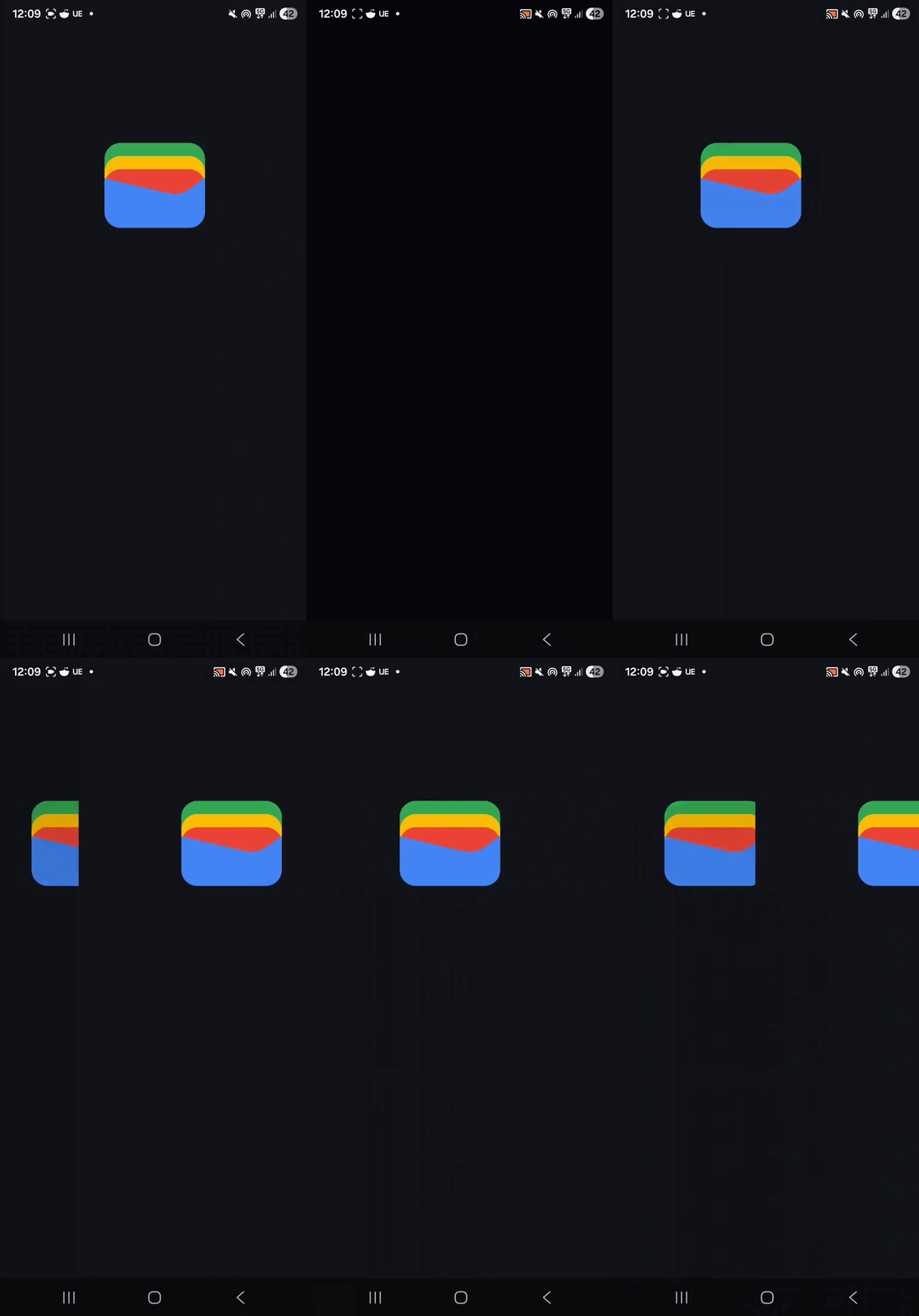
samsung google wallet glitch

If you’re also experiencing this bug, don’t worry, it should be resolved soon. A Google spokesperson tells Android Authority, “We’ve identified an issue that caused the Google Wallet screen to flicker for a small number of users and have begun rolling out a fix.”

Have you experienced any major glitches with a recent Pixel update?

321 votes

Google has also offered some troubleshooting tips for those experiencing issues. One Reddit user who contacted Google about the problem claims to have received the following response from the company’s support team:

Thank you for your patience while I consulted with our technical team regarding the issues you’ve been experiencing with the Google Wallet app.


To help resolve this, please try the following troubleshooting steps in order:


  • Restart your device: This often resolves temporary system glitches.


  • Check for Software Updates: Go to Settings > Software Update > Download & Install to ensure your phone is running the latest OS.


  • App Updates: Open the Play Store and ensure the Google Wallet app and Google Play Services are fully updated.


If the issue persists, please try clearing the app’s temporary data:


  • Force Stop & Clear Cache: Go to Settings > Apps > Wallet > Force Stop, then select Storage > Clear Cache.


  • Clear App Data: If the cache doesn’t work, select Clear Data (Note: You may need to sign back in or re-add your cards after this step).


  • Reinstall: Uninstall the Google Wallet app and reinstall it fresh from the Play Store.


Sometimes specific display or system settings can interfere with the app:


  • Display Settings: Try temporarily disabling Adaptive Refresh Rate or Motion Smoothness (Settings > Display > Motion Smoothness > Standard).


  • Developer Options: If you have Developer Options enabled, ensure “Show surface updates” or “HW overlays” are turned off.


  • Safe Mode: Try opening the app in Safe Mode to see if a third-party app is causing a conflict.


Ensure your Google account is syncing correctly. In extreme cases, removing and re-adding your Google account to the device can refresh the connection to Google services.

Thank you for being part of our community. Read our Comment Policy before posting.
Sign Up For Daily Newsletter

Be keep up! Get the latest breaking news delivered straight to your inbox.
By signing up, you agree to our Terms of Use and acknowledge the data practices in our Privacy Policy. You may unsubscribe at any time.
Share This Article
Facebook Twitter Email Print
Share
What do you think?
Love0
Sad0
Happy0
Sleepy0
Angry0
Dead0
Wink0
Previous Article Corvette recall: GM pulls vehicles over faulty software issue Corvette recall: GM pulls vehicles over faulty software issue
Next Article China Post Group ventures into drone sector · TechNode China Post Group ventures into drone sector · TechNode
Leave a comment

Leave a Reply Cancel reply

Your email address will not be published. Required fields are marked *

Stay Connected

248.1k Like
69.1k Follow
134k Pin
54.3k Follow

Latest News

Tesla Model Y ownership review after six months: What I love and what I don’t
News
when speculation becomes the best possible campaign
Mobile
Bill Gates to appear before House panel in Epstein investigation
News
90+ May Marketing Ideas for Any Business or Budget | WordStream
Computing

You Might also Like

Tesla Model Y ownership review after six months: What I love and what I don’t
News

Tesla Model Y ownership review after six months: What I love and what I don’t

15 Min Read
Bill Gates to appear before House panel in Epstein investigation
News

Bill Gates to appear before House panel in Epstein investigation

0 Min Read
Samsung’s 2026 foldable plans may be even bigger than we thought
News

Samsung’s 2026 foldable plans may be even bigger than we thought

3 Min Read
The Moto Pad is Motorola’s first US-bound tablet in over a decade
News

The Moto Pad is Motorola’s first US-bound tablet in over a decade

2 Min Read
//

World of Software is your one-stop website for the latest tech news and updates, follow us now to get the news that matters to you.

Quick Link

  • Privacy Policy
  • Terms of use
  • Advertise
  • Contact

Topics

  • Computing
  • Software
  • Press Release
  • Trending

Sign Up for Our Newsletter

Subscribe to our newsletter to get our newest articles instantly!

World of SoftwareWorld of Software
Follow US
Copyright © All Rights Reserved. World of Software.
Welcome Back!

Sign in to your account

Lost your password?