By using this site, you agree to the Privacy Policy and Terms of Use.
Accept
World of SoftwareWorld of SoftwareWorld of Software
  • News
  • Software
  • Mobile
  • Computing
  • Gaming
  • Videos
  • More
    • Gadget
    • Web Stories
    • Trending
    • Press Release
Search
  • Privacy
  • Terms
  • Advertise
  • Contact
Copyright © All Rights Reserved. World of Software.
Reading: Chrome is making some clever changes to tab layout, and now’s your chance to try it
Share
Sign In
Notification Show More
Font ResizerAa
World of SoftwareWorld of Software
Font ResizerAa
  • Software
  • Mobile
  • Computing
  • Gadget
  • Gaming
  • Videos
Search
  • News
  • Software
  • Mobile
  • Computing
  • Gaming
  • Videos
  • More
    • Gadget
    • Web Stories
    • Trending
    • Press Release
Have an existing account? Sign In
Follow US
  • Privacy
  • Terms
  • Advertise
  • Contact
Copyright © All Rights Reserved. World of Software.
World of Software > News > Chrome is making some clever changes to tab layout, and now’s your chance to try it
News

Chrome is making some clever changes to tab layout, and now’s your chance to try it

News Room
Last updated: 2026/04/07 at 1:40 PM
News Room Published 7 April 2026
Share
Chrome is making some clever changes to tab layout, and now’s your chance to try it
SHARE

Joe Maring / Android Authority

TL;DR

  • Google is rolling out changes to Chrome browser tabs and reading mode starting today.
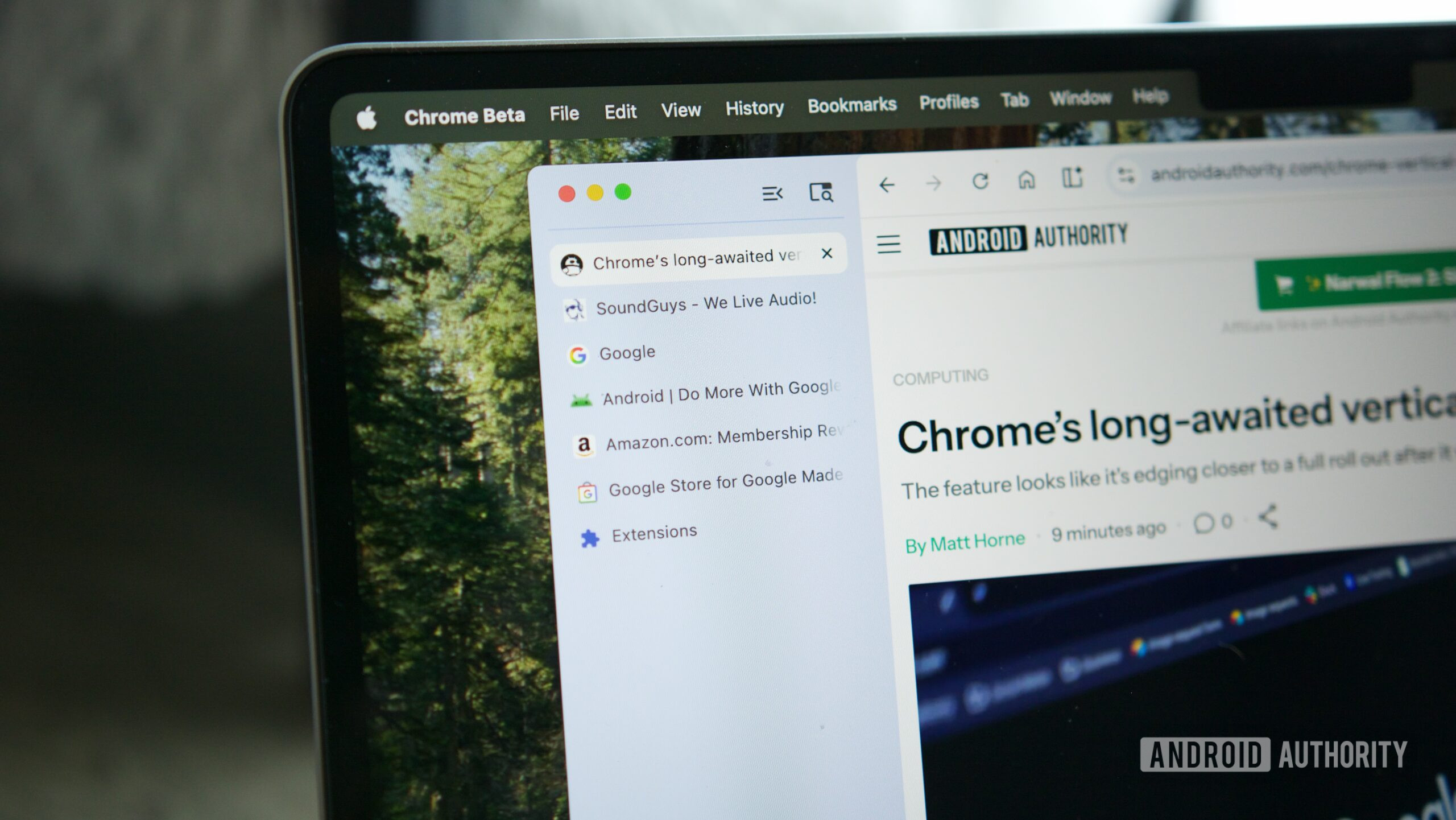
  • A new vertical tab grouping option, previously available in beta, lets you move your tabs to the left-hand side of the window.
  • Chrome’s reading mode will now fill the whole window, rather than opening in a split view with the original web page.

Google’s been cooking up a new vertical tab organization option for Chrome on desktop for a while now, with the layout graduating from Canary to Beta status at the beginning of the year. Today, Google’s announced that vertical tabs are rolling out in stable Chrome, along with new changes to the browser’s reading mode.

With vertical tabs enabled, your Chrome tabs move from the top of the browser window to the left-hand side, saving some vertical real estate and giving text labels on tabs more room to breathe. Reading mode, which removes visual elements like photos and ads from a page, making for a more digestible reading experience, is being upgraded with a full-screen view that hides the original webpage entirely while you’re reading.

Don’t want to miss the best from Android Authority?

google preferred source badge light@2xgoogle preferred source badge dark@2x

To use the new vertical tab grouping, right click on a Chrome window and then click Show Tabs Vertically. Once the vertical layout is enabled, your tabs will be stacked neatly on top of one another on the left edge of the browser window. If you want to focus on a single tab at a time, there’s a button that collapses the tab bar out of view.

If you really want to lock in on a single tab, you can turn on reading mode by right clicking anywhere in the tab, then clicking Open in Reading Mode. Prior to the update announced today, Chrome’s reading mode opened in a split view, with the full website shown on the left side and the cleaned-up reading layout on the right. Starting today, reading mode will take up the whole window, making it a little easier to focus on what you’re reading.

Google says both of these features are rolling out to the stable desktop version of Chrome starting today.

Thank you for being part of our community. Read our Comment Policy before posting.

Sign Up For Daily Newsletter

Be keep up! Get the latest breaking news delivered straight to your inbox.
By signing up, you agree to our Terms of Use and acknowledge the data practices in our Privacy Policy. You may unsubscribe at any time.
Share This Article
Facebook Twitter Email Print
Share
What do you think?
Love0
Sad0
Happy0
Sleepy0
Angry0
Dead0
Wink0
Previous Article Price war intensifies Amazon targets Chinese sellers TechNode Price war intensifies Amazon targets Chinese sellers TechNode
Next Article Intel QAT Driver With Linux 7.1 Adding Zstd Offload Support Intel QAT Driver With Linux 7.1 Adding Zstd Offload Support
Leave a comment

Leave a Reply Cancel reply

Your email address will not be published. Required fields are marked *

Stay Connected

248.1k Like
69.1k Follow
134k Pin
54.3k Follow

Latest News

Adobe Reader Zero-Day Exploited via Malicious PDFs Since December 2025
Computing
Appknox launches KnoxIQ to prioritize real-world exploitability in AI-driven application security –  News
Appknox launches KnoxIQ to prioritize real-world exploitability in AI-driven application security – News
News
Revolut launches in-app AI assistant – UKTN
News
3 Artificial Intelligence (AI) Stocks That Will Really Benefit From Google’s TurboQuant Breakthrough
News

You Might also Like

Appknox launches KnoxIQ to prioritize real-world exploitability in AI-driven application security –  News
News

Appknox launches KnoxIQ to prioritize real-world exploitability in AI-driven application security – News

4 Min Read
Revolut launches in-app AI assistant – UKTN
News

Revolut launches in-app AI assistant – UKTN

2 Min Read
3 Artificial Intelligence (AI) Stocks That Will Really Benefit From Google’s TurboQuant Breakthrough
News

3 Artificial Intelligence (AI) Stocks That Will Really Benefit From Google’s TurboQuant Breakthrough

10 Min Read
Google Gemini’s New Notebooks Help Organize Chats, Research Into Projects
News

Google Gemini’s New Notebooks Help Organize Chats, Research Into Projects

4 Min Read
//

World of Software is your one-stop website for the latest tech news and updates, follow us now to get the news that matters to you.

Quick Link

  • Privacy Policy
  • Terms of use
  • Advertise
  • Contact

Topics

  • Computing
  • Software
  • Press Release
  • Trending

Sign Up for Our Newsletter

Subscribe to our newsletter to get our newest articles instantly!

World of SoftwareWorld of Software
Follow US
Copyright © All Rights Reserved. World of Software.
Welcome Back!

Sign in to your account

Lost your password?