It seemed that AI had arrived in our browsers. In fact, it seemed that the new batch of browsers with AI could change everything, but the truth is that at the moment they have not changed anything. Neither Comet, nor Atlas, nor Dia have managed to conquer us in that aspect. The integration of Gemini in Chrome or Copilot in Edge does not seem to convince us much either. They are striking options, but they remain in the background.
The curious thing is that the evolution of browsers has not caught the AI fever, but is gaining momentum with practical, pragmatic and almost everyday options: small details that improve usability and really add up.
Vertical eyelashes to power
The first of these options is an old acquaintance: the ability to organize our browser using vertical tabs instead of horizontal ones has been gaining ground among more and more users, but the curious thing is that this feature is, indeed, old.
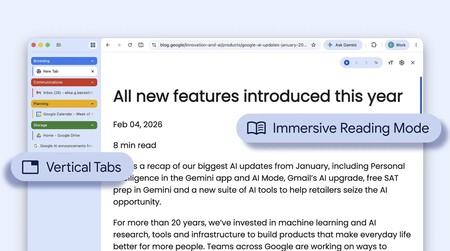
Google has just integrated the option to enjoy vertical tabs in Chrome.
In fact, Opera already had an option of this type almost 20 years ago (if not before) with its “visual tabs”, but it ended up abandoning them and in fact today it does not have that option officially although it is possible to add it through extensions. Firefox also adopted that path: it did not have them as standard, but there were those who were experimenting with that concept as early as 2009 through extensions for this browser.
Those who ended up copying and using that option were others: Microsoft Edge did it in 2021, Brave in 2023, for example, and Vivaldi has also had them for a long time. Two of the latest to join this trend are Firefox and Chrome, which has just released this feature. But before that, the person who had made them fashionable again was probably Arc, a browser with many striking ideas that fortunately is now being inherited by its successor, Dia, which had erratic beginnings.
The success of vertical tabs probably has a lot to do with the way widescreen displays (16:9, 21:9) have ended up conquering our tables. Too much horizontal space and no vertical spacewhich makes vertical tabs make more ergonomic sense than ever.

In fact, what is normal in traditional browsers with tabs organized horizontally is that as we open more and more tabs, identifying them (not even with favicons) and selecting them gradually becomes more and more difficult. Vertical organization solves this in a remarkable way, and the fact that Chrome has finally adopted this option is the definitive confirmation that it is valuable to many people… and will probably end up being valuable to many more.
Two better than one
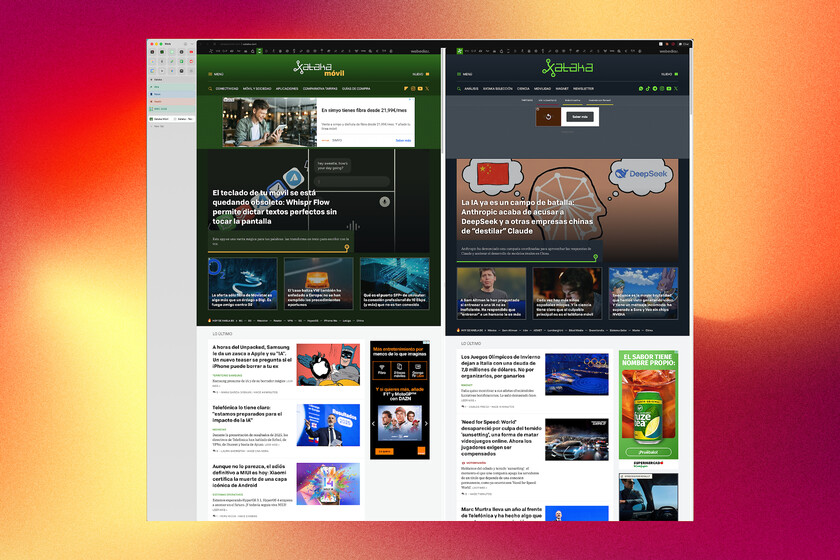
The second great novelty that is taking hold in the browser market is integrate split screen. Many users—me first—use two browser windows facing each other, one on each side of the screen, but now browsers offer exactly the same thing directly.
The Maxthon browser was probably one of the first to offer this option: it already had it integrated even before the launch of Windows 10 in 2015. Then we have seen how others have followed in its wake: Vivaldi did it, Microsoft Edge did it, and later Opera also added that option.
Google has also ended up catching this fever, and added the split screen feature in February 2026. The developers of the most used browser in the world recognized that this type of function “helps people multitask and get more done on the web.”

It’s curious because, as we mentioned, this feature was already within our reach thanks to that feature of “Snap” and placing browser windows on both sides of the screen. However, this type of function, although popular, usually requires some familiarity with keyboard shortcuts, although operating systems have been enhancing this ability with more accessible ways to choose the distribution of advantages on the desktop.
This function integrated into browsers It is especially useful on laptops or for users of smaller monitors: there, fitting multiple windows in a small space is more inconvenient, and the split screen of browsers can help.
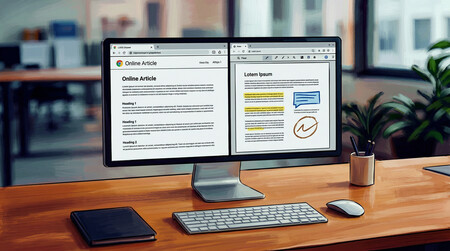
But the beauty is not only in dividing the screen: it is that you can open a link directly in the other panel without creating a new tab. The combination of this function with vertical tabs makes the browser gain integers and we can do more in the same space.
And the funny thing is that these practical and simple improvements end up being more popular and used than AI functions. The latter may effectively end up “supervitamining” our browsers, but today it’s the little things that win.
and it is fantastic that they do it.
In WorldOfSoftware | Perplexity is perfecting an art: bluffing